Home
This page explains how to create and use definitions (.yaml files) in FS Copilot, which describe how to read and write simulation variables and events in Microsoft Flight Simulator.
Before creating or testing your own YAML definitions, you should know that FS Copilot includes a built-in Developer Mode for quickly testing variable mappings and synchronization logic.
You can enable it by launching the app with the --dev argument:
> .\FsCopilot.exe --dev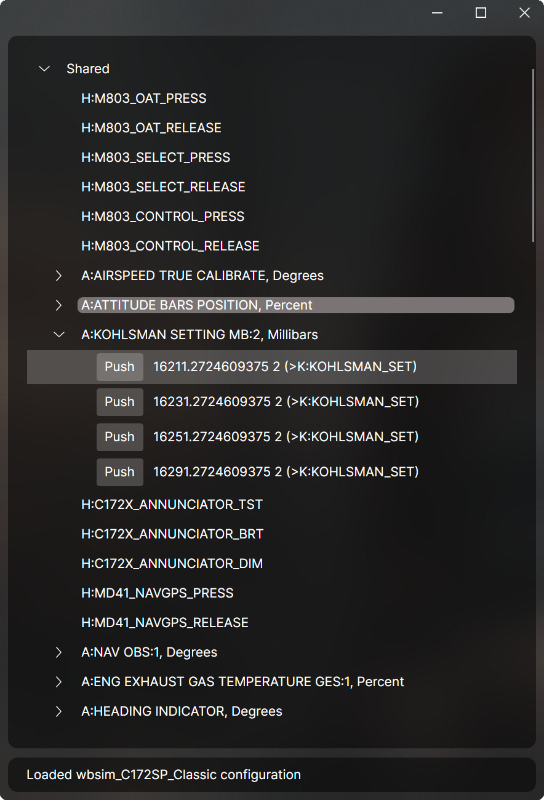
This mode provides a developer-friendly interface to inspect live data updates, preview get / set variable behavior, and debug control mappings.
A definition file tells FS Copilot which variables to monitor (get:) on one client and how to update them (set:) on others.
Each definition corresponds to a single simulation parameter or control.
Example:
- get: A:GENERAL ENG THROTTLE LEVER POSITION:1, Percent
  set: "`${value} (>K:THROTTLE_SET)`"
Warning
Keep in mind: some aircraft variables are read-only by design.
In this case, reading them with get is fine, but to change aircraft behavior you must use set and call the corresponding event instead. Otherwise, FS Copilot will use an implicit set for you.
The variable to read from the simulator.
It can refer to:
-
A:— Simulation variable (SimVar). This variable requires specify a unit (e.g., feet, knots, percent). See the official unit list: SimVar Units Reference -
B:— Behavior variable -
L:— Local variable (LVar) -
Z:— Z variable (custom or internal) -
H:— HTML event or cockpit variable -
K:— Key events
Example:
get: L:PFD_BrightnessThe expression used to write or trigger an event in the simulator.
You can call:
-
A:— Simulation variables -
L:— Local variables -
Z:— Custom variables -
H:— HTML events -
B:— Behavior events -
K:— Key events
Example:
set: 3 (>K:TOGGLE_AIRCRAFT_EXIT)Skip defines which variable should be skipped from updating when subscribed variable changes.
This is useful to prevent feedback loops.
- get: A:GPS DRIVES NAV1, Bool
  set: (>K:TOGGLE_GPS_DRIVES_NAV1)
  skp: H:AS1000_PFD_SOFTKEYS_6
⏱️ There is no guarantee about the update order of variables,
except for H: events, which are always delayed slightly to ensure reliable skipping.
The set field supports inline JavaScript expressions or full functions.
This lets you add logic, math, and conditional behavior.
- get: A:TRANSPONDER IDENT:1, Bool
set: "value ? '1 (>K:XPNDR_IDENT_ON)' : '1 (>K:XPNDR_IDENT_OFF)'"- get: Z:AUDIO_Knob_Selector_1
set: |
switch (value) {
case 0: return '(>H:KMA28_TRANSMISSION_KNOB_COM3)'
case 20: return '(>H:KMA28_TRANSMISSION_KNOB_COM2)'
case 40: return '(>H:KMA28_TRANSMISSION_KNOB_COM1)'
case 60: return '(>H:KMA28_TRANSMISSION_KNOB_COM1_2)'
case 80: return '(>H:KMA28_TRANSMISSION_KNOB_COM2_1)'
case 100: return '(>H:KMA28_TRANSMISSION_KNOB_TEL)'
default: return ''
}Some events accept multiple arguments.
You can list them before the event name:
- get: A:AUTOPILOT HEADING LOCK DIR:1, Degrees
set: "`${value} 1 (>K:HEADING_BUG_SET)`"You can use JavaScript expressions to transform values before sending them to the simulator.
Example — converting millibars to internal units:
- get: A:KOHLSMAN SETTING MB:0, Millibars
set: "`${value * 16} 0 (>K:KOHLSMAN_SET)`"If you define only get, an implicit set will be created automatically with the same variable name.
- get: A:LIGHT NAV, BoolBehaves as if:
- get: A:LIGHT NAV, Bool
set: "`${value} (>A:LIGHT NAV)`"If you use set: (>var/event) without specifying a value,
FS Copilot automatically inserts the last get value:
- get: A:GENERAL ENG FUEL PUMP SWITCH EX1:1, Bool
  set: (>K:ELECT_FUEL_PUMP1_SET)
is equivalent to:
- get: A:GENERAL ENG FUEL PUMP SWITCH EX1:1, Bool
set: "`${value} (>K:ELECT_FUEL_PUMP1_SET)`"You can find a detailed step-by-step guide on how to discover aircraft variables here: 👉 Finding Simulation Variables in Microsoft Flight Simulator
✈️ FS Copilot Definitions let you describe the behavior of any aircraft system — from simple light switches to complex autopilot logic — using clear YAML and flexible JavaScript-powered transformations.