

☝️ Join our Discord ☝️ Support here
🌐 Visit the official website — FS Copilot — Shared Cockpit for MSFS 2024
FS Copilot is a companion app for Microsoft Flight Simulator 2024 that lets multiple pilots control the same aircraft together — in real time.
Fly as a real crew. 👨
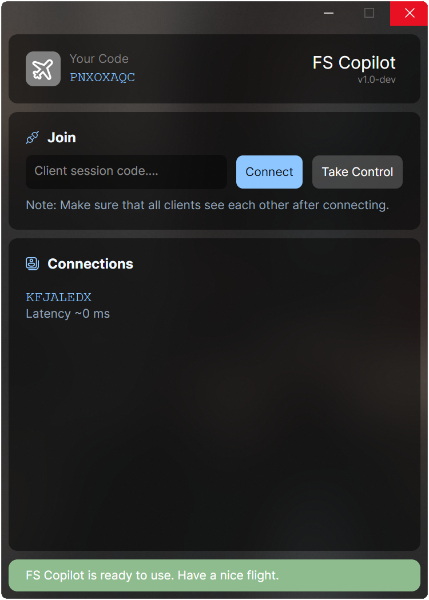
FS Copilot synchronizes the aircraft position, control surfaces, and cockpit switches between both pilots. So when one pilot turns right, the other pilot’s aircraft turns right as well. It’s like you’re both flying the same plane together.
- Launch FS Copilot. On the first run, it copies the required files into your Community folder automatically.
- Start Microsoft Flight Simulator and choose a supported aircraft.
- Enter your partner’s session code and select Join.
- Enjoy shared flight 🛫
You can find the list of supported aircraft directly on https://fscopilot.com/.
The list is always up to date and updates automatically.
Additionally, join to the Discord server. Community members often share new or custom profiles there, so your aircraft might already be supported even if it’s not included by default.
FS Copilot is built for Microsoft Flight Simulator 2024 but aims to remain compatible with MSFS 2020.
However, development is primarily focused on MSFS 2024, so some features may not behave exactly as intended in the 2020 version.
FS Copilot is built with .NET 9 (C#) and designed for modular extensibility. It includes a flexible networking layer using peer-to-peer UDP connection by hole punching, allowing direct low-latency connections without external servers.
Each aircraft is defined via YAML templates that describe variable mappings, event bindings, and transformation logic. These templates support embedded JavaScript expressions for dynamic data handling — enabling complex synchronization behavior right inside the config.
For example:
- get: L:AS1000_PFD_SelectedNavIndex # NAV 1/2
  set: (>B:AS1000_PFD_1_NAV_Khz_Button_Push)
- get: L:PFD_CDI_Source # CDI
  set: "value < 3 ? `${value} (>K:AP_NAV_SELECT_SET)` : '(>K:TOGGLE_GPS_DRIVES_NAV1)'"
  skp: H:AS1000_PFD_SOFTKEYS_6
- get: A:KOHLSMAN SETTING MB:0, Millibars # BARO
  set: "`${value * 16} 0 (>K:KOHLSMAN_SET)`"
- get: Z:AUDIO_Knob_Selector_1 # MIC
  set: |
    switch (value) {
        case   0: return '(>H:KMA28_TRANSMISSION_KNOB_COM3)'
        case  20: return '(>H:KMA28_TRANSMISSION_KNOB_COM2)'
        case  40: return '(>H:KMA28_TRANSMISSION_KNOB_COM1)'
        case  60: return '(>H:KMA28_TRANSMISSION_KNOB_COM1_2)'
        case  80: return '(>H:KMA28_TRANSMISSION_KNOB_COM2_1)'
        case 100: return '(>H:KMA28_TRANSMISSION_KNOB_TEL)'
        default: return ''
    }
You can find a detailed documentation here: 👉 FS Copilot — Definitions Guide
This project was inspired by the ideas explored in YourControls.
Several good concepts and approaches originated there and helped shape the early direction of this work.
The core of this project has been written entirely from scratch, features a distinct architecture, and is implemented in a different programming language.
FS Copilot is created by aviation and MSFS enthusiast Yury Sсherbakov. Born from the idea that flying together should be as easy as sitting next to your co-pilot.
“Fly together. Control together.”
✈️


