Need to review some SQL, this book (in progress) seems like a good way to do it. The author uses a sqlite3 database. I'm going to use MySQL to solve the problems instead.
Each problem is organized into one folder consisting of the necessary .sql files.
install:
# MySQL
$ sudo apt install mysql-server
$ mysql -u root -p

# sqlite
sudo apt install sqlite3
/* After installing MySQL, the first thing we need to do is create a
* database.
*
* mysql> SOURCE ~/code/Learn-SQL-The-Hard-Way/Exercise-0-The-Setup/create_database.sql
*/
-- Create the database
CREATE DATABASE learn_sql_the_hard_way;
-- Delete the database
DROP DATABASE learn_sql_the_hard_way;
-- We really shouldn't have done that, let's recreate the database
CREATE DATABASE learn_sql_the_hard_way;
-- Let's check out what we did
SHOW DATABASES;SQLite 是一个进程内的库,实现了自给自足的、无服务器的、零配置的、事务性的 SQL 数据库引擎。它是一个零配置的数据库,这意味着与其他数据库一样,您不需要在系统中配置。
为什么要用 SQLite?
- 不需要一个单独的服务器进程或操作的系统(无服务器的)。
- SQLite 不需要配置,这意味着不需要安装或管理。
- 一个完整的 SQLite 数据库是存储在一个单一的跨平台的磁盘文件。
- SQLite 是非常小的,是轻量级的,完全配置时小于 400KiB,省略可选功能配置时小于 250KiB。
- SQLite 是自给自足的,这意味着不需要任何外部的依赖。
- SQLite 事务是完全兼容 ACID 的,允许从多个进程或线程安全访问。
- SQLite 支持 SQL92(SQL2)标准的大多数查询语言的功能。
- SQLite 使用 ANSI-C 编写的,并提供了简单和易于使用的 API。
- SQLite 可在 UNIX(Linux, Mac OS-X, Android, iOS)和 Windows(Win32, WinCE, WinRT)中运行。
SQLite 命令
- DDL
- create,
- alter,
- drop
- DML
- insert,
- update,
- delete
- DQL
- select
Commands of sqlite3
-
.help
上面的命令会显示各种重要的 SQLite 点命令的列表,如下所示:
命令 描述 .backup ?DB? FILE 备份 DB 数据库(默认是 "main")到 FILE 文件。 .bail ON OFF .databases 列出附加数据库的名称和文件。 .dump ?TABLE? 以 SQL 文本格式转储数据库。如果指定了 TABLE 表,则只转储匹配 LIKE 模式的 TABLE 表。 .echo ON OFF .exit 退出 SQLite 提示符。 .explain ON OFF .header(s) ON OFF .help 显示消息。 .import FILE TABLE 导入来自 FILE 文件的数据到 TABLE 表中。 .indices ?TABLE? 显示所有索引的名称。如果指定了 TABLE 表,则只显示匹配 LIKE 模式的 TABLE 表的索引。 .load FILE ?ENTRY? 加载一个扩展库。 .log FILE off .mode MODE 设置输出模式 .nullvalue STRING 在 NULL 值的地方输出 STRING 字符串。 .output FILENAME 发送输出到 FILENAME 文件。 .output stdout 发送输出到屏幕。 .print STRING... 逐字地输出 STRING 字符串。 .prompt MAIN CONTINUE 替换标准提示符。 .quit 退出 SQLite 提示符。 .read FILENAME 执行 FILENAME 文件中的 SQL。 .schema ?TABLE? 显示 CREATE 语句。如果指定了 TABLE 表,则只显示匹配 LIKE 模式的 TABLE 表。 .separator STRING 改变输出模式和 .import 所使用的分隔符。 .show 显示各种设置的当前值。 .stats ON OFF .tables ?PATTERN? 列出匹配 LIKE 模式的表的名称。 .timeout MS 尝试打开锁定的表 MS 毫秒。 .width NUM NUM 为 "column" 模式设置列宽度。 .timer ON OFF 让我们尝试使用
.show命令,来查看 SQLite 命令提示符的默认设置。sqlite>.header on sqlite>.mode column sqlite>.timer on -
SQLite 语法
sqlite>.help -- This is a single line comment -
SQLite 数据类型
NULL, INTERGER, REAL, TEXT, BLOB
$sqlite3 DatabaseName.db
sqlite> .databases
seq  name             file
---  ---------------  ----------------------------------------------------------
0    main             /home/tzx/git/Learn-SQL-The-Hard-Way/DatabaseName.db

sqlite> .quit
.dump
/* Create a table. For extra credit, add other INTEGER and TEXT fields
 * This fulfills the Create specification of the Create Read Update
 * Delete (CRUD) operations
 *
 * Instead of adding additional INTEGER and TEXT fields, I added Boolean,
 * Float, and Date fields.
 *
 * mysql> SOURCE ~/code/Learn-SQL-The-Hard-Way/Exercise-1-Creating-Tables/create_table.sql
 */

-- Select the database
USE learn_sql_the_hard_way;

-- Create a table in the database
CREATE TABLE person (
       id INTEGER PRIMARY KEY,
       first_name TEXT,
       last_name TEXT,
       age INTEGER
       /* Extra Credit */
       -- male BOOLEAN,
       -- height_inches FLOAT,
       -- Birthday DATE
       );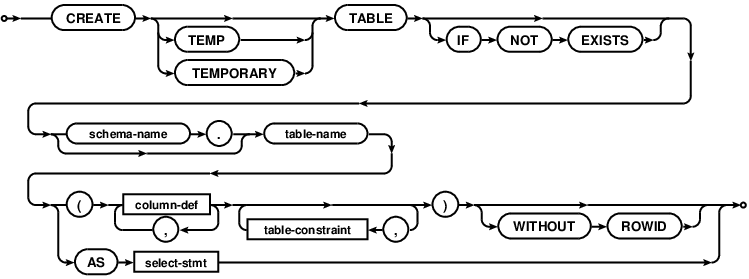
CREATE TABLE database_name.table_name(
   column1 datatype  PRIMARY KEY(one or more columns),
   column2 datatype,
   column3 datatype,
   .....
   columnN datatype,
);/* Create multiple tables where we can store data.
* Fulfills the Create spec for CRUD operations
*
* This script assumes we're already using 'learn_sql_the_hard_way'
* mysql> SOURCE ~/code/Learn-SQL-The-Hard-Way/Exercise-2-Creating-A-MultiTable-Database/multi-table.sql
*/
-- Create table about Pets
CREATE TABLE pet (
id INTEGER PRIMARY KEY,
name TEXT,
breed TEXT,
age INTEGER,
dead INTEGER);
-- People call these "linking" tables "relations";
/* person_pet is a "relations" table
* tables containing data are called "tables"; at least in this book
*/
CREATE TABLE person_pet (
person_id INTEGER,
pet_id INTEGER);
-- Create table about vehicles
CREATE TABLE vehicle (
id INTEGER PRIMARY KEY,
name TEXT,
company TEXT,
year INTEGER,
mileage INTEGER);
CREATE TABLE COMPANY(
   ID INT PRIMARY KEY     NOT NULL,
   NAME           TEXT    NOT NULL,
   AGE            INT     NOT NULL,
   ADDRESS        CHAR(50),
   SALARY         REAL
);

CREATE TABLE DEPARTMENT(
   ID INT PRIMARY KEY      NOT NULL,
   DEPT           CHAR(50) NOT NULL,
   EMP_ID         INT      NOT NULL
);
.tables
.schema COMPANY
DROP TABLE database_name.table_name;
/* Insert data into the tables we just created
 *
 * Fulfills the Create spec for CRUD operations
 * This script assumes we're already using 'learn_sql_the_hard_way'
 * mysql> SOURCE ~/code/Learn-SQL-The-Hard-Way/Exercise-3-Inserting-Data/insert-values.sql
 */

-- Insert first person & their pet
INSERT INTO person (id, first_name, last_name, age)
    VALUES (0, "Zed", "Shaw", 37);

INSERT INTO pet (id, name, breed, age, dead)
    VALUES (0, "Fluffy", "Unicorn", 1000, 0);

-- Insert second person & their pet
INSERT INTO person VALUES (1, "Terry", "Berry", 42);
INSERT INTO pet VALUES (1, "Gigantor", "Robot", 1, 1);

-- Insert me and my pet
INSERT INTO person (id, first_name, last_name, age)
    VALUES (2, "Tyler", "Brown", 25);

INSERT INTO pet (id, name, breed, age, dead)
    VALUES (2, "Murphy", "Yellow lab", 6, 0);

/* Let's check out what we did */
-- SELECT * FROM person;
-- SELECT * FROM pet;
INSERT INTO COMPANY (ID,NAME,AGE,ADDRESS,SALARY)
VALUES (1, 'Paul', 32, 'California', 20000.00 );
INSERT INTO COMPANY (ID,NAME,AGE,ADDRESS,SALARY)
VALUES (2, 'Allen', 25, 'Texas', 15000.00 );
INSERT INTO COMPANY (ID,NAME,AGE,ADDRESS,SALARY)
VALUES (3, 'Teddy', 23, 'Norway', 20000.00 );
INSERT INTO COMPANY (ID,NAME,AGE,ADDRESS,SALARY)
VALUES (4, 'Mark', 25, 'Rich-Mond ', 65000.00 );
INSERT INTO COMPANY (ID,NAME,AGE,ADDRESS,SALARY)
VALUES (5, 'David', 27, 'Texas', 85000.00 );
INSERT INTO COMPANY (ID,NAME,AGE,ADDRESS,SALARY)
VALUES (6, 'Kim', 22, 'South-Hall', 45000.00 );
INSERT INTO COMPANY VALUES (7, 'James', 24, 'Houston', 10000.00 );/* Who owns what pets? That information deals with relations.
* Let's insert that info
*
* How this works is I'm using the id values from the person row I want
* (in this case, 0) and the id from the pet rows I want (again, 0 for the
* Unicorn and 1 for the Dead Robot). I then insert one row into person_pet
* relation table for each "connection" between a person and a pet.
*
* Fulfills the Create spec for CRUD operations
* This script assumes we're already using 'learn_sql_the_hard_way'
* mysql> SOURCE ~/code/Learn-SQL-The-Hard-Way/Exercise-4-Insert-Referential-Data/insert-referential.sql
*/
-- Zed Shaw owns Fluffy the Unicorn & Gigantor the Robot
INSERT INTO person_pet (person_id, pet_id) VALUES (0, 0);
INSERT INTO person_pet VALUES (0, 1);
-- Tyler Brown owns Murphy the Yellow lab
INSERT INTO person_pet (person_id, pet_id) VALUES (2, 2);/* What's in our tables? Select data from a table given certain conditions.
*
* Fulfills the Read spec for CRUD operations
* This script assumes we're already using 'learn_sql_the_hard_way'
* mysql> SOURCE ~/code/Learn-SQL-The-Hard-Way/Exercise-5-Selecting-Data/select-statements.sql
*/
-- Select all columns from the person table
SELECT * FROM person;
-- Select only the name & age columns from the pet table
SELECT name, age FROM pet;
-- Select name & age columns from pet table where the pet isn't dead
SELECT name, age FROM pet WHERE dead = 0;
-- Select all columns from the person table where first_name is not "Zed"
SELECT * FROM person WHERE first_name != "Zed";/* What pets does Zed own? We need to check multiple tables to figure this
* out.
*
* Fulfills the Read spec for CRUD operations
* This script assumes we're already using 'learn_sql_the_hard_way'
* mysql> SOURCE ~/code/Learn-SQL-The-Hard-Way/Exercise-6-Select-Across-Many-Tables/select-from-tables.sql
*/
/* Let's use comments to walk through this statment */
-- Dot notation allows us to select a column from a table like using the
-- name column from the pet table with "pet.name"
SELECT pet.id, pet.name, pet.age, pet.dead
-- Here we're selecting 3 tables to get info
FROM pet, person_pet, person
-- Where clause means 'make sure the data meets these conditions'
WHERE
-- Match the id from "pet" table with id from "person_pet" table
pet.id = person_pet.pet_id AND
-- Match "person_pet" id with "person" id
person_pet.person_id = person.id AND
-- Make sure the first_name column in "person" is "Zed"
person.first_name = "Zed";/* How can we delete data that we don't want? The delete statement!
*
* Fulfills the Delete spec for CRUD operations
* This script assumes we're already using 'learn_sql_the_hard_way'
* mysql> SOURCE ~/code/Learn-SQL-The-Hard-Way/Exercise-7-Deleting-Data/deleting-data.sql
*/
/* make sure there's dead pets */
SELECT name, age FROM pet WHERE dead = 1;
/* aww poor robot */
DELETE FROM pet WHERE dead = 1;
/* make sure the robot is gone */
SELECT * FROM pet;
/* let's resurrect the robot */
INSERT INTO pet VALUES (1, "Gigantor", "Robot", 1, 0);
/* the robot LIVES! */
SELECT * FROM pet;/* How can we delete all of the pets? How can we delete all of the pets
* belonging to a certain person?
*
* "DELETE is like SELECT but it removes rows from the table." The
* limitation is you can only delete from one table at a time
*
* Fulfills the Delete spec for CRUD operations
* This script assumes we're already using 'learn_sql_the_hard_way'
* mysql> SOURCE ~/code/Learn-SQL-The-Hard-Way/Exercise-8-Deleting-Using-Other-Tables/deleting-and-matching.sql
*/
/* Ok, let's walk through these queries */
-- Delete all rows from the "pet" table that achieve some matching conditions
--DELETE FROM pet WHERE id IN (
-- Here's the matching conditions
-- The id from "pet"
--SELECT pet.id
--FROM pet, person_pet, person
--WHERE
-- We use the "person_pet" relations table to delete all pets that
-- belong to "Zed"
--person.id = person_pet.person_id AND
--pet.id = person_pet.pet_id AND
--person.first_name = "Zed"
--);
/* The SQLite implementation in the book doesn't work for MySQL
* Explanation (http://stackoverflow.com/questions/45494/
* mysql-error-1093-cant-specify-target-table-for-update-in
* -from-clause)
*
* Instead, I decided that an id in the pet table would always match
* the person_pet.pet_id as long as we agree to make a rule about
* not deleting one without deleting the other. We can see that in the
* delete statement following the one I'm using that person_pet rows
* are deleted where pet.id is not present. As long as this sequence
* always occurs then we can get away with the altered SQL statement
*/
DELETE FROM pet WHERE id IN (
SELECT person_pet.pet_id
FROM person_pet, person
WHERE
person.id = person_pet.person_id AND
person.first_name = "Zed"
-- Checking out the remaining pets. Where'd Zed's pets go?
SELECT * FROM pet;
-- Demonstrating the relationship between Zed's pets and the "person_pet"
-- relations.
SELECT * FROM person_pet;
-- Here we're thinking ok, we don't need to track Zed's pets anymore
-- since they've been deleted from "pet"
DELETE FROM person_pet
WHERE pet_id NOT IN (
SELECT id FROM pet
);
-- Shows how the relations for Zed's pets have been deleted
SELECT * FROM person_pet;/* Fulfills the Update spec for CRUD operations
* This script assumes we're already using 'learn_sql_the_hard_way'
* mysql> SOURCE ~/code/Learn-SQL-The-Hard-Way/Exercise-9-Updating-Data/update-statements.sql
*/
-- Update the person table so that anyone named Zed is now referred to as
-- "Hilarious Guy"
UPDATE person SET first_name = "Hilarious Guy"
WHERE first_name = "Zed";
-- Update the pet table so any row with an id of 0 will now be named
-- "fancy pants",aka Zed's pet
UPDATE pet SET name = "Fancy Pants"
WHERE id=0;
-- Ok, let's show that what we think happened did happen
SELECT * FROM person;
SELECT * FROM pet;/* Change all pets owned by Zed to be named "Zed's pet"
*
* Fulfills the Update spec for CRUD operations
* This script assumes we're already using learn_sql_the_hard_way
*
* Going to modify this one a bit because we previously named Zed
* "Hilarious Guy". Also, the UPDATE query as given throws an error
* in MySQL
*
* mysql> SOURCE ~/code/Learn-SQL-The-Hard-Way/Exercise-10-Updating-Complex-Data/update-complex.sql
*/
-- Select all columns from the "pet" table
SELECT * FROM pet;
-- Update any Pet owned by Zed to "Zed's pet"
--UPDATE pet SET name = "Zed's Pet" WHERE id IN (
-- SELECT pet.id
-- FROM pet, person_pet, person
-- WHERE
-- person.id = person_pet.person_id AND
-- pet.id = person_pet.pet_id AND
-- person.first_name = "Zed"
--);
/* The preceding sqlite3 query generates the following error:
* ERROR 1093 (HY000): You can't specify target table 'pet' for update
* in FROM clause
*
* Let's revise.
*/
UPDATE pet
SET name = "Zeds Pet"
WHERE id IN (
SELECT person_pet.pet_id
FROM person_pet, person
WHERE
person_pet.person_id = person.id AND
person.first_name = "Hilarious Guy"
);
-- Verify that the "Zed's pet" update occured
SELECT * FROM pet;/* "Alternative way to insert data which helps with atomic replacement of
* rows. You don't necessarily need this too often, but it does help if
* you're having to replace whole records and don't want to do a more
* complicated UPDATE without resorting to transactions."
*
* Fulfills the Update spec for CRUD operations
* This script assumes we're already using learn_sql_the_hard_way
*
* mysql> SOURCE ~/code/Learn-SQL-The-Hard-Way/Exercise-11-Replacing-Data/replace-data.sql
*/
/* This should fail because 0 is already taken. */
INSERT INTO person (id, first_name, last_name, age)
VALUES (0, 'Frank', 'Smith', 100);
/* We can force it by doing an INSERT OR REPLACE. */
INSERT OR REPLACE INTO person (id, first_name, last_name, age)
VALUES (0, 'Frank', 'Smith', 100);
/* In MySQL, these two queries will each generate an error:
* ERROR 1062 (23000): Duplicate entry '0' for key 'PRIMARY'
* ERROR 1064 (42000): You have an error in your SQL syntax;
*
* So let's revise using this guidance:
* http://stackoverflow.com/questions/7490991/mysql-if-exsists-insert-into-or-else-do-something-else
*/
/* This actually brings up a more complicated issue about dealing with
* a duplicate primary key addressed here:
* http://stackoverflow.com/questions/548541/insert-ignore-vs-insert-on-duplicate-key-update/548570#548570
* It's a tangent so let's leave it alone.
*/
-- Going to manually change the primary key to keep the db consisent with
-- the example
INSERT INTO person (id, first_name, last_name, age)
VALUES (3, 'Frank', 'Smith', 100);
SELECT * FROM person;
/* And shorthand for that is just REPLACE. */
REPLACE INTO person (id, first_name, last_name, age)
VALUES (0, 'Zed', 'Shaw', 37);
/* Now you can see I'm back. */
SELECT * FROM person;
/* We're sourcing this into destroy-and-alter.sql
 *
 * mysql> SOURCE ~/code/Learn-SQL-The-Hard-Way/Exercise-12-Destroying-And-Altering-Tables/recreate-person-table.sql
 */

-- Create the table
CREATE TABLE person (
    id INTEGER PRIMARY KEY,
    first_name TEXT,
    last_name TEXT,
    age INTEGER
);

-- Populate the table
INSERT INTO person
(id, first_name, last_name, age)
VALUES
  (0, 'Zed', 'Shaw', 37),
  (1, 'Terry', 'Berry', 42),
  (2, 'Tyler', 'Brown', 25),
  (3, 'Frank', 'Smith', 100);
/* Add or remove columns from a table with ALTER TABLE
*
* Fulfills the Update spec for CRUD operations
* This script assumes we're already using learn_sql_the_hard_way
*
* mysql> SOURCE ~/code/Learn-SQL-The-Hard-Way/Exercise-12-Destroying-And-Altering-Tables/destroy-and-alter.sql
*/
/* Only drop table if it exists. */
DROP TABLE IF EXISTS person;
/* Create again to work with it. */
CREATE TABLE person (
id INTEGER PRIMARY KEY,
first_name TEXT,
last_name TEXT,
age INTEGER
);
/* Rename the table to peoples. */
ALTER TABLE person RENAME TO peoples;
/* Add a hatred column to peoples. */
ALTER TABLE peoples ADD COLUMN hatred INTEGER;
/* Rename peoples back to person. */
ALTER TABLE peoples RENAME TO person;
-- In MySQL, we use DESCRIBE instead of .schema
DESCRIBE person;
/* We don't need that. */
DROP TABLE person;
/* Let's repopulate "person" since I haven't been using a code.sql
* to keep track of everything
*/
SOURCE ~/code/Learn-SQL-The-Hard-Way/Exercise-12-Destroying-And-Altering-Tables/recreate-person-table.sql/* Make a series of changes to the MySQL database.
*
* Fulfills the Read & Update spec for CRUD operations
* This script assumes we're already using learn_sql_the_hard_way
*
* mysql> SOURCE ~/code/Learn-SQL-The-Hard-Way/Exercise-13-Migrating-and-Evolving-Data/migrate-evolve.sql
*/
/* Add a dead column to person that's like the one in pet. */
ALTER TABLE person ADD COLUMN dead INTEGER;
/* Add a phone_number column to person. */
ALTER TABLE person ADD COLUMN phone_number CHAR(8);
/* Add a salary column to person that is float. */
ALTER TABLE person ADD COLUMN salary FLOAT;
/* Add a dob column to both person and pet that is a DATETIME. */
ALTER TABLE person ADD COLUMN dob DATETIME;
/* Add a purchased_on column to person_pet of type DATETIME. */
ALTER TABLE person_pet ADD COLUMN purchased_on DATETIME;
/* Add a parent to pet co lumn that's an INTEGER and holds the id for
* this pet's parent. */
ALTER TABLE pet ADD COLUMN parent INT;
/* Update the existing database records with the new column data using
* UPDATE statements. Don't forget about the purchased_on column in
* person_pet relation table to indicate when that person bought the pet. */
-- Update the new columns for "person"
UPDATE person SET
dead = 0,
phone_number = (
CASE
WHEN person.id = 0 THEN "867-5309"
WHEN person.id = 1 THEN "555-9021"
WHEN person.id = 2 THEN "321-3097"
WHEN person.id = 3 THEN "332-1826"
ELSE "missing"
END ),
salary = (
CASE
WHEN person.id <= 1 THEN 45000.00
WHEN person.id > 1 THEN 65000.00
ELSE 0
END ),
dob = '1988-02-02 03:00:00';
-- Update the new columns for "pet"
UPDATE pet
INNER JOIN person_pet ON pet.id = person_pet.pet_id
SET pet.parent = person_pet.person_id;
-- Update the new columns for "person_pet"
UPDATE person_pet
SET purchased_on = (
CASE
WHEN person_pet.person_id >= 0 AND
person_pet.person_id <= 4 THEN '1998-02-02 03:00:00'
WHEN person_pet.person_id = 5 OR
person_pet.person_id = 6 THEN '2000-02-02 03:04:00'
WHEN person_pet.person_id = 7 THEN '2012-02-02 03:14:00'
ELSE 0
END);
/* Add 4 more people and 5 more pets and assign their ownership and what
* pet's are parents. On this last part remember that you get the id of the
* parent, then set it in the parent column. */
-- 4 more people
INSERT INTO person
(id, first_name, last_name, age, dead, salary, dob, phone_number)
VALUES
(4, "Rufus", "Mova", 21, 0, 25000.00, '1992-04-04 03:04:00', "123-4567"),
(5, "Brutus", "Opah", 22, 0, 25000.00,'1991-04-05 03:04:00', "567-1234"),
(6, "Wheatus", "TheBand", 34, 1, 100000.00, '1991-04-02 03:04:00',
"434-0595"),
(7, "Jolene", "Mean", 26, 0, 23000.00, '1987-04-06 03:04:00', "900-0904")
;
-- 5 more pets
INSERT INTO pet
(id, name, breed, age, dead, parent)
VALUES
(3, "Dirka", "Dragon", 4000, 0, 4),
(4, "Quirka", "Wagon", 4, 0, 5),
(5, "Jose", "Cat", 5,0, 6),
(6, "Monty", "Python", 6,0, 7),
(7, "Holly", "Grasshopper", 3,0, 5);
-- Assign values to person_pet
INSERT INTO person_pet
(person_id, pet_id, purchased_on)
VALUES
(4,3,'2013-10-22 03:00:00'),
(5,4,'2013-10-23 03:00:00'),
(6,5,'2013-10-24 03:00:00'),
(7,6,'2013-10-25 03:00:00'),
(5,7,'2013-10-26 03:00:00');
/* Write a query that can find all the names of pets and their owners bought
* after 2004. Key to this is to map the person_pet based on the
* purchased_on column to the pet and parent. */
SELECT pet.name, person.first_name
FROM pet, person, person_pet
WHERE
person.id = person_pet.person_id
AND
person_pet.purchased_on >= '2004-01-01 12:00:00';
/* Write a query that can find the pets that are children of a given pet.
* Again look at the pet.parent to do this. It's actually easy so don't over
* think it. */
-- Ended up setting pet.parent to the Owner's name so let's find all owners
-- with multiple pets...seems close enough
SELECT person.first_name AS "The Owner",
pet.name AS "The Pet",
pet.breed AS "Pet Breed"
FROM pet, person
WHERE pet.parent = person.id
AND pet.parent IN
(SELECT pet.parent
FROM pet
GROUP BY pet.parent
HAVING COUNT(pet.parent) > 1)
ORDER BY pet.name ASC;/* Instructions for Exercise 14: Basic Transactions
*
* Take your ex13.sql and copy it to ex14.sql so you can modify it.
* Once you have that, put a BEGIN at the top and a ROLLBACK at the bottom.
* Now run it and you'll see that it's as if your script didn't do anything.
* Next, change the ROLLBACK to be COMMIT and run it again, and you'll see
* it works like normal.
* Get rid of the BEGIN and COMMIT from your ex14.sql so it's back the way
* it was.
* Now create an error by removing one of the TABLE keywords from one of
* the lines. This is so you can make it have an error and recover.
*
* In other words, let's get familar with START TRANSACTION, COMMIT, and
* ROLLBACK syntax in MySQL.
*
* START TRANSACTION or BEGIN start a new transaction
*
* COMMIT commits the current transaction, making its changes permanent
*
* ROLLBACK rolls back the current transaction, canceling its changes
*
* SET autocommit disables or enables the default autocommit mode for the
* current session
*/
-- I haven't been exactly playing by the same rules as Learn SQL the Hard
-- Way so let's just roll through this thing with some SELECT statements
-- Doing it for a unicorn
DELIMITER $$
DROP PROCEDURE IF EXISTS find_unicorn $$
-- Create a stored procedure to alert us if a unicorn sneaks into the db
CREATE PROCEDURE find_unicorn()
BEGIN
-- If someone has a pet unicorn, sound the alarm!
IF EXISTS((SELECT breed FROM pet WHERE breed="Unicorn")) THEN
ROLLBACK;
ELSE
COMMIT;
END IF;
END $$
/* Let's COMMIT this one */
BEGIN;
-- Find anyone who owns more than one pet
SELECT person.first_name AS "The Owner",
pet.name AS "The Pet",
pet.breed AS "Pet Breed"
FROM pet, person
WHERE pet.parent = person.id
AND pet.parent IN
(SELECT pet.parent
FROM pet
GROUP BY pet.parent
HAVING COUNT(pet.parent) > 1)
ORDER BY pet.name ASC;
COMMIT;
-- Find a unicorn
SELECT breed
FROM pet
WHERE breed = "Unicorn";
-- Find Jolene
SELECT first_name
FROM person
WHERE first_name = "Jolene";
DELIMITER $$
CALL find_unicorn() $$
DELIMITER ;
END;
sqlite> .tables
book           checkout_item  member         movie

sqlite> .schema book
CREATE TABLE book (                     --  表 book:就有 id 和 title(title 是 unique)
  id integer primary key,
  title text,
  unique(title)
);
sqlite> .schema checkout_item           --  表 checkout_item:member id,book id,movie id
CREATE TABLE checkout_item (
  member_id integer,
  book_id integer,
  movie_id integer,
  unique(member_id, book_id, movie_id) on conflict replace,
  unique(book_id),
  unique(movie_id)
);

sqlite> .schema member                  --  表 member:id,name
CREATE TABLE member (
  id integer primary key,
  name text,
  unique(name)
);

sqlite> .schema movie                   --  表 movie:id,title,可以看到 book 和 movie 其实一样
CREATE TABLE movie (
  id integer primary key,
  title text,
  unique(title)
);-
Who checked out the book 'The Hobbit’?
select member.name from member
where id = (
    select member_id from checkout_item
    where book_id = (select id from book where title = 'The Hobbit')
);
output:
Anand Beck -
How many people have not checked out anything?
select count(*) from member
left join checkout_item on member.id = checkout_item.member_id
where checkout_item.member_id is NULL;
output:
37 -
What books and movies aren't checked out?
select title from book
left join checkout_item on book.id = checkout_item.book_id
where member_id is null union
select title from movie left join checkout_item on movie.id = checkout_item.movie_id
where member_id is null;
output:
1984 Catcher in the Rye Crouching Tiger, Hidden Dragon Domain Driven Design Fellowship of the Ring Lawrence of Arabia Office Space Thin Red Line To Kill a Mockingbird Tom Sawyer -
Add the book 'The Pragmatic Programmer', and add yourself as a member. Check out 'The Pragmatic Programmer'. Use your query from question 1 to verify that you have checked it out. Also, provide the SQL used to update the database.
insert into book (title) values ('The Pragmatic Programmer');
insert into member (name) values ('Zhixiong Tang');
insert into checkout_item (member_id, book_id) values (
    (select id from member where name = 'Irsal Alsanea'),
    (select id from book where title = 'The Pragmatic Programmer')
);
-
Who has checked out more that 1 item? (Tip: Research the GROUP BY syntax.)
select name from member where id in (select member_id
    from (
        select member_id, count(member_id) as count_of_members from checkout_item group by member_id
    )
    where count_of_members > 1
);
output:
Anand Beck
Frank Smith
The submit:
--  1.  Who checked out the book 'The Hobbit’?
--------------------------------------------------------------------------------
select member.name from member
where id = (
    select member_id from checkout_item
    where book_id = (select id from book where title = 'The Hobbit')
);
--  output:
--      Anand Beck

--  2.  How many people have not checked out anything?
--------------------------------------------------------------------------------
select count(*) from member
left join checkout_item on member.id = checkout_item.member_id
where checkout_item.member_id is NULL;
--  output:
--      37

--  3.  What books and movies aren't checked out?
--------------------------------------------------------------------------------
select title from book
left join checkout_item on book.id = checkout_item.book_id
where member_id is null union
select title from movie left join checkout_item on movie.id = checkout_item.movie_id
where member_id is null;
--  output:
--      1984
--      Catcher in the Rye
--      Crouching Tiger, Hidden Dragon
--      Domain Driven Design
--      Fellowship of the Ring
--      Lawrence of Arabia
--      Office Space
--      Thin Red Line
--      To Kill a Mockingbird
--      Tom Sawyer

--  4.  Add the book 'The Pragmatic Programmer', and add yourself as a member.
--      Check out 'The Pragmatic Programmer'. Use your query from question 1 to
--      verify that you have checked it out. Also, provide the SQL used to update
--      the database.
--------------------------------------------------------------------------------
insert into book (title) values ('The Pragmatic Programmer');
insert into member (name) values ('Zhixiong Tang');
insert into checkout_item (member_id, book_id) values (
    (select id from member where name = 'Irsal Alsanea'),
    (select id from book where title = 'The Pragmatic Programmer')
);

--  5.  Who has checked out more that 1 item? (Tip: Research the GROUP BY syntax.)
--------------------------------------------------------------------------------
select name from member where id in (select member_id
    from (
        select member_id, count(member_id) as count_of_members from checkout_item group by member_id
    )
    where count_of_members > 1
);
--  output:
--      Anand Beck
--      Frank Smith