forked from tbonza/Learn-SQL-The-Hard-Way
-
Notifications
You must be signed in to change notification settings - Fork 0
Expand file tree
/
Copy pathREADME.txt
More file actions
408 lines (311 loc) · 10.6 KB
/
Copy pathREADME.txt
File metadata and controls
408 lines (311 loc) · 10.6 KB
1
2
3
4
5
6
7
8
9
10
11
12
13
14
15
16
17
18
19
20
21
22
23
24
25
26
27
28
29
30
31
32
33
34
35
36
37
38
39
40
41
42
43
44
45
46
47
48
49
50
51
52
53
54
55
56
57
58
59
60
61
62
63
64
65
66
67
68
69
70
71
72
73
74
75
76
77
78
79
80
81
82
83
84
85
86
87
88
89
90
91
92
93
94
95
96
97
98
99
100
101
102
103
104
105
106
107
108
109
110
111
112
113
114
115
116
117
118
119
120
121
122
123
124
125
126
127
128
129
130
131
132
133
134
135
136
137
138
139
140
141
142
143
144
145
146
147
148
149
150
151
152
153
154
155
156
157
158
159
160
161
162
163
164
165
166
167
168
169
170
171
172
173
174
175
176
177
178
179
180
181
182
183
184
185
186
187
188
189
190
191
192
193
194
195
196
197
198
199
200
201
202
203
204
205
206
207
208
209
210
211
212
213
214
215
216
217
218
219
220
221
222
223
224
225
226
227
228
229
230
231
232
233
234
235
236
237
238
239
240
241
242
243
244
245
246
247
248
249
250
251
252
253
254
255
256
257
258
259
260
261
262
263
264
265
266
267
268
269
270
271
272
273
274
275
276
277
278
279
280
281
282
283
284
285
286
287
288
289
290
291
292
293
294
295
296
297
298
299
300
301
302
303
304
305
306
307
308
309
310
311
312
313
314
315
316
317
318
319
320
321
322
323
324
325
326
327
328
329
330
331
332
333
334
335
336
337
338
339
340
341
342
343
344
345
346
347
348
349
350
351
352
353
354
355
356
357
358
359
360
361
362
363
364
365
366
367
368
369
370
371
372
373
374
375
376
377
378
379
380
381
382
383
384
385
386
387
388
389
390
391
392
393
394
395
396
397
398
399
400
401
402
403
404
405
406
407
408
Learn-SQL-The-Hard-Way
======================
Need to review some SQL, this book (in progress) seems like a good way to do
it. The author uses a sqlite3 database. I'm going to use MySQL to solve the
problems instead.
Each problem is organized into one folder consisting of the necessary .sql
files.
## Exercise-0-The-Setup
install:
```bash
# MySQL
$ sudo apt install mysql-server
$ mysql -u root -p
# sqlite
sudo apt install sqlite3
```
```sql
%include <-=Exercise-0-The-Setup/create_database.sql=
```
SQLite 是一个进程内的库,实现了自给自足的、无服务器的、零配置的、事务性的 SQL
数据库引擎。它是一个零配置的数据库,这意味着与其他数据库一样,您不需要在系统中配置。
为什么要用 SQLite?
- 不需要一个单独的服务器进程或操作的系统(无服务器的)。
- SQLite 不需要配置,这意味着不需要安装或管理。
- 一个完整的 SQLite 数据库是存储在一个单一的跨平台的磁盘文件。
- SQLite 是非常小的,是轻量级的,完全配置时小于
400KiB,省略可选功能配置时小于 250KiB。
- SQLite 是自给自足的,这意味着不需要任何外部的依赖。
- SQLite 事务是完全兼容 ACID 的,允许从多个进程或线程安全访问。
- SQLite 支持 SQL92(SQL2)标准的大多数查询语言的功能。
- SQLite 使用 ANSI-C 编写的,并提供了简单和易于使用的 API。
- SQLite 可在 UNIX(Linux, Mac OS-X, Android, iOS)和 Windows(Win32, WinCE,
WinRT)中运行。
SQLite 命令
- DDL
- create,
- alter,
- drop
- DML
- insert,
- update,
- delete
- DQL
- select
Commands of `sqlite3`
- .help
上面的命令会显示各种重要的 SQLite 点命令的列表,如下所示:
| 命令 | 描述 |
| :--- | :--- |
| .backup ?DB? FILE | 备份 DB 数据库(默认是 "main")到 FILE 文件。 |
| .bail ON|OFF | 发生错误后停止。默认为 OFF。 |
| .databases | 列出附加数据库的名称和文件。 |
| .dump ?TABLE? | 以 SQL 文本格式转储数据库。如果指定了 TABLE 表,则只转储匹配 LIKE 模式的 TABLE 表。 |
| .echo ON|OFF | 开启或关闭 echo 命令。 |
| .exit | 退出 SQLite 提示符。 |
| .explain ON|OFF | 开启或关闭适合于 EXPLAIN 的输出模式。如果没有带参数,则为 EXPLAIN on,及开启 EXPLAIN。 |
| .header(s) ON|OFF | 开启或关闭头部显示。 |
| .help | 显示消息。 |
| .import FILE TABLE | 导入来自 FILE 文件的数据到 TABLE 表中。 |
| .indices ?TABLE? | 显示所有索引的名称。如果指定了 TABLE 表,则只显示匹配 LIKE 模式的 TABLE 表的索引。 |
| .load FILE ?ENTRY? | 加载一个扩展库。 |
| .log FILE|off | 开启或关闭日志。FILE 文件可以是 stderr(标准错误)/stdout(标准输出)。 |
| .mode MODE | 设置输出模式 |
| .nullvalue STRING | 在 NULL 值的地方输出 STRING 字符串。 |
| .output FILENAME | 发送输出到 FILENAME 文件。 |
| .output stdout | 发送输出到屏幕。 |
| .print STRING... | 逐字地输出 STRING 字符串。 |
| .prompt MAIN CONTINUE | 替换标准提示符。 |
| .quit | 退出 SQLite 提示符。 |
| .read FILENAME | 执行 FILENAME 文件中的 SQL。 |
| .schema ?TABLE? | 显示 CREATE 语句。如果指定了 TABLE 表,则只显示匹配 LIKE 模式的 TABLE 表。 |
| .separator STRING | 改变输出模式和 .import 所使用的分隔符。 |
| .show | 显示各种设置的当前值。 |
| .stats ON|OFF | 开启或关闭统计。 |
| .tables ?PATTERN? | 列出匹配 LIKE 模式的表的名称。 |
| .timeout MS | 尝试打开锁定的表 MS 毫秒。 |
| .width NUM NUM | 为 "column" 模式设置列宽度。 |
| .timer ON|OFF | 开启或关闭 CPU 定时器。 |
让我们尝试使用 `.show` 命令,来查看 SQLite 命令提示符的默认设置。
```
sqlite>.header on
sqlite>.mode column
sqlite>.timer on
```
- SQLite 语法
```
sqlite>.help -- This is a single line comment
```
- SQLite 数据类型
NULL, INTERGER, REAL, TEXT, BLOB
```bash
$sqlite3 DatabaseName.db
sqlite> .databases
seq name file
--- --------------- ----------------------------------------------------------
0 main /home/tzx/git/Learn-SQL-The-Hard-Way/DatabaseName.db
sqlite> .quit
```
.dump
## Exercise-1-Creating-Tables
```sql
%include <-=Exercise-1-Creating-Tables/create_table.sql=
```
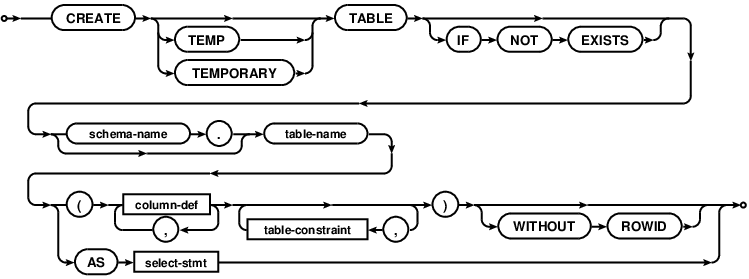
```sql
CREATE TABLE database_name.table_name(
column1 datatype PRIMARY KEY(one or more columns),
column2 datatype,
column3 datatype,
.....
columnN datatype,
);
```
## Exercise-2-Creating-A-MultiTable-Database
```sql
%include <-=Exercise-2-Creating-A-MultiTable-Database/multi-table.sql=
```
```
CREATE TABLE COMPANY(
ID INT PRIMARY KEY NOT NULL,
NAME TEXT NOT NULL,
AGE INT NOT NULL,
ADDRESS CHAR(50),
SALARY REAL
);
CREATE TABLE DEPARTMENT(
ID INT PRIMARY KEY NOT NULL,
DEPT CHAR(50) NOT NULL,
EMP_ID INT NOT NULL
);
```
.tables
.schema COMPANY
DROP TABLE database_name.table_name;
## Exercise-3-Inserting-Data
```sql
%include <-=Exercise-3-Inserting-Data/insert-values.sql=
```
```sql
INSERT INTO COMPANY (ID,NAME,AGE,ADDRESS,SALARY)
VALUES (1, 'Paul', 32, 'California', 20000.00 );
INSERT INTO COMPANY (ID,NAME,AGE,ADDRESS,SALARY)
VALUES (2, 'Allen', 25, 'Texas', 15000.00 );
INSERT INTO COMPANY (ID,NAME,AGE,ADDRESS,SALARY)
VALUES (3, 'Teddy', 23, 'Norway', 20000.00 );
INSERT INTO COMPANY (ID,NAME,AGE,ADDRESS,SALARY)
VALUES (4, 'Mark', 25, 'Rich-Mond ', 65000.00 );
INSERT INTO COMPANY (ID,NAME,AGE,ADDRESS,SALARY)
VALUES (5, 'David', 27, 'Texas', 85000.00 );
INSERT INTO COMPANY (ID,NAME,AGE,ADDRESS,SALARY)
VALUES (6, 'Kim', 22, 'South-Hall', 45000.00 );
INSERT INTO COMPANY VALUES (7, 'James', 24, 'Houston', 10000.00 );
```
## Exercise-4-Insert-Referential-Data
```sql
%include <-=Exercise-4-Insert-Referential-Data/insert-referential.sql=
```
## Exercise-5-Selecting-Data
```sql
%include <-=Exercise-5-Selecting-Data/select-statements.sql=
```
## Exercise-6-Select-Across-Many-Tables
```sql
%include <-=Exercise-6-Select-Across-Many-Tables/select-from-tables.sql=
```
## Exercise-7-Deleting-Data
```sql
%include <-=Exercise-7-Deleting-Data/deleting-data.sql=
```
## Exercise-8-Deleting-Using-Other-Tables
```sql
%include <-=Exercise-8-Deleting-Using-Other-Tables/deleting-and-matching.sql=
```
## Exercise-9-Updating-Data
```sql
%include <-=Exercise-9-Updating-Data/update-statements.sql=
```
## Exercise-10-Updating-Complex-Data
```sql
%include <-=Exercise-10-Updating-Complex-Data/update-complex.sql=
```
## Exercise-11-Replacing-Data
```sql
%include <-=Exercise-11-Replacing-Data/replace-data.sql=
```
## Exercise-12-Destroying-And-Altering-Tables
```sql
%include <-=Exercise-12-Destroying-And-Altering-Tables/recreate-person-table.sql=
```
```sql
%include <-=Exercise-12-Destroying-And-Altering-Tables/destroy-and-alter.sql=
```
## Exercise-13-Migrating-and-Evolving-Data
```sql
%include <-=Exercise-13-Migrating-and-Evolving-Data/migrate-evolve.sql=
```
## Exercise-14-Basic-Transactions
```sql
%include <-=Exercise-14-Basic-Transactions/transaction.sql=
```
---
## References
- [SQLite 教程 | 菜鸟教程](http://www.runoob.com/sqlite/sqlite-tutorial.html)
- [SQLite Query Language: CREATE TABLE](https://sqlite.org/lang_createtable.html)
- [irsal/TWU_Biblioteca_Databases](https://github.com/irsal/TWU_Biblioteca_Databases)
---
## Homework
```sql
sqlite> .tables
book checkout_item member movie
sqlite> .schema book
CREATE TABLE book ( -- 表 book:就有 id 和 title(title 是 unique)
id integer primary key,
title text,
unique(title)
);
sqlite> .schema checkout_item -- 表 checkout_item:member id,book id,movie id
CREATE TABLE checkout_item (
member_id integer,
book_id integer,
movie_id integer,
unique(member_id, book_id, movie_id) on conflict replace,
unique(book_id),
unique(movie_id)
);
sqlite> .schema member -- 表 member:id,name
CREATE TABLE member (
id integer primary key,
name text,
unique(name)
);
sqlite> .schema movie -- 表 movie:id,title,可以看到 book 和 movie 其实一样
CREATE TABLE movie (
id integer primary key,
title text,
unique(title)
);
```
1. Who checked out the book 'The Hobbit’?
```sql
select member.name from member
where id = (
select member_id from checkout_item
where book_id = (select id from book where title = 'The Hobbit')
);
```
output:
```
Anand Beck
```
2. How many people have not checked out anything?
```sql
select count(*) from member
left join checkout_item on member.id = checkout_item.member_id
where checkout_item.member_id is NULL;
```
output:
```
37
```
3. What books and movies aren't checked out?
```sql
select title from book
left join checkout_item on book.id = checkout_item.book_id
where member_id is null union
select title from movie left join checkout_item on movie.id = checkout_item.movie_id
where member_id is null;
```
output:
```
1984
Catcher in the Rye
Crouching Tiger, Hidden Dragon
Domain Driven Design
Fellowship of the Ring
Lawrence of Arabia
Office Space
Thin Red Line
To Kill a Mockingbird
Tom Sawyer
```
4. Add the book 'The Pragmatic Programmer', and add yourself as a member.
Check out 'The Pragmatic Programmer'. Use your query from question 1 to
verify that you have checked it out. Also, provide the SQL used to update
the database.
```sql
insert into book (title) values ('The Pragmatic Programmer');
insert into member (name) values ('Zhixiong Tang');
insert into checkout_item (member_id, book_id) values (
(select id from member where name = 'Irsal Alsanea'),
(select id from book where title = 'The Pragmatic Programmer')
);
```
5. Who has checked out more that 1 item? (Tip: Research the GROUP BY syntax.)
```sql
select name from member where id in (select member_id
from (
select member_id, count(member_id) as count_of_members from checkout_item group by member_id
)
where count_of_members > 1
);
```
output:
```
Anand Beck
Frank Smith
```
The submit:
```sql
%include <-=submit.sql=
```