


'master' branch is a dev-branch, please download stable version from Release if you just want to use it.
v11.08
Since v11.00, this password manager is mature and stable. That said, there will be no more major changes (e.g. database structure change) in the future. But just bug fixes and crypto algorithm updates. I know in the past, upgrading is painful due to the client-side encryption nature. But going forward, it will not be an issue anymore. All users should upgrade to at least v11.00!
Supports are available here for versions v11.00 or later
-
Client side encryption. Server only keeps the encrypted strings. Strong encryption: Server side uses PBKDF2+SHA3-512, client side uses AES256 / PBKDF2+[SHA512|SHA3-512] (SHA512 is used at client side as Javascript SHA3 is too slow) See more about security analysis. Due to client-side encryption nature, if you forget your login password, there's NO WAY to recover your data.
-
Customized fields support. You can add and delete fields for the password manager. You might want a URL field to keep login URL for all your accounts.
-
PIN login. You don't need to input your long login password everytime. Instead, you can use a short PIN, in your trusted devices.
-
Files support. You can attach files to accounts (such as key or license file). Of course, files are encrypted in your browser before they are uploaded. Maximum file name length supported is 38 Bytes (if your file name is too long, rename it). Maximum file size support (tested) is 2MB.
-
Tags support and searching support. This makes it easier to manage lots of accounts.
-
Import/Export as CSV file. (Export CSV has been moved to recovery - you need to: generate backup -> recovery -> export to CSV. It is to discourage user from exporting CSV as the raw format is very unsafe)
-
Easy to backup and recover. For recovery, you only need backup file and login password when generating this backup file. All other information needed for decryption is stored in the backup file. Even if you mistakenly doomed your server, you can download source from github and do recovery (no configuration is needed). After recovery successfully decrypt all data, you can export CSV (no file or password history information). You can also export RAW format that has all data (a full clone) and can be imported into another Password-Manager instance.
-
Authentication control. Account/IP will be blocked for too many failed attempts. After a short time of no action, you'll sign out automatically.
-
TOTP based two-step verification support for first-time or long-time inactive device login.
-
Up to 15 password histories per account.
-
Frontend and backend are separated. So you can install frontend in somewhere abosolutely safe.
-
Support management of TOTP MFA.
-
Friendly UI.
See wiki
You can choose to install both frontend and backend in one server. But the recommended way is to install frontend in somewhere abosolutely safe (e.g. GitHub Pages on a separate and very safe GitHub account -- and enable MFA on your GitHub account).
See wiki
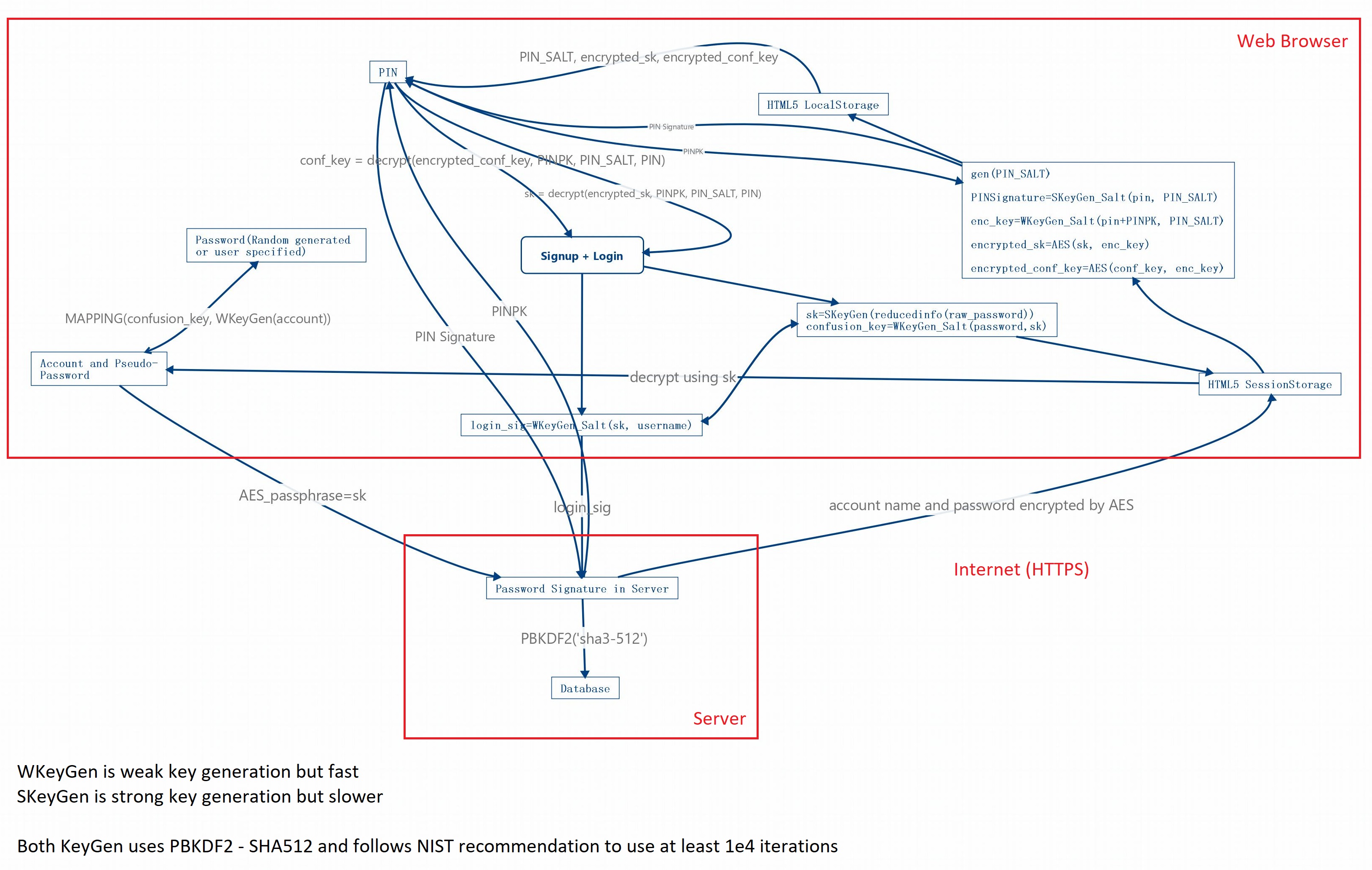
You can read more information about implementation in wiki.
Please read the guide first.
All contributors to this project must agree their work to be published under MIT license ONLY (see LICENSE file) before submitting a pull request.