Give your AI agent a search engine for your local files.
Local Search Agent is a Python framework that gives your AI agent a search engine for your local files and lets it search, fetch, and reason over your local documents — the same way a researcher searches the web, but entirely on your machine.
Point it at a folder. Ask a question. The agent searches your documents, reads the relevant ones, and gives you an answer with citations — no cloud upload, no API calls to external search services, no embeddings, no vector stores.
"What was the AWS spend in Q3?" → agent searches index → fetches relevant docs → answers with sources
Traditional RAG (Retrieval-Augmented-Generation) has a fundamental problem: it converts your documents into embeddings and stores them in a vector database. That means:
- Stale indexes — embeddings go out of date silently. You never know if the agent is reading your latest documents or a six-month-old snapshot
- Black-box retrieval — you can't see why a document was retrieved or not. Debugging poor answers is guesswork
- Chunking anxiety — split too small and you lose context. Split too large and retrieval quality degrades. There's no right answer
- Infrastructure overhead — a vector database is another service to run, maintain, and pay for
- Semantic drift — embeddings are sensitive to how questions are phrased. A question about "cloud expenditure" may never match a document that says "AWS spend"
Local Search Agent takes a different approach: BM25 keyword search via Meilisearch, structured metadata, and a LangGraph agent loop with tools. The agent searches your document index the same way a developer searches Stack Overflow — with real queries, real results, and full transparency into what was retrieved and why.
The result is deterministic, auditable, and fast. You can see exactly what the agent fetched for every answer.
1. INGEST     Your documents → parsed, cleaned, chunked, indexed into Meilisearch
2. SERVE      FastAPI file server makes documents available to the agent via HTTP
3. SEARCH     LangGraph agent loop: search_local_index → fetch_local_url → reason
4. ANSWER     Agent returns an answer with inline source citations
Everything runs locally. Meilisearch downloads automatically on first use, no manual setup.
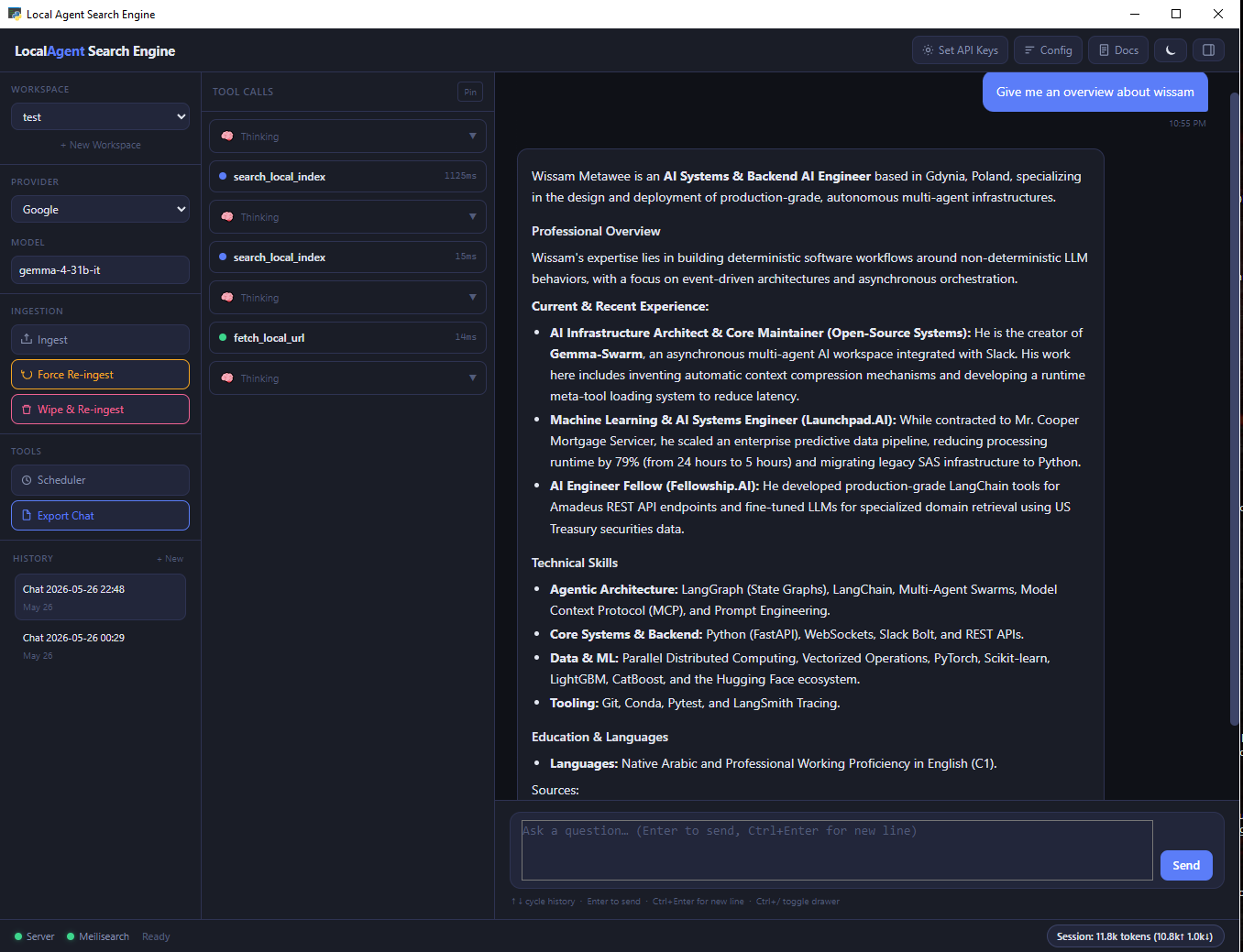
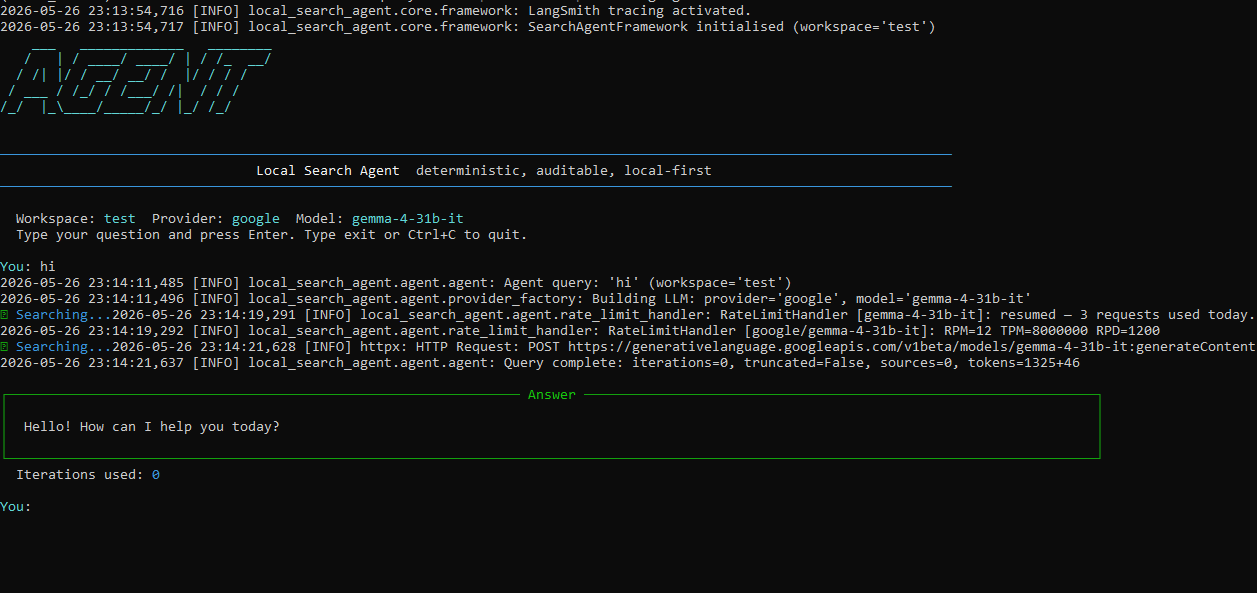
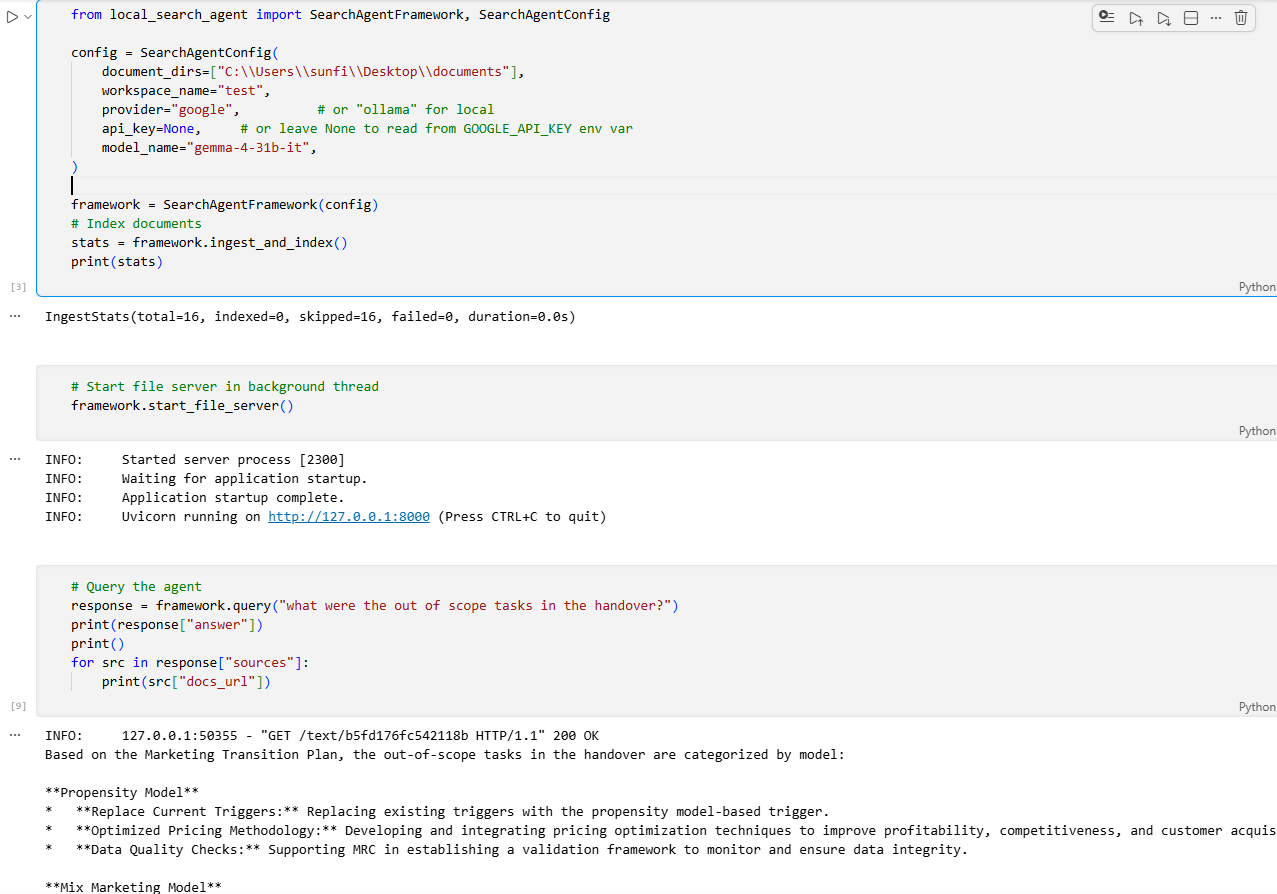
- Native UI — Watch the UI design and configuration video demo
- CLI AGENT — Watch the Terminal document querying video demo
- Python API — Watch the Local Search Agent API Integration video demo
pip install local-search-agent# Google AI Studio (free tier — recommended) or paid from openai or anthropic
local-search config set-key --provider google --key YOUR_KEY
# Or use Ollama for a fully local, zero-cost setup (no key needed)
# Install from https://ollama.com
# Download any model that support function calling and system instructions:
`ollama pull gemma4:e2b` (7.2GB)
`ollama pull gemma4:e4b` (9.6GB)
`ollama pull nemotron-3-nano:4b` (2.8GB Highly recommended)
local-search uiThe desktop UI open:
- Create a workspace, name it, point it at a directory of files. The "Database path" field is optional — leave it blank to use the default location shown in the hint, or paste a custom path and click "Set & Restart".
- Ingest (parse, clean, chunk).
- Get a free google api key from ai-studio.
- Set your api key at the top bar's right corner, or add a paid key for anthropic\openai . Note: For paid models or ollama, you will need to set model name via the config button at the top bar's right corner.
- click Ingest from the left sidebar.
- watch the progress bar at the bottom bar, wait until all files marked as completed.
- Start asking questions.
# Create a workspace and ingest documents
local-search workspace create finance "C:\my_docs"
local-search ingest --workspace finance --dirs "C:\my_docs"

# Start the file server (keep this running)
local-search serve --workspace finance

# Ask a question
local-search query "What was the AWS spend in Q3?" --workspace finance --provider google

# Use interactive mode
local-search query --workspace finance --provider googlefrom local_search_agent import SearchAgentFramework, SearchAgentConfig
config = SearchAgentConfig(
document_dirs=["C:/my_docs"],
workspace_name="finance",
provider="google",
# db_path defaults to your OS user config dir — same location as keys.json
# override only if you need a custom location:
# db_path="D:/mydata/search.db",
)
framework = SearchAgentFramework(config)
framework.ingest_and_index()
framework.start_file_server()
response = framework.query("What was the AWS spend in Q3?")
print(response["answer"])Wrap an indexed workspace as a tool and plug it into any external AI agent — LangChain, LangGraph, Google Gemini SDK, or any framework that calls a function.
from local_search_agent import SearchAgentFramework, SearchAgentConfig, LocalSearchTool

config = SearchAgentConfig(
    document_dirs=["C:/skills"],
    workspace_name="skills",
    provider="google",
    model_name="gemini-2.0-flash-lite",  # cheap model for retrieval
)

# Index once
framework = SearchAgentFramework(config)
framework.ingest_and_index()
framework.start_file_server()

# Create the tool
skill_tool = LocalSearchTool(config)

# Use inside a LangChain / LangGraph agent
from langchain_core.tools import tool

@tool
def search_skills(query: str) -> str:
    """Search the skills knowledge base for coding patterns and techniques."""
    return skill_tool.run(query).answer
Pass return_raw=True to bypass the internal LLM summarisation and return the full document text verbatim — useful when the calling agent should reason over the raw content itself:
skill_tool = LocalSearchTool(config, return_raw=True)See the Python API Reference for the full LocalSearchTool documentation.
By default, scanned or image-based PDFs are processed using RapidOCR. Installing Tesseract enables a faster OCR path (~5 second per page vs. minutes without it).
Digitally-created PDFs (with a text layer) are never affected — they use direct text extraction and skip OCR entirely.
Windows
Download and run the installer from https://github.com/UB-Mannheim/tesseract/wiki
Make sure "Add Tesseract to the system PATH" is checked during installation.
Linux
sudo apt install tesseract-ocr        # Ubuntu / Debian
sudo dnf install tesseract             # Fedora / RHEL
sudo pacman -S tesseract               # Arch
macOS
brew install tesseractAfter installation, restart the application — Tesseract is detected automatically. If it's not found, ingestion continues normally using RapidOCR with no errors.
| Format | Extension |
|---|---|
.pdf |
|
| Word | .docx |
| Excel | .xlsx |
| PowerPoint | .pptx |
| HTML | .html, .htm |
| Plain text | .txt, .md |
| CSV | .csv |
| JSON | .json |
| XML | .xml |
.eml |
- One command install —
pip install local-search-agent. Meilisearch downloads automatically - No embeddings, no vector stores — BM25 search with structured metadata. Fast, deterministic, auditable
- Native desktop UI — pywebview window with live streaming agent responses, workspace management, and chat history
- Multi-provider LLM — Google, Ollama (local), OpenAI, Anthropic
- Multi-workspace — isolate document collections by department, project, channel, or topic. Each workspace is its own search index
- Incremental sync — background scheduler re-indexes only changed files. A 10,000-document corpus with 50 changes re-indexes only the 50
- Full CLI parity — everything you can do in the UI you can do from the terminal
- Python API — embed the framework directly in your own application
- Cross-platform — Windows, macOS, Linux
| Guide | Description |
|---|---|
| Getting Started | First steps, quick start for UI, CLI, and Python API |
| Installation | Full install guide, API keys, Ollama setup, platform notes |
| Architecture | Full architrecture, design guide |
| CLI Reference | All commands and flags |
| Python API Reference | Full API documentation |
| Configuration | All config options and patterns |
| Ingestion | How ingestion works, supported formats, chunking, scheduler |
| Multi-Workspace | Managing multiple document collections |
| Semantic Search | Experimental: concept extraction, query expansion |
| Troubleshooting | Common issues and fixes |
Contributions are welcome. Clone the repo and install in editable mode with dev dependencies:
git clone https://github.com/wiss84/local-search-agent.git
cd local-search-agent
pip install -e ".[dev]"
Run tests before submitting a PR:
pytest tests/ -v --cov=local_search_agent --cov-report=term-missing
ruff check .
ruff format .MIT — see LICENSE for details.
Built by Wissam Metawee