The Petrinet Interface Visualizer is a program that allows users to draw and edit petri net models. The program was written in C++ and built with QT 5.11.
This visualizer is intended to create petri net models to represent biological reactions or events for simulation purposes. The program would allow users to create petri net models of molecular reactions and save the data of the models to a file. The program would also be to read in data from such a file for users to edit the models.

Data from the user created models could be fed into a biological reaction simulator. Such simulator would use the data it recieved to compute results about the possible outcomes of the molecular reactions and generate results that could be used to predict the possible outcomes of biological events. When creating or editing, users can change the stucture of the models, the inputs and outputs of an event, and manipulate the biological attributes of the molecules or events. Users would manipulate such attributes to values that would affect simulations that the data would be used on.
The programs operates by building an initial event in the visualizer object and allows users to edit the event via methods in the visualizer. Currently a hard coded test event is loaded into the visualizer. The visualizer is the link that connects the user to the back end structure that organizes the data. The back end structure that organizes the data consist of an event object that contains two lists that hold molecules. Each list represents the molecules that are the inputs and the outputs of the reactions of the molecular event. Both Event and molecule objects have certain attributes that either affect their properties in simulations or visual properties when drawn in the visualizer. When users manipulates the event structure via actions offered by the visualizer, the actions are methods that change the structure to the user's choices.
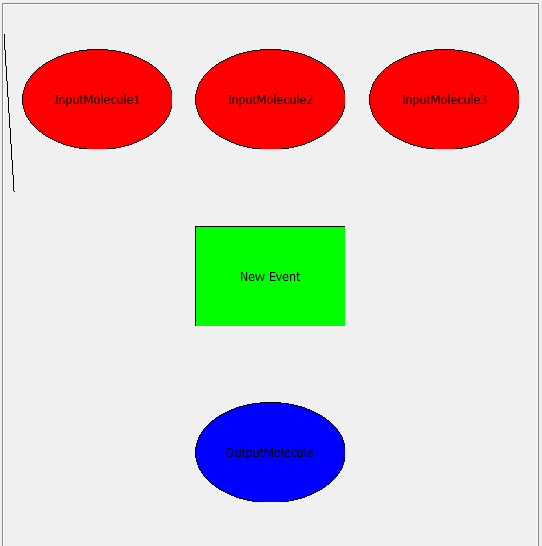
Currently the program needs to be opened in the QT program to be built and launched there. Once the program is built and launched, a view of the visualizer is shown by the program. Users Most of the actions that allow users to edit the event are found with the right click menu that is activated as users right click on the visualizer. The right click menu has options that allow users pick from several options: edit, cut, copy, paste, delete, add, and save.
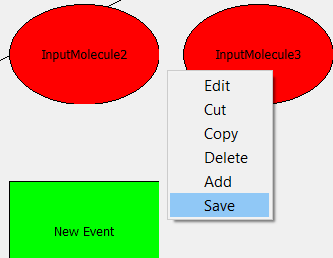
The edit option allows users to edit the attributes of molecules or events if the user opened the menu over molecules or events. The copy option will temporarily record the data of the molecule that the user's mouse is over. The cut option will delete the molecule that the user's mouse is over and record the data of the deleted molecule. The delete option will remove the molecule that the user's mouse is over. The add option adds a new generic molecule at the nearest open position to the mouse. To restructure the the molecules in the event, mouse over the molecule that you intend to restructure and drag it with the left mouse button to the desired location.