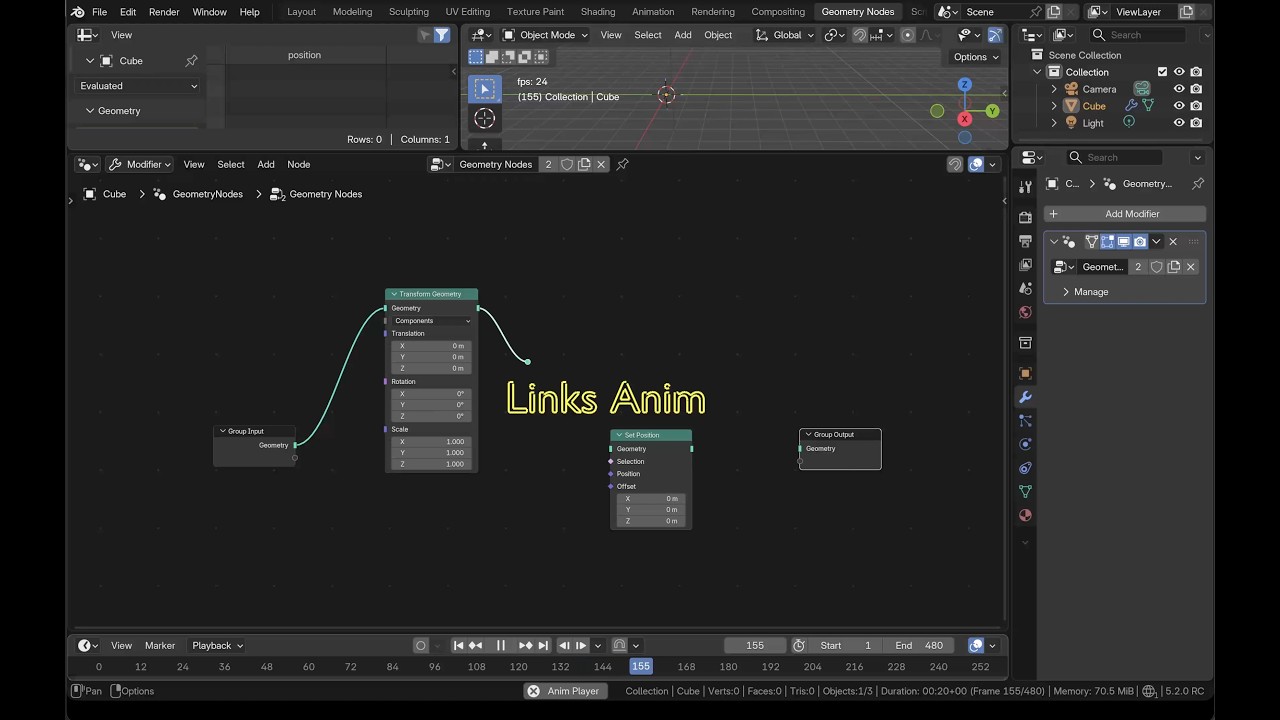
This tool is for creating fancy node tree animation for blender node tree systems, you can use it to create animation for shader nodes, geometry nodes, compositor nodes, etc. It is a powerful tool that can help you create complex animation for your node tree explainary tutorials.

If you like the project, please give me a star! ⭐
- Supporting all node tree types, including shader nodes, geometry nodes, compositor nodes, texture nodes.
- Support for creating animation for nodes, links, values, views and even annotations.
- Live update animation parameters.
- Anim Curve editor for creating complex animation curves.
Edit -> Preference -> Get Extensions -> Install from Disk..., locate the zip file to install.
Go to any tree editor space (Geometry Node Editor, Compositor, Shader Editor, Texture Node Editor), N panel to
open the Nodetree Anim panel in the node worksapce to build the wanted animations.
| Node Anim Buildup | Link Anim Buildup | Value Anim Buildup | View Anim Buildup | Annotation Anim Buildup |
|---|---|---|---|---|
 |
 |
 |
 |
 |
You can animate Nodes, Links, Values, Views and Annotations. You can build the animations in Bulk for
Nodes, Links and Views or one by one in Manual for Nodes, Links and Values.
Annotation animation in its own category.
- Bulk Build
- The options above the list window are global controls, their value will control all items in the list.
- The
Anim Start Frameis an exceptional one, it only affects the first item's start value.
- The
- You can control individual behavior in the list.
- The options above the list window are global controls, their value will control all items in the list.
- Manual Build
- First select a
Nodein the node list,- Adjust desired controls to build the node's animation.
- For
LinkandValue, the available links and values of the selected node will show up in the list, select one to build its animation. - You can also add a new
Link.
- First select a
- Annotate
- Add your annotation first, several quick tools, drawing, eraser, etc., are accessible for your convenience.
- 🟢 Also support
Input textsbesidesFree drawing
- 🟢 Also support
- Once you have annotation, you can select and build the animation based on different levels, including
Layer,FrameandStroke. - A writing symbol can be added for writing effect animation.
- You can
Restore Annotationand start over your animation builds. - 🔴 Morph animation hasn't implemented yet.
- Add your annotation first, several quick tools, drawing, eraser, etc., are accessible for your convenience.
Detailed description of settings
Bulk Build
Anim Start Frame which only affects the first item's Start Frame.
Nodes
Anim Start FrameandStart Frame: The anim start frame.Anim Length: The anim length in frames.Stagger Length: The gap frames between previous and next item's animation.Sync Before Start: Will sync the node's position to theStart Positionbefore the anim starts.Start Position: Set the node'sFly Inanim starting position. The end position is always the position that before the anim creation.Path Multiplier: Used for the path curve. Since the curve range is limited in Blender, you will need to multiply the point's y value in the curve by thePath Multiplierto get the actual position.Refresh Node ListandRebuild Node List: Operator to refresh/rebuild the node list when you add/del nodes in the node tree.Node Anim Curve: Control how the anim behaves.
Links and Views will not be repeated again in the following.
Links
Start OffsetandEnd Offset: I just estimate the links' position, when there are vector type links or previous socket is linked, the position is not accurate anymore, so you have to adjust the offset to match the connection position precisely.
Move Size: For the viewFollowmovement, how much the view will move, positive for the view to move right, negative for the view to move left.Zoom Size: For the viewZoommovement, how much the view will zoom in/out, positive for the view to zoom in, negative for the view to zoom out.
Manual Build
link and value, the
available item list will show up when you select a node. You also can add new link.
Value
Start ValueandEnd Value: The animated start and end range.Sync beginning value before start: The value will sync to the start value for the time prior to the anim starting time.
Annotate
Annotationis organized bylayers, eachlayercan have multipleframes, eachframecontains multiplestrokes. Properties likeOpacityandThicknessare layer level property, so you can only control the annotations' apperance in layer level.- When a stroke in a layer is animated, the layer will be locked and can't edit anymore. You can
Restore Annotationto edit the layer and rebuild the animation. It's better just add new layers to add new annotations. - You can add a writing symbol for the
Write OnorWrite Offeffect.
Once the animation added, some controls will show up under their category, the controls are lively updating.
- Annotation
- Implement Morph Anim
- Add Input text option for Annotation
Check the detailed tutorial