


Session manager for development teams using terminal AI coding agents (Claude Code, Codex, Cursor CLI) on one or more Linux servers. Team visibility via OS accounts, cross-host visibility via SSH, supervision via sudoers.
Use uxon when terminal AI coding agents are a runtime someone
else may need to see, attach to, or stop. Four shapes of
deployment, one tool:
- One developer, one host. Persistent TUI over
tmux; agents optionally sandboxed in a low-priv<user>_agentaccount so a yolo run can't trash your$HOME. - One developer, several hosts. Aggregate everything into
one TUI with a
HOSTcolumn; locals first, then peers grouped by host. - A team sharing one host. Each developer runs as their
paired
<user>_agent. The lead's TUI sees everyone viasudo. Cross-user supervision without impersonation — the lead never becomes the developer. - A team across several hosts. Same supervision property
per host; per-peer authority (each host's
sudoersis the authority on that host); cross-host audit correlation via UUIDcorrelation_idjoining caller-side and peer-side events.
Aggregation is client-side: the lead's TUI fans out over SSH. No daemon, no database, no central server to deploy. Each host stays independently configured and independently authorised.
Requires Python 3.11+, tmux, and Linux.
# Team / shared host (recommended): one root-owned binary in
# /usr/local/bin/uxon. Operator owns the version and the install
# path; launch users can append audit events but cannot edit
# the binary or the trail.
sudo pipx install --global uxon

# Solo / single-owner: each OS user manages their own copy.
uv tool install uxon              # or:  pipx install uxon

uxon                              # launch the TUI; it self-diagnoses
For the bundled installer, PEP 668 caveat, and unreleased-from-
main builds, see docs/start/install.md.
The site at docs/ is organised two ways. Pick the
entry that matches what you have in mind.
By scenario:
By task (Diátaxis layout):
docs/start/— tutorials (install, bootstrap a host, add a peer).docs/guides/— how-to recipes (operate, harden, customise, debug).docs/reference/— every command, every flag, every config key, every audit event.docs/explain/— the model (isolation, supervision, multi-host, audit channel).
Top-level pointers:
docs/index.md— full table of contents.docs/clients.md— laptop side (Eternal Terminal, SSH config, hardware keys).docs/privacy.md— whatuxonrecords about each developer; for sharing with your team.docs/migrations.md— version-bump operator notes.SECURITY.md— disclosure policy + threat model summary.CHANGELOG.md— version history.CONTRIBUTING.md— local checks, branch policy, release process.
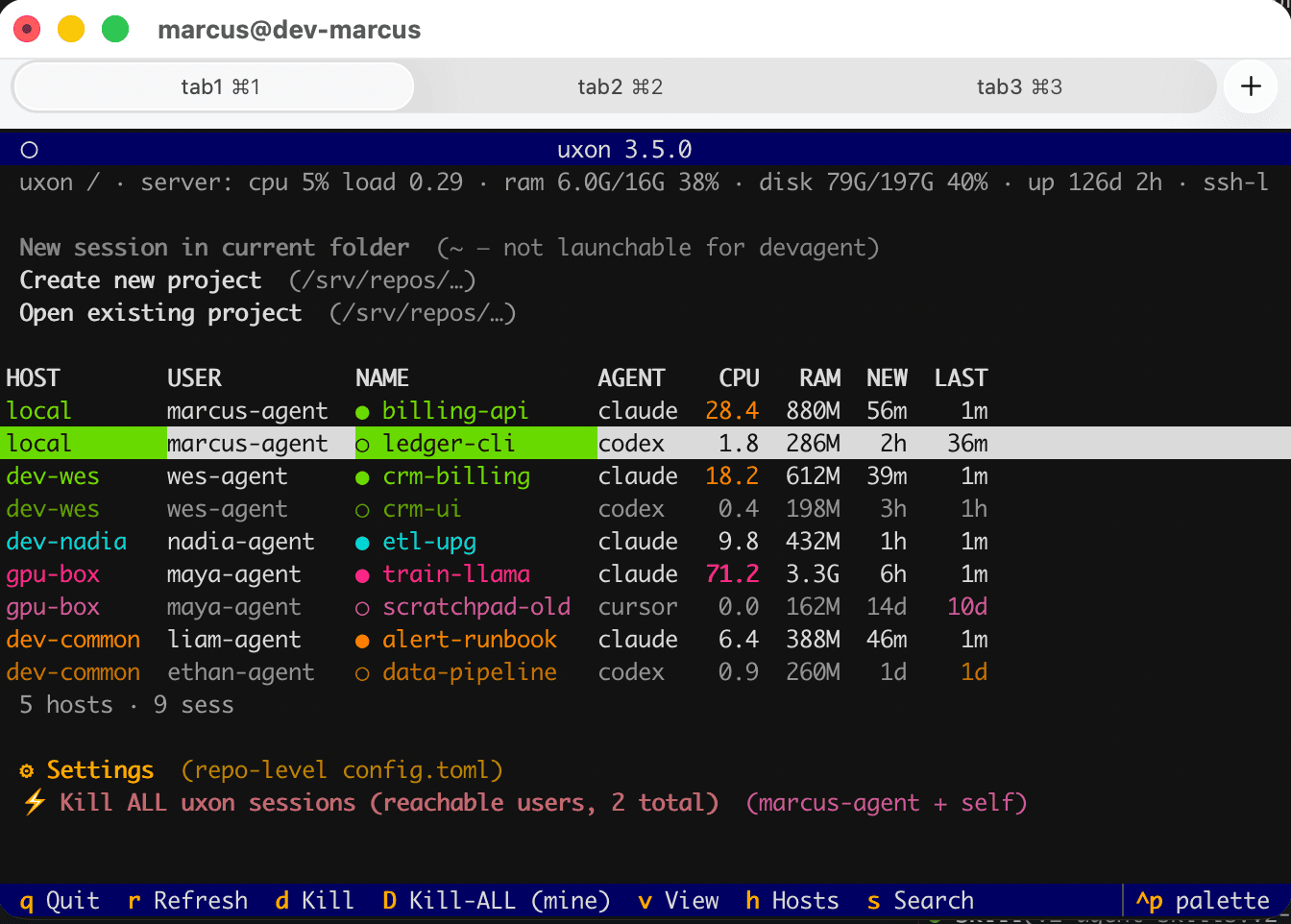
uxon (no args, on a TTY) opens a full-screen picker:
- New session in current folder — start the default agent
in
$PWD. - Create new project — prompt for a name, create
<new_project_root>/<name>, optionally create a GitHub repo, launch the agent. - Open existing project — pick a directory under
new_project_rootand launch.
Below that: a unified session dashboard mounting your own
sessions, other-user sessions visible via sudo (when the
superuser block is active), and one row per session on each
configured [[remote_hosts]] peer. Two view modes — flat
(default; single ranked list) and by_host (per-host tabs and
a status bar); toggle with v. ←/→ on the dashboard cycles
between hosts (host tabs in by_host, (host, own/other)
transitions in flat).
A search bar filters across all rows — hidden by default, press
s (or /) to summon it. Per-row data: agent, working dir,
live CPU / RAM, attached glyph (●/○), creation time, last
activity time. Enter attaches; d kills with confirmation.
Every launch asks whether to start in normal mode or with
--dangerously-skip-permissions ("yolo") — the TUI does not
start yolo without that explicit choice.
Full keybinding list:
docs/reference/keybindings.md.
| Agent id | Binary | --auto mode |
--dsp (yolo) |
Install |
|---|---|---|---|---|
claude |
claude |
--permission-mode auto |
--dangerously-skip-permissions |
Anthropic docs |
codex |
codex |
--full-auto |
--dangerously-bypass-approvals-and-sandbox |
npm i -g @openai/codex |
cursor |
cursor-agent |
(not supported) | --yolo |
curl https://cursor.com/install -fsSL | bash |
Enable agents in config/config.toml:
[agents]
enabled = ["claude", "codex"]
default = "claude"
-w <branch> (worktree) works with any agent; uxon manages the worktree
itself. --auto is unavailable for cursor.
uxon doctor probes each enabled agent and prints its path,
version, and status. The TUI auto-detects newly-installed
agents and offers a one-keypress enable.
uxon follows SemVer. uxon --version
prints the version and short git commit (with -dirty when the
checkout has uncommitted changes).
In a team·N fleet, all peers must run the same major version
— see docs/guides/operate/roll-fleet-upgrade.md.
MIT © 2026 Vasily Zakharov.