This project is a web application designed to scrape data from YouTube and Twitch, process it, and display it via a Flask-based interface. The data is stored in an Elasticsearch index to enable advanced searching and filtering functionalities. The app supports features like search autocompletion and filtering by game, video title, channel, date, and tags.
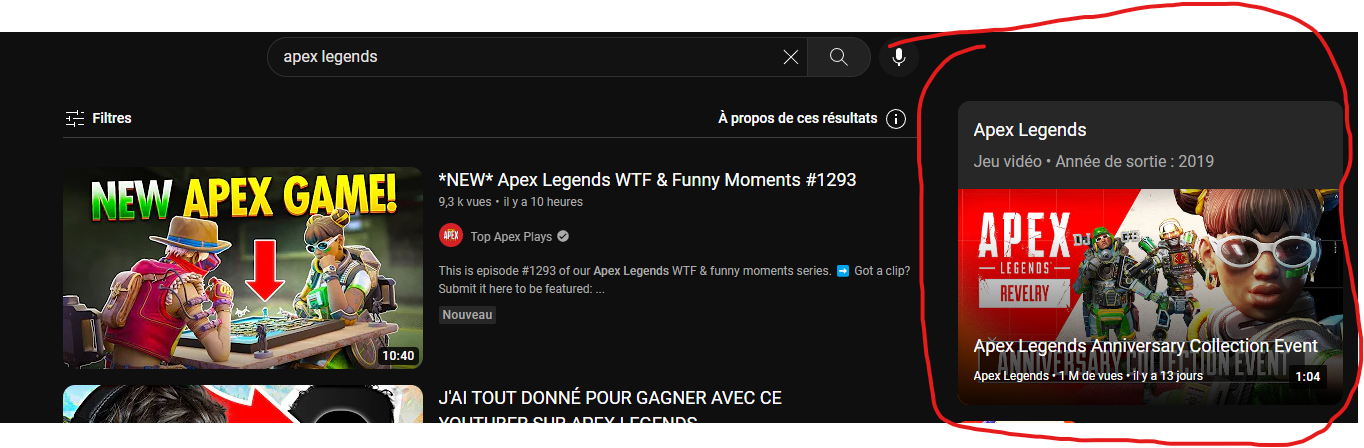
We decided to leverage the data available in YouTube's game cards, as shown below:
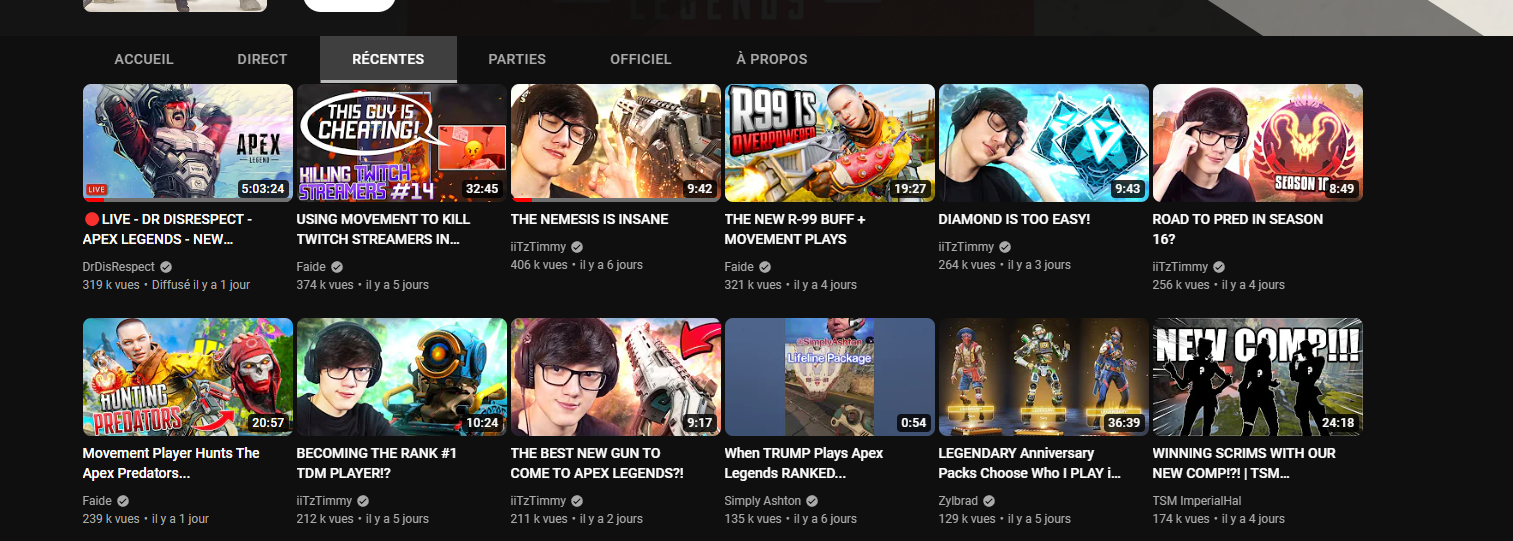
This tab lists videos related to a specific game. However, we noticed that this feature is not well optimized and doesn't allow for easy navigation to find the most relevant video. For instance, as shown in the image below, it's not possible to sort videos by upload date or by view count:
To select the games for which we will collect video data, we decided to retrieve the top 20 most popular games at any given time. This allows our project to function in real-time and stay continuously up to date. To achieve this, we fetch the names of the top 20 games with the most viewers from the streaming platform "Twitch."
Data Sources:
YouTube: https://www.youtube.com/ Twitch: https://www.twitch.tv/
Warning: The demo provided here is not run within Docker. This is intentional because the web scraping process utilizes ChromeDriver, which, in a production environment (such as when using Docker), would typically be executed in headless mode on a Linux system. Headless mode allows ChromeDriver to run without displaying the browser, making it efficient but not visually informative.
For the purpose of this demo, we have disabled headless mode so that users can observe the scraping process in real time. This means you will see the browser open, navigate through YouTube and Twitch, and collect the required data. We believe this is a more engaging way to demonstrate how the scraping works, as opposed to running the process silently in the background.
In a production environment, scraping would occur in headless mode to improve performance, especially when running in a Docker container. However, headless mode hides the browser, making it impossible to visually track what the ChromeDriver is doing.
Click on the image to watch the video on Youtube :
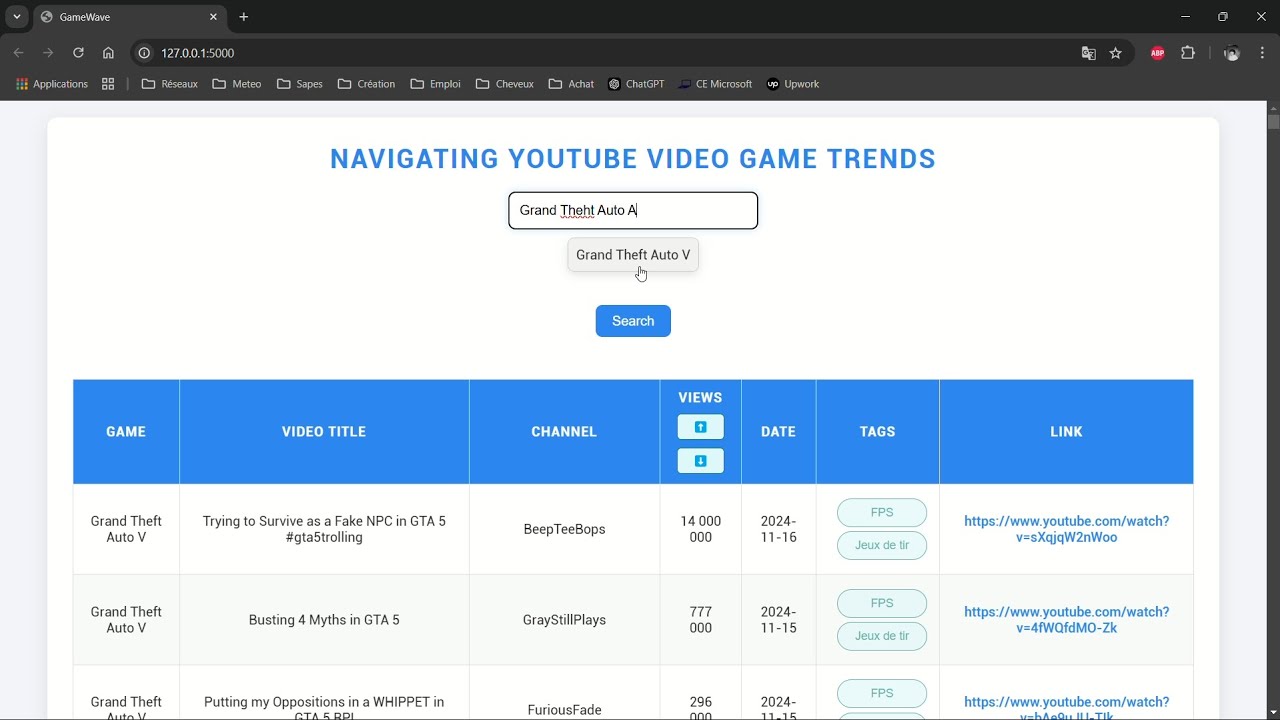
- YouTube & Twitch Scraping: Uses Selenium to scrape data from Twitch and YouTube based on game-related searches.
- Elasticsearch Integration: Stores the scraped data and enables advanced search capabilities.
- Flask Web Application: Provides a frontend interface with filters, autocompletion, and search features.
- Dockerized Setup: The entire application is containerized using Docker for ease of deployment and scalability.
- Scraping: Fetch data from Twitch and YouTube, including game names, video titles, channels, view counts, and upload dates.
- Data Cleaning: Views and date fields are cleaned and normalized for consistency in the application.
- Elasticsearch: Data is stored in an Elasticsearch index (
yt_twitch) for fast querying and filtering. - Autocomplete Suggestions: Provides suggestions based on partial queries for better user experience.
- Flask Web Interface: Displays the scraped data with search and filtering functionalities using a clean and responsive UI.
-
Backend:
- Python 3.12
- Flask
- Elasticsearch
- Selenium with ChromeDriver
-
Frontend:
- HTML/CSS (for the Flask app templates)
-
Containers: Docker for containerizing the application and Elasticsearch service.
-
Version Control: Git for source code management.
Before setting up the project, ensure you have the following installed:
- Docker (latest version)
- Docker Compose (latest version)
git clone <repository-url>
cd <repository-directory>To run the application using Docker, follow these steps:
-
Build Docker Containers:
docker-compose up --build
This will build both the
flask_appandelasticsearchcontainers. -
Access the Application:
Once the containers are running, you can access the Flask web app at:
http://localhost:5000 -
Elasticsearch:
Elasticsearch will be accessible at:
http://localhost:9200You can verify if the service is running properly by visiting this URL.
If you prefer to run the app without Docker and see the browser scraping in real-time, you can follow these steps:
-
Switch to the
demobranch of the repository:Go to this branch: https://github.com/victger/Gamewave/tree/demo
-
Install Python 3.12 and ensure that
pipis installed on your machine. -
Install Elasticsearch (version 8.15.3 or a compatible version).
-
Install Dependencies:
Run the following command to install all required Python dependencies:
pip install -r requirements.txt
-
Run the Application:
Start the application by running:
python main.py
By following these steps, you will be able to see the scraping process in the browser.
TREND_YT_TWITCH/
├── app/
│   ├── static/
│   │   ├── css/
│   │   │   └── style.css
│   │   ├── js/
│   │   │   ├── app.js
│   │   │   └── datepicker.js
│   ├── templates/
│   │   └── index.html
│   ├── elastic_utils.py
│   ├── elastic.py
│   └── flask_app.py
├── chromedriver/
│   └── ChromeDriver.py
├── chromedriver-win64/
│   ├── chromedriver.exe
│   ├── LICENSE.chromedriver
│   └── THIRD_PARTY_NOTICES.chromedriver
├── images/
│   └── youtube_card.png
├── twitch/
│   └── Twitch.py
├── youtube/
│   └── Youtube.py
├── docker-compose.yml
├── Dockerfile
├── main.py
├── README.md
└── requirements.txt
PYTHONUNBUFFERED: Ensures the output is flushed immediately and not buffered, for real-time logs.
- Index:
yt_twitch - Elasticsearch Port:
9200
To interact with Elasticsearch directly, use the following endpoints:
GET /yt_twitch/_search: Retrieve data from the index.POST /yt_twitch/_bulk: Insert bulk data into the index.
-
Search Filters: You can filter by:
GameVideo titleChannelDateTags
-
Autocomplete: As you type into the search fields, suggestions will appear based on existing data in the index.
This project is licensed under the MIT License. See the LICENSE file for details.
-
Elasticsearch Fails to Start:
- Check if the port
9200is already in use by another service. - Ensure Docker has sufficient memory allocated (recommended: at least 2GB).
- Check if the port
-
ChromeDriver Issues (for a setup on Local Machine):
- Ensure you are using the correct version of ChromeDriver that matches your installed Google Chrome version.
- Make sure that the Chrome browser is properly installed inside the Docker container.
-
Scraping Issues:
- Ensure that Twitch and YouTube's page structure has not changed. If so, you may need to adjust the scraping logic.
- Improve the date picker
- Implement machine learning models to analyze video trends and predict future popular games or videos.
- Add pagination for large data sets.
- Integrate user authentication for personalized search and data access.