
(Pronounced "can I please", á la gopls)
A language server that shows caniuse.com support percentages for web features, right in your editor.
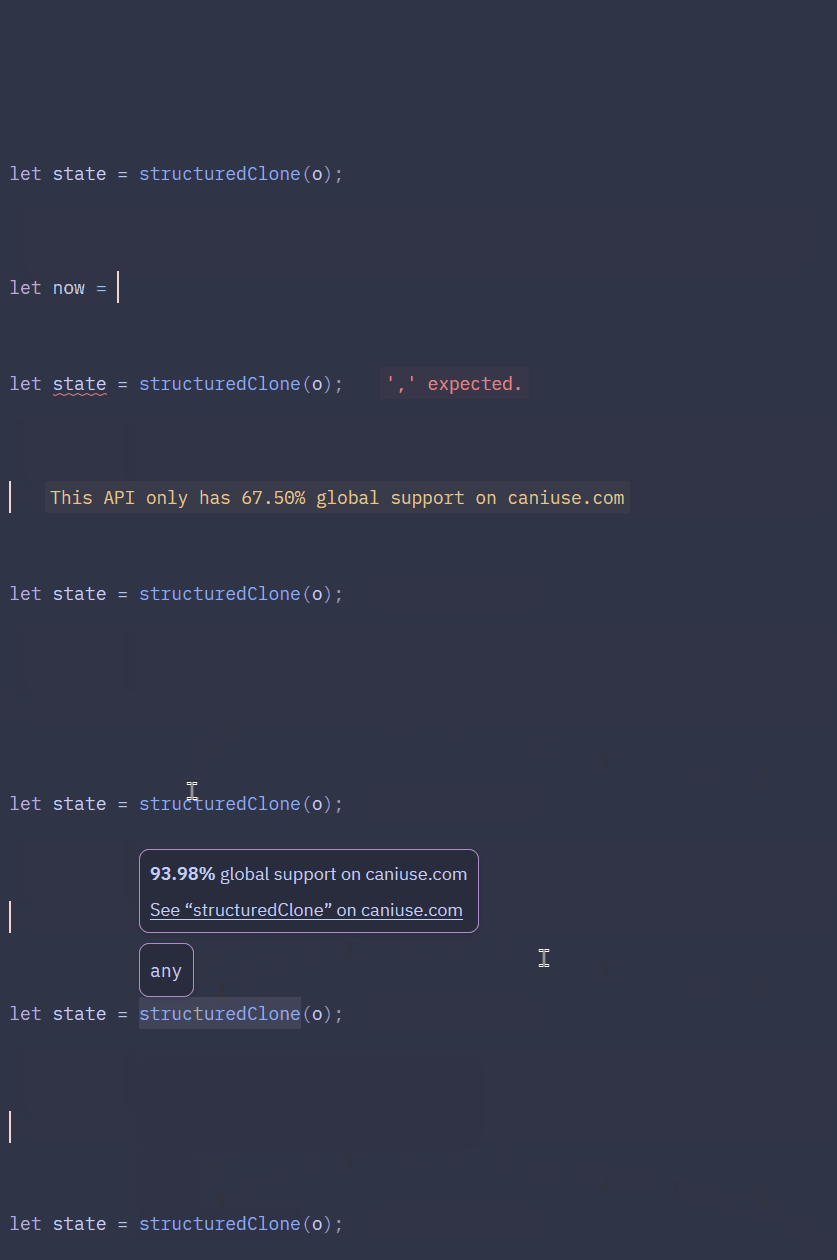
Implements the following features of Microsoft's Language Server Protocol:
- diagnostics - shows warnings on features whose global support percentage falls below the user-defined desired support threshold (or the default, if none is specified.)
- hover - hover over any native HTML element, global attribute, CSS at-rule, property, psuedo-selector, JavaScript API or buultin, to see its global support percentage.
Supported file types:
- HTML
- CSS
- JavaScript/Typescript
- JSX/TSX
- Vue
- Svelte
- Astro
Important
While global support percentages from canipls rarely match 1:1 those of caniuse.com's, they are never more than ~1% off, and rarely more than about 0.1% off. canipls data is refreshed once a day, but caniuse.com does not divulge all of its data sources.
A note on JavaScript features and how canipls works
canipls works by using Tree-sitter parsers to make sense of input code; it only knows basic syntactical structure, nothing else.
What this means is that, unfotunately, canipls is not smart enough to know the type of JavaScript identifiers, only that they're identifiers.
For instance, given the following code:
const myFriends = ["John", "Mikey"];
myFriends.push("Steve");
canipls does not know that myFriends is an Array; just an identifier. As such, hovering over .push() won't show any hover documentation, and using a low-support Array feature on myFriends won't show any warnings from canipls.
A workaround is that it will provide those features for methods by typing <parent class>.prototype.<method or property>:
Map.prototype.getOrInsert // "This method only has 75.19% global support on caniuse.com"Follow the instructions for getting canipls up and running in your editor:
VS Code
Download the canipls extension from the marketplace or from within VS Code.
Zed
Download the canipls Zed extension from within Zed (ctrl/cmd + shift + x to open the Extensions view).
Neovim
- Download the
caniplsexecutable from the Releases page for your operating system & architecture. - (optional) Add the executable obtained in step 1 to your PATH.
- Add the following to your
init.lua:vim.lsp.config('canipls', { cmd = { 'canipls', '--stdio' }, filetypes = { -- include as many of the following languages as you need: 'html', 'css', 'javascript', 'typescript', 'javascriptreact', 'typescriptreact', 'vue', 'svelte', 'astro', }, }) vim.lsp.enable('canipls')
Helix
- Download the
caniplsexecutable from the Releases page for your operating system & architecture. - (optional) Add the executable obtained in step 1 to your PATH.
- Add the following to your
languages.toml:[language-server.canipls] command = "canipls" # add as many of the following languages as you need: [[language]] name = "html" language-servers = ["canipls"] [[language]] name = "css" language-servers = ["canipls"] [[language]] name = "javascript" language-servers = ["canipls"] [[language]] name = "typescript" language-servers = ["canipls"] [[language]] name = "jsx" language-servers = ["canipls"] [[language]] name = "tsx" language-servers = ["canipls"] [[language]] name = "vue" language-servers = ["canipls"] [[language]] name = "svelte" language-servers = ["canipls"] [[language]] name = "astro" language-servers = ["canipls"]
It is possible to opt out of canipls warnings for specific lines of code. This is done via various magic comments:
| comment text | function |
|---|---|
canipls-ignore |
Ignore the line this comment is found on |
canipls-ignore-nextline |
Ignore the line following the one this comment is found on |
canipls-ignore-file |
Ignore the whole file if this comment is found anywhere therein |
canipls-ignore-start |
Start ignoring from this line |
canipls-ignore-end |
Stop ignoring after this line |
/* canipls-ignore-nextline */
@starting-style {
    /* ... */
}
const now = Temporal.Now.instant(); // canipls-ignorecanipls can be configured, and upon startup, will search the following places for configuration options, in order of precedence:
- a file called
.canipls.jsonin the current project's root directory - a file called
canipls.jsonin the user's global app config directory- on Windows, this is found at
%HOME%/AppData/Roaming/canipls/ - on macOS and Linux, this is found at
~/.config/canipls/
- on Windows, this is found at
- use the default values (see below table)
The following configuration options are available:
| name | type | default | description |
|---|---|---|---|
support_threshold |
number | 90.0 |
The minimum global browser support threshold, according to caniuse, that features must meet |
show_low_support_warnings |
boolean | true |
Whether to show warning diagnostics for features that fall below the desired support threshold. (If this is set to false, support_threshold has no effect.) |
ignored_feature_ids |
string[] | [] |
List of caniuse feature IDs (without the mdn- prefix) which should be ignored when throwing warning diagnostics; may include a trailing * wildcard |
Where can I find a feature's caniuse ID?
Search for the feature you want on caniuse.com, and click the big # button to the left of the feature card:

The caniuse feature ID is the URL following "caniuse.com/", but canipls is only concerned with what follows mdn-:

Example:
{
    "support_threshold": 80.0,
    "show_low_support_warnings": true,
    "ignored_feature_ids": [
        "css_properties_cursor_*",
        "javascript_builtins_temporal"
    ]
}
Credit
- zigtools/lsp-kit handles the actual LSP communication
- MDN
browser-compat-datacontains all the feature support data - caniuse.com, especially its browser support table
If you come across any strange or incorrect behavior, please don't hesitate to open an issue or pull request.
Note
This project is researched, designed, and written completely by hand. Among other reasons, quality is a higher priority than quantity. Pull requests that contain AI-generated content of any kind will be rejected.