


The dashboard's Governor Log and Evidence Receipts panels are temporarily disabled while stability improvements are being rolled out.
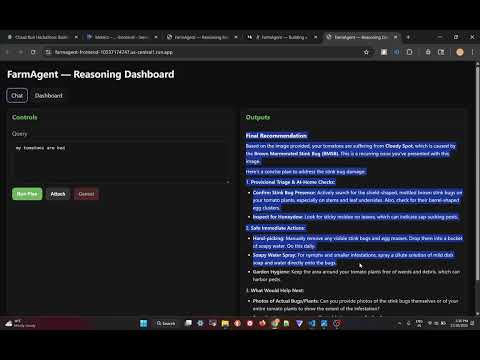
FarmAgent is an LLM-driven crop advisory assistant built using the Google Agent Development Kit (ADK).
It provides a transparent workflow for:
- Understanding crop issues
- Generating a step-wise plan
- Executing tools (image analysis, lookup APIs, symptom matching)
- Synthesizing a final actionable recommendation
The system consists of:
- Frontend → Flask reasoning dashboard
- Backend → ADK-powered Planner → Governor → Executor → Synthesizer pipeline
FarmAgent uses a strict separation between UI and agent logic, communicating via a safe Cloud-Run-friendly gateway.

agent_gateway.py— Secure bridge between UI and ADK backendsrc/agent/orchestrator.py— Defines theFarmAgent_Orchestrator(SequentialAgent)src/agent/advisor— Planner, Governor, Executor, Synthesizer, and promptssrc/agent/tools— Tools executed during plan executionfrontend/app.py— Flask server powering the UI & reasoning dashboard
Example query: "My tomato leaves are yellowing." (with image)
-
User Input
- Query + image uploaded via browser
- Image saved temporarily → converted to file URI
-
Frontend → Gateway
/run_plan→ formats payload → sends to ADK backend
-
Backend (ADK)
FarmAgent_Orchestratorexecutes the 4-stage pipeline- Planner creates JSON plan
- Governor validates safety + sanity
- Executor runs tools → logs receipts
- Synthesizer generates final human-readable output
-
Gateway → Frontend
- Returns: final output, plan, receipts, execution metrics
-
UI Updates
- JS updates reasoning dashboard in real time
- Python 3.10+
- Google Cloud project with Vertex AI enabled
Recommended:
gcloud auth application-default loginOr use a service account:
GOOGLE_APPLICATION_CREDENTIALS=service-account-key.jsoncd farmagent
python -m venv .venv
# Windows
.venv\Scripts\activate
# Mac/Linux
source .venv/bin/activate
pip install --upgrade pip
pip install -r requirements.txtRename .env.example → .env:
ADK_SERVER_URL=http://127.0.0.1:8000
ADK_APP=src
ADK_USER_ID=user
ADK_SESSION_ID=s_local

FLASK_PORT=5000
FLASK_DEBUG=True

GOOGLE_CLOUD_PROJECT=your-gcp-project-id
GOOGLE_CLOUD_LOCATION=us-central1
GOOGLE_GENAI_USE_VERTEXAI=TrueTerminal 1 — ADK Backend:
adk api_server . --port=8000Terminal 2 — Flask UI:
python frontend/app.pyOpen UI → http://127.0.0.1:5000
gcloud run deploy farmagent-adk-backend \
  --source . \
  --region us-central1 \
  --allow-unauthenticated \
  --set-env-vars="GOOGLE_CLOUD_PROJECT=your-gcp-project-id,GOOGLE_CLOUD_LOCATION=us-central1,GOOGLE_GENAI_USE_VERTEXAI=True" \
  --command="adk" \
--args="api_server,.,--port,8080"export ADK_BACKEND_URL="your-adk-backend-url"
gcloud run deploy farmagent-frontend \
--source . \
--region us-central1 \
--allow-unauthenticated \
--set-env-vars="ADK_SERVER_URL=$ADK_BACKEND_URL,ADK_APP=src,ADK_USER_ID=cloud_user,ADK_SESSION_ID=s_cloud"Access the deployed UI using the generated Cloud Run URL.
- Source Code: https://github.com/swarajdhondge/farmagent
- AgenticOps Blog: https://agenticops.hashnode.dev/devfest-seattle-2025-agentic-engineering
Built for the #CloudRunHackathon using Google's Agent Development Kit.
Contributions are welcome! Please feel free to submit a Pull Request.