A simple Python implementation that would allow your users/clients/customers to perform ping, traceroute, and dig on a Discord channel through your own infrastructures.
- ICMP ping a target (Dual stack)
- Traceroute to a target (Dual stack)
- Dig A and AAAA records of a target using DoH (DNS over HTTPS)
- Automatically delete result messages to prevent flooding your channel
- Enable/disable a function
- Control channels that the bot can be used in
- Customizable command name and description
- Customizable DoH server
- Customizable ICMP ping count
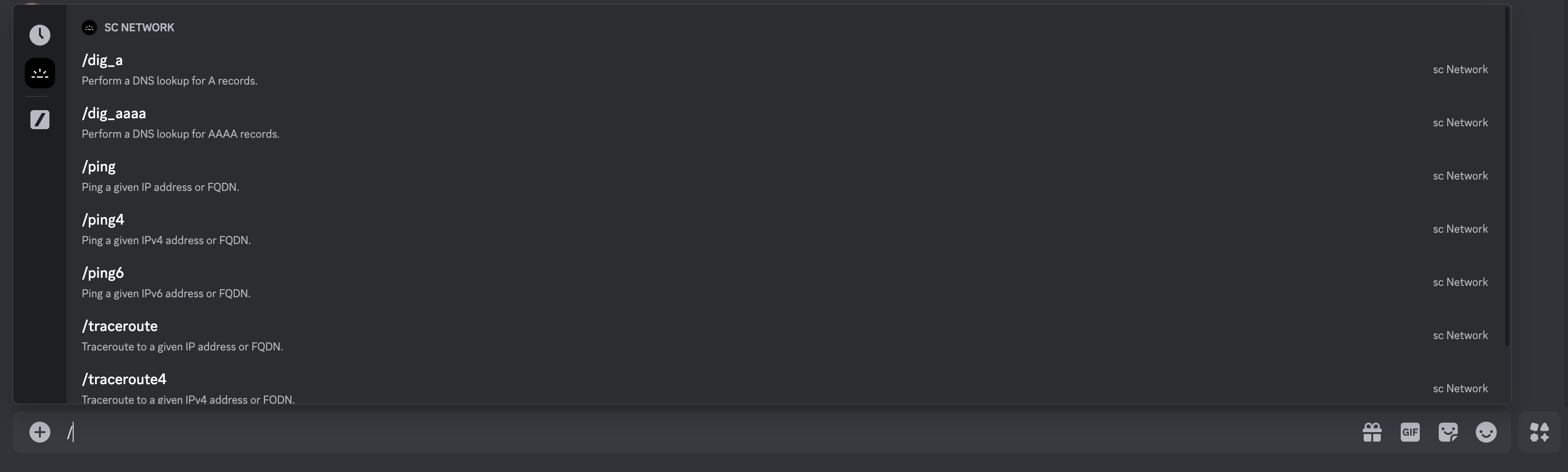
/ping $target Ping a given IP address or FQDN.
/ping4 $target Ping a given IPv4 address or FQDN.
/ping6 $target Ping a given IPv4 address or FQDN.
/traceroute $target Traceroute to a given IP address or FQDN.
/traceroute4 $target Traceroute to a given IPv4 address or FQDN.
/traceroute6 $target Traceroute to a given IPv6 address or FQDN.
/dig_a $target Perform a DNS lookup for A records of the target.
/dig_aaaa $target Perform a DNS lookup for AAAAA records of the target.
/ping 1.1.1.1

/traceroute sc.sb

/dig_a sc.sb

You need to create a new Discord bot at discord.com/developers/applications.
Then you need to create your own config.yaml. You can copy-paste-rename-edit the config-example.yaml provided.
| Parameter | Description | Value |
|---|---|---|
| bot_token | Discord bot token. Get one under Bot > Token (Click "Reset Token" if it doesn't show). | String |
| client_id | Discord client ID. Get one under OAuth2 > Client information. | String |
| allowed_channel_ids | Discord channel IDs where you want to allow users to use the bot. (Guide) | Integer |
| doh_server | DoH server for dig_a and dig_aaaa to use. Must follow the RFC 8484 standards. |
String |
| message_deletion_time | Time in seconds for a result message to be deleted. Set to 0 to keep persistent. | Integer |
| ping_count | Number of execution times for the ping, ping4 and ping6 commands. |
Integer |
Each command can be customized.
| Parameter | Description | Value |
|---|---|---|
| name | Name of a command shown in Discord | String |
| description | Description of a command shown in Discord | String |
| enable | Enable or disable a command for use | Boolean |
Image python:3.12-slim will be used and would additionally install iputils-ping and traceroute in the container.
-
Install Docker on your system. Guide: https://docs.docker.com/.
-
Clone this repository:
git clone https://github.com/sudo-sc/netcord
-
Navigate to the repository folder and execute:
docker compose up
Note: Use docker compose up -d to run in the background.
network_mode: host is written in docker-compose.yaml to obtain optimal results. Check with the network administrator if this would be allowed in your organization. However, you can adjust to other network settings depending on your desired outcome.
Skip the next section.
Nothing special, just install the requirements and run the program.
-
Install requirements:
pip install -r requirements.txt
-
Run:
python3 netcord.py
Upon starting the container/program, an invitation link will be shown. If you started the container/program in the background, you will need to access the log to retrieve the link.

For instance, if you used docker compose up -d, you need to execute:
docker logs sudo-sc.netcordto see the output.
This invitation link enables the applications.commands and bot scopes that are required for functioning. It also permits Send Mesages, Manage Messages, Read Message History, and Use Slash Commands.
These are the minimum and required permissions for the bot to function properly.
- You can customize the bot's name, description, tags, avatar (App Icon), banner, etc. at the Discord Developer Portal.
- Issues submitted will be generally reviewed in a timely manner.
- Suggestions are welcomed.
- Pull Requests are welcomed.
- Implement MTR.
- Implement BGP AS-PATH support.
- Implement Testing from multiple nodes.