Terminal spectrum analyzer for currently playing audio.
- Works with PipeWire and PulseAudio
- Graph axes
- 3 color mode
- Bars slowly fall down
- Peak markers remain after bars fall down
- Custom frequency range
- Custom loudness range
- Custom colors
- Custom characters
- Custom fall speed and peak hold
- Automatic resizing
- Fix for PipeWire switching headset to 'handsfree'
usage: spectroterm [-h] [-a] [-b] [-c] [-p] [-f FALL_SPEED] [-o PEAK_HOLD] [--min-freq MIN_FREQ]
                   [--max-freq MAX_FREQ] [--min-db MIN_DB] [--max-db MAX_DB] [--discrete]
                   [--window WINDOW] [-r BAR_CHARACTER] [-e HALF_BAR_CHARACTER] [-k PEAK_CHARACTER]
                   [--green GREEN] [--orange ORANGE] [--red RED] [--even-x-axis] [--delay DELAY]
                   [--bt-delay BT_DELAY] [--sample-rate SAMPLE_RATE] [--sample-size SAMPLE_SIZE]
                   [--reference-max REFERENCE_MAX] [--pipewire-fix] [--print-pipewire-node]
                   [--pipewire-node-id PIPEWIRE_NODE_ID] [-v]

Terminal spectrum analyzer for currently playing audio

options:
  -h, --help            show this help message and exit
  -a, --axes            draw graph axes
  -b, --box             draw lines at terminal borders
  -c, --color           3 color mode
  -p, --peaks           draw peaks that disappear after some time
  -f, --fall-speed FALL_SPEED
                        speed at which bars fall in characters per second
  -o, --peak-hold PEAK_HOLD
                        time after which peak will disappear, in ms
  --min-freq MIN_FREQ   minimum frequency on spectrum graph (x-axis)
  --max-freq MAX_FREQ   maximum frequency on spectrum graph (x-axis)
  --min-db MIN_DB       minimum loudness on spectrum graph (y-axis)
  --max-db MAX_DB       maximum loudness on spectrum graph (y-axis)
  --discrete            use discrete interpolation (each sample is a bar) instead default energy
                        interpolation; visible only for low frequencies
  --window WINDOW       windowing function; options: none (default), hamming, hann, blackman; useful
                        only when zooming in the x axis, and if there is spectral leakages
  -r, --bar-character BAR_CHARACTER
                        character used to draw bars
  -e, --half-bar-character HALF_BAR_CHARACTER
                        character used to draw half of a bar; set to none to disable; always use
                        bottom half character
  -k, --peak-character PEAK_CHARACTER
                        character used to draw peaks
  --green GREEN         8bit ANSI color code for green part of bar
  --orange ORANGE       8bit ANSI color code for orange part of bar
  --red RED             8bit ANSI color code for red part of bar
  --even-x-axis         make x axis points evenly spaced (but x axis is still logarithmic)
  --delay DELAY         spectrogram delay for a better sync with sound.
  --bt-delay BT_DELAY   spectrogram delay for auto-detected bluetooth devices.
  --sample-rate SAMPLE_RATE
                        loopback device sample rate
  --sample-size SAMPLE_SIZE
                        sample size in ms, higher values will decrease fps but increase resolution
                        at lower frequencies
  --reference-max REFERENCE_MAX
                        value used to tune maximum loudness of sound
  --pipewire-fix        pipewire only, connect to output with custom loopback device. This prevents
                        headsets from switching to 'handsfree' mode, which is mono and has lower
                        audio quality. Sometimes this wont work unless sound is playing
  --print-pipewire-node
                        will print all currently used pipewire nodes to monitor sound, then exit
  --pipewire-node-id PIPEWIRE_NODE_ID
                        ID of custom pipewire node to use. Set this to preferred node if spectroterm
                        is launched before any sound is reproduced. Effective only whith --pipewire-
                        fix. Use 'pw-list -o' to get list of available nodes, or use --print-
                        pipewire-node
  -v, --version         show program's version number and exit
Colors are provided as integer and they are 8bit ANSI color codes. -1 is default terminal color.
- Pre-built binaries are available in releases
- From AUR:
yay -S spectroterm - Build, then copy built executable to system:
sudo cp dist/spectroterm /usr/local/sbin/
- Clone this repository
- Install uv
cd spectroterm- run build script:
python build.py - To build with Nuitka, add
--nuitkaflag. More optimized, smaller executable, long compile time. See Nuitka for more info.
To enable building with Nuitka, add --nuitka flag (takes a long time).
Nuitka built binaries are more optimized.
Optionally, add --clang flag to tell nuitka to compile using llvm, which might run even faster.
Nuitka requirements:
- on Linux: GCC or clang and
patchelfpackage - on Windows: Visual Studio 2022 or mingw (will be downloaded by nuitka)
- on macOS install XCode via Apple Store
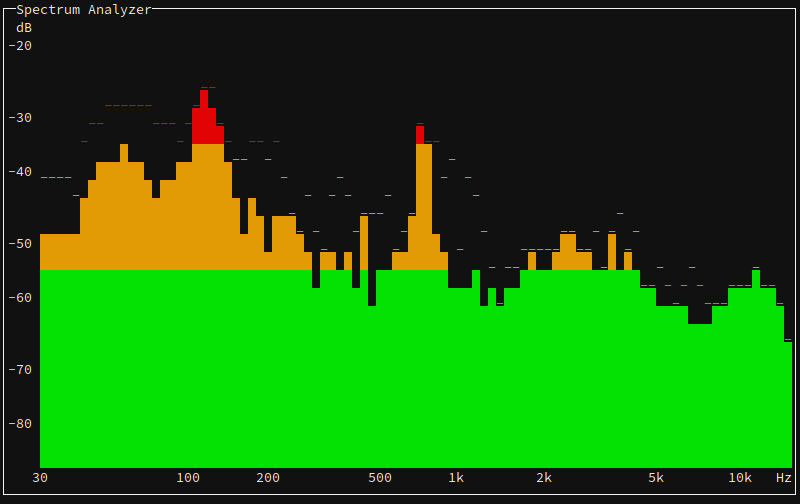 Spectroterm running in tmux:
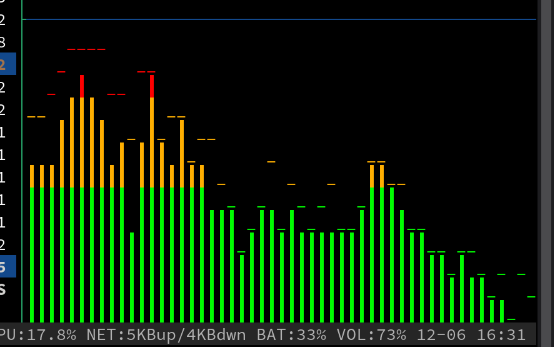
(Command: spectroterm -pc -r ┃ -e ╻ --min-db=-70 --max-db=-20)