
Part of @sahil87's open source toolkit — see all projects there.



rk riff spawns AI coding agents in parallel git worktrees. The browser dashboard lets you watch them all — from your desk or your phone.
- One command per parallel agent —
rk riffcreates a worktree, opens a tmux window in it, and launches Claude Code.rk riff -N 3spawns three workspaces in parallel; failures roll back cleanly. - Browser dashboard for tmux — every tmux session and pane shows up in a sidebar. Click a pane for a live terminal in the browser; open the same dashboard on your phone over Tailscale.
- Mobile-first, keyboard-first —
Cmd+Kcommand palette is the primary discovery surface. Touch targets are tuned for mobile so you can drive an agent session from your phone while away from your desk. - No database, no daemon magic — state is derived from tmux and the filesystem. Agent sessions survive
rkrestarts because the daemon never touches them. - The dashboard layer over
fab-kitandwt—rk riff --skill /fab-ffflaunches a full fab-kit pipeline in an isolated worktree. Use rk when you have more parallel changes than you can watch in a single terminal.


rk is two independent halves that compose:
rk riff              rk serve
  ▼                    ▼
spawns agent        runs the
workspaces ─────►   browser dashboard
(tmux + worktree)   (watches tmux)
You can run either alone. Run rk riff in any tmux session without ever starting rk serve — you get the spawning behavior, no dashboard. Run rk serve and never call rk riff — you get a tmux browser dashboard for sessions you spawn manually. The two are designed to compose, not depend on each other.
From a clean install to a working dashboard with one agent running:
brew install sahil87/tap/rk     # install
rk serve -d                     # start the dashboard daemon on :3000
open http://localhost:3000      # open the dashboard in your browser

# in any tmux session:
rk riff --skill /fab-discuss    # spawn an agent workspace
The new workspace appears in the dashboard's sidebar; click into it to drive the agent from the browser.
To upgrade later, run rk update — pulls the latest version via Homebrew and restarts the daemon so the new binary takes effect immediately.
See the install & access guide for prerequisites, rk doctor, development setup, and driving rk from your phone over Tailscale HTTPS.
The headline command. One invocation gives you a git worktree, a tmux window inside it, and one or more Claude Code panes ready to go.
Pane array model. --skill and --cmd are repeatable. Each occurrence adds one pane; argv order (left to right) becomes pane order. Bare --skill opens a blank Claude session; bare --cmd drops into $SHELL.
Layouts. auto (default), tiled, even-horizontal, even-vertical, main-horizontal, main-vertical. Set with --layout.
Presets. Common pane/layout combos go in fab/project/config.yaml under riff.presets.<name>. Invoke as rk riff <name> or rk riff --preset <name>.
Parallel. -N <N> spawns N workspaces in parallel; failures roll back successful ones before exiting.
wt passthrough. Flags after -- go to wt create verbatim (e.g. --base, --reuse, --worktree-name).
Examples:
rk riff                                              # 1 pane, default skill (/fab-discuss)
rk riff --skill /fab-fff                             # 1 pane, specific slash-command
rk riff --skill /fab-fff --cmd "just dev"            # 2 panes (agent + dev server)
rk riff --skill /a --cmd x --cmd y --layout main-vertical
rk riff ship                                         # invoke the 'ship' preset
rk riff ship -N 3                                    # 3 parallel ship workspaces
rk riff -- --worktree-name pacing-canyon             # name the worktree
Prerequisites: must be inside a tmux session, wt on PATH, and the launcher (default claude --dangerously-skip-permissions) available. Override the launcher per-project via agent.spawn_command in fab/project/config.yaml.
See the riff guide for the full reference.
Start the HTTP server. Configurable via RK_HOST (default 127.0.0.1) and RK_PORT (default 3000).
rk serve                                # foreground on 127.0.0.1:3000
RK_HOST=0.0.0.0 RK_PORT=8080 rk serve   # bind all interfaces, port 8080
rk serve -d                             # background daemon in a tmux session
rk serve --restart                      # idempotent restart
rk serve --stop                         # graceful shutdown
The daemon runs in its own dedicated tmux server (rk-daemon), completely separate from your agent sessions. Restart the daemon and your agents keep running — the dashboard reconnects automatically.
Each window in the sidebar, dashboard, and pane panel carries a single status dot that tells you where it sits in the fab → PR lifecycle and how healthy it is — using two orthogonal channels:
- Hue = phase (where in the journey):
intake →
execution (apply/review) + completion (hydrate) →
shipping (ship/review-pr) →
the live PR. A plain window with no fab change is gray — color is reserved for the journey.
- Shape = status (health), one vocabulary across every phase: ring = pending · solid circle = active/ready · dashed ring + red center = failed · square = done/merged · gray ring = skipped/closed.


Exactly one signal drives the dot, in precedence order PR > fab > tmux.
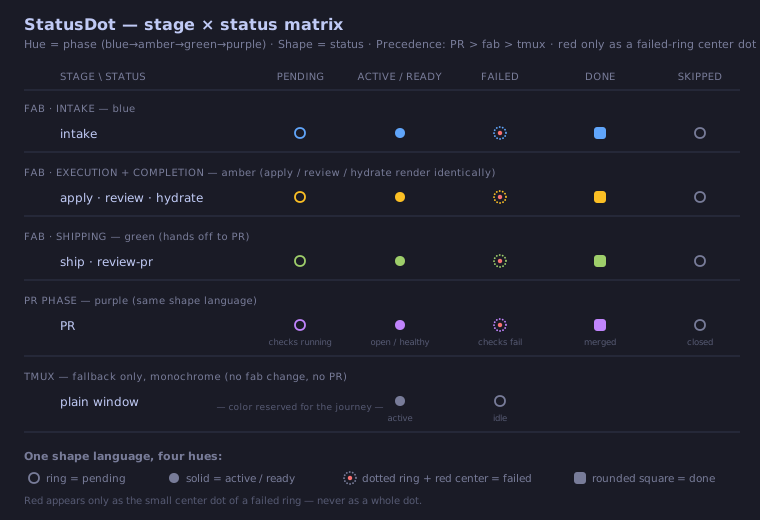
See the status dot reference for the full matrix, the per-state rendering, and the design rationale.
A board is a named, cross-server pane dashboard. Pin any tmux window from any server into a board, and the board renders all pinned panes side-by-side in a horizontally-scrollable layout — perfect for watching three parallel agent sessions, or comparing a just dev server's output against the agent that's editing it.
Three ways to pin a window to a board:
- Sidebar pin icon — every window row in the sidebar has a pin icon. Click it to open a popover listing existing boards (click to pin/unpin), plus a "Pin to new board…" input that creates a new board on first pin.
- Command palette (
Cmd+K) —Board: Pin Current Window,Board: Unpin Current Window,Board: Switch to <name>,Board: Leave Board View. - Board pane header — each pinned pane shows an unpin button in its header for one-click removal.
Inside a board:
Cmd+]/Cmd+[cycles pane focus to the next / previous pane (wraps).- Click a pane to focus it; keystrokes route to that pane's terminal.
- Drag the pane edge to resize (desktop only; widths persist per-board in
localStorage). - On mobile, panes render as a single-pane swipe carousel.
Pin state lives in tmux (via the @rk_board window option) so it follows the window, not the browser — open the same board URL on your phone and you see the same panes. Pane widths are intentionally local to each device.
Some browser features (clipboard, secure context) require HTTPS. Accessing rk from another machine on your tailnet also requires HTTPS:
- Enable HTTPS at DNS > HTTPS Certificates.
- Run
tailscale serve --bg http://localhost:3000. - Open
https://<machine>.<tailnet>.ts.neton your phone or another laptop.
For a stable custom hostname or public access via Funnel, see the Tailscale guide.
Any process on the box can push a real OS-level notification to your phone or desktop — even when the RunKit PWA tab is closed — via Web Push:
rk notify "deploy finished" --title "CI"rk notify POSTs to the local server, which fans the message out to every
subscribed browser using the Web Push protocol (signed with a server-side VAPID
key persisted under ~/.rk/). It is fail-silent: if the server is
unreachable or returns an error it exits 0 and prints nothing, so it never
stalls a calling script or agent loop.
Opt in from the browser: click the bell icon in the top bar (or open the
command palette with Cmd+K and run Notifications: Enable push). This
requests notification permission and subscribes the current device. There is no
settings page — the bell dropdown and the palette are the opt-in gestures. The
bell dropdown also offers Send test notification (a local test that bypasses
the server) and a Notifications help link.
See the notifications guide for setup and the common "it says sent but nothing appears" troubleshooting (almost always an OS-level notification block — e.g. macOS Focus mode).
Secure-context requirement: Web Push (service worker +
PushManager) only works in a secure context — that means HTTPS orlocalhost. Hitting rk onlocalhost:3000or behind a TLS reverse proxy (e.g.tailscale serve, see Drive it from your phone) both qualify. Over plain HTTP to a remote host, the browser silently refuses to register the service worker and the Enable push command will report that a secure context is required.
rk shell-init <shell> emits eval-safe tab-completion for your shell. Add this line to your rc file:
eval "$(rk shell-init zsh)"   # in ~/.zshrc
eval "$(rk shell-init bash)"  # in ~/.bashrc
Supports zsh, bash, fish, and powershell. Completion-only — rk has no shell function wrapper; every subcommand is reached via rk <subcommand>.
💡 Have other sahil87 tools?
shll shell-installhandles all of their shell integrations and autocompletions at once.
| Command | What it does |
|---|---|
rk riff |
Create a worktree + tmux window + Claude Code pane(s). |
rk serve |
Start the HTTP server (foreground or daemon). |
rk status |
Show a tmux session summary. |
rk context |
Print agent-optimized environment info (server URL, ports, etc.) — designed to be read by AI agents inside an rk-spawned workspace. |
rk notify |
Send a Web Push notification to your subscribed devices (see Push notifications). Fail-silent. |
rk doctor |
Check runtime dependencies. Run this first when something breaks. |
rk init-conf |
Scaffold default tmux.conf and tmux.d/ drop-in directory to ~/.rk/. Optional. |
rk update |
Upgrade via Homebrew and restart the daemon. |
rk completion |
Generate shell completion scripts (or use rk shell-init for eval-safe output). |
rk help |
Help about any command. |
Run rk <command> --help for full flag details, or see the full command reference for every command and flag.
rk rifffails with "not in a tmux session" — riff requires$TMUXto be set. Start tmux first (tmux new -s work), then runrk riffinside it.rk rifffails with "wt not found" — installwtviabrew install sahil87/tap/wt, or via the toolkit meta-formulabrew install sahil87/tap/all.- Anything else broken — run
rk doctor. It checks tmux,wt, the launcher binary, port availability, and prints per-dependency status.
rk's daemon runs in a dedicated tmux server (rk-daemon), separate from agent sessions (runkit). Restarts use kill-and-restart (no polling loop or signal files), are idempotent (--restart works whether or not a daemon is running), and never touch agent tmux sessions — agents survive daemon restarts unaffected.