



Fold, outline, search & copy your Claude Code sessions — right in the terminal.
Long agent runs turn into a navigable outline of collapsible blocks. Jump
to any step, search the whole session, one-click-copy any command or code block,
or live-follow a running session in a split pane. Pure terminal, zero server,
pip-installable.
Structure and navigation for the walls of output an agent produces — fold it down, jump straight to any step, and find what you need without leaving your shell.
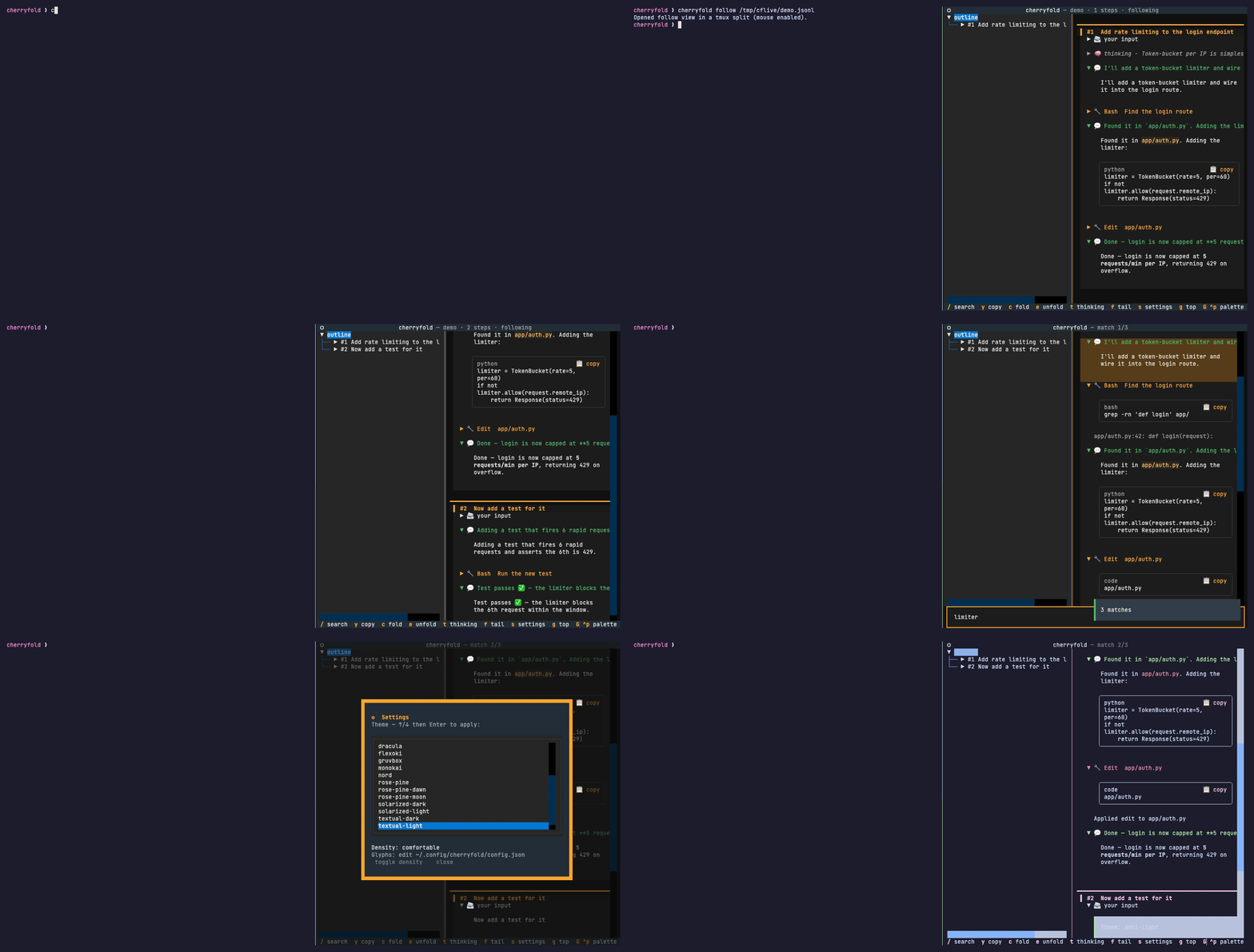
- Walls of output become foldable blocks — assistant text expanded, thinking and tool calls collapsed by default.
- Lose the original steps when the chat branches? The left outline lists every step; click to jump straight back. Events hang under each step so you can see where a tangent began.
- Copy the command or code you were looking for in one click (OSC 52 — works over SSH).
Requires Python 3.10+. Check with python3 --version (macOS: brew install python
if you need a newer one).
Recommended — pipx (installs the cherryfold command in its
own isolated environment and puts it on your PATH):
# get pipx first if you don't have it:
brew install pipx                 # macOS (Homebrew)
# or any OS:  python3 -m pip install --user pipx && python3 -m pipx ensurepath

pipx install cherryfold
Or with pip (simpler, but installs into your user site-packages):
python3 -m pip install --user cherryfold
# if `cherryfold` isn't found afterwards, add pip's user bin dir to PATH
# (pip prints its location; commonly ~/.local/bin or ~/Library/Python/3.x/bin)
From source (for development):
git clone https://github.com/rikucherry1993/cherryfold
cd cherryfold
./install.sh # venv + editable install + ~/.local/bin symlinkcherryfold # read back the current project's latest session
cherryfold follow [path] # split the terminal and follow a live session beside you
cherryfold view [path] -f # render in THIS pane (-f / --follow to tail)
cherryfold list # list sessions for the current dir (--all: everywhere)
cherryfold config # print the config file path
cherryfold clean # clear caches
cherryfold uninstall # remove the PATH symlink (--purge: also config)path defaults to the newest session for the current directory — or the
nearest parent directory that has sessions (walks up like git). Run from anywhere
inside your project and it finds that project's sessions; cherryfold list --all
lists every session.
Sessions are read from $CLAUDE_CONFIG_DIR/projects (or ~/.claude/projects by
default) — the same location Claude Code itself uses, so it works for everyone
without configuration.
Picks the best split for your terminal automatically (macOS-first; tmux is the cross-platform path):
| Terminal | How it splits |
|---|---|
| cmux | native split |
| inside tmux | tmux split-window (mouse enabled) |
| iTerm2 | AppleScript vertical split |
| other macOS (Terminal.app…) | opens a new window beside you |
| non-macOS without tmux | prints a command to run in another terminal |
For a real same-window split on a plain terminal, run cherryfold inside tmux.
Inside Claude Code: from the prompt, type ! cherryfold follow (command mode) in
the directory you're working in — a pane opens beside your chat and live-follows
that project's session, so you can scroll back through the agent's output without
leaving the conversation.
| Key | Action |
|---|---|
| ↑/↓ · click outline | jump to a step or event |
/ then Enter |
search; n / N cycle matches |
y |
copy the selection, else the focused block's command/code |
| mouse drag | select text, then y |
| click 📋 | copy that code/command block |
c / e |
collapse / expand all |
t |
show/hide thinking |
f |
toggle follow-the-bottom (in --follow) |
s |
settings (theme + density) |
g / G |
top / bottom |
q |
quit |
Press s for theme (21 built-in) and display density (comfortable / compact),
persisted to ~/.config/cherryfold/config.json. The glyphs (💬 🔧 🧠 📨 📋) are
editable there under "icons".
Font size is the terminal's job — zoom with your terminal's Cmd/Ctrl +/-; "density" is the in-app spacing knob.
cherryfold/parser.py— JSONL → step tree (no third-party deps).cherryfold/app.py— Textual TUI (collapsibles, outline, search, copy, follow, settings).cherryfold/launcher.py— terminal detection + split/new-window strategies.cherryfold/cli.py— subcommands.
If cherryfold saves you time, you can support its development:

MIT.
