This is a simple HTTP server implementation with SSL/TLS support using OpenSSL, ls-qpack, and msquic. It includes both server and client functionalities.
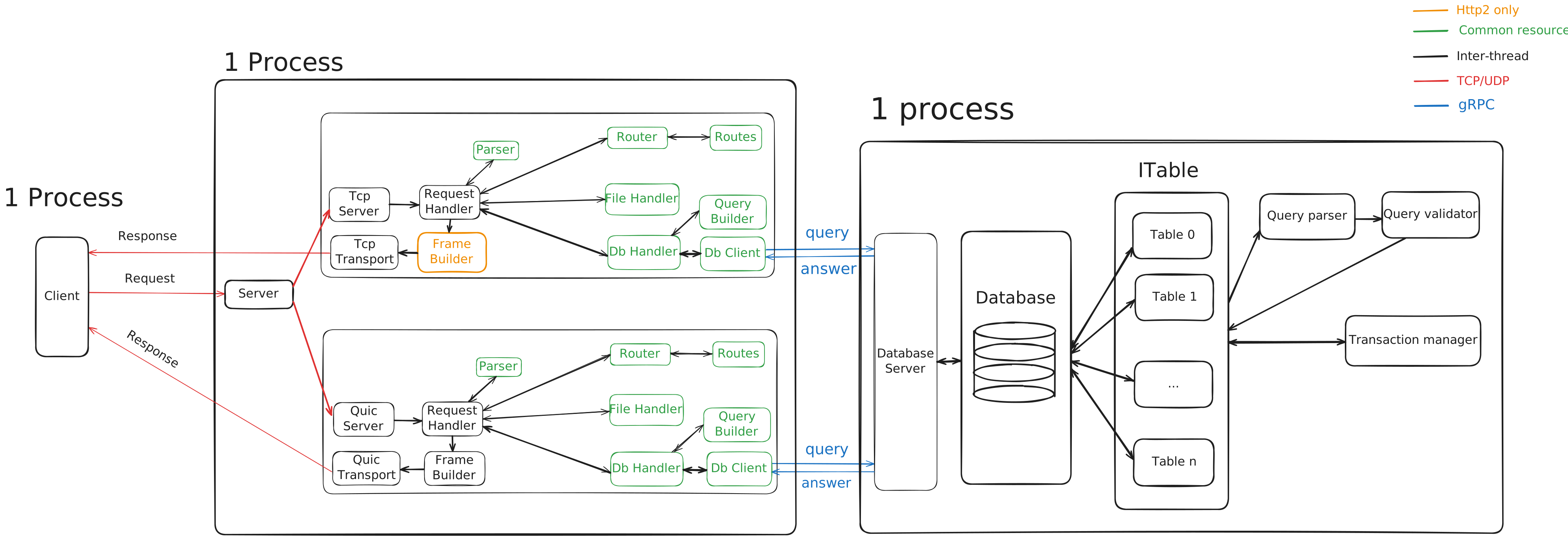
- Linux (other OS may work, but this has been tested on Linux)
- OpenSSL (for SSL/TLS support)
- CMake (for building the project)
- Make (to build the project)
- Git (to clone the repository)
Before you begin, make sure you have the following dependencies installed:
-
OpenSSL: For SSL/TLS support.
- Linux:
- Ubuntu/Debian:
sudo apt-get install openssl libssl-dev - RHEL 8:
sudo dnf install openssl-devel
- Ubuntu/Debian:
- macOS:
brew install openssl
- Linux:
-
CMake: For building external libraries.
- Linux:
- Ubuntu/Debian:
sudo apt-get install cmake - RHEL 8: Download the x86_64 Linux installation script from cmake.org and run:
sudo sh cmake.sh --prefix=/usr/local/ --exclude-subdir
- Ubuntu/Debian:
- macOS:
brew install cmake
- Linux:
-
Make: For building the project.
- Linux:
sudo apt-get install make - macOS:
brew install make
- Linux:
-
Git: To clone the repository.
- Linux:
sudo apt-get install git - macOS:
brew install git
- Linux:
-
LTTng: To build msquic lib (Linux Only).
# Add the PPA repository for stable LTTng version
sudo apt-add-repository ppa:lttng/stable-2.13

# Update package lists
sudo apt-get update

# Install required packages
sudo apt-get install build-essential liblttng-ust-dev lttng-tools
On RHEL 8, you will need to install the following additional dependencies:
sudo dnf install libatomicThis project depends on three external libraries (submodules):
- ls-qpack (a library for HTTP/3 compression)
- ls-hpack (a library for HTTP/2 compression)
- msquic (Microsoft's QUIC implementation)
Lastly grpc and protobuf are required to be installed and you might have to change the CMakeLists.txt prefix path with your grpc and protobuf directories.
To clone the repository along with its submodules, use the following command:
git clone --recurse-submodules https://github.com/qqueke/http_server.git
cd http_server
If you forgot to clone with recurse--submodules option, you can initialize and update the submodules by running:
git submodule update --init --recursiveCreate build directory, navigate into it.
mkdir -p build && cd build/Build the project with:
cmake ..
makeYou need to generate SSL certificates for the server. Use OpenSSL to generate the certificate and private key:
mkdir -p certificates

# Generate the private key
openssl genpkey -algorithm RSA -out certificates/server.key -aes256

# Generate the self-signed certificate
openssl req -new -x509 -key certificates/server.key -out certificates/server.crt -days 365Note: If you don't want to use a passphrase for the private key, you can remove it with:
openssl rsa -in certificates/server.key -out certificates/server.key./server -server -cert_file:certificates/server.crt -key_file:certificates/server.keyTo run the client, you need to specify the server's IP address and port, and indicate that the connection is unencrypted (unless you're using SSL):
./client -client -target:<ipAddr>:<port> -unsecureYou can also specify a file containing multiple HTTP requests to be sent by the client. Use the --requests argument to specify the path to the requests file:
./client -client -target:<ipAddr>:<port> -unsecure --requests:requests.txtWhere requests.txt is a file formatted as follows:
GET /hello HTTP/1.1
Host: qqueke
User-Agent: custom-client/1.0
Accept: */*


GET /goodbye HTTP/1.1
Host: qqueke
User-Agent: custom-client/1.0
Accept: */*

Body: Goodbye, World!
-server: Run the program as a server.-cert_file:<path_to_cert_file>: Path to the server's SSL certificate file (e.g.,certificates/server.crt).-key_file:<path_to_key_file>: Path to the server's private key file (e.g.,certificates/server.key).
-client: Run the program as a client.-target:<ipAddr>:<port>: Target server IP address and port.-unsecure: Use an unencrypted connection.requests:<path_to_requests_file>: Path to a file containing HTTP requests. The file should contain a list of HTTP requests with optional Body: sections, as shown above.