This repository provides auxiliary resources to help students and robotics enthusiasts visualize simulations and create new nodes for their projects. It complements the pla10/ros2_ur5_interface Docker image, which delivers a pre-configured ROS 2 Jazzy environment tailored for the UR5 manipulator robot. This repo is included, at its latest release, in the /home/ubuntu/ros2_ws of the pla10/ros2_ur5_interface Docker image.
The resources in this repository were developed for the "Fundamentals of Robotics" course at the University of Trento and aim to streamline project development and learning.
- Simulation visualization: Tools to interact with the UR5 simulation in a graphical environment.
- Example ROS 2 nodes: Includes a sample node for trajectory publication to get you started.
- Launch files: Ready-to-use launch files for interacting with the simulated or real UR5 robot.
- Bash scripts: Simplifies running the UR5 simulation and ROS 2 environments with pre-defined commands.
.
├── launch/
│   ├── sim.launch.py                     # Launch file to simulate the UR5 robot in gazebo
│   ├── interface.launch.py               # Launch file to interact with simulated and real UR5 robot
├── src/
│   ├── gripper_service.cpp               # Node that provides a service to open/close the gripper
│   ├── publish_trajectory_node.cpp       # Example node for trajectory publication
├── config/
│   ├── ur_controllers.yaml               # Configuration file for the UR5 controllers
├── params/
│   ├── ur5_bridge.yaml                   # Parameters file for the Gazebo bridge
├── gripper/
│   ├── open.script                       # Script to open the soft robotics gripper
│   ├── close.script                      # Script to close the soft robotics gripper
│   ├── neutral_from_open.script          # Script to move the gripper to a neutral position from the open position
│   ├── neutral_from_closed.script        # Script to move the gripper to a neutral position from the closed position
├── models/
│   ├── desk.urdf.xacro                   # URDF file that defines the desk where the UR5 is mounted
│   ├── desk.config                       # Config file auxiliary to the SDF file
│   ├── ur_gz.ros2_control.xacro          # URDF file that defines the UR5 robot with ROS 2 control
│   ├── ur_gz.urdf.xacro                  # URDF file that defines the UR5 robot
│   ├── soft_robotics_gripper.urdf.xacro  # URDF file that defines the soft robotics gripper
│   ├── camera.sdf                        # SDF file that defines the RGBD camera
│   ├── block.urdf.xacro                  # URDF file that defines a block
│   ├── block.config                      # Config file auxiliary to the SDF file
│   ├── meshes
│   |   ├── desk.stl                      # STL file with the 3D mesh of the desk
│   |   ├── base.stl                      # STL file with the 3D mesh of the base of the soft robotics gripper
│   |   ├── link1.stl                     # STL file with the 3D mesh of the first link of the soft robotics gripper
│   |   ├── link2.stl                     # STL file with the 3D mesh of the second link of the soft robotics gripper
│   |   ├── X*-Y*-Z*.stl                  # STL files with the 3D mesh of the blocks
├── docker/
│   ├── Dockerfile                        # Dockerfile for the ROS 2 UR5 interface docker image
│   ├── entrypoint.sh                     # Entrypoint script used in the docker
├── scripts/
│   ├── ur5.sh                            # Starts the URSim simulator container
│   ├── ros2.sh                           # Starts the pla10/ros2_ur5_interface container
├── worlds/
│   ├── empty.world                       # Gazebo world file with plugins for the UR5 simulation
├── rviz/
│   ├── ur5.rviz                          # RViz configuration file
├── README.md                             # Project overview and instructions
- Docker: Ensure Docker is installed and running on your system.
- Docker Network Setup: Create a Docker network named
ursim_netbefore running the containers:docker network create --subnet=192.168.56.0/24 ursim_net
You can choose between two simulation environments:
- URSim: A graphical simulation environment for the UR5 robot that uses a dedicated Docker container. This solution is preferred since it is lightweight and simulates the real connection with the robot. But with this solution you can simulate ONLY the robot, not the environment (no cameras, external sensors, etc).
- Gazebo: A more complex simulation environment that uses the ROS 2 Gazebo bridge and is included in the pla10/ros2_ur5_interface Docker image.
Run the URSim container using the provided bash script:
bash scripts/ur5.shThis starts the pla10/ursim_e-series Docker container for UR5 simulation. Access the simulator via your browser at http://localhost:6080.
To prepare the robot to work with ROS2 you need to go to the program tab and add the URCaps > External Control.
Run the ROS 2 container using the provided bash script:
bash scripts/ros2.shThis starts the pla10/ros2_ur5_interface container. Access the environment via noVNC at http://localhost:6081.
The user password is "ubuntu".
- Open a terminal inside the ROS 2 container (accessible via noVNC).
- Navigate to the ROS 2 workspace:
cd /home/ubuntu/ros2_ws - Source the ROS 2 setup:
source install/setup.bash - Launch the control nodes using the provided launch files:
ros2 launch ros2_ur5_interface interface.launch.py
Run the ROS 2 container using the provided bash script:
bash scripts/ros2.shThis starts the pla10/ros2_ur5_interface container. Access the environment via noVNC at http://localhost:6081.
- Open a terminal inside the ROS 2 container (accessible via noVNC).
- Navigate to the ROS 2 workspace:
cd /home/ubuntu/ros2_ws - Source the ROS 2 setup:
source install/setup.bash - Launch the simulation nodes using the provided launch files:
ros2 launch ros2_ur5_interface sim.launch.py
Run the trajectory publication node to visualize the UR5 robot moving:
ros2 run ros2_ur5_interface publish_trajectory_nodeCheck the robot's IP address by following these steps:
- Press the burger menu button on the top right of the robot's teach pendant.
- Select "Settings".
- Navigate to "System" > "Network".
- Check the IP address.

Check under the installation tab if in the URCaps > External Control your IP address is the same as the one you are using to connect to the robot.
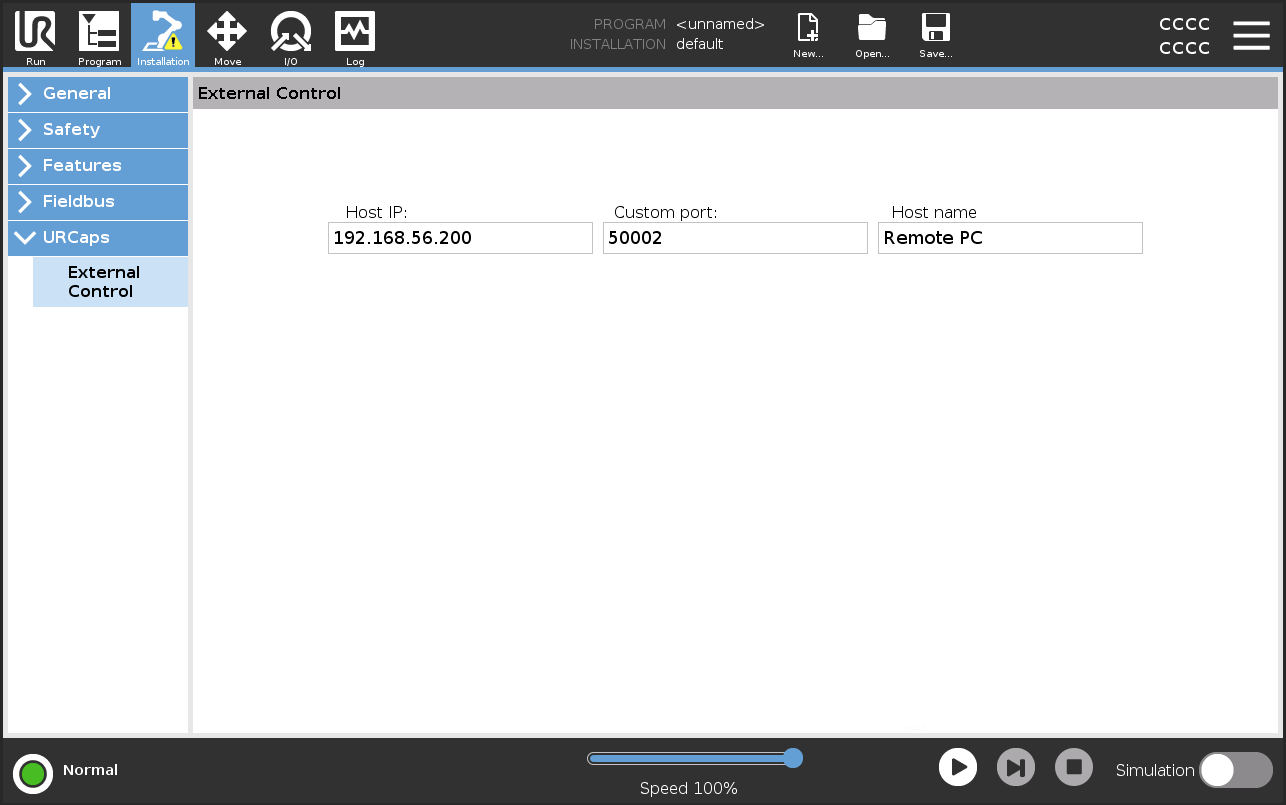
To connect to the real UR5 robot you need to specify the IP address of the robot when launching the interface.launch.py file. You can do this by adding the following argument to the launch command:
ros2 launch ros2_ur5_interface interface.launch.py robot_ip:=<robot_ip>


Students and contributors are welcome to improve this repository by adding new nodes, launch files, or other auxiliary tools. Feel free to open issues or submit pull requests.
This project is licensed under the MIT License. See the LICENSE file for details.