MyMy at SemEval-2025 Task 9: A Robust Knowledge-Augmented Data Approach for Reliable Food Hazard Detection
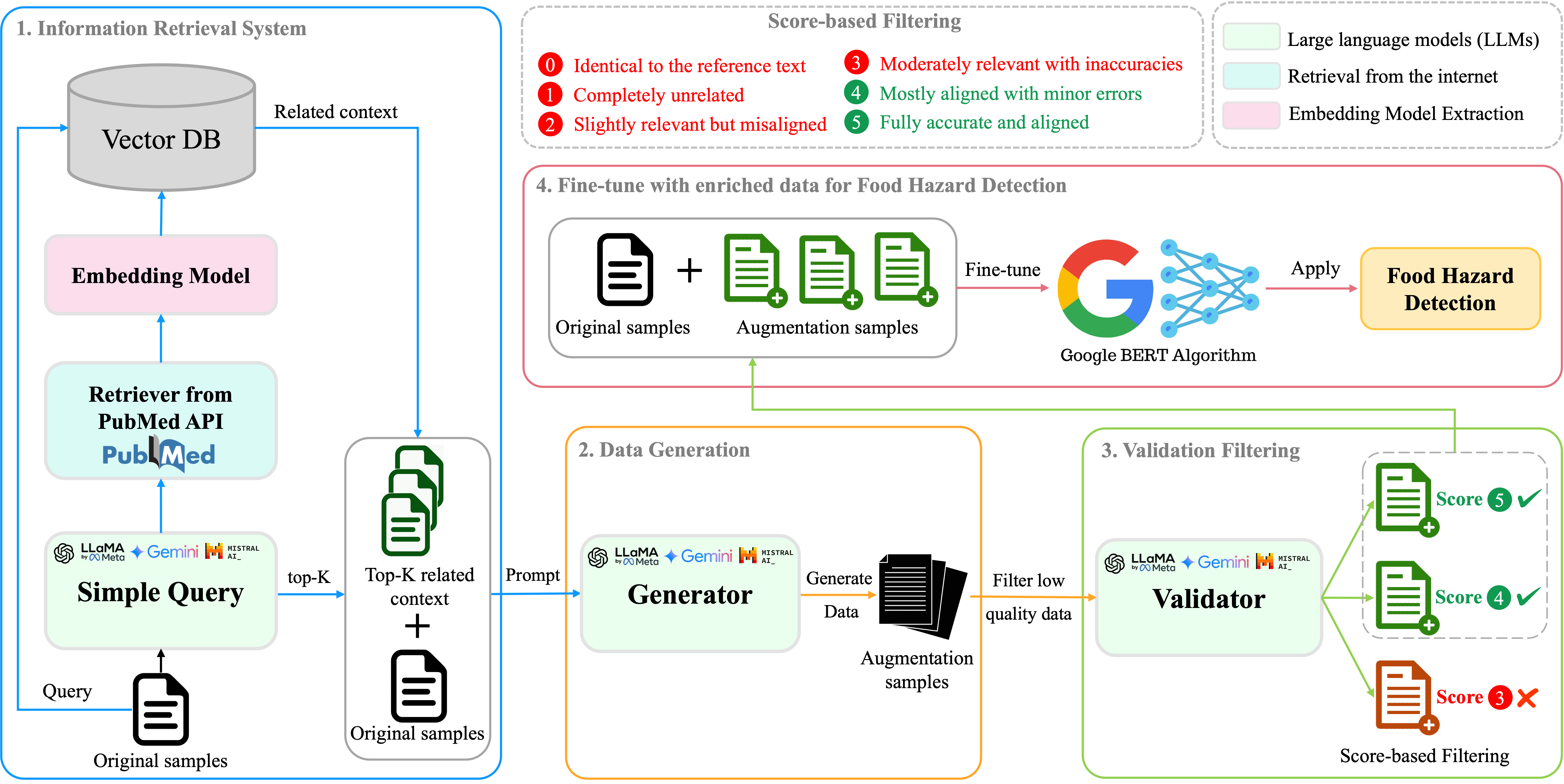
KAD-FoodHazard is an advanced pipeline developed for SemEval-2025 Task 9, focusing on enhancing food hazard detection through Knowledge-Augmented Data (KAD). By integrating Retrieval-Augmented Generation (RAG) with Large Language Models (LLMs) and fine-tuning techniques, this system addresses challenges such as class imbalance and hallucination in food incident reports.
- KnowledgeAugmentedData: Augments training data using RAG and domain-specific knowledge.
- FineTuneFoodHazard: Fine-tunes models on the enriched dataset to improve classification accuracy.
- Retrieval-Augmented Generation (RAG) utilizing the PubMed API for domain-specific knowledge.
- LLM-based data augmentation employing models like Llama 3.1 and Mixtral.
- Validation filtering to ensure high-quality augmented data.
- Fine-tuning of state-of-the-art models such as PubMedBERT and Gemini Flash.
- Ensemble strategies for robust predictions.
The system follows four key steps:
- Information Retrieval: Retrieves relevant documents from external sources like PubMed.
- Data Generation: Uses LLMs to generate augmented samples based on retrieved knowledge.
- Validation Filtering: Filters low-quality data using a scoring system to ensure dataset integrity.
- Fine-Tuning: Trains models on the enriched dataset and employs ensemble strategies for improved performance.
Clone the repository and set up the required environments:
# Clone the repository
git clone https://github.com/phanben110/KAD-FoodHazard.git
cd KAD-FoodHazard

# Install KnowledgeAugmentedData environment
conda env create -f augLLMs.ymlInstall Ollama, a tool for managing LLMs locally:
curl -fsSL https://ollama.com/install.sh | sh

# Download required LLMs
ollama pull llama3.1:8b
ollama pull mixtralFollow the official Google Cloud SDK installation guide.
This module generates high-quality augmented data using Retrieval-Augmented Generation (RAG).
Steps:
-
Navigate to the
KnowledgeAugmentedDatadirectory:cd KnowledgeAugmentedData -
Configure the augmentation settings in
config/augmentation_cfg.yaml. -
Run the main script to generate augmented data:
python main.py --config ./../config/augmentation_cfg.yaml --task SemEval_2025_task9 --aug
Output: Augmented data will be saved in datasets/SemEval_2025_task9/demo_augmentation_llama3.1:8b.
Once the augmented data is ready, fine-tune models for food hazard detection.
Steps:
-
Navigate to the
FineTuneFoodHazarddirectory:cd FineTuneFoodHazard -
Update the fine-tuning configuration in
config/finetune_cfg.yaml(e.g., specify model type, dataset paths). -
Run the fine-tuning script:
python main.py --config ./../config/finetune_cfg.yaml
💻 Watch our system in action: YouTube Demo
-
Ben Phan
Master in Computer Science at National Cheng Kung University. -
Jung-Hsien Chiang
Distinguished Professor at the Department of Computer Science and Information Engineering, NCKU.