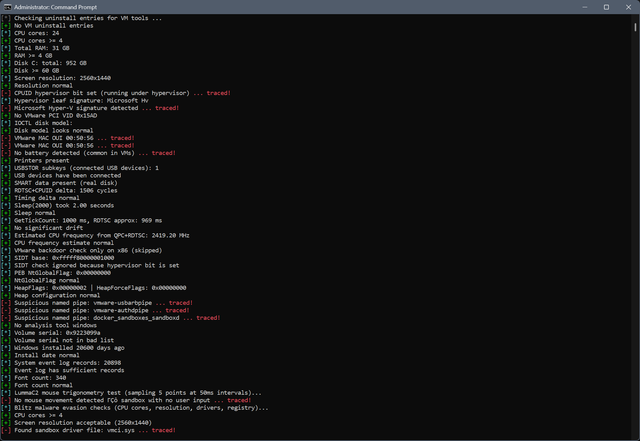
PafishX is a Windows environment inspection tool inspired by Pafish.
It runs a collection of checks to figure out whether the system looks like a physical machine or something running inside a virtual machine / sandbox.
PafishX covers a pretty wide range of signals. Most of them are independent checks that look at different parts of the system.
- CPUID hypervisor bit
- Hypervisor vendor signatures (Hyper-V, VMware, KVM, Xen)
- Hyper-V enlightenment features (synthetic timers, hypercalls, partitions)
- VMware backdoor I/O check (where applicable)
- SIDT-based sanity checks (only when relevant)
- VMware Tools registry keys
- VirtualBox Guest Additions keys
- Sandboxie-related keys
- VM-related service entries (vmci, vbox, vmtools, etc.)
- Virtual device driver entries
- VMware / VirtualBox services
- VM tools processes (vmtoolsd, vboxservice, etc.)
- Common analysis tools (x64dbg, IDA, Wireshark, Procmon, etc.)
- VMware Tools installation folders
- VirtualBox Guest Additions paths
- VM driver files (vmci.sys, vboxguest.sys, vmmouse.sys, etc.)
- WMI queries for system manufacturer and model
- BIOS vendor strings
- GPU name and configuration (DXGI)
- Disk model via IOCTL
- Storage adapter properties
- SMART / TRIM capability checks
- MAC address OUI detection (VMware / VirtualBox ranges)
- PCI vendor ID checks (VMware VID 0x15AD)
- USB history presence (USBSTOR keys)
- RDTSC + CPUID timing delta
- Sleep accuracy / time acceleration checks
- TickCount vs RDTSC drift comparison
- QPC vs RDTSC frequency estimation
- CPU jitter patterns from repeated CPUID calls
- Computer name and username patterns
- Installed font count
- Recent documents presence
- Clipboard content check
- Foreground window process age
- Mouse movement entropy
- Cursor vector angle analysis (movement pattern randomness)
- DXGI adapter enumeration
- VRAM size sanity check
- Virtual GPU detection (VMware SVGA / Basic Render Driver)
- Monitor/output presence and resolution checks