This enhanced version of Grist extends the powerful spreadsheet-database hybrid with semantic search capabilities and AI-powered embeddings, opening new possibilities for intelligent data management and retrieval.
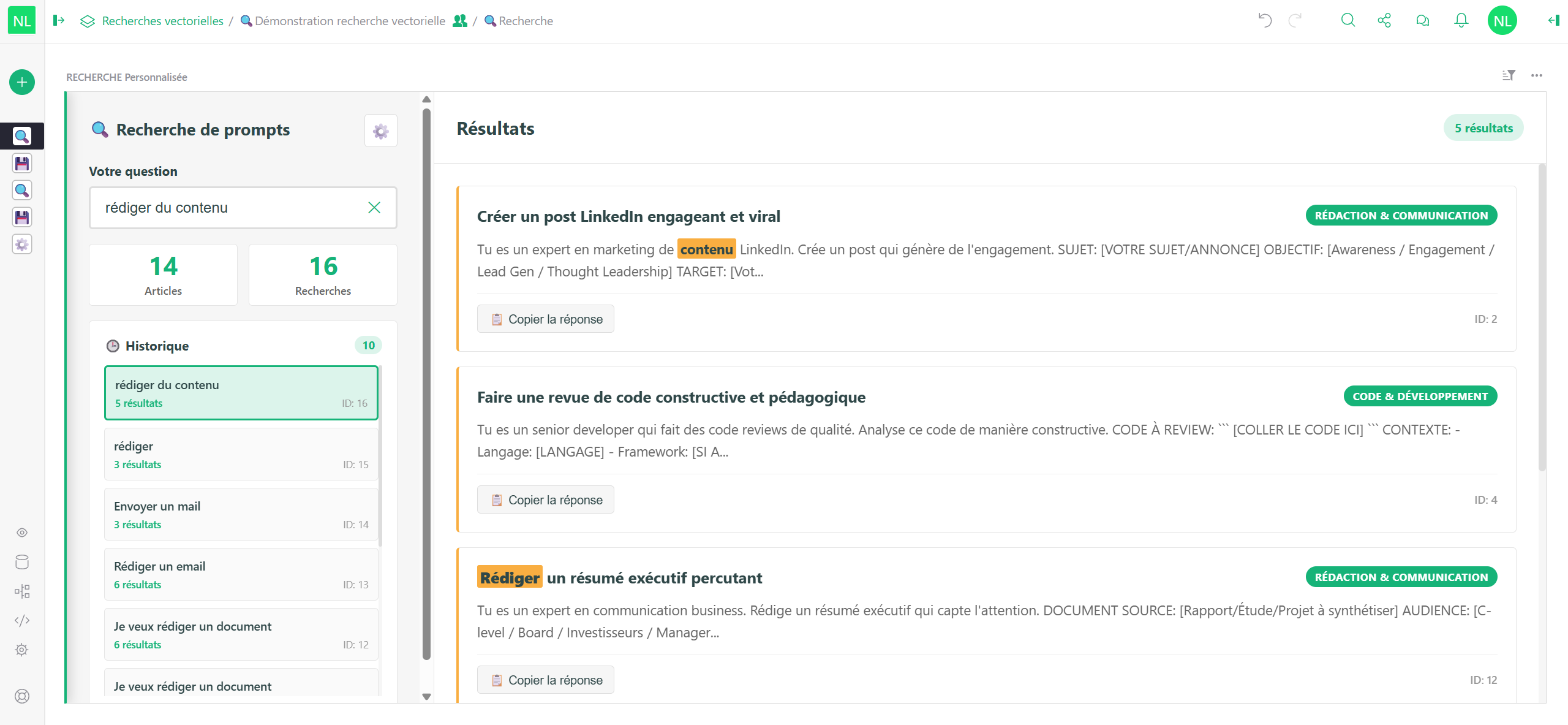
Search your data by meaning, not just keywords. Find similar documents, detect duplicates, recommend content, and discover connections that traditional searches would miss.
Create tailored embeddings from specific fields to enable precise, context-aware searches that understand the semantic relationships in your data.
Vector- Store and manipulate embedding vectors (1024 dimensions)Geometry- Handle spatial data with GeoJSON support
Built-in geospatial operations for location-based analytics:
ST_DISTANCE()- Calculate distances between pointsST_AREA()- Compute polygon areasST_CONTAINS()- Test point containmentST_CENTROID()- Find geometric centers
Every table automatically generates semantic embeddings, making your data searchable by meaning:
# Find similar documents instantly
VECTOR_SEARCH(Documents, "quarterly financial report")
No configuration needed - it just works!
Create targeted embeddings from specific fields for specialized searches:
# Column A (Vector type) - Create custom embedding
CREATE_VECTOR($title, $summary, $tags)

# Column B (Reference List) - Search using custom embedding
VECTOR_SEARCH(Documents, $search_query, embedding_column="A")
Use cases:
- 📄 Document Management: Search by content, metadata, or both separately
- 🛍️ E-commerce: Match products by description, technical specs, or reviews
- 💬 Customer Support: Find relevant knowledge base articles from user questions
- 📊 Data Deduplication: Identify semantic duplicates with high threshold
- 🎯 Recommendation Systems: Suggest similar items based on attributes
Fine-tune searches with threshold and limit parameters:
# Strict matching for high precision
VECTOR_SEARCH(Products, "laptop", threshold=0.85, limit=5)

# Broad matching for discovery
VECTOR_SEARCH(Articles, $user_question, threshold=0.6, limit=20)
Threshold guide:
0.6-0.7- Broad semantic relevance0.7-0.8- Similar content0.8-0.9- Very similar0.9+- Near-identical (deduplication)
Search records by semantic similarity.
Parameters:
table- Table to search inquery- Search text or column reference (e.g.,"contracts"or$description)threshold- Minimum similarity (0.0 to 1.0, default: 0.75)limit- Maximum results (default: 20)embedding_column- Custom Vector column name (optional)
Returns: List of record IDs (Reference List compatible)
Examples:
# Basic search with auto-embedding
VECTOR_SEARCH(Documents, "annual report 2024")

# Search with custom embedding column
VECTOR_SEARCH(Files, "invoice", embedding_column="metadata_vector")

# Use column content as query
VECTOR_SEARCH(KnowledgeBase, $customer_question, threshold=0.7, limit=10)

# Find similar to current record
VECTOR_SEARCH(Products, $name + " " + $description, threshold=0.8, limit=5)Generate custom embedding from selected fields.
Parameters:
*field_values- Any number of columns to combine (e.g.,$col1, $col2, $col3)
Returns: 1024-dimension vector or None if generating
Examples:
# Embedding from title + description
CREATE_VECTOR($title, $description)

# Metadata-only embedding
CREATE_VECTOR($tags, $category, $author)

# Content-only embedding
CREATE_VECTOR($full_text_content)

# Multi-field combination
CREATE_VECTOR($title, $subtitle, $keywords, $summary, $notes)Calculate similarity between two vectors.
Parameters:
vector1,vector2- Vector columns or listsmethod- Similarity metric:'cosine','euclidean', or'manhattan'
Returns: Similarity score (0.0 to 1.0 for cosine)
Example:
VECTOR_SIMILARITY($embedding_A, $embedding_B, 'cosine')Calculate distance between two points.
Parameters:
point1,point2- GeoJSON points{"type": "Point", "coordinates": [lon, lat]}unit- Distance unit:'m','km','mi','ft'
Returns: Distance in specified unit
Example:
ST_DISTANCE($location, {"type": "Point", "coordinates": [2.3522, 48.8566]}, 'km')Calculate polygon area.
Parameters:
polygon- GeoJSON polygonunit- Area unit:'m2','km2','ha','acre'
Example:
ST_AREA($property_boundary, 'ha')Test if polygon contains point.
Returns: True or False
Example:
ST_CONTAINS($delivery_zone, $customer_location)Find geometric center of polygon.
Returns: GeoJSON Point
Example:
ST_CENTROID($region_boundary)Scenario: Build a knowledge base with semantic search
-
Create Documents table with columns:
title(Text)content(Text)tags(Text)content_vector(Vector) =CREATE_VECTOR($content)metadata_vector(Vector) =CREATE_VECTOR($title, $tags)
-
Create Search Interface table:
search_query(Text) - User inputcontent_results(Reference List) =VECTOR_SEARCH(Documents, $search_query, embedding_column="content_vector")metadata_results(Reference List) =VECTOR_SEARCH(Documents, $search_query, embedding_column="metadata_vector")
-
Users can now:
- Search by document content (technical details)
- Search by metadata (categories, tags)
- Compare different search strategies
Scenario: Suggest similar products to customers
-
Products table:
name,description,specificationsproduct_vector(Vector) =CREATE_VECTOR($name, $description, $specifications)
-
Add recommendation column:
similar_products(Reference List) =VECTOR_SEARCH(Products, $description, threshold=0.75, limit=5, embedding_column="product_vector")
-
Result: Each product shows similar items automatically
Scenario: Automatically find relevant solutions
-
Knowledge Base table:
problem,solution,categorykb_vector(Vector) =CREATE_VECTOR($problem, $category)
-
Tickets table:
customer_issue(Text)suggested_articles(Reference List) =VECTOR_SEARCH(KnowledgeBase, $customer_issue, threshold=0.7, limit=3, embedding_column="kb_vector")
-
Result: Instant article suggestions for each ticket
Scenario: Find and merge duplicate records
-
Add similarity column:
potential_duplicates(Reference List) =VECTOR_SEARCH(MyTable, $name + " " + $description, threshold=0.90, limit=5)
-
Review suggestions:
- High threshold (0.90+) ensures only very similar records appear
- Manual review for final merge decision
- Provider: Albert API (French Government AI)
- Model:
albert-largefor generation,embeddings-smallfor compact storage - Dimensions: 1024 (configurable)
- Language Support: Multilingual, optimized for French
- Auto-embedding: Asynchronous generation with queue and retry
- Caching: MD5-based content hashing to avoid regeneration
- Search: Linear scan O(n) - suitable for tables up to ~100k records
- Similarity: Cosine distance (fast, normalized)
- Embeddings stored as JSON arrays in Vector columns
- Auto-embeddings in special columns:
grist_record_embedding,grist_embedding_hash - Custom embeddings in user-defined Vector columns
- Query must not be empty/None (returns
[]if empty) - Vector columns must have compatible dimensions
- Search is not indexed (brute-force comparison)
- Docker & Docker Compose
- Albert API key (for embeddings)
# Albert API Configuration
ALBERT_API_URL=https://albert.api.etalab.gouv.fr/v1
ALBERT_API_TOKEN=your-api-token-here
ALBERT_MODEL=albert-large
ALBERT_MODEL_EMBEDDING=embeddings-small
EMBEDDING_DIMENSION=1024

# Grist Configuration
GRIST_SESSION_SECRET=your-session-secret
GRIST_FORCE_LOGIN=truedocker-compose up -dAccess Grist at http://localhost:8484
- Grist Documentation: https://support.getgrist.com/
- Vector Search Guide: See function docstrings in formula editor
- Albert API: https://albert.api.etalab.gouv.fr/docs
- GeoJSON Specification: https://geojson.org/
This enhanced version builds upon the excellent foundation of Grist. Contributions are welcome:
- Test new use cases and share feedback
- Report issues with detailed reproduction steps
- Suggest improvements to vector search algorithms
- Add examples and tutorials
Same as Grist core - Apache 2.0
Built with ❤️ on top of Grist
This enhanced edition adds semantic search capabilities while preserving all the powerful features that make Grist great.