Project Title : Active Pay
Team Members
- Anurag Nandre
- Sneha Govindarajan
- Jahnavi Gangarapu
- Madhura Kurhadkar
Project Description:
Active Pay is One-stop platform design using ReactjS for paying your credit card bills, providing them with exclusive offers and access to premium experiences.This project also helps you to update your personal information , add cards and fetch Payment history using MongoDb database.
Technologies Used : React, NodeJS, Mongo, HTML/CSS , Sass, Javascript
User Requirements:
- Login / Sign up
a. Login: i. Fields: Username and Password are two fields used for authenticating the user. ii. The username can be email id. iii. Password must be at least 8 characters long and must have at least 1 special character and at the most 2 special characters. Password should have at least 1 number. iv. Validation: The username and password key-value will be verified immediately when the user clicks on login button.
b. Signup / Register: i. Fields: Username, Password, Confirm Password. ii. The Username can be email id. iii. Password and Confirm Password must be at least 8 characters long and must have at least 1 special character and at the most 2 special characters. Password should have at least 1 number. iv. Both Password and Confirm Password should be exactly matching. v. Once the user clicks the sign-up button, verification email link must be sent to verify the user.
-
Edit Profile a. Users can edit below fields: i. Profile picture: User can update or remove the profile picture. ii. Display name: This can be updated the user specified name or the default, which is registered email of the user profile. iii. Registered email address: User can update the email address and verify it by clicking on the verification link email. iv. Phone number: Phone number is not mandatory field, but user can add or update the phone number and verify it using OTP. v. Password Reset: User can update the login password.
-
View Cards a. Once the user clicks view cards, user needs to be authenticated by a 4-digit numeric pin. b. After successful authentication, the list of saved cards will be displayed on the page. c. Each card will display only the last 4 digits, remaining all digits will be hidden by an asterisk. The name on the card will be displayed as is. The expiry date month will be displayed but year will be hidden.
-
Add Cards a. When user clicks on Add New Card button, there will be a form that accepts below fields. i. Name on the card: Upper case alphabetic string only. ii. Card number: Numeric value only. It will be only 16 digits only. iii. Expiration Date: MM/YYYY format and the date should be future date only. iv. Issue Date: MM/YYYY format and date should not be today or future date.
-
Rewards a. Display all rewards which are available for a user b. In corporate option to buy additional rewards with available coins
-
Pay Bills a. When user lands on this page fetch all transactions and display pending transactions. b. Add pagination c. Navigate to payment page when user clicks pay button d. Navigate to payment history page when user clicks view history
-
Payment History a. Display all successful transactions b. Incorporate filter, search feature
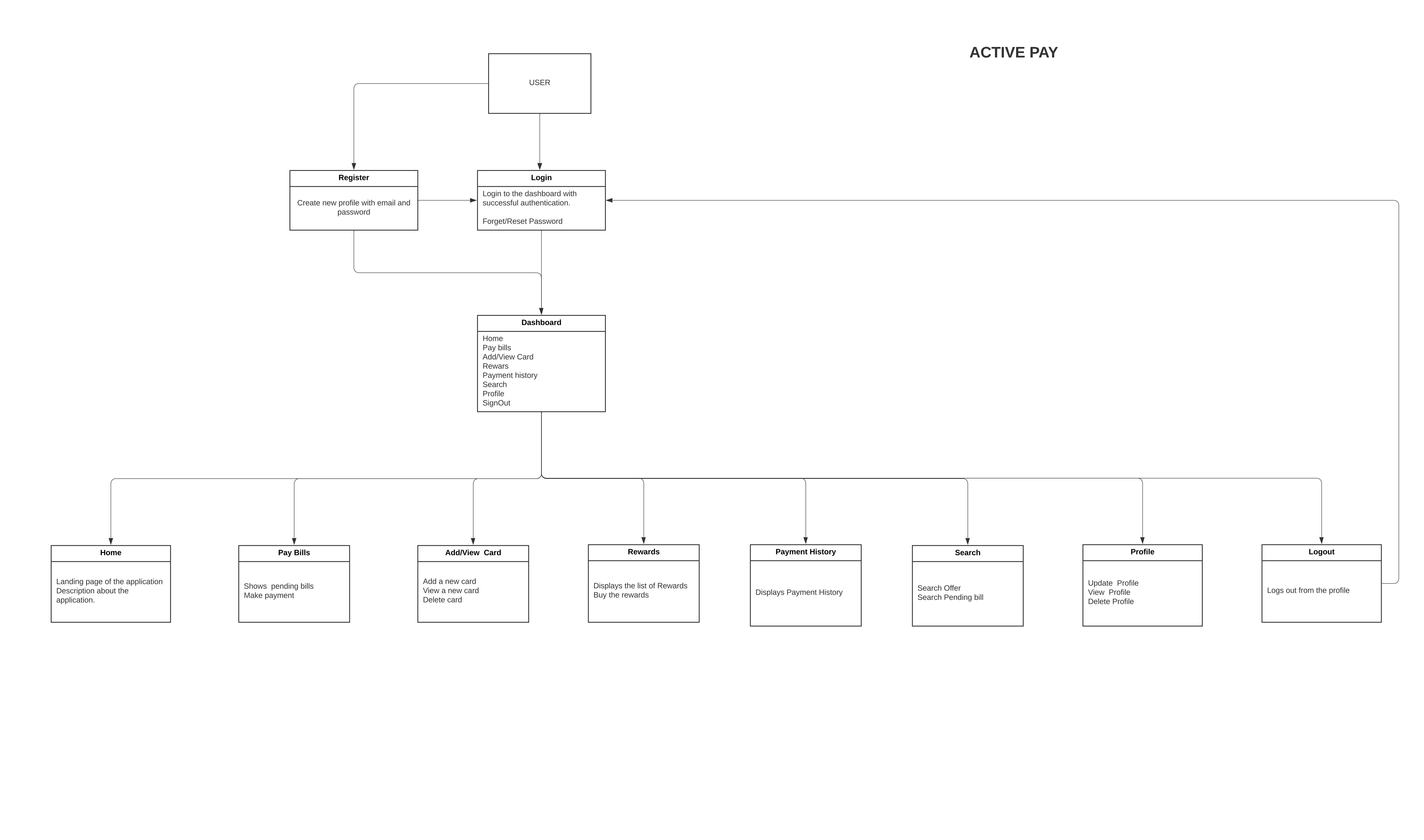
Refer Below URL for Domain model:
Steps to set up Project Locally:
git clone url Install all dependencies locally - cmd : npm install Convert styles from scss to css - cms : sass Styles/index.scss dist/index.css add live server extension in your ide to run project Steps to push changes to Global branch
check changes with help of ide. git add . ( to add changes in your local branch) git commit -m "give approriate msg" ( cmd to stage changes) git push origin main ( cmd to push changes to global branch)