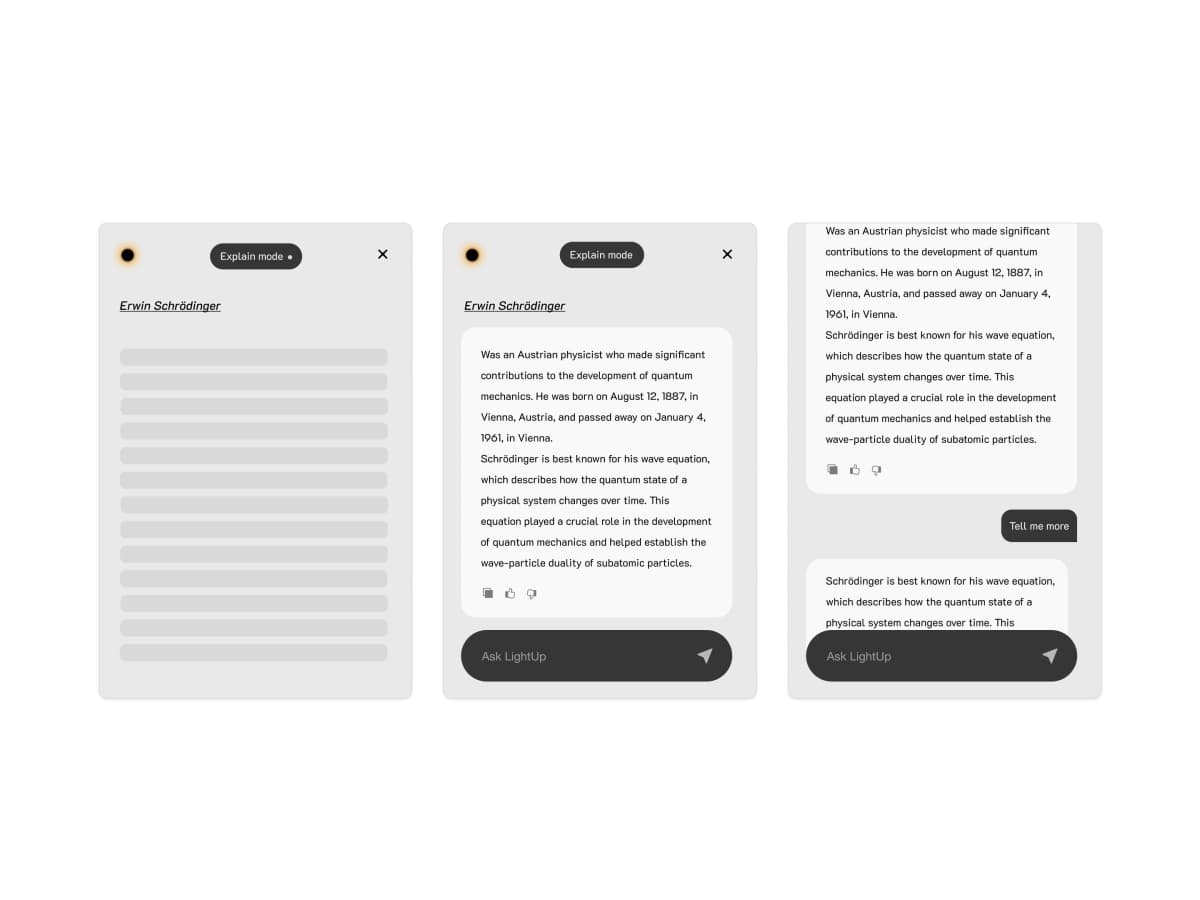


LightUp lets you highlight any text and get instant AI explanations, summaries, translations, and more—right on the page. No tab switching, no broken flow.
- 🧠 Smart analysis: Explain, summarize, analyze, translate, or ask anything
- 🔒 Privacy-first: Optional local LLM support; session-only memory
- 🎨 Flexible UI: Floating, sidebar, or centered layouts
- ⚡ Fast: Keyboard shortcuts and instant follow-up questions
- 🌐 Multi-provider: OpenAI, Gemini, xAI/Grok, or local models
- 🛠️ Custom prompts: Create your own actions and workflows
- Smart text analysis: Explain, summarize, analyze, translate, or ask anything.
- Multiple layouts: Floating, sidebar, or centered modal UI.
- Follow-up questions: Keep the context and dig deeper.
- Flexible AI backends: OpenAI, Gemini, xAI/Grok, or local LLMs.
- Keyboard shortcuts + theming: Dark/light/system theme and fast actions.
- Privacy-first: Session-only memory; optional local processing.

- Chrome Web Store: Install LightUp
- GitHub Releases: Download the latest release
- Manual install (if you downloaded a ZIP):
- Open
chrome://extensions/ - Enable Developer mode
- Click Load unpacked and select the unzipped folder
- Open
- Pin LightUp in your browser toolbar.
- Right‑click the LightUp icon → Options.
- Choose your provider:
- Local LLM (requires a local server URL)
- OpenAI (API key)
- Google Gemini (API key + model)
- xAI/Grok (API key)
⚠️ Using cloud providers sends content to their APIs. Local LLM keeps processing on your machine.
- OpenAI: GPT-4, GPT-4o, GPT-5 (requires API key)
- Google Gemini: Gemini 1.0 Pro, Gemini 1.5 Pro, Gemini 1.5 Flash (requires API key)
- xAI/Grok: Grok, Grok-2 (requires API key starting with
xai-) - Local LLM: Ollama, LM Studio, Text Generation WebUI via
http://127.0.0.1:1234or custom URL - Basic: Free tier (no API key) — currently uses Grok
- Run a local server exposing
POST /v1/chat/completions - Set the server URL in Options → Local LLM
- Example URLs:
- Ollama:
http://127.0.0.1:11434 - LM Studio:
http://127.0.0.1:1234
- Ollama:
LightUp supports a wide range of local models, including:
- Llama: Llama 4 (70B/40B), Llama 3.3 (70B/8B), Llama 3.2 (3B/1B), Llama 3.1 (405B/70B/8B), Llama 2 (70B/13B)
- DeepSeek: DeepSeek R1 series, DeepSeek V3, DeepSeek Coder series
- Qwen: Qwen 3 (32B/14B), Qwen 3 Coder
- Mistral: Mistral Large 3, Mixtral (8x22B/8x7B), Codestral 22B, Mistral 7B
- Phi: Phi 4 series (14B/3.8B), Phi 3 series, Phi 4 Reasoning
- Gemma: Gemma 3 (27B/9B/4B), Gemma 2 (27B/9B)
- Other: Neural Chat, OpenThinker, QWQ
Models are categorized by hardware requirements (from 2GB VRAM to 400GB+ VRAM) and use case (general, reasoning, coding, compact).
- Floating: Compact popup near your selection
- Sidebar: Persistent sidebar (access via right edge)
- Centered: Modal overlay with blurred background
- Session-only memory: Conversations are kept in memory only and cleared when you close the popup or navigate away. No history is saved to disk.
- Local processing option: Use a local LLM to keep all text processing on your machine—nothing leaves your device.
- Encrypted storage: API keys are encrypted in browser storage.
- No tracking: LightUp does not track users or send usage data to third parties.
- Cloud providers: If you use OpenAI, Gemini, or xAI/Grok, your selected text is sent to their APIs for processing. We recommend reviewing their privacy policies.
- Open source: All code is public on GitHub for transparency.
See PRIVACY.md for a deeper technical breakdown.
- Select any text on a webpage.
- LightUp appears with your selected mode.
- Ask follow‑up questions for deeper context.
- Explain: Detailed explanations
- Summarize: Quick summaries
- Analyze: Deep analysis
- Translate: Translate to another language
- Free: Ask anything
Ctrl+Shift+Z: ExplainCtrl+Shift+S: SummarizeCtrl+Shift+A: AnalyzeCtrl+Shift+T: TranslateCtrl+Shift+F/Command+Shift+F: Free mode popupCtrl+Shift+X: Toggle LightUp on/offCtrl+Shift+R: Toggle Radically Focus modeCtrl+Shift+D: Toggle theme
Selection → Content Script → Background Service Worker → UnifiedAIService → Provider → UI
Key entry points:
src/contents/index.tsx(content script UI)src/background/index.ts(service worker + routing)src/services/llm/UnifiedAIService.ts(provider selection + streaming)
pnpm install
pnpm dev
Load the dev build from build/chrome-mv3-dev in chrome://extensions/.
Start here: docs/README.md
- Architecture
- Development Guide
- Configuration & Providers
- Privacy & Data Handling
- Troubleshooting
- Releasing
See CONTRIBUTING.md.
See SECURITY.md.