


Local-first memory runtime for Claude Code, Codex, ChatGPT, MCP workflows, and local agents.
Works locally for free. Squish Cloud is available for cross-device sync.
Squish gives agents stable orientation, durable memory, and searchable session history across runs. Use it locally with no cloud dependency, or connect Squish Cloud for sync across machines.
npm i -g squish-memory && squish install --allSquish provides AI agent memory that persists between sessions, across agents, and across machines. It is a free local-first MCP server with built-in embeddings, a knowledge graph, and hybrid retrieval. Squish Cloud is the paid managed tier for sync, dashboard, and team features.
Cloud pricing:
- Local Free: $0
- Cloud Solo: $9/mo
- Cloud Pro: $29/mo
- Founder Pass: $49-$99

| Concept | What It Is |
|---|---|
| Recall | Durable memory — decisions, preferences, constraints |
| Sessions | Evidence from past agent runs |
| Pinned | Stable facts that do not decay |
| Beliefs | Passive model of user/project |
| Strategies | Active operating rules |
| Decay | Stale weak traces fade automatically |
| Graph | Reinforced relationships from usage |
Every AI coding agent starts from zero when a new session begins. The architecture decision from last week, the config you spent an hour debugging, the preference you mentioned yesterday — gone.
Built-in memory files like CLAUDE.md and .cursorrules help, but they have hard limits. They cap out around 200 lines, require manual curation, and do not work across agents. You end up copy-pasting the same context into every tool.
Squish gives you persistent memory for coding agents that scales without limits. No manual maintenance. No token waste. No agent lock-in.
| Layer | What It Does | Command |
|---|---|---|
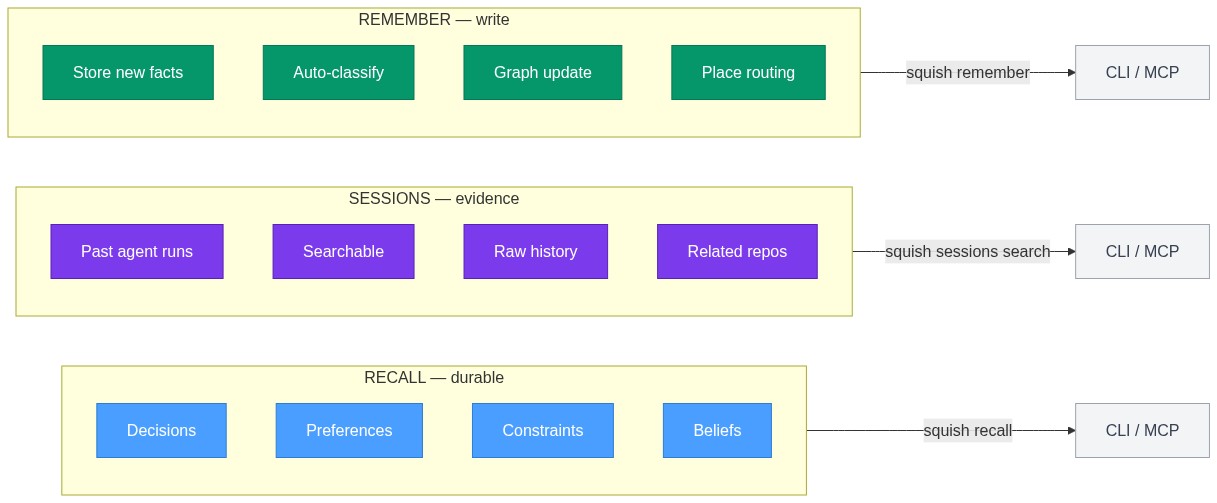
| Recall | Durable memory — decisions, preferences, constraints that persist across sessions | squish recall |
| Sessions | Searchable history — past agent runs you can inspect for evidence and context | squish sessions search |
| Remember | Write to long-term memory — store new facts, decisions, observations | squish remember |
| Method | Token Usage | Cost per Session | Cross-Agent | Auto-Capture |
|---|---|---|---|---|
| Paste full context | ~2,000 tokens | $0.06 - $0.12 | No | No |
| LLM-summarized context | ~500 tokens | $0.02 - $0.05 | No | No |
| CLAUDE.md / .cursorrules | ~200 lines max | Free | No | No |
| Squish (local) | ~50-200 tokens | $0.00 | Yes | Yes |
| Squish (Cloud) | ~50-200 tokens | $0.00 | Yes | Yes |
Squish retrieves only the relevant memories for the current task. The average context injection is 50-200 tokens — a fraction of what you would paste manually.
npm install -g squish-memory && squish install --allThis installs the Squish CLI, MCP server, and plugin hooks for all detected agents.
Start your coding agent as usual. Squish runs in the background, auto-capturing decisions, constraints, preferences, and context.
squish remember "We chose PostgreSQL for team mode" --type decision
squish recall "project decisions"After a few sessions, search your agent history:
squish sessions search "postgres migration"
squish sessions related --repo-path .Close your session and open a new one. Your agent picks up where you left off — all context is restored automatically.
squish context    # See what your agent remembers
squish stats      # Check memory health
Works locally free. Paid Squish Cloud is available at squishplugin.dev for sync, dashboard, and team features.
Squish works with any AI coding agent that supports MCP (Model Context Protocol) or HTTP connections. One memory server, shared across all of them.
| Agent | Integration Method | Notes |
|---|---|---|
| Claude Code | MCP server + plugin | Auto-captures via hooks |
| Codex CLI | MCP server | OpenAI's CLI agent |
| GitHub Copilot CLI | MCP server | VS Code integration |
| Cursor | MCP server | Editor + agent |
| Gemini CLI | MCP server | Google's CLI agent |
| OpenCode | MCP server + hooks | Auto-capture + MCP tools |
| Cline | MCP server | VS Code extension |
| Goose | MCP server | Block's agent |
| Kilo Code | MCP server | VS Code extension |
| Windsurf | MCP server | Codeium's editor |
| Roo Code | MCP server | VS Code extension |
| Claude Desktop | MCP server | Desktop app |
| Aider | MCP server | Terminal pair programmer |
| ChatGPT | MCP server (via Squish Cloud) | Cloud sync required |
| VS Code (Copilot) | MCP server | Via MCP extension |
Works with any agent that speaks MCP or HTTP. One server, memories shared across all of them.
Add Squish to any MCP-compatible client:
{
  "mcpServers": {
    "squish": {
      "command": "squish-mcp",
      "args": ["--http", "--port", "8767"],
      "env": {
        "SQUISH_DB_PATH": "./squish-data"
      }
    }
  }
}
For cloud-connected agents:
{
  "mcpServers": {
    "squish-cloud": {
      "type": "url",
      "url": "https://api.squishplugin.dev/mcp",
      "headers": {
        "Authorization": "Bearer <your-token>"
      }
    }
  }
}Most memory tools need a second LLM for embeddings and retrieval. That means extra API costs, latency, and infrastructure you have to manage.
Squish uses local embeddings by default. Zero LLM dependency. 1-5ms latency. $0 runtime cost in local mode.
Bring your own LLM if you want — Squish supports external embeddings and reasoning, but nothing requires it.
| Feature | Squish | Built-in (CLAUDE.md) | agentmemory | mem0 |
|---|---|---|---|---|
| Auto-capture | Yes (hooks) | Manual | Yes (12 hooks) | Manual API |
| Local embeddings | Yes (default) | N/A | Yes | No (cloud) |
| External DB required | No (SQLite) | No | Yes (iii-engine) | Yes (Qdrant) |
| MCP tools | 15 | 0 | 53 | 9 |
| Knowledge graph | Yes | No | Yes | No |
| Cross-agent sync | Yes (Cloud) | No | No | API-based |
| Price | Free local / $9/mo cloud | Free | Free | $249/mo Pro |
| Setup time | 30 seconds | 5 minutes | 15 minutes | 30 minutes |
| Data ownership | Full (local SQLite) | Git repo | External DB | Cloud vendor |
- Auto-captures decisions, constraints, and preferences as you work
- Restores relevant context when an agent restarts
- Handles contradictions and temporal facts with expiration
- Graph-boosted retrieval connects related memories across sessions
- Contradiction detection flags conflicting information
- Temporal reasoning tracks when facts were true vs. now
- Confidence scoring adjusts memory relevance over time
- Decay system automatically ages low-value memories
- Search previous Claude Code, Codex, and OpenCode sessions
- Find related sessions by project path or file overlap
- Inspect past decisions, errors, and commands as evidence
- Separate from long-term memory — raw session history, not distilled facts
- CLI:
squish remember,recall,inspect,context,stats,search,sessions - MCP Server: 15 tools for any MCP client — recall, health, graph, recency, maintenance
- Web UI: Local dashboard at
localhost:37777for visualizing memories - Cloud Dashboard: Paid analytics and management at squishplugin.dev
- SQLite (local, default) or PostgreSQL (team mode)
- Hybrid retrieval: keyword + semantic similarity with RRF fusion
- AES-256-GCM encryption for sensitive memories
- Places routing: organize memories by project, feature, or context
- Full-text search with BM25 ranking
- Vector search with TF-IDF embeddings (768-dimensional)
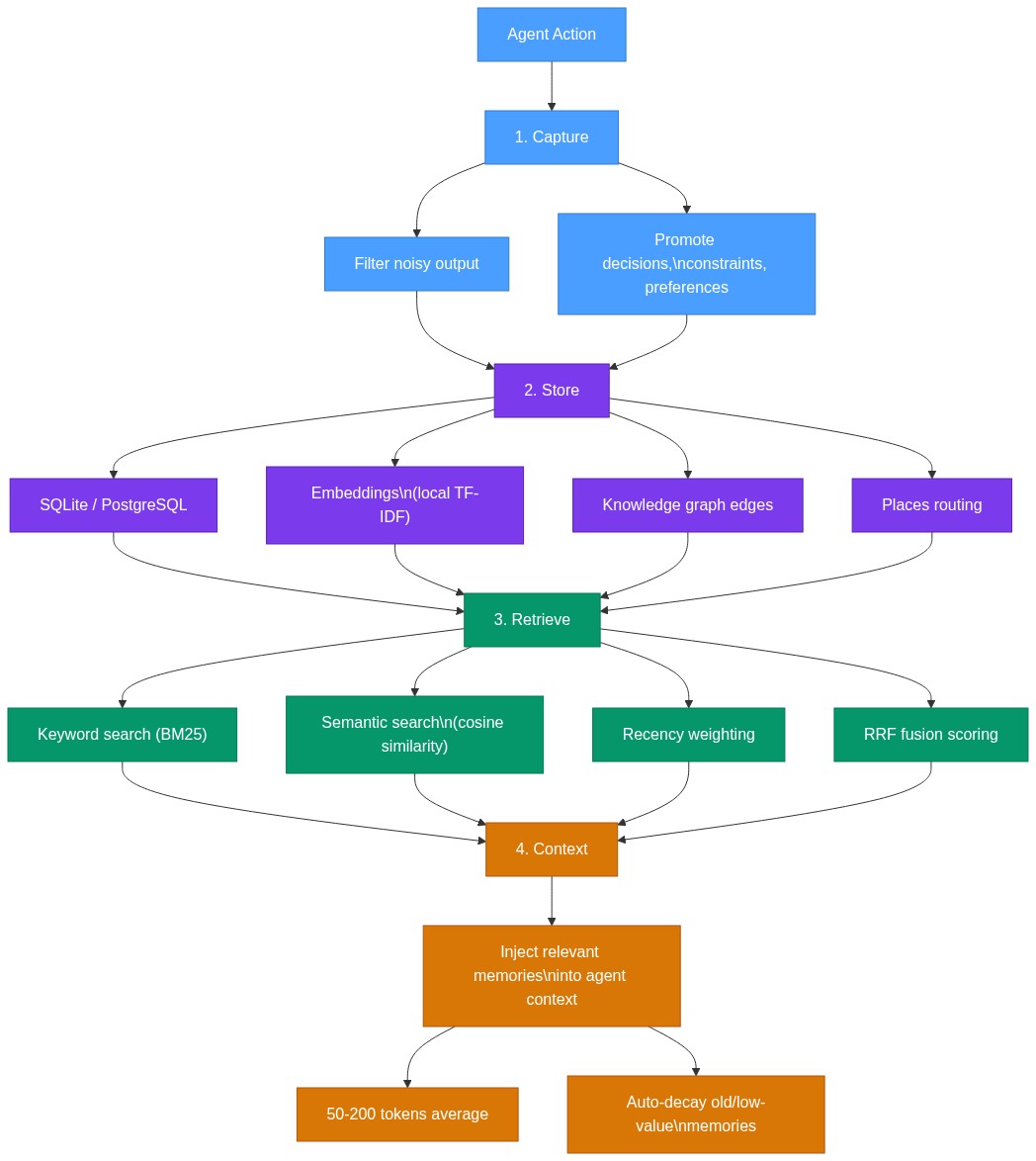
Squish uses a 4-stage pipeline to process memories:
- Capture — Filters noisy tool output, promotes what matters (decisions, constraints, preferences)
- Filter — Deduplicates, resolves contradictions, scores importance
- Store — Persists to SQLite/PostgreSQL with graph relationships and embeddings
- Retrieve — Hybrid search combines keyword, semantic, recency, and importance scoring
| SQLite (default) | PostgreSQL (team mode) |
|---|---|
| memories | memories |
| associations | associations |
| embeddings | embeddings |
| graph_edges | graph_edges |
| places | places |
| sessions | sessions |
| AES-256-GCM encryption | AES-256-GCM encryption |
Persistent memory across ChatGPT, Claude Desktop, Claude Code, and local agents. One account, synchronized everywhere.
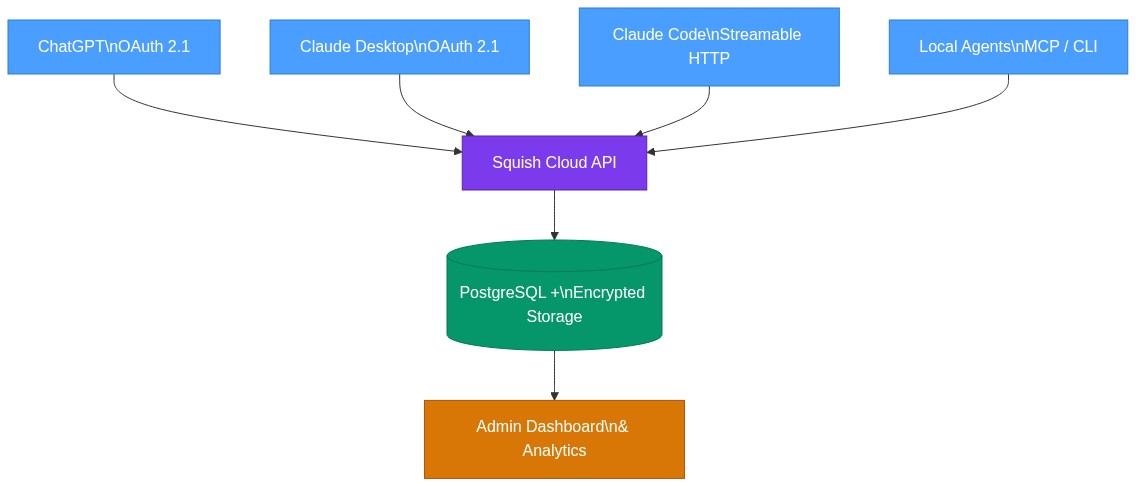
Cloud features: OAuth 2.1 + PKCE login, cross-platform sync, team workspaces, admin dashboard, priority support.
| Tier | Price | Storage | Users | Features |
|---|---|---|---|---|
| Local | Free | Local SQLite | 1 | Full memory, CLI, MCP, Web UI |
| Cloud Solo | $9/mo | 50 MB synced | 1 | Cloud sync, OAuth, dashboard |
| Cloud Pro | $29/mo | 250 MB synced | 1 | Pro features, priority support |
| Team | $99/mo | 1 GB shared | Up to 10 | Shared workspaces, admin |
| Founder Pass | $99/yr | Pro features | 1 | Launch-only annual pricing |
Sign up at squishplugin.dev — 30 seconds, no credit card needed.
Founder Pass is a launch-only offer. $99/year instead of $348/year (Pro monthly).
- Claude Code — MCP server + plugin hooks for auto-capture
- OpenCode — MCP server + hooks for OpenCode agent
- OpenClaw — MCP server setup for OpenClaw
npm install -g squish-memory && squish install --allSquish auto-detects which agents you have installed and configures hooks for each one.
Squish is tested against real-world memory retrieval tasks and synthetic benchmarks.
| Metric | Result | Notes |
|---|---|---|
| Core Tests | 9/9 passed (100%) | All memory operations |
| LoCoMo Memory | 65% | 100 REAL questions from locomo10.json |
| Throughput | 39 ops/sec | With local embeddings |
| Total Time | 230ms | For 9 core tests |
| Package Size | 283 KB | Lightweight footprint |
| Latency (embed) | 6.6ms | Local TF-IDF embeddings |
| Latency (search) | 6.1ms | Hybrid retrieval |
Full benchmark details: docs/BENCHMARK.md
| Document | Description |
|---|---|
| CLI Reference | All CLI commands and options |
| MCP Server | 15 MCP tools and configuration |
| Architecture | System design and data flow |
| Decay System | How memories age and lose relevance |
| Scoring | Importance and relevance scoring |
| Environment Config | Environment variables and settings |
| Plugin Architecture | Hook system and agent integration |
| Quick Start | Getting started guide |
| Agent Comparison | Squish vs other memory tools |
| Contributing | How to contribute |
| Release Notes | Changelog and version history |
Squish is a local-first memory runtime for AI coding agents. It gives your agents stable orientation, durable memory, and searchable session history across runs. Think of it as a brain that persists between sessions — your agents remember decisions, constraints, preferences, and context without you having to re-explain everything. In v1.6.0, Squish also searches past agent sessions as evidence, so agents can inspect prior work instead of starting from zero.
No. Squish works locally by default with zero API keys. It uses local embeddings (TF-IDF) and SQLite storage. You can optionally configure an external LLM for enhanced reasoning, but it's not required. An API key is only needed if you want to use the paid Squish Cloud for cross-device sync.
Squish is the only option that works locally with zero external dependencies. mem0 requires Qdrant (a vector database) and cloud API calls. agentmemory requires iii-engine. Squish uses SQLite and local embeddings by default. See the full comparison in the Why Squish section above.
Yes. Squish works with any MCP-compatible agent. One memory server is shared across Claude Code, Cursor, Codex, Copilot, Gemini CLI, and any other agent that supports MCP. Memories are available to all connected agents.
Yes. In local mode, all data stays on your machine in an encrypted SQLite database. Nothing is sent to any cloud service. AES-256-GCM encryption protects sensitive memories. In cloud mode, data is encrypted in transit and at rest.
Squish supports SQLite (default, local) and PostgreSQL (team mode). SQLite requires zero configuration. PostgreSQL is used for team workspaces and shared memory across multiple users.
squish recall searches your long-term memory — distilled facts, decisions, and preferences that Squish has captured and organized. squish sessions search searches raw past agent runs — the actual messages, commands, and file changes from previous Claude Code, Codex, or OpenCode sessions. Recall gives you what the system decided to remember. Sessions give you the evidence.
See docs/CONTRIBUTING.md for guidelines on how to contribute to Squish.
MIT — see LICENSE for details.