- Basics of C++
- Time and Space Complexity
- Pattern Solving
- C++ STL (Standard Template Library)
- Basic Maths
- Introduction to Recursion
- Hashing
- Sorting
- Bit Manipulation
- Dynamic Programming
Basics of C++ is fundamental for understanding data structures and algorithms. Some key topics include:
- Variables and Data Types
- Control Structures (if-else, switch-case)
- Loops (for, while, do-while)
- Functions and Recursion
- Arrays and Strings
- Pointers and References
Time and space complexity are crucial for analyzing the efficiency of algorithms.
Time complexity describes how the runtime of an algorithm changes with the size of the input. It measures the efficiency of an algorithm in terms of the time it takes to execute.
- Description: Checks each element in a list until the target element is found or the end of the list is reached.
- Time Complexity: O(n)
In the worst case, the time it takes to search for an element grows linearly with the size of the list.
- Description: Works on a sorted list, repeatedly dividing the list in half to find the target element.
- Time Complexity: O(log n)
The time it takes to search for an element grows logarithmically with the size of the list, making it more efficient for large lists compared to linear search.
Space complexity describes how the amount of memory an algorithm uses changes with the size of the input. It measures the efficiency of an algorithm in terms of the memory it requires.
- Description: Stores
nelements in an array. - Space Complexity: O(n)
The amount of memory required grows linearly with the size of the array.
- Description: Calls itself
ntimes before reaching the base case, with each call adding a new frame to the call stack. - Space Complexity: O(n)
The amount of memory required for the call stack grows linearly with the number of recursive calls.
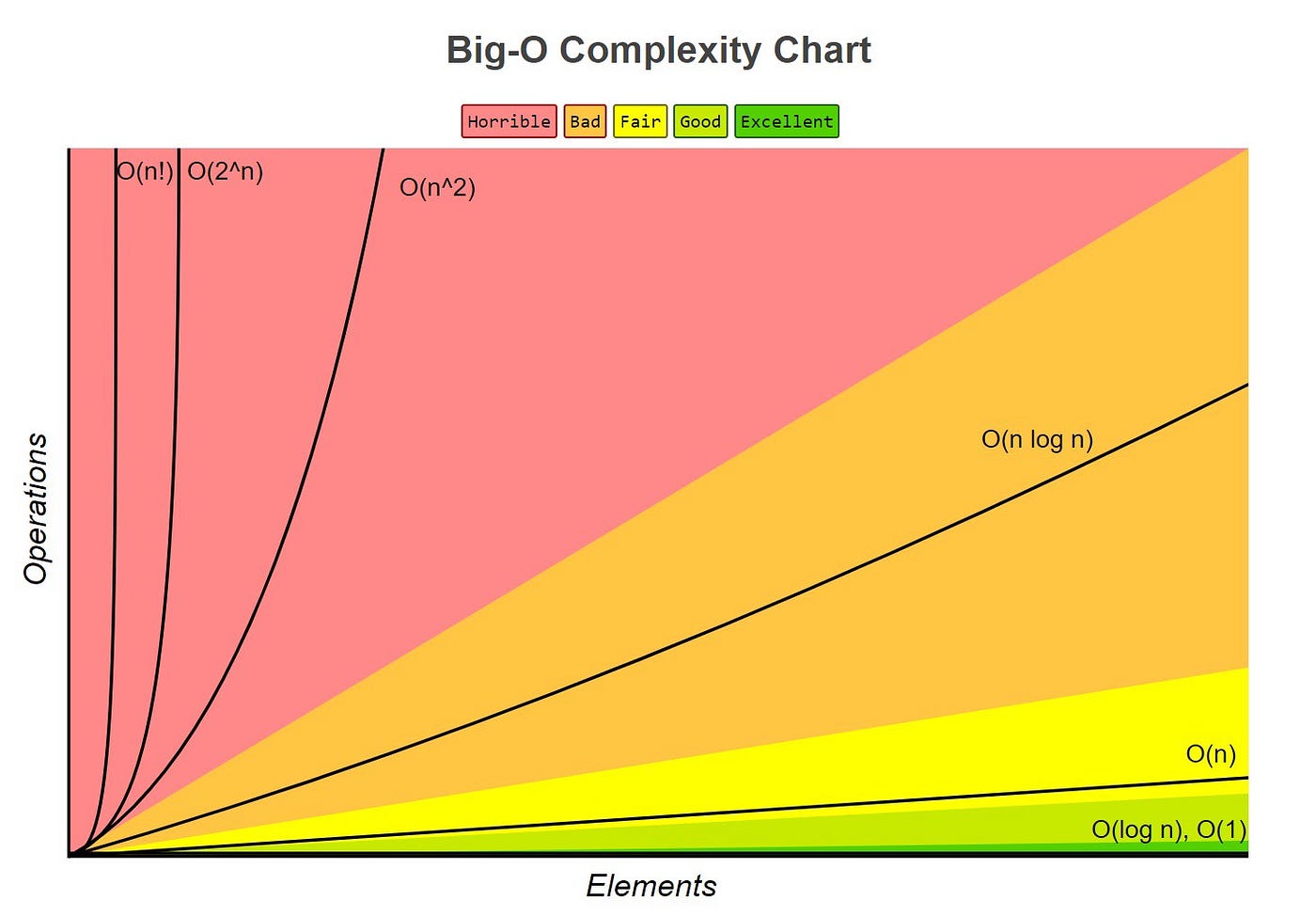
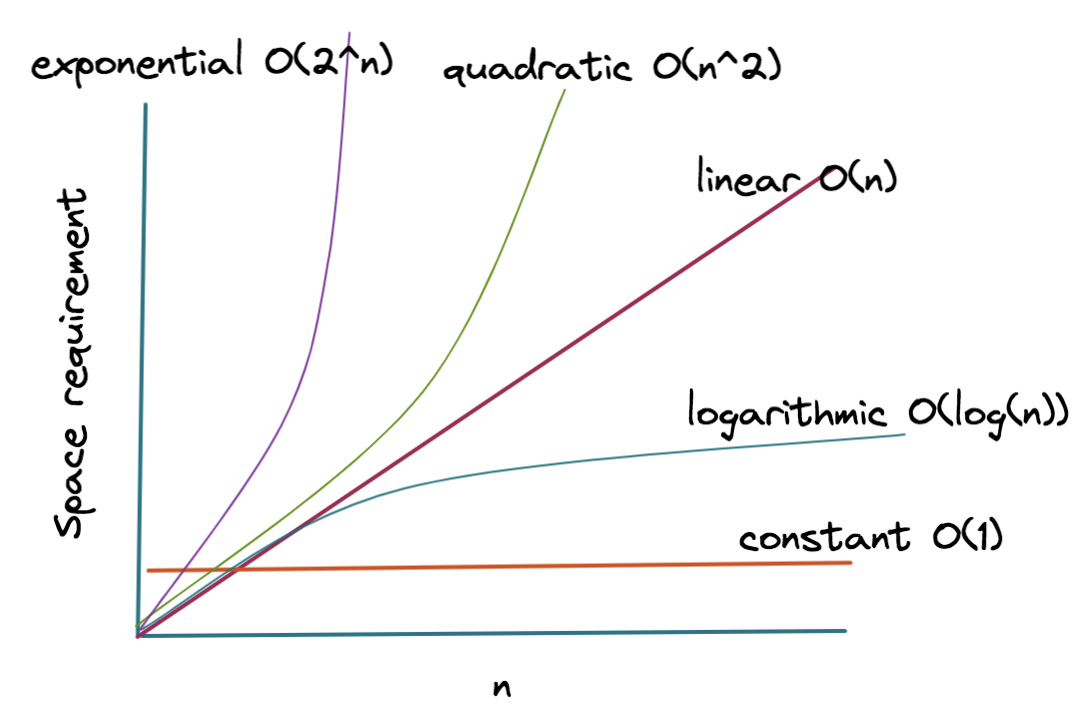
Big O notation describes the upper bound of an algorithm's complexity. Common Big O notations include:
- O(1): Constant time/space. Complexity does not change with the size of the input.
- O(log n): Logarithmic time/space. Complexity grows logarithmically with the size of the input.
- O(n): Linear time/space. Complexity grows linearly with the size of the input.
- O(n log n): Linearithmic time/space. Complexity grows faster than linear but slower than quadratic.
- O(n^2): Quadratic time/space. Complexity grows quadratically with the size of the input.
- O(2^n): Exponential time/space. Complexity grows exponentially with the size of the input.
-
Time Complexity: Measures how the runtime of an algorithm changes with the size of the input.
- Examples: Linear search (O(n)), Binary search (O(log n))
-
Space Complexity: Measures how the memory usage of an algorithm changes with the size of the input.
- Examples: An array of size
n(O(n)), A recursive function withncalls (O(n))
- Examples: An array of size
Analyzing the time and space complexities of algorithms helps in choosing the most efficient one for handling large inputs.
Pattern solving involves identifying and solving repetitive or structured problems. It enhances logical thinking and coding skills.
- Star Patterns
- Number Patterns
- Alphabet Patterns
The C++ Standard Template Library (STL) provides a set of common classes and interfaces for data structures and algorithms.
C++ is one of the most popular high-level programming languages, extensively used by developers for a long time and always loved by all programmers, especially competitive programmers, because of its faster execution time.
STL is one of the unique abilities of C++ which makes it stand out from every other programming language. STL stands for Standard Template Library, which contains a lot of pre-defined templates in terms of containers and classes. This makes it very easy for developers or programmers to implement different data structures easily without having to write complete code and worry about space-time complexities.
If you dive a little deeper into STL, you will have to understand everything about templates and how they work, which is one of the most powerful tools when it comes to the C++ programming language.
However, in this tutorial, we will stick to some of the most popular STL containers and algorithms, and their useful functions, which are used by programmers very frequently in day-to-day programming.
- unordered_set in C++ STL
- Vector in C++ STL
- Set in C++ STL
- unordered_multiset in C++ STL
- multiset in C++ STL
- unordered_map in C++ STL
- map in C++ STL
- unordered_multimap in C++ STL
- queue in C++ STL
- stack in C++ STL
- deque in C++ STL
- priority_queue in C++ STL
- multimap in C++ STL
- list in C++ STL
- next_permutation in STL
- __builtin_popcount() in STL
- sort() in C++ STL
- min_element() in C++ STL
- max_element() in C++ STL
- Vectors
- Stacks
- Queues
- Deques
- Lists
- Maps
- Sets
STL has four major components:
- Containers
- Iterators
- Algorithms
- Function objects
If you are dealing with many elements, then you need to use some sort of container. Containers can be described as objects that are used to store the collection of data. They help in recreating and implementing complex data structures efficiently.
Containers are further classified into three categories:
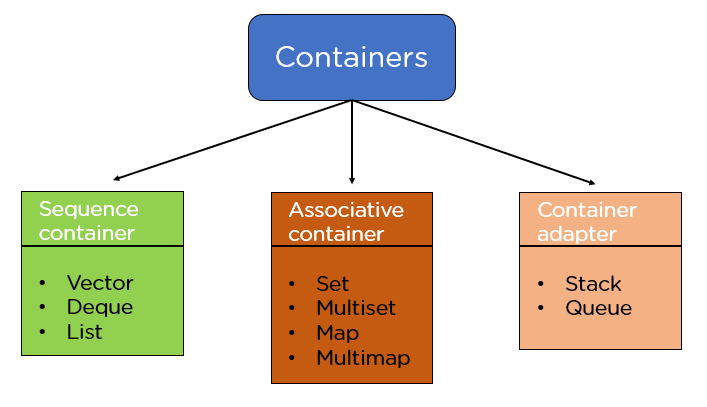
- Sequence Containers: These are used to implement sequential data structures like a linked list, array, etc.
- Associative Containers: These are containers in which each element has a value that is related to a key. They are used to implement sorted data structures, for example, set, multiset, map, etc.
- Container Adapters: Container adapters can be defined as an interface used to provide functionality to the pre-existing containers.
Sequence Container:
-
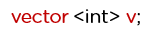
Vectors: Vectors can be defined as a dynamic array or an array with some additional features.
Syntax:
-
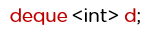
Dequeue: Deque is also known as a double-ended queue that allows inserting and deleting from both ends; they are more efficient than vectors in case of insertion and deletion.
Syntax:
-
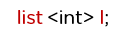
List: List is also the sequential container and allows non-contiguous allocation. It allows insertion and deletion anywhere in the sequence.
Syntax:
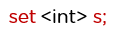
Set is an associative container that is used to store elements that are unique.
Syntax:
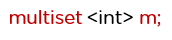
This container is similar to that of the set container; the only difference is that it stores non-unique elements.
Syntax:
Map container contains sets of key-value pairs where each key is associated with one value.
Syntax:

Here, the int is the key type, and the int is the value type.
These containers also store key-value pairs, but unlike maps, they can have duplicate elements.
Syntax:

Stack follows the last-in, first-out (LIFO) approach, which means new elements are added at the end and removed from that end only.
Queue follows the first-in, first-out (FIFO) approach, which means new elements are added from the end and removed from the front.
Example:
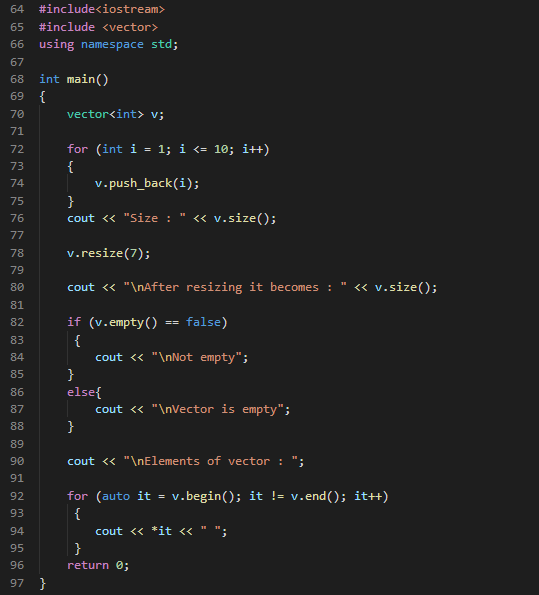
In the above example, you are using vector functions and some other functions to do some operations. After declaring the vector v, you add the elements inside the vector using the push_back() function and with the help of the loop. After that, you are displaying the size of the vector using the size() function. Now using the resize() function, you are resizing the vector size to 7.
Using the empty() function, you check if the vector is empty; if it’s false, then you will display "not empty," and if it is not false, then you will display "the vector is empty."
After that, you display all the vector elements using a for loop and functions like begin() and end(), pointing to the first element and the last element, respectively.
Iterators are used to access data in the containers, and they help in traversing through elements of containers using their functions. They can be incremented and decremented as per choice and help in the manipulation of data in the container.
Iterators are used to access data in the containers, and it helps in traversing through elements of containers using its functions. They can be incremented and decremented as per choice and help in the manipulation of data in the container.
- begin(): This function points the iterator to the first element of the container.
- end(): This function points the iterator to the position past the last element of the container.
In STL, different types of algorithms can be implemented with the help of iterators. Algorithms can be defined as functions applied to the containers and provide operations for the content of the container. Examples include: sort(), swap(), min(), max(), etc.

- Modifying algorithms
- Non-modifying algorithms
- Sorting algorithms
- Searching algorithms
- Numeric algorithms
A function object, also known as a functor, is an object of a class that provides a definition for the operator(). Suppose you have declared an object of some class, then you can use that object just like a function.
After reading this tutorial on C++ STL, you should have understood the Standard Template Library and generic programming and all the components of STL in C++, like containers, iterators, and algorithms, in detail. You also learned about function objects along with some examples.
Basic mathematical concepts are essential for understanding and solving algorithmic problems.
- Prime Numbers
- GCD and LCM
- Modular Arithmetic
- Probability and Combinatorics
-
Count Digits - Easy
- Write a function to count the number of digits in a given number.
-
Reverse a Number - Easy
- Create a function to reverse the digits of a given number.
-
Check Palindrome - Easy
- Implement a function to check if a given number or string is a palindrome.
-
GCD or HCF - Easy
- Write a function to find the Greatest Common Divisor (GCD) or Highest Common Factor (HCF) of two given numbers.
-
Armstrong Numbers - Easy
- Create a function to check if a given number is an Armstrong number.
-
Print all Divisors - Easy
- Implement a function to print all divisors of a given number.
-
Check for Prime - Easy
- Write a function to check if a given number is a prime number.
Recursion is a method where the solution to a problem depends on solutions to smaller instances of the same problem.
- Base Case and Recursive Case
- Recursive Functions
- Stack Memory
- Tail Recursion
Recursion is a fundamental concept in computer science and is extensively used in data structures and algorithms. This document provides a comprehensive overview of recursion, its importance, and how it is used in DSA.
- What is Recursion?
- How Recursion Works
- Base Case and Recursive Case
- Advantages and Disadvantages of Recursion
- Common Recursive Algorithms
- Recursion vs Iteration
- Examples
- Best Practices
Recursion is a technique where a function calls itself in order to solve a problem. A problem is divided into smaller instances of the same problem, and each instance is solved using the same algorithm.
When a recursive function is called, the following steps are executed:
- The current state of the function (variables, execution point) is saved.
- The function processes the base case.
- If the base case is not met, the function calls itself with a modified argument.
- Each call adds a new layer to the call stack until the base case is reached.
- Once the base case is reached, the function returns its result, and the stack is unwound.
The base case is the condition under which the recursion ends. Without a base case, the function would call itself indefinitely, leading to a stack overflow.
The recursive case is the part of the function where the function calls itself with a modified argument. This step brings the problem closer to the base case.
- Simplifies the code for complex problems.
- Naturally fits problems that can be divided into similar sub-problems.
- Useful for tree and graph traversal.
- Can lead to high memory usage due to call stack.
- May result in slower execution compared to iterative solutions.
- Risk of stack overflow if the base case is not defined properly.
- Factorial Calculation: Computes the factorial of a number.
- Fibonacci Sequence: Generates numbers in the Fibonacci sequence.
- Tree Traversal: Inorder, Preorder, and Postorder traversals of a tree.
- Graph Traversal: Depth-First Search (DFS).
- Divide and Conquer Algorithms: Quick Sort, Merge Sort.
While recursion involves function calls, iteration uses looping constructs like for and while. Recursion is often more intuitive for problems that can be broken down into similar sub-problems, but it can be less efficient in terms of memory and execution time.
def factorial(n):
    if n == 0:
        return 1  # Base case
    else:
        return n * factorial(n - 1)  # Recursive case
def fibonacci(n):
if n <= 1:
return n # Base case
else:
return fibonacci(n - 1) + fibonacci(n - 2) # Recursive caseint binary_search(int arr[], int low, int high, int x) {
if (high >= low) {
int mid = (high + low) / 2;
if (arr[mid] == x) {
return mid;
} else if (arr[mid] > x) {
return binary_search(arr, low, mid - 1, x);
} else {
return binary_search(arr, mid + 1, high, x);
}
} else {
return -1; // Element is not present in array
}
}The learner must know how to write a basic function in any language and how to make a function call from the main function.
It is a phenomenon when a function calls itself indefinitely until a specified condition is fulfilled.
Let's understand recursion with the help of an illustration:
As we can see in the above image, a function is calling the same function inside its body. Since there is no condition to stop the recursive calls, the calls will run indefinitely until the stack runs out of memory (stack overflow).
Whenever recursion calls are executed, they're simultaneously stored in a recursion stack where they wait for the completion of the recursive function. A recursive function can only be completed if a base condition is fulfilled and the control returns to the parent function.
But, when there is no base condition given for a particular recursive function, it gets called indefinitely which results in a Stack Overflow i.e, exceeding the memory limit of the recursion stack and hence the program terminates giving a Segmentation Fault error.
The illustration above also represents the case of a Stack Overflow as there is no terminating condition for recursion to stop, hence it will also result in a memory limit exceeded error.
It is the condition that is written in a recursive function in order for it to get completed and not to run infinitely. After encountering the base condition, the function terminates and returns back to its parent function simultaneously.
To get a better understanding of how the base condition is an integral part of recursive functions, let us see an example below:
Let's say we have to print integers starting from 0 till 2 only, this will be how the pseudocode for it will look like:
int count = 0;
void func(){
if(count == 3 ) return;
print(count);
count++;
func();
}
main()
{
print();
}
According to this pseudocode, the function will increment and print the value of count and then return when the base condition becomes true i.e, it will only print 0,1,2 and 3 and then execution gets completed.
#include<bits/stdc++.h>
using namespace std;
int cnt = 0;

void print(){
   // Base Condition.
   if(cnt == 3)  return;
   cout<<cnt<<endl;

   // Count Incremented
   cnt++;
   print();
}

int main(){
    print();
    return 0;
}0 1 2
A recursive tree is a visual representation of recursion, illustrating how functions are called and returned in a series of consecutive events. It provides a pictorial description of the recursive process.
- Function Calls: The tree shows how functions are called recursively.
- Return Flow: It depicts how control returns to parent functions.
- Execution Order: The tree illustrates the sequence of function executions.
- Functions are called recursively, branching out in the tree structure.
- When a recursive call completes, control returns to its parent function.
- The parent function continues execution.
- This process repeats until the last function in the recursive stack returns.
Recursive trees help in:
- Visualizing the flow of recursive algorithms
- Understanding the order of function calls and returns
- Analyzing the depth and complexity of recursive processes
Hashing is a technique used to uniquely identify a specific object from a group of similar objects.
- Hash Functions
- Collision Handling (Chaining, Open Addressing)
- Hash Tables Hashing is a crucial concept in computer science, used extensively for fast data retrieval. This document provides an in-depth look at hashing, its importance in DSA, and examples in C++.
- What is Hashing?
- Hash Function
- Hash Table
- Collision Handling
- Advantages and Disadvantages of Hashing
- Common Applications of Hashing
- Best Practices
Hashing is a technique used to uniquely identify a specific object from a group of similar objects. It is used to map data of arbitrary size to fixed-size values, typically using a hash function. The output, known as a hash value or hash code, is used as an index to store data in a hash table.
A hash function is a function that takes input (or 'key') and returns a fixed-size string of bytes. The output is typically a numerical value which serves as an index to an array. A good hash function should minimize the probability of collisions and distribute keys uniformly across the hash table.
int hashFunction(int key, int tableSize) {
    return key % tableSize;
}A hash table is a data structure that implements an associative array, a structure that can map keys to values. Hash tables use a hash function to compute an index into an array of buckets or slots, from which the desired value can be found.
Collisions occur when two keys hash to the same index. Several methods exist to handle collisions:
Separate chaining involves maintaining a list of all elements that hash to the same value. This is typically implemented using linked lists.
Open addressing stores all elements in the hash table itself. When a collision occurs, the algorithm searches for the next available slot using a probing sequence.
- Fast data retrieval
- Efficient memory usage
- Simple implementation
- Collisions can degrade performance
- Hash functions can be complex to design
- Inefficient for small datasets
- Implementing associative arrays
- Database indexing
- Caching
- Password storage
- Data de-duplication
- Choose a good hash function: Ensure it distributes keys uniformly.
- Handle collisions efficiently: Select the appropriate method based on the use case.
- Consider table size: Avoid too many collisions by choosing an appropriate size.
- Rehashing: Dynamically resize the hash table when it becomes too full.
By understanding and applying these principles, you can effectively use hashing to solve a variety of problems in data structures and algorithms.
Sorting is the process of arranging data in a particular order. It is a fundamental operation in computer science.
- Bubble Sort
- Selection Sort
- Insertion Sort
- Merge Sort
- Quick Sort
- Heap Sort
Sorting is a fundamental operation in computer science that arranges elements of a list in a particular order. This document covers various sorting algorithms and their implementations in C++.
Selection Sort is a simple sorting algorithm that repeatedly selects the minimum (or maximum) element from the unsorted portion and swaps it with the first unsorted element.
void selectionSort(int arr[], int n) {
    for (int i = 0; i < n - 1; ++i) {
        int min_index = i;
        for (int j = i + 1; j < n; ++j) {
            if (arr[j] < arr[min_index]) {
                min_index = j;
            }
        }
        swap(arr[i], arr[min_index]);
    }
}
void bubbleSort(int arr[], int n) {
for (int i = 0; i < n - 1; ++i) {
bool swapped = false;
for (int j = 0; j < n - i - 1; ++j) {
if (arr[j] > arr[j + 1]) {
swap(arr[j], arr[j + 1]);
swapped = true;
}
}
if (!swapped) break;
}
}
cpp
void insertionSort(int arr[], int n) {
for (int i = 1; i < n; ++i) {
int key = arr[i];
int j = i - 1;
while (j >= 0 && arr[j] > key) {
arr[j + 1] = arr[j];
--j;
}
arr[j + 1] = key;
}
}Sorting algorithms are essential tools in computer science for arranging data in a particular order. To effectively utilize sorting algorithms, consider the following best practices:
-
Choose the appropriate algorithm: Different sorting algorithms have different performance characteristics (e.g., time complexity, space complexity). Select an algorithm based on the size of the data set and its nature (e.g., already partially sorted, uniformly distributed).
-
Understand the algorithm's complexity: Familiarize yourself with the time and space complexity of each sorting algorithm. This knowledge helps in making informed decisions about which algorithm to use based on the expected size of the data and available memory.
-
Test with various input sizes: Validate the sorting algorithm's performance with different input sizes. Test with small, medium, and large datasets to ensure it performs efficiently across various scenarios and doesn't exhibit unexpected behavior for specific inputs.
-
Consider stability: Some sorting algorithms are stable, meaning they maintain the relative order of equal elements (elements with the same key). If preserving the original order of equal elements is important in your application, choose a stable sorting algorithm.
By adhering to these best practices and understanding the principles behind sorting algorithms, you can effectively choose and implement sorting solutions that meet the requirements of different applications and datasets.
Bit manipulation is an essential topic in computer science and programming. It involves manipulating bits, the smallest unit of data in a computer. This README provides a comprehensive guide on various aspects of bit manipulation including binary number conversions, 1's and 2's complements, and bitwise operators.
Binary number conversions are fundamental in understanding bit manipulation. Here, we explore various conversions involving binary numbers.
To convert a decimal number to binary, divide the number by 2 and record the remainder. Repeat this process with the quotient until the quotient is zero. The binary representation is the sequence of remainders read in reverse order.
Example:
- Decimal: 10
- Binary: 1010
To convert a binary number to decimal, multiply each bit by 2 raised to the power of its position from the right (starting from 0) and sum the results.
Example:
- Binary: 1010
- Decimal: (1 \times 2^3 + 0 \times 2^2 + 1 \times 2^1 + 0 \times 2^0 = 8 + 0 + 2 + 0 = 10)
To convert binary to hexadecimal, group the binary digits into sets of four (starting from the right) and convert each set to its hexadecimal equivalent.
Example:
- Binary: 10101100
- Grouped: 1010 1100
- Hexadecimal: AC
To convert hexadecimal to binary, convert each hexadecimal digit to its 4-bit binary equivalent.
Example:
- Hexadecimal: AC
- Binary: 1010 1100
To convert binary to octal, group the binary digits into sets of three (starting from the right) and convert each set to its octal equivalent.
Example:
- Binary: 10101100
- Grouped: 010 101 100
- Octal: 254
To convert octal to binary, convert each octal digit to its 3-bit binary equivalent.
Example:
- Octal: 254
- Binary: 010 101 100
1's and 2's complements are methods to represent negative numbers in binary.
1's complement of a binary number is obtained by inverting all bits (changing 1s to 0s and 0s to 1s).
Example:
- Binary: 1010
- 1's Complement: 0101
2's complement is obtained by adding 1 to the 1's complement of the number. It is widely used in computer systems to represent negative numbers.
Example:
- Binary: 1010
- 1's Complement: 0101
- 2's Complement: 0101 + 1 = 0110
Bitwise operators are used to perform operations on individual bits of binary numbers. Here we discuss common bitwise operators.
The AND operator (&) performs a logical AND operation on each pair of corresponding bits of two numbers. The result is 1 only if both bits are 1.
Example:
- 1010
- AND 0110
- Result: 0010
The OR operator (|) performs a logical OR operation on each pair of corresponding bits of two numbers. The result is 1 if at least one of the bits is 1.
Example:
- 1010
- OR 0110
- Result: 1110
The XOR operator (^) performs a logical XOR operation on each pair of corresponding bits of two numbers. The result is 1 if only one of the bits is 1.
Example:
- 1010
- XOR 0110
- Result: 1100
The NOT operator (~) inverts all bits of a number (changing 1s to 0s and 0s to 1s).
Example:
- Binary: 1010
- NOT: 0101
Shift operators shift the bits of a number to the left or right. They include left shift (<<) and right shift (>>).
The left shift operator shifts bits to the left by a specified number of positions. Bits shifted out from the left are discarded, and zero bits are shifted in from the right.
Example:
- Binary: 1010
- Left Shift by 2: 101000
The right shift operator shifts bits to the right by a specified number of positions. Bits shifted out from the right are discarded, and zero bits are shifted in from the left.
Example:
- Binary: 1010
- Right Shift by 2: 0010
Bitwise operations are fundamental in low-level programming and are extensively used in system programming, cryptography, network programming, and more. Understanding these concepts is crucial for efficient coding and optimization.
Dynamic programming is a method for solving complex optimization problems by breaking them down into simpler subproblems, solving each of these subproblems just once, and storing their solutions. The stored solutions are then reused whenever needed, thus reducing the computation time significantly.
This approach is particularly useful for problems with overlapping subproblems and optimal substructure properties. Dynamic programming is widely used across different domains, from algorithm design to various real-world applications.
- Introduction
- Key Concepts
- Approaches to Dynamic Programming
- Applications of Dynamic Programming
- Advantages and Limitations
- Conclusion
- Further Reading
Dynamic programming (DP) is a mathematical optimization method and a computer programming approach. Unlike divide and conquer algorithms, which solve subproblems independently, dynamic programming solves each subproblem only once and stores its result for future use.
The term "dynamic programming" was coined by Richard Bellman in the 1950s. He used it to solve multi-stage decision processes where decisions at one stage affect subsequent stages. This approach has become a cornerstone in both algorithm design and operational research.
- Efficiency: It reduces the time complexity of algorithms from exponential to polynomial time by storing solutions of subproblems.
- Reusability: Once a subproblem is solved, its solution can be reused multiple times, making the process efficient.
- Optimal Solutions: Dynamic programming ensures finding the most efficient solution to a problem by systematically exploring all possible solutions.
Dynamic programming is especially useful for problems with a large number of overlapping subproblems and problems where finding the optimal solution involves combining solutions of subproblems in a recursive manner.
Dynamic programming is based on two key principles:
Overlapping subproblems arise when a recursive algorithm revisits the same problem multiple times. This is typical in problems that can be solved using recursion where a function calls itself with the same arguments repeatedly.
Example Explanation: Consider a problem of computing Fibonacci numbers. The naive recursive approach recalculates the same Fibonacci numbers multiple times, leading to redundant calculations. Instead, by storing already computed Fibonacci numbers, dynamic programming solves this problem efficiently.
-
Identifying Overlapping Subproblems: A problem is said to have overlapping subproblems if it can be broken down into subproblems which are reused multiple times. This characteristic is crucial for applying dynamic programming.
-
Efficiency Gain: By solving each subproblem only once and storing the results, dynamic programming avoids the redundant computation, thereby enhancing efficiency significantly.
Common Problems with Overlapping Subproblems:
- Fibonacci Sequence
- Longest Common Subsequence
- Edit Distance
Optimal substructure means that an optimal solution to the problem contains optimal solutions to the subproblems. This property allows a problem to be solved using dynamic programming.
Example Explanation: In the shortest path problem, the optimal path from a starting node to an ending node is composed of optimal paths between intermediate nodes. Thus, solving subproblems optimally helps in solving the larger problem optimally.
-
Identifying Optimal Substructure: If a problem can be solved by breaking it down into smaller subproblems, and the solutions to these subproblems can be combined to form a solution to the original problem, it exhibits optimal substructure.
-
Importance: This property is critical for applying dynamic programming techniques, as it ensures that solving subproblems optimally guarantees an optimal solution to the overall problem.
Common Problems with Optimal Substructure:
- Knapsack Problem
- Matrix Chain Multiplication
- Travelling Salesman Problem
Dynamic programming can be implemented using two main approaches, each with its own characteristics and use cases.
The top-down approach, also known as memoization, involves solving problems recursively and storing the results of already solved subproblems to avoid recalculations.
-
How It Works: Start with the original problem and recursively break it down into subproblems. Store the solutions to subproblems in a data structure, usually a map or array, so that when the same subproblem is encountered again, the stored result can be used.
-
Characteristics:
- Recursive function calls.
- Uses additional data structures (like arrays or hash tables) for storage.
- Can be easier to implement for problems with a natural recursive structure.
-
Advantages:
- Simplicity: Easier to write and understand if the problem has a recursive structure.
- Reusability: Efficiently uses recursion with stored results to avoid redundant calculations.
-
Disadvantages:
- Space Overhead: Requires additional space to store solutions to subproblems.
- Stack Overflow: Recursive calls may lead to stack overflow for problems with large input sizes.
-
Use Cases: Top-down approaches are often used in problems where the natural structure of the problem leads to recursive solutions, such as Fibonacci numbers or certain graph problems.
Example Explanation: In computing the nth Fibonacci number using memoization, instead of recalculating previously computed Fibonacci numbers, they are stored in an array or dictionary for future reference. This eliminates redundant computations and reduces the overall time complexity.
The bottom-up approach, or tabulation, solves problems iteratively by building up solutions from the simplest subproblems to the desired complex solution.
-
How It Works: Start by solving the smallest subproblems and use these solutions to iteratively solve larger subproblems, eventually solving the original problem.
-
Characteristics:
- Iterative approach using loops.
- Utilizes tables or arrays to store solutions of subproblems.
- Constructs solutions systematically from base cases up to the original problem.
-
Advantages:
- Space Efficiency: Typically requires less memory than memoization since it doesn’t rely on the call stack.
- No Stack Overflow: Avoids the risk of stack overflow as it doesn't involve deep recursive calls.
-
Disadvantages:
- Complexity: May be harder to implement for problems where the recursive structure is more apparent.
- Initialization: Requires careful initialization of the table and iteration order.
-
Use Cases: Bottom-up approaches are preferred when the problem can be broken down into a set of subproblems that can be solved iteratively, such as in problems involving sequences or arrays like the longest common subsequence.
Example Explanation: In finding the longest common subsequence between two strings, the bottom-up approach builds a table that iteratively calculates the length of the subsequence for increasing substrings of the input strings. This allows for a systematic exploration of all possibilities, storing intermediate results in a table for later use.
Comparison: Top-Down vs Bottom-Up
| Feature | Top-Down (Memoization) | Bottom-Up (Tabulation) |
|---|---|---|
| Approach | Recursive | Iterative |
| Space Usage | Higher (due to recursion) | Lower (usually) |
| Ease of Use | Simple for recursive problems | Complex problems with no natural recursion |
| Stack Risk | Possible stack overflow | No risk of stack overflow |
| Performance | Often similar, depends on problem | Often similar, depends on problem |
Dynamic programming is a versatile and powerful tool applied across numerous domains. Here are some of its most well-known applications:
Description: Calculate Fibonacci numbers, where each number is the sum of the two preceding ones.
- Application: In mathematical computations, analysis of algorithms, and many other scientific applications.
- Dynamic Programming Use: Store previously calculated Fibonacci numbers to avoid recalculating them, reducing time complexity from exponential to linear.
Description: Determine the maximum value that can be achieved with a given weight capacity of a knapsack and a set of items with given weights and values.
- Application: Resource allocation, financial decision-making, and other optimization scenarios.
- Dynamic Programming Use: Solve subproblems of smaller capacity knapsacks, storing results to build up to the desired capacity, thereby ensuring optimal resource utilization.
Description: Find the longest subsequence common to two sequences, which may not necessarily be contiguous.
- Application: Bioinformatics for DNA sequence alignment, text processing, and version control systems.
- Dynamic Programming Use: Build a matrix to compare all subsequences and store intermediate results, allowing efficient identification of the longest common subsequence.
Description: Calculate the minimum number of edits (insertions, deletions, substitutions) required to convert one string into another.
- Application: Spell checkers, natural language processing, and genetic sequence alignment.
- Dynamic Programming Use: Use a matrix to represent the transformation costs between all possible prefixes of the two strings, iteratively filling the matrix to determine the minimum edit distance.
Description: Construct a binary search tree with minimal expected search cost based on a set of keys with given access probabilities.
- Application: Database indexing, search algorithms, and data retrieval systems.
- Dynamic Programming Use: Solve subproblems for smaller trees and combine solutions to determine the optimal cost for larger trees, ensuring minimal access cost.
Description: Find the most efficient way to multiply a given sequence of matrices.
- Application: Computer graphics, scientific computing, and performance optimization.
- Dynamic Programming Use: Determine the cost of multiplying every possible combination of matrices, storing results in a table to minimize overall computation cost.
Description: Find the shortest possible route that visits each city exactly once and returns to the origin city.
- Application: Route optimization, logistics, and transportation planning.
- Dynamic Programming Use: Solve subproblems for paths through subsets of cities and use these to build up to the complete route, ensuring the shortest path is found.
Description: Given a rod of length n and a set of prices for each length, determine the maximum revenue obtainable by cutting up the rod and selling the pieces.
- Application: Resource optimization in manufacturing, financial modeling, and supply chain management.
- Dynamic Programming Use: Solve subproblems for different lengths and store results to maximize revenue for the full rod.
Description: Determine the minimum number of coins needed to make a specific amount using given coin denominations.
- Application: Financial calculations, vending machines, and cash register systems.
- Dynamic Programming Use: Build a table of solutions for smaller amounts, iteratively calculating the minimum number of coins needed for larger amounts.
Description: Determine if there is a subset of a given set of integers that adds up to a specific target sum.
- Application: Cryptography, partitioning problems, and combinatorial optimization.
- Dynamic Programming Use: Solve subproblems for smaller subsets and store results to efficiently determine if the target sum is achievable.
-
Bioinformatics: Dynamic programming is extensively used in bioinformatics for DNA sequence alignment and protein structure prediction, enabling the efficient comparison and analysis of genetic data.
-
Speech Recognition: Algorithms like the Hidden Markov Model (HMM) utilize dynamic programming for efficient computation of speech patterns and recognition of spoken words.
-
Finance: In finance, dynamic programming helps solve complex decision-making problems like portfolio optimization and risk management by efficiently exploring all possible investment strategies.
-
Operations Research: Dynamic programming is used in operations research for solving multi-stage decision problems, such as supply chain optimization and resource allocation, to achieve optimal outcomes.
-
Game Theory: Dynamic programming techniques are applied in game theory to analyze and solve complex strategic interactions between players, determining optimal strategies and outcomes.
-
Efficiency: Dynamic programming reduces time complexity by storing and reusing solutions to subproblems, avoiding redundant computations and significantly speeding up algorithms.
-
Reusability: Once a subproblem is solved, its solution can be reused multiple times, enhancing efficiency and performance in solving larger problems.
-
Optimal Solutions: Dynamic programming ensures finding the most efficient solution to a problem by systematically exploring all possible solutions and selecting the best one.
-
Versatility: Applicable to a wide range of problems across different domains, from computer science to operations research, finance, and more.
-
Deterministic: Provides deterministic solutions that guarantee optimal results for problems with overlapping subproblems and optimal substructure.
-
Space Complexity: Storing solutions to subproblems can lead to high space complexity, especially for problems with a large number of subproblems or large input sizes.
-
Complexity: Designing dynamic programming solutions requires a deep understanding of the problem's structure and can be more complex compared to other techniques.
-
Not Always Suitable: Dynamic programming is not suitable for problems that do not exhibit optimal substructure or overlapping subproblems, limiting its applicability.
-
Initialization Overhead: Careful initialization of tables or data structures is required, which can add complexity to the implementation.
-
Problem-Specific: Dynamic programming solutions are often highly problem-specific and may not generalize well to other problems.
Dynamic programming is a powerful and efficient method for solving complex optimization problems that exhibit overlapping subproblems and optimal substructure properties. By breaking problems down into simpler subproblems, storing their solutions, and reusing these solutions, dynamic programming significantly reduces computation time and ensures optimal solutions.
This technique is widely used across various domains, from algorithm design to real-world applications like bioinformatics, finance, and operations research. Understanding and applying dynamic programming concepts can greatly enhance problem-solving skills and improve the efficiency of algorithms.
For those interested in exploring dynamic programming further, here are some recommended resources:
-
Books:
- Introduction to Algorithms by Thomas H. Cormen, Charles E. Leiserson, Ronald L. Rivest, and Clifford Stein - A comprehensive textbook on algorithms, including dynamic programming concepts.
- The Art of Computer Programming by Donald E. Knuth - An authoritative book series covering various algorithms and programming techniques, including dynamic programming.
-
Online Resources:
- Dynamic Programming - GeeksforGeeks - A detailed collection of articles and problems on dynamic programming.
- Dynamic Programming - LeetCode - A curated list of dynamic programming problems and solutions on LeetCode.
- Dynamic Programming Primer - MIT OpenCourseWare - Lecture notes and resources on dynamic programming from MIT's Introduction to Algorithms course.
-
Research Papers:
- Bellman, R. E. (1957). Dynamic Programming. Princeton University Press. - The foundational work by Richard Bellman that introduced the concept of dynamic programming.
- Bertsekas, D. P. (2000). Dynamic Programming and Optimal Control. Athena Scientific. - A comprehensive text on dynamic programming and its applications in optimal control.
-
Courses:
- Coursera - Algorithmic Design and Techniques by University of California San Diego - A specialization course covering algorithmic techniques, including dynamic programming.
- edX - Introduction to Computer Science and Programming by MIT - A course offering an introduction to computer science concepts, including dynamic programming.
A Linked List is a linear data structure where elements are stored in nodes. Each node contains a data part and a reference (or pointer) to the next node in the sequence.
- Singly Linked List: Each node points to the next node.
- Doubly Linked List: Each node points to both the next and the previous nodes.
- Circular Linked List: The last node points back to the first node.
- Insertion: Add elements at the beginning, end, or at a specific position.
- Deletion: Remove elements from the beginning, end, or a specific position.
- Traversal: Go through each node starting from the head.
- Insertion: O(1) at the head, O(n) for arbitrary position.
- Deletion: O(1) for head, O(n) for arbitrary position.
- Search: O(n)
A Stack is a linear data structure that follows the LIFO (Last In, First Out) principle. The last element added is the first one to be removed.
- Push: Add an element to the top.
- Pop: Remove the top element.
- Peek/Top: Return the top element without removing it.
- IsEmpty: Check if the stack is empty.
- Function call management (recursion).
- Undo operations in text editors.
- Expression evaluation and syntax parsing.
- Push, Pop, Peek: O(1)
A Queue is a linear data structure that follows the FIFO (First In, First Out) principle. The first element added is the first one to be removed.
- Simple Queue: Basic FIFO structure.
- Circular Queue: The last element points back to the first.
- Priority Queue: Elements are dequeued based on priority rather than insertion order.
- Enqueue: Add an element to the rear.
- Dequeue: Remove the front element.
- Front: Get the front element without removing it.
- IsEmpty: Check if the queue is empty.
- CPU scheduling.
- Printer queue management.
- BFS (Breadth-First Search) in graphs.
- Enqueue, Dequeue: O(1)
A Tree is a hierarchical data structure with a root node and children represented as a set of linked nodes. It has a recursive structure, meaning each subtree is also a tree.
- Binary Tree: Each node has at most two children.
- Binary Search Tree (BST): A binary tree where the left child node contains values smaller than the parent and the right child node contains values greater than the parent.
- AVL Tree: A self-balancing binary search tree.
- Heap: A complete binary tree used in heap sort.
- Insertion: Insert nodes at appropriate positions.
- Deletion: Remove a node and rearrange the tree.
- Traversal: In-order, Pre-order, Post-order, Level-order.
- Hierarchical data representation (e.g., file systems).
- Expression parsing in compilers.
- Database indexing (B-Trees).
- Search, Insertion, Deletion: O(log n) for balanced trees, O(n) for unbalanced trees.
A Graph is a collection of nodes (called vertices) and edges connecting them. Graphs can be directed or undirected.
- Undirected Graph: Edges have no direction.
- Directed Graph (Digraph): Edges have a direction.
- Weighted Graph: Edges have weights.
- Adjacency Matrix: A 2D array to represent connections.
- Adjacency List: A list of lists to represent connections.
- BFS (Breadth-First Search): Explore neighbors level by level.
- DFS (Depth-First Search): Explore as far as possible along a branch.
- Shortest Path Algorithms: Dijkstra's, Bellman-Ford.
- Minimum Spanning Tree: Prim's, Kruskal's.
- Social networks, GPS systems, network routing.
- Pathfinding in games.
- BFS, DFS: O(V + E) where V is the number of vertices and E is the number of edges.
A Trie (also called a prefix tree) is a specialized tree used to store associative data structures. It is used primarily for quick retrieval of keys, such as words in a dictionary.
- Insert: Add a word or string to the trie.
- Search: Check if a word or string is in the trie.
- Prefix Search: Find all strings that start with a given prefix.
- Autocomplete features.
- Spell-checking.
- IP routing.
- Insert, Search: O(L), where L is the length of the word being inserted or searched.
Understanding these fundamental data structures is essential for developing efficient algorithms and solving complex problems in software engineering. Each data structure has its specific use cases, and selecting the right one can significantly optimize the performance of your application.