


An industrial-grade testing suite that synchronizes robotic actuators with real-time piezoresistive sensor telemetry to detect early material failure.
Developed during my Engineering Internship at Universidad Autónoma de Yucatán (UADY).
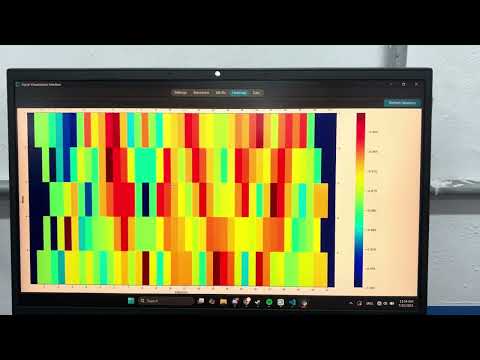
This project solves the problem of manual, inconsistent material stress testing. It creates a closed-loop automated system where a desktop application controls a 6-axis robot arm to apply precise force while simultaneously recording high-speed sensor data.
The system decouples data ingestion from visualization using multi-threading, ensuring that heavy CSV logging (O(1) circular buffers) never freezes the UI.
- Universal Robot Integration: Uses
urxand TCP/IP (Port 30002) to control UR-Series robot arms. - Automated Cycles: Performs "Stress-Relax" testing loops with configurable dwell times, velocity, and acceleration.
- Safety protocols: Immediate stop commands and joint-limit checks implemented in Python.
- High-Speed Plotting: Renders live sensor waveforms and 2D heatmaps using
CustomTkinterandMatplotlib. - Non-Blocking Architecture: Separation of concerns between the Serial Worker Thread (Data Acquisition) and the Main GUI Thread (Rendering).
- Serial Command Interface: Custom ASCII-based protocol to configure ESP32 sampling rates and states on the fly.
- Circular Buffering: Implemented O(1) fixed-size buffers for telemetry storage, preventing memory bloat during long tests.
- Thread-Safe Logging: Asynchronous writing to CSV files for post-process analysis in MATLAB/Excel.
- Host Application (Python): The brain of the operation. Runs the GUI, manages the robot connection (Ethernet), and talks to the sensors (USB-UART).
- Actuator (Universal Robot): Receives motion commands via TCP/IP.
- Sensor Node (ESP32): Runs MicroPython firmware to sample piezoresistive arrays and stream packets to the Host.
- Language: Python 3.9+
- GUI Libraries:
CustomTkinter(Dashboard),PyQt5(Robot Control Panel) - Robotics:
urx(Universal Robot Python Library) - Communication:
pyserial(UART),socket(TCP/IP) - Data Handling:
numpy,pandas