YOUR OPEN-SOURCE DIGITAL SHREDDER. Automate GDPR/CCPA requests, purge your data from broker databases, and permanently reclaim your inbox.
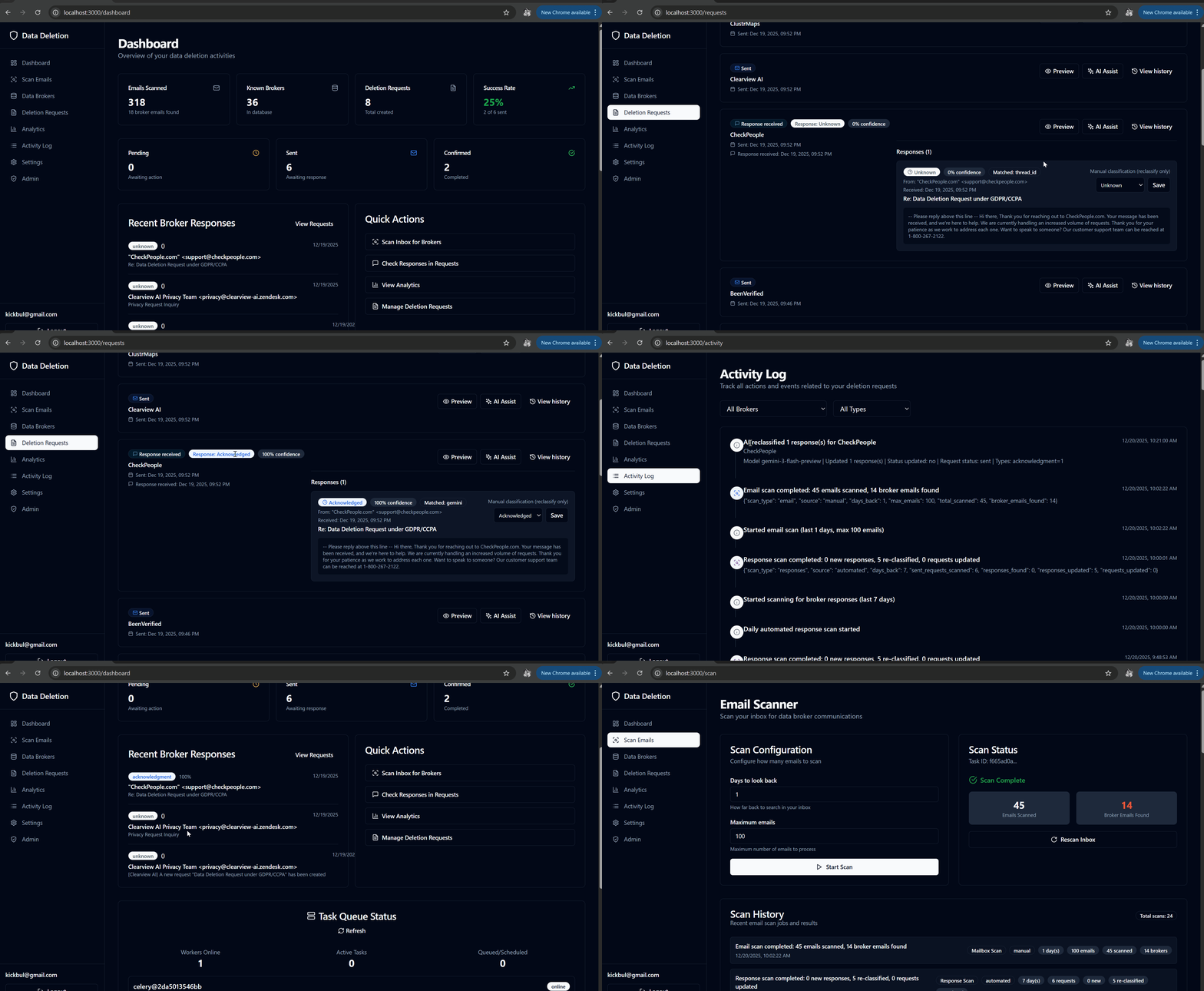
A comprehensive web application that scans your Gmail inbox for data broker communications, generates legally compliant deletion requests, and tracks broker responses—all with an intuitive dashboard and powerful analytics.


Warning
🚧 EARLY DEVELOPMENT VERSION 🚧
This project is currently in active development and should be considered alpha/beta quality.
Known Limitations:
⚠️ Not production-ready - use at your own risk- 🐛 May contain bugs and incomplete features
- 🔄 APIs and database schema may change without notice
- 📝 Documentation may be incomplete or outdated
- 🔒 Security features are still being hardened
Recommended Usage:
- ✅ Development and testing environments only
- ✅ Personal experimentation and learning
- ✅ Contributing to development
- ❌ Not recommended for production use with real personal data
Contributions welcome! Help us make this production-ready. See Contributing section below.
- Features
- Hourly Response Scan Workflow
- Tech Stack
- Architecture
- Getting Started
- Usage
- Development
- Project Structure
- Security
- Contributing
- License
- Recent Updates
- Roadmap
- Scans Gmail inbox for communications from 15+ known data brokers
- Keyword-based email classification with confidence scoring
- Domain matching against known broker databases
- Customizable scan depth (days back, max emails)
- Scan history log with pagination and totals
- Email results live inside the Scan Emails page with broker-only toggle and pagination
-
Generate legally compliant GDPR/CCPA deletion request emails
-
Pre-filled templates with broker-specific information
-
One-click email sending via Gmail API
-
Track request status (pending, sent, confirmed, rejected)
-
Duplicate-request detection prevents accidental resends and surfaces friendly messaging in the UI
-
Automatic detection of broker responses
-
Classify responses: confirmation, rejection, acknowledgment, info request
-
Scheduled scans for new responses via Celery Beat (hourly during active development, configurable)
-
Success rate analytics and broker compliance ranking
-
Timeline charts showing request progress over time
-
Per-request history timeline (creation, sends, responses, and Gmail rate-limit notices) keeps context in one place
-
Unified Deletion Requests view with inline responses, match method, and manual reclassification
-
Real-time overview of all deletion activities
-
Success rate metrics and confirmation tracking
-
Recent broker responses with type badges
-
Quick action shortcuts to key features
-
Task queue health widget exposes Celery worker status, queue depth, and refresh controls for admin users
- Each user configures their own Gemini API key + model selection in Settings
- API keys encrypted at rest using Fernet encryption - completely isolated per user
- AI Assist reclassifies all responses on a thread when invoked
- Structured JSON output shown in-app and logged in the activity feed
- Status updates only when model output is valid JSON with confidence ≥ 0.75
- Zero cross-user access - your API key is used only for your requests
- Visual charts with recharts library
- Broker compliance ranking (success rate + response time)
- Response type distribution pie charts
- Timeline views (7/30/90 day ranges)
- Average response time tracking
- All users can sync brokers from the built-in directory
- Collapsible "Manual Broker Entry" form for quickly adding new brokers (name, domains, privacy email, opt-out URL, category)
- Broker cards highlight whether a deletion request already exists and disable the CTA accordingly
- Inline validation/error handling bubbled up from the backend
- Community-driven broker database available to all users
During active development, the response scan runs hourly via Celery Beat. This job rechecks Gmail for broker replies and updates request statuses.
- Celery Beat triggers
scan_all_users_for_responsesat the top of each hour (UTC). - The task finds users with sent deletion requests and enqueues
scan_for_responses_taskper user. - Each per-user task builds a Gmail query from broker domains and the oldest sent request date (or 7-day fallback).
- Gmail API searches the inbox and fetches up to 50 full messages matching that query.
- Existing responses are reclassified; new responses are created if the Gmail message ID is new.
- Responses are matched to deletion requests and can update status on high confidence (or thread match).
- Results are committed and logged as
response_scannedwith JSON details andsource="automated". - The Scan History panel shows these runs alongside manual mailbox scans.
To switch back to daily scheduling, adjust the Beat schedule in backend/app/celery_app.py.
- FastAPI - Modern Python web framework
- SQLAlchemy - ORM for PostgreSQL
- Celery - Distributed task queue for background jobs
- Celery Beat - Periodic task scheduling
- Google Gmail API - OAuth2 authentication and email access
- Pydantic - Data validation and settings management
- Cryptography - Fernet encryption for OAuth tokens
- React 18 - UI library
- TypeScript - Type-safe JavaScript
- Vite - Fast build tool
- TanStack Query (React Query) - Data fetching and caching
- Zustand - Lightweight state management
- React Router - Client-side routing
- shadcn/ui - Accessible component library
- Tailwind CSS - Utility-first CSS framework
- Recharts - Charting library for analytics
- PostgreSQL 15 - Relational database
- Redis 7 - Cache and message broker
- Docker & Docker Compose - Containerization
- Nginx - Frontend web server
- Caddy - Reverse proxy + automated TLS for production
┌─────────────────┐
│   React SPA     │  ← User Interface (TypeScript + Tailwind)
│  (Port 3000)    │
└────────┬────────┘
         │ HTTP/REST
         ▼
┌─────────────────┐
│  FastAPI        │  ← Backend API + Gmail OAuth
│  (Port 8000)    │
└────────┬────────┘
         │
    ┌────┴─────┬──────────┐
    │          │          │
    ▼          ▼          ▼
┌────────┐ ┌───────┐ ┌─────────┐
│Postgres│ │ Redis │ │  Gmail  │
│   DB   │ │ Queue │ │   API   │
└────────┘ └───┬───┘ └─────────┘
               │
        ┌──────┴───────┐
        │              │
        ▼              ▼
   ┌────────┐    ┌──────────┐
   │ Celery │    │  Celery  │
   │ Worker │    │   Beat   │
   └────────┘    └──────────┘
- Authentication: User authorizes Gmail access via OAuth2
- Scanning: Celery worker scans inbox for broker emails
- Request Creation: User creates deletion requests from dashboard
- Email Sending: Automated emails sent via Gmail API
- Response Tracking: Scheduled Celery Beat task scans for broker responses
- Analytics: Real-time analytics computed from database
- Docker and Docker Compose (recommended)
- Python 3.11 or 3.12 (not 3.13 - lxml compatibility)
- Node.js 20+
- uv - Python package manager (recommended for local development)
- Google Cloud Project with Gmail API enabled (for full functionality)
For Docker-only usage, you can skip Python, Node.js, and uv; they are only required for local development.
Platform-specific instructions: See CONTRIBUTING.md for detailed Windows/Linux/macOS setup guides.
Linux/macOS:
git clone https://github.com/kirilan/OpenShred.git
cd OpenShred
./scripts/setup.sh   # or: make setup
make dev
Windows (PowerShell):
git clone https://github.com/kirilan/OpenShred.git
cd OpenShred
.\scripts\setup.ps1
docker compose up -d
Access the application:
- Frontend: http://localhost:3000
- API Docs: http://localhost:8000/docs
- Go to Google Cloud Console
- Create a new project or select an existing one
- Enable the Gmail API:
- Navigate to APIs & Services > Library
- Search for Gmail API and click Enable
- Create OAuth 2.0 Credentials:
- Go to APIs & Services > Credentials
- Click Create Credentials > OAuth client ID
- Application type: Web application
- Name:
OpenShred - Authorized redirect URIs:
http://localhost:8000/auth/callbackhttp://localhost:3000/oauth-callback
- Click Create and copy the Client ID and Client Secret
cp .env.example .envEdit .env and add your credentials:
# Google OAuth
GOOGLE_CLIENT_ID=your-client-id.apps.googleusercontent.com
GOOGLE_CLIENT_SECRET=your-client-secret
GOOGLE_REDIRECT_URI=http://localhost:8000/auth/callback

# Database (Docker default)
DATABASE_URL=postgresql://postgres:postgres@db:5432/antispam

# Redis (Docker default)
REDIS_URL=redis://redis:6379/0

# Security Keys (generate these!)
SECRET_KEY=your-secret-key-here
ENCRYPTION_KEY=your-encryption-key-here

# Environment & URLs
ENVIRONMENT=development
FRONTEND_URL=http://localhost:3000
VITE_API_URL=http://localhost:8000

# Reverse proxy (only needed when ENVIRONMENT=production)
APP_HOSTNAME=app.example.com
API_HOSTNAME=api.example.com
CADDY_ACME_EMAIL=admin@example.com
Generate Security Keys:
# SECRET_KEY
python -c "import secrets; print(secrets.token_urlsafe(32))"

# ENCRYPTION_KEY
python -c "from cryptography.fernet import Fernet; print(Fernet.generate_key().decode())"make dev # or: docker compose up --buildThis will start:
- PostgreSQL on port
5432 - Redis on port
6379 - FastAPI backend on port
8000 - Celery worker for background tasks
- Celery beat for scheduled tasks
- React frontend on port
3000
- Frontend: http://localhost:3000
- Backend API: http://localhost:8000
- API Docs: http://localhost:8000/docs
- Health Check: http://localhost:8000/health
When you are ready to expose the app publicly, the preferred method is to use the built-in Caddy profile from docker-compose.yml:
- Set
ENVIRONMENT=production, updateFRONTEND_URLtohttps://<your app hostname>, and setVITE_API_URLtohttps://<your API hostname>inside.env. - Provide
APP_HOSTNAME,API_HOSTNAME, andCADDY_ACME_EMAILso the proxy knows which domains to serve and which email to use for ACME. - Create DNS
A/AAAArecords for both hostnames pointing to the server that will run Docker. - Build the production images and start the stack with the proxy enabled:
docker compose --profile production up -d --build
- Caddy (configured via
Caddyfile) will terminate TLS on ports80/443, obtain certificates automatically, and forward traffic to the internalfrontendandbackendservices while the FastAPI app locks CORS down toFRONTEND_URL.
If you already run your own reverse proxy and TLS termination, you can use docker-compose.prod.yml instead and expose only the frontend service (no Caddy).
You can use either uv (recommended) or pip for backend development.
# Install uv
curl -LsSf https://astral.sh/uv/install.sh | sh  # Linux/macOS
# powershell -c "irm https://astral.sh/uv/install.ps1 | iex"  # Windows

# Install dependencies
make install-dev

# Start PostgreSQL and Redis
docker compose up -d db redis

# Run backend (uv handles venv automatically)
make run-backend      # or: cd backend && uv run uvicorn app.main:app --reload

# Run tests
make test # or: cd backend && uv run pytest# Create and activate virtual environment
cd backend
python -m venv .venv
source .venv/bin/activate # Linux/macOS
# .venv\Scripts\activate # Windows
# Install dependencies
pip install -r requirements-dev.txt
# Run backend (venv must be activated)
uvicorn app.main:app --reload
# Run tests
pytestDetailed guide: See CONTRIBUTING.md for the full backend development workflow, including dependency management and the comparison between uv and pip.
make help              Show all commands
make dev               Start Docker environment
make test              Run tests
make test-all          Run backend + frontend tests
make lint              Run linters via pre-commit
make check             Run lint + test
make sync-requirements Regenerate requirements.txt from pyproject.toml
- Navigate to http://localhost:3000
- Click Login with Gmail
- Authorize the application to access your Gmail account
- You'll be redirected to the dashboard
- Navigate to Data Brokers page
- Click Sync Brokers to load 15+ known data brokers
- View broker information (name, website, privacy email, domains)
- Go to Scan Emails page
- Configure scan parameters:
- Days back: How far to scan (default: 1 day)
- Max emails: Maximum emails to process (default: 100)
- Click Start Scan
- Review scan history and results in the same Scan Emails screen (broker-only by default)
- Navigate to Deletion Requests page
- Click Create Request
- Select a data broker
- Choose legal framework (GDPR or CCPA)
- Review the generated email
- Click Send Request to send via Gmail
- Go to Deletion Requests page
- Click Scan for Responses to manually check for replies
- Review responses inline with each request and the match reason
- Use manual reclassification or AI Assist as needed
- View response types:
- ✅ Confirmation - Deletion confirmed
- ❌ Rejection - Request denied
- ⏳ Acknowledgment - Request received, processing
⚠️ Info Request - More information needed- ❓ Unknown - Unable to classify
- Filter by response type
- Scheduled response scans run hourly during development (configurable in Celery Beat)
- Navigate to Settings page
- Enter your Google Gemini API key
- Select your preferred model (e.g., gemini-1.5-flash, gemini-1.5-pro)
- Your API key is encrypted and stored securely - only you can use it
- Use AI Assist on the Deletion Requests page to reclassify responses
- Navigate to Analytics page
- View success metrics:
- Total requests and success rate
- Average response time
- Timeline charts (requests sent vs confirmations)
- Broker compliance ranking
- Response type distribution
- Admin users can view task queue health on the Dashboard (worker status, active tasks, queue depth)
The backend uses uv for fast, reliable dependency management.
# Install dependencies
make install-dev

# Run locally (requires PostgreSQL + Redis)
make run-backend    # API server
make run-worker     # Celery worker
make run-beat # Celery beat schedulercd frontend
npm install
npm run devFrontend available at http://localhost:5173
# Run migrations
make migrate

# Create new migration
make migrate-new m="Add new table"

# View migration history
make migrate-historymake test # Run backend tests
make test-cov # Backend tests with coverage
make test-frontend # Run frontend tests
make test-all # Run all tests
make lint # Check code style
make format # Auto-format code
make check # Run all checks (lint + tests)The project uses multi-stage Docker builds with security-focused defaults:
| File / Profile | Purpose | Target |
|---|---|---|
docker-compose.yml |
Local development | development stage |
docker-compose.yml (profile: production) |
Production with Caddy reverse proxy (recommended) | production stage |
docker-compose.prod.yml |
Production with external reverse proxy | production stage |
Security Features:
- All containers run as non-root user (
appuserUID 1000) - Multi-stage builds minimize image size
- Production images contain no build tools
Port Configuration (via .env):
POSTGRES_PORT=5432    # PostgreSQL
REDIS_PORT=6379       # Redis
BACKEND_PORT=8000     # FastAPI backend
FRONTEND_PORT=3000    # Frontend (dev) / 80 (prod)
Building for Production (Caddy profile):
docker compose --profile production up -d --buildBuilding for Production (external reverse proxy):
docker compose -f docker-compose.prod.yml up -d --buildGitHub Actions runs automatically on every push and pull request:
| Job | Description |
|---|---|
backend-lint |
Ruff linting + formatting check |
backend-test |
pytest with PostgreSQL service |
frontend-lint |
ESLint + TypeScript check |
frontend-test |
Vitest with coverage |
frontend-build |
Production build test |
docker-build |
Docker image build test |
Pre-commit hooks enforce code quality locally before commits.
OpenShred/
├── backend/
│   ├── app/
│   │   ├── main.py                 # FastAPI application entry
│   │   ├── config.py               # Settings & environment config
│   │   ├── database.py             # Database connection
│   │   ├── celery_app.py           # Celery configuration
│   │   ├── logging_config.py       # Structured logging
│   │   ├── models/                 # SQLAlchemy ORM models
│   │   │   ├── user.py
│   │   │   ├── data_broker.py
│   │   │   ├── email_scan.py
│   │   │   ├── deletion_request.py
│   │   │   └── broker_response.py
│   │   ├── schemas/                # Pydantic schemas
│   │   ├── services/               # Business logic layer
│   │   │   ├── gmail_service.py          # Gmail API wrapper
│   │   │   ├── email_scanner.py          # Inbox scanning
│   │   │   ├── broker_detector.py        # Email classification
│   │   │   ├── broker_service.py         # Broker CRUD
│   │   │   ├── deletion_request_service.py
│   │   │   ├── response_detector.py      # Response type detection
│   │   │   ├── response_matcher.py       # Match responses to requests
│   │   │   └── analytics_service.py      # Analytics calculations
│   │   ├── tasks/                  # Celery tasks
│   │   │   └── email_tasks.py
│   │   ├── api/                    # API route handlers
│   │   │   ├── auth.py
│   │   │   ├── brokers.py
│   │   │   ├── emails.py
│   │   │   ├── requests.py
│   │   │   ├── responses.py
│   │   │   └── analytics.py
│   │   ├── templates/              # Email templates (GDPR/CCPA)
│   │   └── utils/
│   │       └── email_templates.py  # GDPR/CCPA email templates
│   ├── tests/                      # pytest tests
│   ├── alembic/                    # Database migrations
│   ├── data/
│   │   └── data_brokers.json       # Known data broker database
│   ├── pyproject.toml              # uv/Python dependencies
│   ├── requirements.txt
│   └── Dockerfile
├── frontend/
│   ├── src/
│   │   ├── components/
│   │   │   ├── auth/               # Authentication components
│   │   │   ├── dashboard/          # Main dashboard
│   │   │   ├── emails/             # Email scanner & list
│   │   │   ├── brokers/            # Broker management
│   │   │   ├── requests/           # Deletion requests
│   │   │   ├── responses/          # Response tracking
│   │   │   ├── analytics/          # Analytics dashboard
│   │   │   ├── layout/             # Navigation & layout
│   │   │   └── ui/                 # shadcn/ui components
│   │   ├── hooks/                  # Custom React hooks
│   │   │   ├── useAuth.ts
│   │   │   ├── useEmails.ts
│   │   │   ├── useBrokers.ts
│   │   │   ├── useRequests.ts
│   │   │   ├── useResponses.ts
│   │   │   └── useAnalytics.ts
│   │   ├── services/
│   │   │   └── api.ts              # Axios API client
│   │   ├── stores/
│   │   │   └── authStore.ts        # Zustand auth store
│   │   ├── test/                   # Test utilities and mocks
│   │   ├── types/                  # TypeScript type definitions
│   │   ├── App.tsx
│   │   └── main.tsx
│   ├── package.json
│   └── Dockerfile
├── Makefile                        # Development commands
├── docker-compose.yml
├── docker-compose.prod.yml
├── .env.example
├── CONTRIBUTING.md                 # Contributor guide
├── LICENSE
└── README.md
- OAuth tokens encrypted at rest using Fernet symmetric encryption
- Gemini API keys encrypted at rest per user - zero cross-user access
- JWT authentication on all API endpoints - user data completely isolated
- Email content never logged to files
- Secure PostgreSQL connections with SSL support
- Environment variables for sensitive credentials
- All deletion requests follow GDPR Article 17 (Right to Erasure)
- CCPA compliance for California residents
- No third-party data sharing
- User data stored locally in your database
- AI features use per-user API keys with encrypted storage
- Use strong, randomly generated
SECRET_KEYandENCRYPTION_KEY - Keep
.envfile out of version control (.gitignoreincluded) - Use HTTPS in production (configure Nginx SSL or use Caddy)
- Regularly update dependencies for security patches
- Most features are available to all users; admin access is required for task queue health and admin endpoints
Contributions are welcome! See CONTRIBUTING.md for detailed setup instructions for Windows, Linux, and macOS.
- Fork the repository
- Set up your environment:
./scripts/setup.sh(Linux/macOS) or.\scripts\setup.ps1(Windows) - Create a feature branch:
git checkout -b feature/amazing-feature - Make your changes (pre-commit hooks run automatically)
- Push and open a Pull Request
- Add more data brokers to
backend/data/data_brokers.json - Improve response detection algorithms
- Add internationalization (i18n)
- Create mobile-responsive designs
- Write comprehensive tests
- Improve documentation
This project is licensed under the MIT License - see the LICENSE file for details.
✅ Commercial use ✅ Modification ✅ Distribution ✅ Private use ❌ Liability ❌ Warranty
- Built with FastAPI
- UI components from shadcn/ui
- Icons from Lucide
- Charts by Recharts
- Inspired by the need for privacy rights enforcement
If you encounter issues:
- Google OAuth Setup: See Google Cloud Documentation
- API Usage: Check the interactive docs at http://localhost:8000/docs
- Bug Reports: Open an issue
- Feature Requests: Start a discussion
Feature Democratization
- 🎉 All features now available to all authenticated users - removed admin role requirements
- All users can create/sync data brokers and access analytics; admin users can view task queue health
- Gemini API keys encrypted at rest per user with complete isolation
- AI Assist fully per-user - your API key only classifies your responses
- Updated test suite to reflect democratized feature access
Security Enhancements
- Gemini API key encryption using Fernet - stored securely per user
- JWT authentication on all endpoints with complete user data isolation
- Zero cross-user access to API keys or data
- Database migration system using Alembic for schema changes
Infrastructure Improvements
- Fixed Nginx proxy configuration for all API endpoints
- Removed unnecessary userId query parameters (backend uses JWT auth)
- Python version constraint (3.11-3.12) to avoid build issues
- All CI/CD checks passing (29/29 backend tests, full frontend test suite)
Highlights
- AI Assist with per-user Gemini API key + model selection, structured JSON output dialog, and activity logging
- Deletion Requests view now includes broker responses, match method, manual reclassification, and AI assist entry point
- Scan Emails refresh: defaults (1 day/100 emails), paginated results + scan history with totals, broker-only toggle
- Scan history includes manual and automated response scans
- Settings page centralizes theme toggle and AI configuration
Authentication & Security
- JWT auth guard on every API request
- Manual broker entry UI with backend validation
- Request timeline entries include Gmail rate-limit messaging
- Admin-only task queue health widget for worker status and queue depth
Developer Experience
- Frontend test suite with Vitest + React Testing Library + MSW
- CI/CD pipeline with GitHub Actions (lint, test, build, docker)
- Makefile with common development commands
- uv for fast Python dependency management
- Pre-commit hooks for code quality
✅ Completed Features
- ✨ Response Tracking System - Automatic broker response detection and classification
- 📊 Analytics Dashboard - Success metrics, broker compliance ranking, timeline charts
- 🤖 Automated Scheduling - Scheduled response scans via Celery Beat (hourly in dev; configurable)
- 📧 Automated Email Sending - One-click deletion request sending via Gmail API
- 🎨 Enhanced Dashboard - Success rate metrics, recent responses, quick actions
- 📈 Interactive Charts - Timeline visualizations with recharts library
- 🔍 Response Classification - 5 response types with confidence scoring
- 🔗 Response Matching - Automatic linking of broker replies to deletion requests
- ⚡ Background Processing - Celery workers for async email operations
- 🎯 Auto-status Updates - Requests automatically marked as confirmed/rejected
🏗️ Core Infrastructure
- Full React SPA with TypeScript
- FastAPI backend with PostgreSQL
- Celery + Redis for task queue
- Docker Compose deployment
- OAuth2 Gmail integration
- End-to-end encrypted token storage
-
Democratize all features - remove admin requirements✅ Completed in v1.2.x -
Per-user AI Assist with encrypted API keys✅ Completed in v1.2.x - Ship backend rate limiting & abuse controls on scan/task endpoints
- Broker import/export tooling with CSV/JSON validation
- Better dashboard error surfaces for expired tokens / 401s
- User profile page with API key management and usage stats
- Customizable email templates plus identity/attachment support
- Manual response overrides and request notes
- Dark mode plus advanced filtering/search across tables
- Export deletion history & analytics (CSV/PDF)
- Automated follow-up reminders with Slack/email notifications
- Additional email providers (Outlook, Proton, Yahoo)
- Mobile/desktop companions & browser extension
- Multi-user workspaces with role-based access control
- ML-assisted broker detection and response parsing
- Community-driven broker database & public compliance leaderboard
Made with care for privacy advocates everywhere.
Remember: Your data is yours. Exercise your rights. 🛡️