An illustrated task scheduler written in MIT/GNU Scheme for Gerald J. Sussman's Spring 2016 offering of 6.945: Adventures in Advanced Symbolic Programming by:
- Geoffrey Gilmore (ggilmore@mit.edu)
- Julian Mendoza (jmend@mit.edu)
- John O'Sullivan (johno@mit.edu)
- Quick Specs
- Input
- Text Output
- Illustrated Output
- Parser 2. Overview 3. Interface 3. Schedule Options 3. Task Parsing
- Scheduler
- Overview
- Interface
- Time Arithmetic
- Scheduling Heuristic
- Scheduling Algorithm
- Possible Expansions
- Illustrator
- Overview
- Interface
- Generic Elements
- Combination of Elements
- Output
Given a text file containing a row of options, a options-to-tasks delimiter, and a number of tasks which all have ids, descriptions, deadlines, durations, and dependency_ids, like so:
8h, 8h, 8h, 8h, 8h, 0h, 0h #! 03h-15m #! 45m-every-04h
--BEGIN--
1 #! 6.945 PSET 7 #! 2016-05-13-11-00 #! 00d-04h-00m #!
2 #! 6.945 PSET 8 #! 2016-05-13-11-00 #! 00d-05h-30m #! 1
3 #! 6.945 PSET 9 #! 2016-05-13-11-00 #! 00d-06h-00m #! 2
4 #! Draft thesis progress presentation #! 2016-05-13-14-00 #! 00d-03h-00m #! 5, 6
5 #! Complete video help-script #! 2016-05-13-14-00 #! 00d-03h-30m #!
6 #! Debug the lessons index page #! 2016-05-13-14-00 #! 00d-04h-00m #!
todo-lisp will produce a schedule consisting of a number of blocks of time dedicated to one task, such that all tasks are completed in the order described by their dependencies. The schedule can be written out like:
------2016/5/9------
09:00 - 12:00 :: task-1-1 / 6.945 PSET 7
12:45 - 16:45 :: task-6-1 / Debug the lessons index page
17:30 - 18:30 :: task-1-2 / 6.945 PSET 7

------2016/5/10------
09:00 - 13:00 :: task-2-1 / 6.945 PSET 8
13:45 - 15:15 :: task-2-2 / 6.945 PSET 8
15:15 - 17:45 :: task-3-1 / 6.945 PSET 9

------2016/5/11------
09:00 - 12:30 :: task-3-2 / 6.945 PSET 9
12:30 - 13:00 :: task-5-1 / Complete video help-script
13:45 - 14:45 :: task-5-2 / Complete video help-script

------2016/5/12------
09:00 - 11:00 :: task-5-3 / Complete video help-script
11:00 - 12:00 :: task-4-1 / Draft thesis progress presentation

------2016/5/13------
09:00 - 11:00 :: task-4-2 / Draft thesis progress presentation
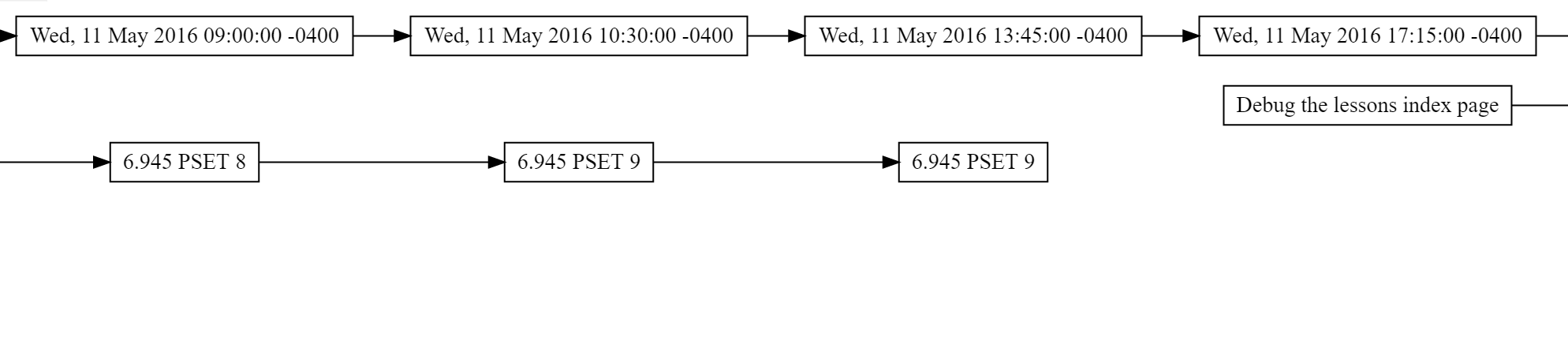
Alternately, the user can also get a visual representation of their schedule as a graph, demonstrating the dependencies and ordering everything needs to be completed in (this is a Very Wide Image broken into three parts):


This part of the program is responsible for parsing a user's given representation for a collection of tasks, validating them, and packaging all this information up so that it the rest of the project can use it.
In our system, an individual task is described (loosely) in the following manner:
('task
    ('id <id>)
    ('description <description>)
    ('duration <duration>)
    ('deadline <deadline>)
    ('duration <duration>)
    ('dependencies <dependencies>))
You can read the program technical specification for more specifics, but here's a brief description of each of the fields:
| Field Name | Field Description | Example |
|---|---|---|
<id> |
unique integer identifier for a task | 22 |
<description> |
description of a task | "This is not The Greatest Task in the World, no. This is just a tribute..." |
<deadline> |
string time representation that represents the fixed moment in time that a task must be completed by ("YYYY-MM-DD-HH-MM") |
"1958-09-09-11-58" <- This creates a deadline for the task that is September 9th 1958, at 11:58 AM |
<duration> |
string time representation for how long a given task is supposed to last ("XXd-XXh-XXm") |
"11d-22h-63m" <- This makes a task with a duration of 11 days, 22 hours, and 63 minutes. |
<dependencies> |
Comma delimited list of integer ids (possibly empty) of the tasks that must be completed before this task can be started | 22, 44 |
A user is also able to define schedule options, which allows the user to the number of hours they are able to work on any given day of the week, etc.
('schedule-options
    ('hours-per-day <hours-per-day>)
    ('time-per-task <time-per-task>)
('break-interval <break-interval>))| Option Name | Option Description | Example |
|---|---|---|
<hours-per-day> |
7 element list with time element strings, representing the amount of hours that you want to work on any given day of the week | "8h, 8h, 5h, 3h, 2h, 0h, 0h" |
<time-per-task> |
String time representation of the maximum amount of time per day that you want to spend doing a particular task ("XXh-XXm") |
"03h-15m" |
<break-interval> |
string time representation of how long of a break the user wants in between work "chunks" ("XXm-every-XXh") |
"45m-every-09h" |
The "official" method for specifying a list of tasks is just to write a plain text file. Individual tasks are separated by newlines, and the individual fields for any given task are separated by a configurable delimiter.
Example of a text file of schedule options, followed by 2 tasks (delimiter == #!):
8h, 8h, 5h, 3h, 2h, 0h, 0h #! 03h-15m #! 45m-every-09h
--BEGIN--
1 #! task 1 depends on task 2  #! 1958-09-09-11-58 #! 11d-22h-63m #! 2
2 #! task 2 depends on nothing #! 1958-09-09-01-40 #! 00d-00h-30m #!
Even though the above is the "official" method of specifying tasks, the parser uses good style, and abstracts the specifics of grabbing the individual fields of each task/schedule option to function calls:
;;emulates python's split() function
;;"1,23,3" -> ("1" "23" "3")
(define (parser:split line delimiter)
  ...)

(define (parser:task:id t)
  (cadr t))

(define (parser:task:description t)
  (caddr t))

(define (parser:task:duration t)
  ...)

...
Nothing is preventing the system from supporting other file formats, such as JSON.
{
    "id": 22,
    "description": "this is a JSON example",
    "duration": "...",
    ...
}
This part of the program does not employ generic operators or pattern matching. The task / schedule option schema is (deliberately) simple and tightly defined, and so the power/flexibility offered by both of these systems is not necessary. In this case, these systems would introduce unnecessary overhead/complexity, and would negatively affect the readability of the program.
After the whole file is parsed, each individual task is handed off to the validator:
(define (parser:valid:task? candidate task-delimiter)
  (let ((args (parser:readline args task-delimiter)))
    (and (eq? 6 (length args))
	 (parser:valid:id? (parser:task:id candidate))
	 (parser:valid:description? (parser:task:description
				     candidate))
	 (parser:valid:duration? (parser:task:duration candidate))
	 (parser:valid:deadline? (parser:task:deadline candidate))
	 (parser:valid:dependencies? (parser:task:dependencies
				      candidate)))))
As you can see above, the each individual field of the task is passed to off to individual "sub" validators:
Examples:
(define (parser:valid:id? candidate)
  (integer? (string->number candidate)))

(define (parser:valid:description? candidate)
  ...)

  (define (parser:valid:time-arg? candidate interval)
    (if (not (and (string? interval)
  		(> (string-length interval) 0)))
        (error "parser:valid:time-arg? -> Interval must be a string and have a length > 0")
        (and (string? candidate)
  	   (>= (string-length candidate) 2)
  	   (string-search-backward interval candidate)
  	   (integer?
  	    (string->number (string-head candidate
  					 (- (string-length
  					     candidate)
  					    (string-length
  					     interval))))))))

(define (parser:valid:duration? candidate)
  (and (string? candidate)
       (let ((args (parser:readline candidate "-")))
	 (pp args)
	 (and (eq? 3 (length args))
	      (parser:valid:time-arg? (car args) "d")
	      (parser:valid:time-arg? (cadr args) "h")
	      (parser:valid:time-arg? (caddr args) "m")))))
...
If any particular task is unable to be parsed, the whole read-file operation fails, and the user is informed as to which field was incorrectly specified. Otherwise, the tasks are all packaged up in simple scheme lists and handed off to the other parts of the program.
This section of the program:
- Creates Tasks, instants, and durations of time
- Uses dependencies and a scheduling heuristic to calculate task order
- Builds a schedule consisting of a list of "work blocks"
The scheduler iteratively solves the "knapsack problem" with the added constraint that after a Task is fully completed, new Tasks may become available according to the dependency tree. It also allows the user to customize how many hours of work happen per day of the week and how regularly they want a break (e.g. 15 minutes of break per 3 hours of work).
Users can also set the maximum amount of time they want to spend on any task on a given day.
Note: while the above feature was originally planned and is supported by the parser, it was never implemented on the scheduler due to time constraints.
The scheduler exposes three main functions for building a schedule: sched:add-task, sched:set-settings, and sched:get-schedule.
(sched:add-task <id> <description> <duration> <deadline> <dependencies>)sched:add-task:
- Accepts integer ids, strings for description/duration/deadline, and a list of integer ids for dependencies.
- Converts the duration and deadline into the internal time representation.
- Creates the Task object as specified.
- If the Task has no dependencies, it's added to the internal
available-taskshash table --- otherwise,blocked-tasks.
(sched:set-settings <hours-per-day> <time-per-task> <break-interval>)sched:set-settings:
- Parses the string arguments into internal time objects.
- Stores the resulting values in globally available config variables which get queried while building the schedule.
(sched:get-schedule)sched:get-schedule is a thunk which analyzes all tasks which have been added and uses the "knapsack" algorithm to build and return a list of appropriately sized work blocks which each represent one duration of work on a given task (i.e. a single task may get mapped into multiple work blocks).
One preliminary problem which needed solving was easily adding and subtracting dates and durations of time. If the scheduler is currently at 3:00pm on May 15th and we add a two hour work block, what will the new current time be? Out of the box, Scheme doesn't have a description for a duration of time.
Scheme's three representations of time are:
- Universal time, number of seconds since January 1st, 1900.
- Decoded time, a human-readable representation with field accessors.
- File time, an OS-specific timestamp we didn't use.
We defined two generic operators, t+ and t-, which allow for the addition and subtraction of instants and durations. An instant is essentially a wrapper over a Scheme decoded-time, while a duration is an association list of integer values for days, hours, and minutes. While we also could've extended built-in arithmetics, this approach seemed lighter-weight given that we only need addition and subtraction on two new types.
(t+ left right)(t+ <duration> <duration>): Returns a new duration whose length is the sum of the original two.(t+ <duration> <instant>): Returns a new instant which isdurationfurther in the future from the original one.(t+ <instant> <instant>): Throws an error, the sum of two dates doesn't make any intuitive sense.
(t- left right)(t- <duration> <duration>): Returns a new duration of lengthlongerDuration - shorterDuration(automatically checks which is larger).(t- <duration> <instant>): Returns a new instant which isdurationfurther back in the past from the original one.(t- <instant> <instant>): Returns a new duration which is the amount of time between the two instants.
Under the hood, these operations are performed by
- Converting durations into an integer number of seconds.
- Converting instants via
decoded-time->universal-time. - Performing all math on second values.
- Converting back in both directions at the end.
In order to apply the "knapsack problem" to the task scheduling problem, each task needs to have a weight and a value. Intuitively, the weight of a task is its duration (or the duration remaining). The value, however, is less obvious. We decided to use a metric which models urgency: <work-hours-remaining-until-task-deadline> - <task-duration>. <work-hours-remaining-until-task-deadline> is calculated by summing the available hours over all of the days until the deadline (i.e. (* <hours-per-task-per-day> <number-days>)).
Each time the system calculates a new work block, it checks the value of this metric for all of the available tasks and then selects the one with the smallest value. If the value were ever negative, for instance, that would mean a task is going to be late given its deadline, duration, and constraints. The task with the smallest value is the most urgent and is assigned the next work block.
Internally, the algorithm calls a few key functions (which are helped by many others).
(sched:compute-time-remaining task current-time)yields the duration of time between now and a task's deadline, as described above.(sched:select-task)is a thunk which usessched:compute-time-remainingto find the most urgent task inavailable-tasksand return it.(sched:allocate-work-block task)takes a task, calculates(min <remaining-daily-hours> <task-duration> <time-remaining-until-break>), adds a new work block of that duration starting at the current time to the schedule, and updates the original task with the remaining duration.(sched:add-work-block)is a thunk which checks the current values of<remaining-daily-hours>and<time-remaining-until-break>to see ifcurrent-timeneeds to be moved forward. If the former variable has a zero length duration, thencurrent-timejumps to the next day. If the latter variable has zero length,current-timejumps forward one break interval.(sched:refresh-available-tasks)performs two iterations. First, it checks allavailable-tasksand moves any whose duration is now 0 tocompleted-tasks. Second, it checks allblocked-tasksand moves any task whose dependencies are now all incompleted-taskstoavailable-tasks.
The main interface function, (sched:get-schedule):
- Checks if there are blocked tasks but no available tasks, and throws an error if so.
- Checks if there are no more blocked or available tasks, and returns the
schedulelist if so. - Otherwise, runs:
(sched:add-work-block)
(sched:refresh-available-tasks)
(sched:get-schedule)
Where (sched:add-work-block) contains a call to (sched:allocate-work-block (sched:select-task)) and (sched:select-task) contains all the calls to sched:compute-time-remaining.
As is, the system has a number of limitations which could be remedied to make it more practical. In no particular order:
- The schedule starts every day at 9am and then assigns the desired number of hours in work blocks from that point onward. A more powerful system could let the user specify the times they want to start and stop working each day, or even multiple working intervals per day.
- The system builds a schedule starting from the instant the function is run. If the user making a plan for an upcoming month of work, they might want to run the function in April but have the schedule begin in May. A more powerful system would let the user input what date/time they'd like their schedule to begin at.
- Currently, the system has no concept of fixed events in the user's schedule which must be planned around --- this makes it almost entirely impractical. A more useful system would also give the user an
add-eventfunction which blocks off a given time range as occupied and then schedules tasks around it. - The system does not currently warn the user if their tasks are unable to be completed by the given deadline --- a better system would build the schedule and deliver a series of warnings to the user letting them know which tasks were unable to be completed on time. Even better, it could tell them why, demonstrating which dependent tasks, if any, kept it from being begun with sufficient time to finish.
This block of the program is responsible for taking input from the task scheduler, as a list of dependencies, and generating graphviz dot files to display the schedule.
The goal of the graphics block will be to accomplish this task with as few limitations on the format of the input as possible. To do this, it will work on generic elements which the user will be able to define. If another format of input is desired, simple changes to the input format are all that's needed typically.
The input for the graphics block will be an list with the work blocks and a specified format. The format will be built using generic elements. To define a format you must define the generic elements and pass both the format and elements into the function.
;; To define a generic element
; predicate: checks whether passed element is of correct format
; return: function to be called with element to extract information
(d:generic-element predicare return)
given that a work block has this format
('workblock
    ('block_id <id>)
    ('dependent_ids <dependencies>)
    ('description <description>)
    ('taskid <taskid>)
    ('duration <duration>)
    ('starttime <deadline>)
    ('deadline <deadline>)
    ('duration <duration>))
We would have to define generic elements for blockid, dependent_ids, description, etc. so an example format might look something like
(d:block_id d:dependent_ids d:description ...)where each of these are generic elements passed as a list.
| Field Name | Field Description | Example |
|---|---|---|
block_id |
The ID for this specific work block | 2320 |
dependent_ids |
A list of the IDs that depend on this element | '(2032 0329 9402) |
taskid |
The ID for the task that this work block belongs to | 4932 |
starttime |
The date and time that a task is scheduled to begin | "0d-3h-10m" |
Note: Much of this is discussed more thoroughly earlier in the Parser section.
As discussed before generic elements are defined using
(d:generic-element predicare return)Here the key function is the return function. This is what decides how the element behaves and what it will be used for. For example, for dot to work, each of the blocks must have their own unique id (this is what the block_id) is, and we define a generic element for it. The return function will return an element, which is a list where the first item is a symbol representing the type of element and next blocks are used for data. The identifying symbol is used by the assembler to know how to use the element.
There are three general types of elements:
These are used as the names for nodes in dot. These are the base for the graph.
There are two types: start and end. These represent the start and end nodes of edges.
These are options that are added onto nodes or edges on the graph. These will typically be different properties that are applied to the graph (such as style properties like color, etc).
There are two types: props and nprops these are edge and node properties respectively.
These are generic elements that don't fit into any other categories, the user has the power to define these as needed. An example of a special element is rank. This is because you must create a subgraph for setting rank. So creating a special element for it makes it a lot easier to define.
We use a generic procedure to operate on special elements, this makes it easier to extend the functionality to apply to any number of special elements the user wants to make.
Combination is a matter of processing them into a graph format.
('graph (('linename1 start end (props) (nprops) (special)) ('linename2 ...) ...))The graph is a linked list where each element is a named line to be generated in the final output.
This graph is generated using the d:elem->graph function in generate.scm.
This format allows for generation to be simple, to create a new edge, we can simply create a new element in the graph alist. The other case, if we want to edit or append something to an element, we can search the graph alist, and edit that element individually.
This is supposed to be internal, but extending this to add new features is straightforward, as you simply need to define the function that will edit the graph for a specific element.
The final output is generated by converting the graph object into a string and writing that to a file. The conversion into a string is fairly straightforward. It's done using d:graph->str.
The one slight modification we had to make for this project was to generate a subgraph that went along with the original. The subgraph was simply a line of times, which corresponded and had to be lined up (using rank) with the original one. We generate the subgraph and ranks separately and append them to the graph string.
Then we run a terminal command using mit-scheme's built in functions to process the generated .dot file. The code for writing the file and running the terminal code are based on to that used in the problem sets.