This repository contains a ride-sharing platform built with a microservices architecture. The current workspace includes Go services, a Next.js web client, local Kubernetes development with Tilt, and production deployment assets for selected services.
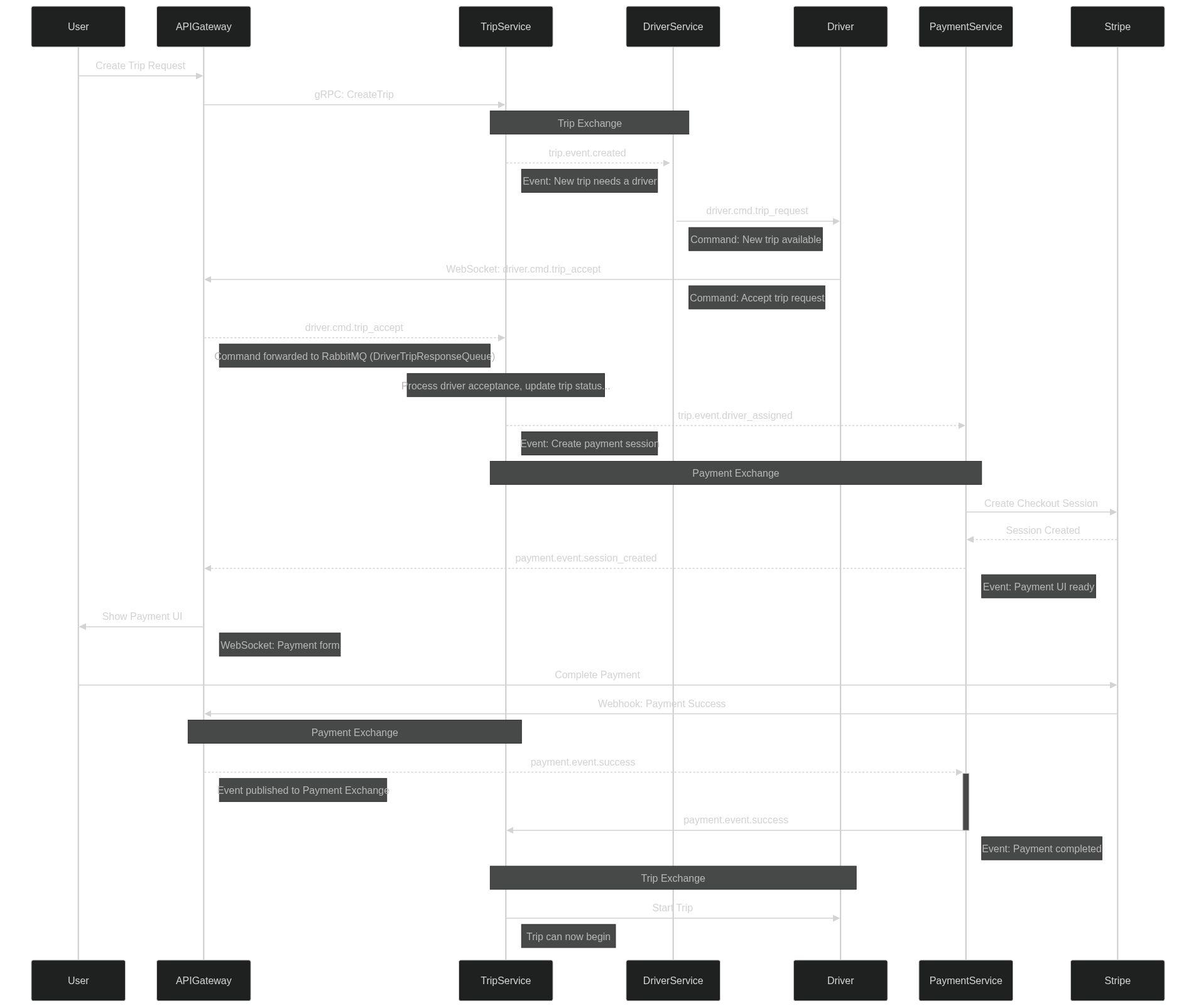
services/apigateway: HTTP and WebSocket gatewayservices/trip-service: trip orchestration and trip domain logicservices/driver-service: driver-related backend serviceweb: Next.js frontendinfra/deploy/development: local Kubernetes and Docker assets used by Tiltinfra/deploy/production: production Dockerfiles and Kubernetes manifests currently available in this repository
Install the following tools before starting the local environment:
- Docker
- Go
- Tilt
kubectl- A local Kubernetes cluster such as Minikube or Docker Desktop Kubernetes
- Install Homebrew.
- Install Docker Desktop.
- Install Minikube.
- Install Tilt.
- Install Go:
brew install go- Install
kubectl.
Use WSL for the local development workflow.
- Install WSL.
- Install Docker Desktop.
- Install Minikube.
- Install Tilt.
- Install Go inside WSL:
wget https://dl.google.com/go/go1.23.0.linux-amd64.tar.gz
sudo tar -xvf go1.23.0.linux-amd64.tar.gz
sudo mv go /usr/local- Add Go to your shell configuration:
export GOROOT=/usr/local/go
export GOPATH=$HOME/go
export PATH=$GOPATH/bin:$GOROOT/bin:$PATH- Reload your shell and verify the installation:
go version- Install
kubectl.
Start the development environment with Tilt:
tilt upMonitor workloads with:
kubectl get podsOr open the Minikube dashboard:
minikube dashboardThis section describes a manual deployment flow to Google Cloud. It is best used as a reference before formalizing the process in CI/CD.
export REGION="europe-west1"
export PROJECT_ID="<your-gcp-project-id>"The production Dockerfiles currently present in this repository are:
docker build -t ${REGION}-docker.pkg.dev/${PROJECT_ID}/ride-sharing/api-gateway:latest --platform linux/amd64 -f infra/deploy/production/docker/api-gateway.Dockerfile .
docker build -t ${REGION}-docker.pkg.dev/${PROJECT_ID}/ride-sharing/trip-service:latest --platform linux/amd64 -f infra/deploy/production/docker/trip-service.Dockerfile .Create a Docker repository in Google Cloud Artifact Registry to store the built images.
docker push ${REGION}-docker.pkg.dev/${PROJECT_ID}/ride-sharing/api-gateway:latest
docker push ${REGION}-docker.pkg.dev/${PROJECT_ID}/ride-sharing/trip-service:latest
If authentication fails:
- Run
gcloud auth loginand select the correct project. - Configure Docker authentication:
gcloud auth configure-docker ${REGION}-docker.pkg.devCreate a Google Kubernetes Engine cluster either through the gcloud CLI or the Google Cloud Console.
gcloud container clusters get-credentials ride-sharing --region ${REGION} --project ${PROJECT_ID}The production manifests under infra/deploy/production/k8s use {{PROJECT_ID}} placeholders. Replace those placeholders before applying the manifests.
kubectl apply -f infra/deploy/production/k8s/app-config.yaml
kubectl apply -f infra/deploy/production/k8s/trip-service-deployment.yaml
kubectl apply -f infra/deploy/production/k8s/api-gateway-deployment.yaml
For redeployments:
kubectl apply -f infra/deploy/production/k8s
kubectl rollout restart deploymentRetrieve the external address for the API gateway:
kubectl get servicesTo switch back to your local Kubernetes context:
kubectl config get-contexts

# Docker Desktop
kubectl config use-context docker-desktop

# Minikube
kubectl config use-context minikube