This project is no longer actively maintained. Development was discontinued due to changes in Google Play Store requirements, particularly around privacy notices and compliance policies that significantly increased the maintenance burden for small hobby projects.
The source code is available for anyone interested in continuing development—feel free to fork this repository if you'd like to maintain or improve it.
UDP Sender is a simple application to allow sending UDP packets.

It supports the implicit Intent Intent.ACTION_SENDTO with a udp://host:port/data format URI.
- data is treated as hex if it starts with 0x.
- If a string starting with 0x is to be sent it can be escaped as \0x
Added in v1.3.1 - Current in Beta see http://goo.gl/reibxw to join
- Allow broadcast packets to be sent.
- Fixed a bug causing a period to be prematurely inserted when entering an IP.
Added in v1.3
- Added support for Tasker to do variable replacement for the host/port as well as the text.
- Remembers your settings when you quit and re-launch the app.
Added in v1.2
- Now supports multi line text messages.
- Bugfix for Send button not working in Landscape mode.
Added in v1.1
- Also acts as a plugin for Locale and Tasker.
- Variable replacement is supported for the Tasker plugin in the text field.
- Changed theme to Holo (Dark)
- Removed unused permissions
- Various tweaks/fixes
Tasker plugin support is now complete and should be straight forward to use.

Alternatively UDP packets can be sent via Tasker with the Misc/Send Intent action.
Just set it up as follows:
- Action = android.intent.action.SENDTO
- Data = udp://host:port/data
- Target = Activity

Example for a www.limitlessled.com Wi-Fi bridge at 192.168.1.100 to turn on all the white LEDs
- Action = android.intent.action.SENDTO
- Data = udp://192.168.1.100:50000/0x350055
- Target = Activity
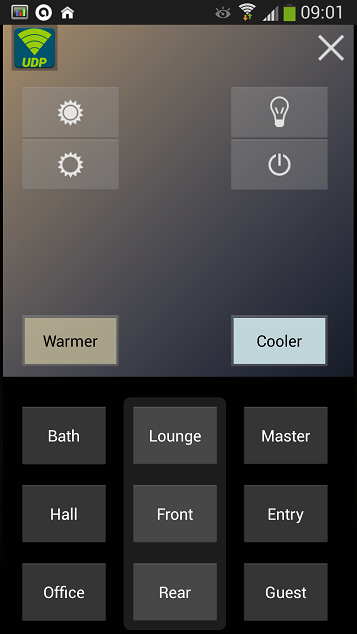
You can get a copy of my current Tasker project (or at least a portion of it) Lights.prj.xml that I'm using.
To give you an idea of how I'm using it I have the following:
- Gesture control via my launcher (Nova) to turn all lights on/off/full bright/night mode and dim/brighten lights.
- Using the Scene shown above I can turn all/individual zones on/off and control bright/dim/warm/cool.
- NOTE: A swipe up/down in the colored square controls a bright/dim ramp and left/right for warm/cool.
- An NFC tag on my bed that when tapped will turn the lights off, or keep some in night mode if I have guests.
- When my phone connects to the Wi-Fi, and it's between sunrise and sunset, my entry hall light is turned on.
NOTE: It should be obvious but you will need to edit this to use it
- Insert your own Weather Underground API key instead of <YOURAPIKEYHERE>.
See http://www.wunderground.com/weather/api/d/docs for more info on getting one.
It's used by the "Get Sunrise/set" which is called once a day to update the global variables. I use this in "Check Night Time" to only turn my entry light on at night when I arrive home and connected to Wi-Fi.
-
You'll want to replace the string for my SSID with your own. Search and replace C86241. Or remove the Stop commands that prevent things working when not on the correct Wi-Fi.
-
You'll obviously need to change IPs and Names to suit your setup.
-
Finally if you're using a device that has a different size screen (my S4 is 1920x1080) you'll need to edit the scene so it fits and adjust the maths for the gestures.