


English | English (UK) | 한국어 | 日本語 | 简体中文 | Deutsch | Français | Italiano | Português | Русский
This project is a heavily expanded version of the original iRon overlay. While preserving the core philosophy of the original project—being extremely lightweight and free of external runtime dependencies—it adds powerful, must-have features for iRacing players.
Based on the original iRon project (by lespalt): https://github.com/lespalt/iRon
1. 💾 Global Layout Auto-Save
- The original iRon suffered from window positions resetting every time the application restarted.
- iRon-Advanced saves your screen coordinate layout, window sizes, and overlay toggle states (On/Off) in the Windows
Documents\iRon_Advanced\config.jsonpath. When re-launched, your last layout is perfectly restored!
2. 📊 Enhanced Standings & Telemetry
- Added a 3-letter Country Initial Badge (e.g.,
[KOR],[USA]) right before the driver names in the Standings overlay to quickly recognize competitors' origins. - Cleaned up redundant car model texts for an extremely professional, clutter-free look.
- Added real-time Expected iRating changes (+/-) based on the Elo rating system directly to the Relative overlay.
3. 🚀 Brand New Overlays Added:
- Left & Right Visual Spotter (NEW): Visual warnings for blind spots. The left and right panels are split and can be dragged/resized independently! They flash Yellow or Red based on the actual proximity distance of cars alongside you, and remain 100% transparent when clear.
- Radar (Proximity Radar): A top-down proximity radar that stays completely transparent when no cars are nearby to avoid cluttering your vision.
- Incident Warning (Smart Incident): Blinking warning banner and exact distance display for crashes within 150m ahead.
- Traffic (Multiclass Traffic): Dynamic blue flag UI based on lap time pace differences when faster classes approach from behind.
The latest binary release can be found here.
Like the Relative box in iRacing, but with additional information such as license, iRating, laps driven since the last pit stop, and real-time Expected iRating changes for current class participants. You can also highlight your friends by adding their names to a buddy list. At the top is an optional minimap. It can be set to either relative mode (own car fixed in the center) or absolute mode (start/finish line fixed in the center).

A dashboard that concentrates important pieces of information for which you would otherwise have to flip through various boxes in iRacing. The fuel calculator shows the estimated remaining laps, remaining amount of fuel, estimated fuel used per lap, estimated additional fuel required to finish the race, and the fuel amount that is scheduled to be added on the next pit stop.

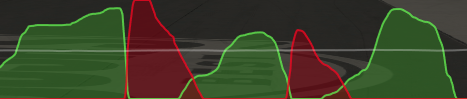
Shows throttle/brake/steering in a moving graph. Extremely useful to practice consistent trail braking.
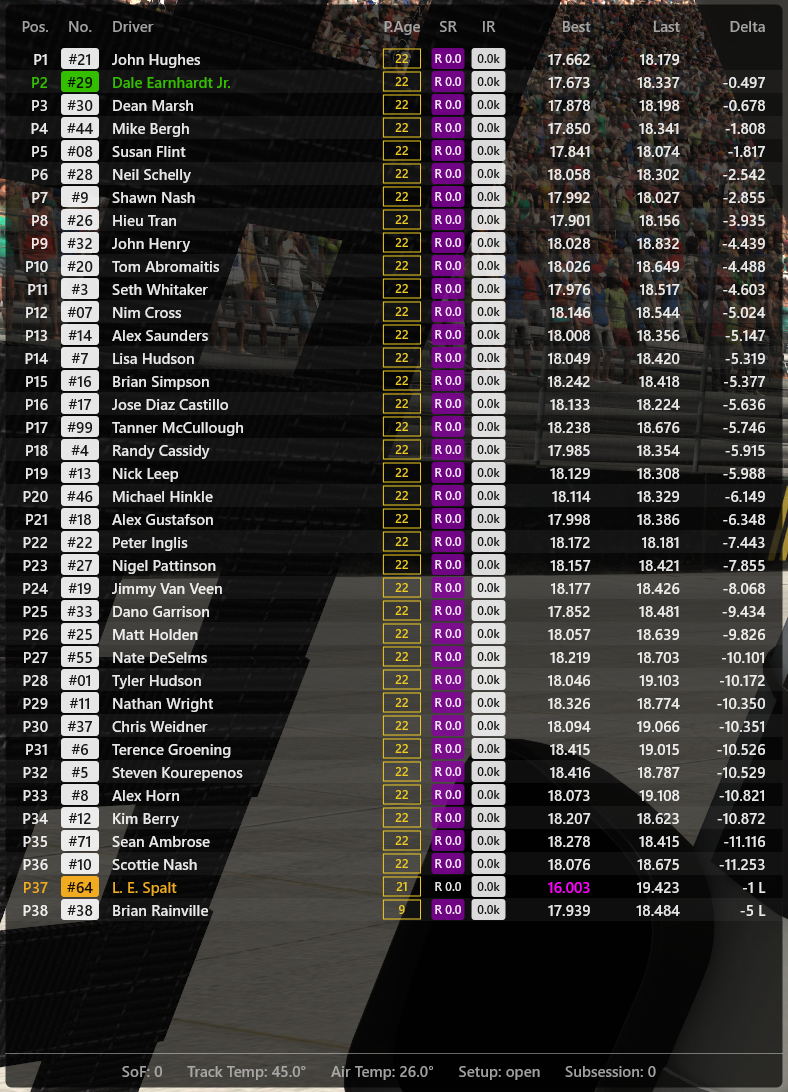
Shows the standings of the entire field, including safety rating, iRating, number of laps since the last pit stop ("pit age"), and a clean Country Initial Badge left of every driver's name. Mainly useful during caution periods or pre-race to get a sense of the competition level.
We skip the screenshot for this one. It is a simple blank black rectangle, useful to cover up distracting in-game dashboards like the one in the next-gen NASCAR.
A visual spotter that draws colored rectangles on the left and right sides of your screen when a car is in your blind spot.
- Left and Right panels are independently configurable, movable, and resizable.
- Displays a Yellow caution bar for nearby cars, and shifts to a bright Red alert bar if a car gets dangerously close (<= 2.2m).
- Completely transparent by default, becoming semi-transparent only when layout editing is active.

A proximity radar rendering a top-down view of cars around you.
- Remains 100% transparent by default when no cars are nearby to maintain screen clarity.
- Activates and renders a top-down view of surrounding vehicles once they enter close range.

A smart incident warning system. Instead of just showing a generic yellow flag banner, this overlay calculates if a car ahead of you has gone off-track during a caution. If a crashed or off-track car is detected within 150 meters ahead, it renders a prominent blinking warning banner specifying the distance to the crash.

A dynamic blue-flag warning system for multiclass racing. It compares the estimated lap times of surrounding cars to yours. If a faster class car approaches within a critical time gap from behind, it triggers a progressive glow UI that flashes intensely blue/white to warn you without blocking your vision.

Shows real-time comparisons with the drivers immediately in front and behind you. Shows position, name, gap, lap times, and sector times (S1, S2, S3) of the last completed lap.
- Highly useful to monitor where you are losing or gaining time compared to your immediate rivals.
- Features a prominent highlight band for your own row.
Displays real-time tracking information of the driver who hit you.
- Automatically triggers when a collision increases your incident count.
- Shows the offender's name, their current race position, and the real-time distance gap in meters.
- In the Relative overlay, the offending driver's row will pulse red, their car number background will turn red, and their name will be prefixed with
[BOMB].
The app does not require installation. Just copy the executable (.exe) to a folder of your choice.
To use it, simply double-click the executable. It doesn't matter whether you do this before or after launching iRacing. A console window will pop up, indicating that iRon is running. Once you're in the car in iRacing, the overlays should show up. We highly recommend running iRacing in Borderless Window mode.
To place and resize the overlays, press ALT-J. This will enter a layout edit mode where you can move overlays around with the mouse and resize them by dragging their bottom-right corner. Press ALT-J again to go back to normal mode.
Overlays can be switched on and off at runtime using the hotkeys displayed during startup. All hotkeys are configurable.
Your layout and settings are automatically and globally saved to:
Documents\iRon_Advanced\config.json
- ALT-J: Move and Resize Mode (Layout Editing)
- Ctrl-Space: Toggle Standings
- Ctrl-1: Toggle DDU (Dashboard)
- Ctrl-2: Toggle Inputs (Pedal Graph)
- Ctrl-3: Toggle Relative Box
- Ctrl-4: Toggle Cover Box
- Ctrl-5: Toggle Spotters (Left/Right synced)
- Ctrl-6: Toggle Proximity Radar
- Ctrl-7: Toggle Incident Warning
- Ctrl-8: Toggle Tire Dash
- Ctrl-9: Toggle Head to Head Widget
- Ctrl-0: Toggle Bomb Avenge Widget
- Ctrl-Shift-D: Cycle Global Display Mode (Race Only / Replay Only / Both)
This app is built with Visual Studio 2022. The free version should suffice, though we haven't verified it. The project/solution files should work out of the box. Depending on your Visual Studio setup, you may need to install additional prerequisites (static libs) needed to build DirectX applications.
There are no runtime dependencies other than standard Windows components like DirectX. Those should already be present on most if not all systems that can run iRacing. Build dependencies (most notably the iRacing SDK and picojson) are kept to a minimum and are included in the repository.