Antigravity Skill Manager is a VS Code extension designed to supercharge your AI coding assistant. It allows you to discover, manage, and install "Skills" (specialized instructions and tools) for Claude Code and Antigravity.
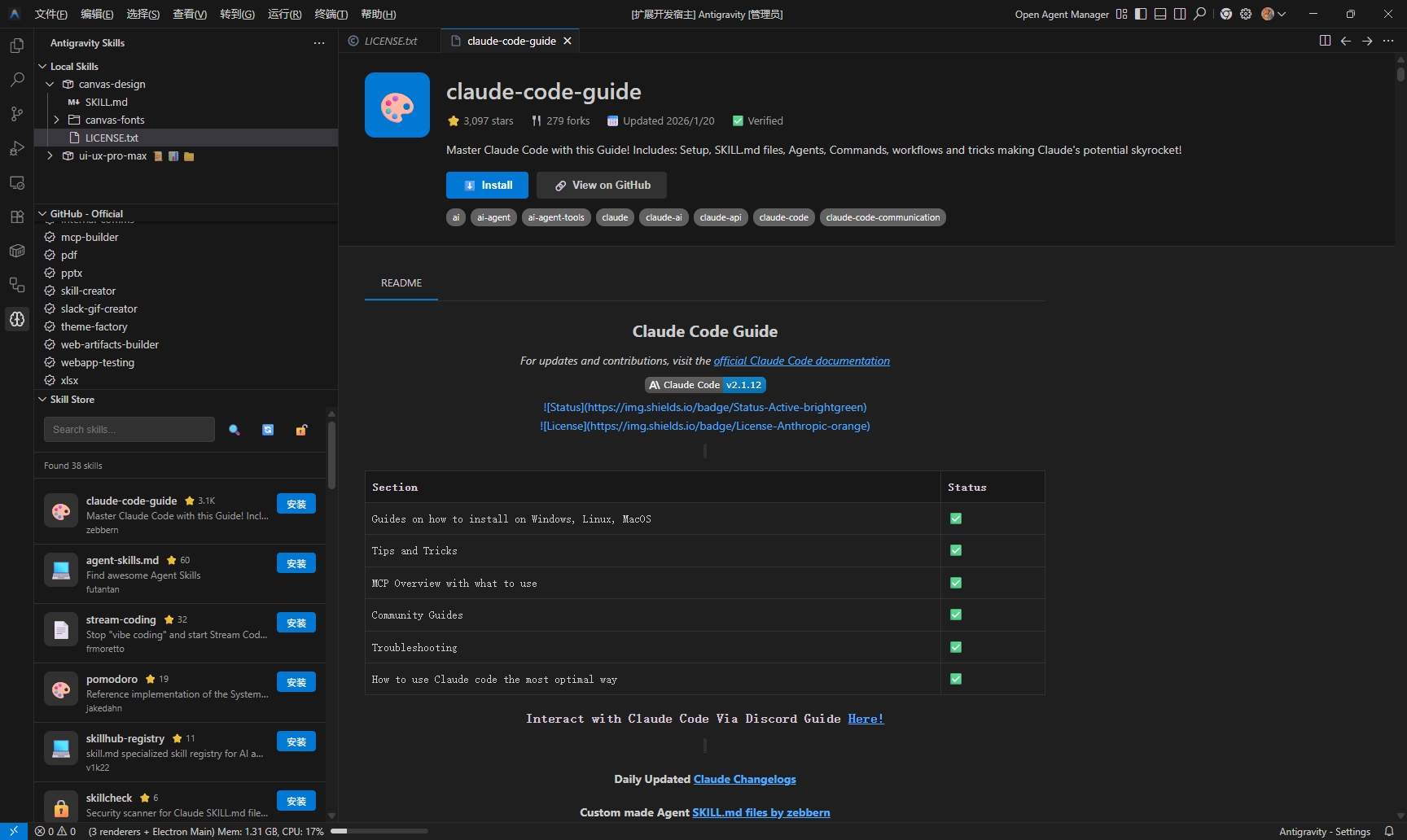
Browse a vast collection of community-created skills directly within VS Code.
- Rich UI: Experience a marketplace-like interface with icons, ratings, and authors.
- Search: Instantly search GitHub for skills matching your needs.
- One-Click Install: Install skills seamlessly without leaving the editor.
- GitHub Auth: Built-in GitHub authentication to bypass API rate limits.
View detailed information about any skill before installing.
- README Rendering: Automatically renders the skill's
README.mdorSKILL.mdwith full Markdown support (tables, images, links). - Metadata: Check stars, forks, verification status, and last update time.
- Image Support: Images in READMEs are automatically processed to display correctly.
- Official Skills: Browse curated skills from
anthropics/skills. - Community Discovery: Automatically discovers skills from the community using
SKILL.mdmarkers. - Verified Only: Filters repositories to ensure valid skills with documentation are shown.
- Manage your installed skills in
~/.gemini/antigravity/skills(or custom path). - Create new skills quickly with local templates.
- Edit existing skills directly in VS Code.
- Open this project in VS Code.
- Run
npm installto install dependencies. - Press
F5to start the extension in a new Debug window.
- Open the Manager: Click the 🧠 icon in the Activity Bar.
- Browse Skills:
- Local Skills: Installed skills on your machine.
- GitHub - Official: Curated skills from Anthropic.
- Skill Store: Searchable community marketplace.
- Install: Click "Install" on any skill card or right-click a tree item.
- View Details: Click on any skill card to open the Details Webview.
| Setting | Description | Default |
|---|---|---|
antigravity.skillsPath |
Custom directory for installing skills | ~/.gemini/antigravity/skills |
antigravity.githubToken |
(Optional) Personal Access Token for GitHub API | - |
antigravity.minStars |
Minimum stars filter for community skills | 0 |
antigravity.showUnverifiedSkills |
Show repositories without SKILL.md |
false |
- Fork the repository
- Create your feature branch (
git checkout -b feature/amazing-feature) - Commit your changes (
git commit -m 'Add some amazing feature') - Push to the branch (
git push origin feature/amazing-feature) - Open a Pull Request
This project is licensed under the MIT License - see the LICENSE file for details.