⚠️ Disclaimer: This app is provided as-is and is not a medical application. The rings are not medical devices. This app does not replace professional healthcare. Always consult your doctor for any medical concerns.
Android port of PulseLoop — a smart ring companion app for the 56ff/Jring and Colmi/Yawell QRing platforms.
- Open PulseLoop and navigate to the Today tab.
- Tap the Bluetooth icon (top-right) to open the ring scanner.
- With your ring nearby and awake (take it out of the charging case briefly), tap your ring when it appears in the device list.
- The ring will connect, sync history, and metrics will begin populating.
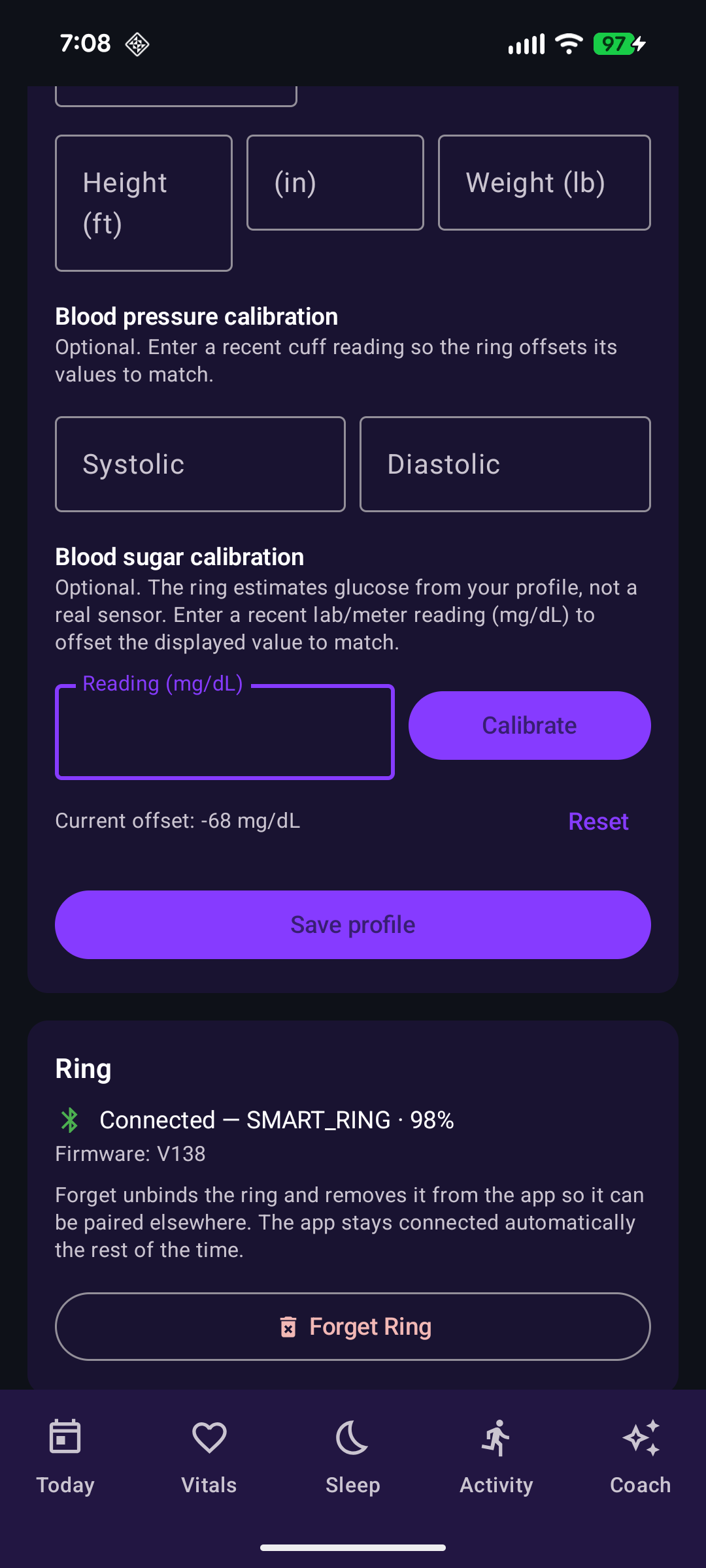
For accurate blood sugar and calorie estimation on 56ff/Jring rings, the ring needs your physical profile. Enter your age, height, weight, and sex in the Settings menu under Profile. This data is stored only on your phone — it is never transmitted off-device.
Blood pressure is a direct sensor reading — it does not require user profile. Colmi rings do not need profile at all — they measure all metrics directly from their sensors and do not support blood pressure or blood sugar.
For 56ff/Jring rings, you can optionally calibrate blood pressure by entering reference values from a cuff. For blood sugar, you can enter a reference lab/meter reading to apply a display offset. These are stored locally as calibration offsets.
| Pairing | Today Dashboard | Vitals Dashboard |
|---|---|---|
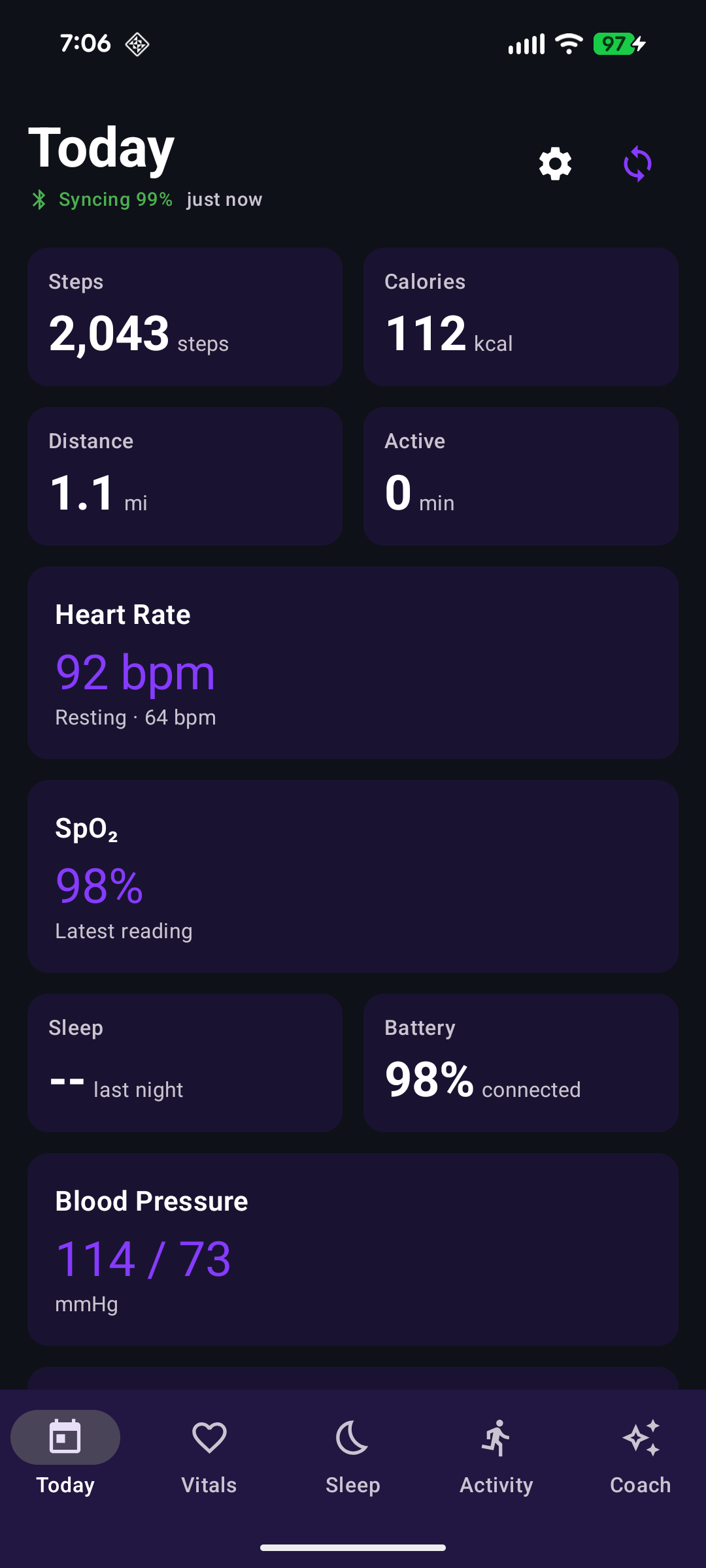 |
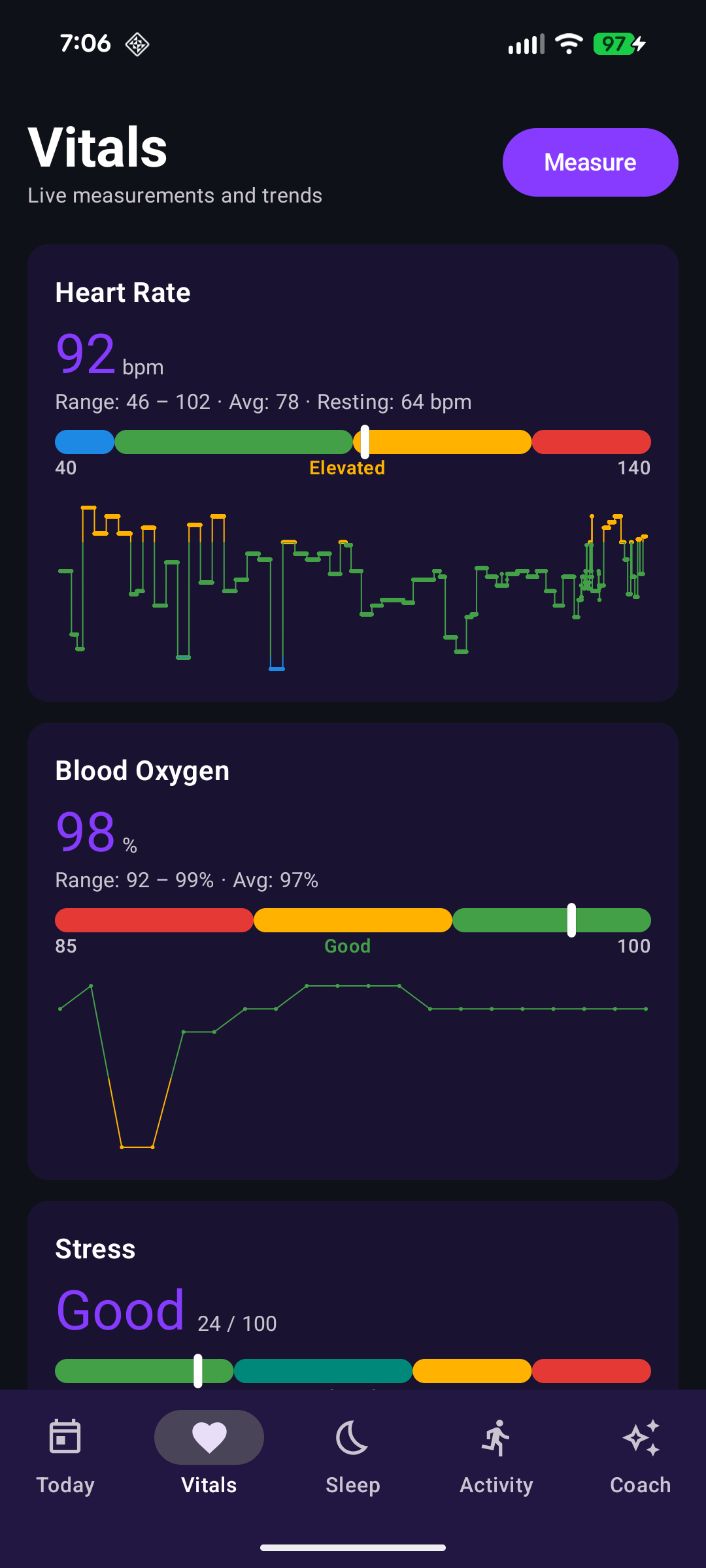 |
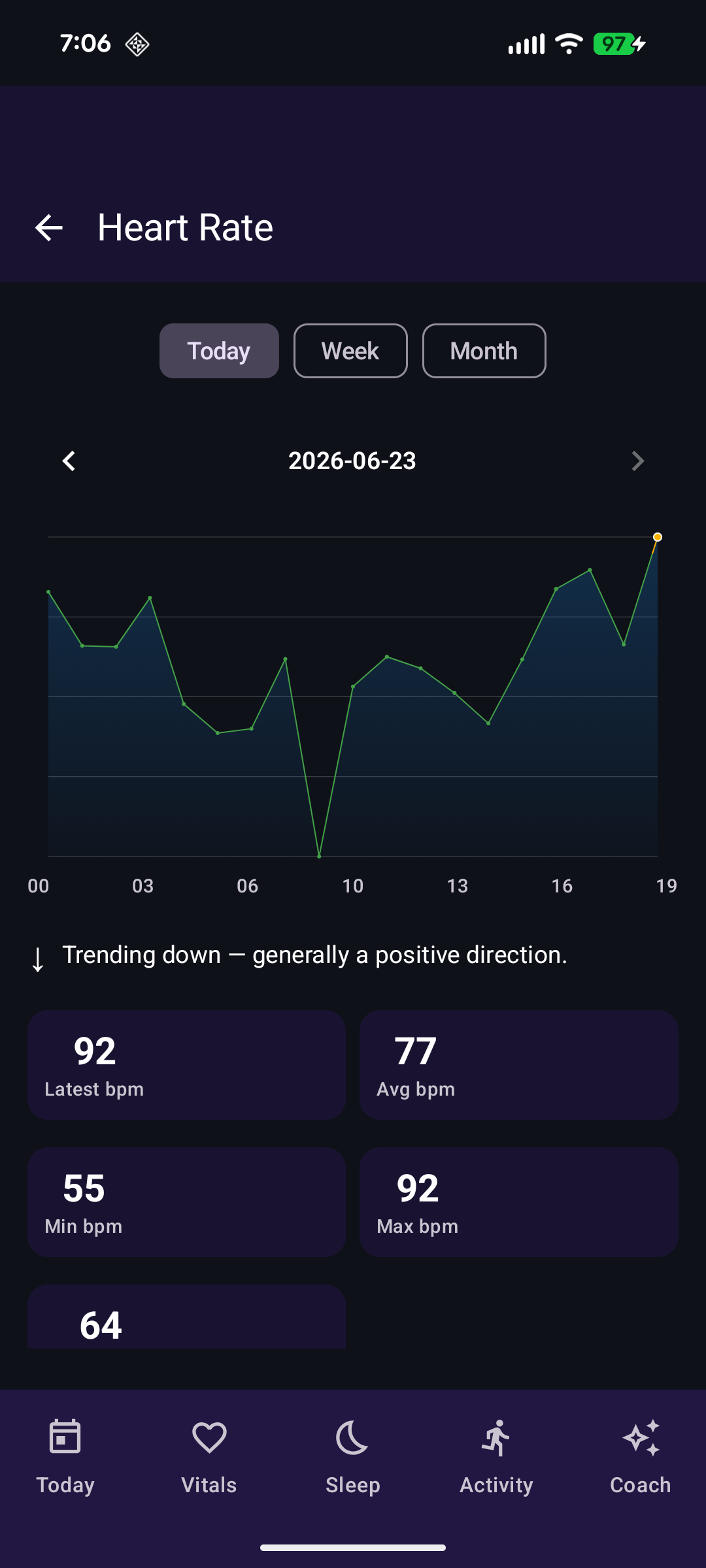 |
| Vitals Detail | Sleep Score |
|---|---|
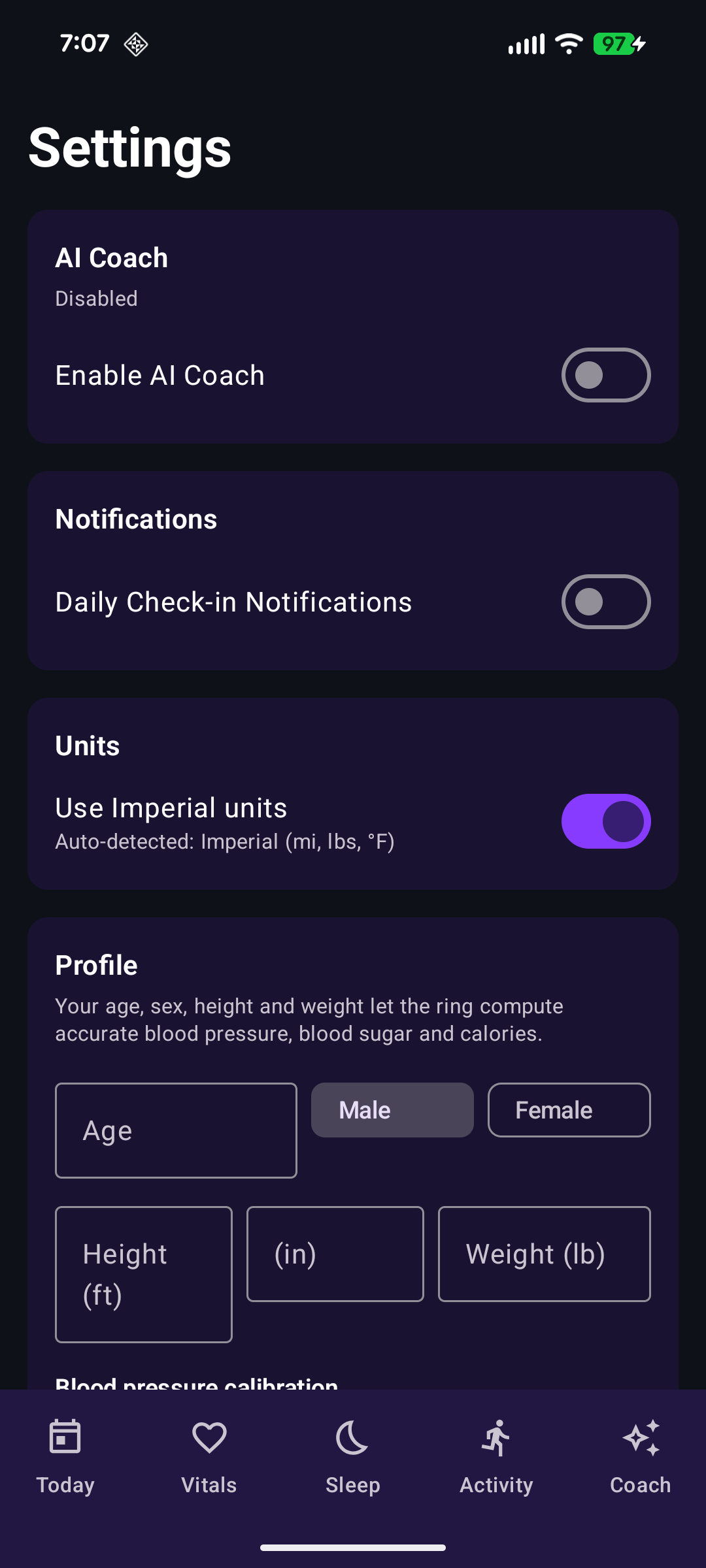 |
 |
- Threshold bars on every metric panel — color-coded horizontal bar (Good → Normal → Borderline → High) showing where the current value falls within reference ranges
- Tap-through detail screens for every metric — tap any panel to open a full trend view with Today/Week/Month period selector, zone-colored line chart, current-value marker, stat tiles (Latest/Avg/Min/Max), and non-medical explainer + disclaimer
- Zone-colored trend charts — detail screen charts color data points by threshold zone (green/amber/red) with a vertical gradient line at zone boundaries. A white-ringed marker highlights the most recent reading
- Range/avg summaries — all panels display
Range: min – max · Avg: avgbelow the value - Combined measurement button — one-tap spot measurement for BP, SpO₂, stress, fatigue, and blood sugar with a visible countdown progress bar. Found at the top of the Vitals screen.
- User profile — age, height, weight, and sex stored locally on-device and sent to 56ff/Jring rings for blood sugar (profile-derived estimate) and calorie algorithms. Blood pressure is a direct sensor reading. Colmi rings do not use this.
- Blood pressure calibration — enter reference systolic/diastolic values from a cuff to apply an offset. 56ff/Jring only.
- Blood sugar calibration — enter a reference glucose reading from lab work or a glucometer to calibrate the ring's profile-derived blood sugar estimates. 56ff/Jring only.
- Forget ring — removes the ring from the app in one tap. The unbind command is sent to the ring to release it for pairing with other apps.
- Improved Bluetooth keep-alive — Android-specific connection reliability improvements including keepalive pings, connection watchdog with automatic recovery, and foreground reconnection on app resume to handle Doze and idle disconnects gracefully.
- Sleep stage breakdown — Deep/Light/Awake percentage pills color-coded per stage
- Sleep coach insights — contextual chip-based recommendations from the onboard sleep analysis engine
- Live workout recording with GPS tracking, HR zone display, and session history
- Reactive Room database with
Flow-based queries — data appears live as the ring syncs - Local-midnight-aligned day bucketing for consistent daily stats across timezones
- Calibrated display pipeline:
bpAdjustSystolic/bpAdjustDiastolicoffsets applied in ViewModels,glucoseOffsetMgdlapplied to blood sugar readings - Pull-to-refresh on Today dashboard triggers immediate ring sync
- Forget ring may not fully clear the Bluetooth stack — removing the ring via the Settings menu has a chance of leaving a stale entry in the Android Bluetooth stack, causing the ring to be invisible to PulseLoop and other apps during subsequent scans. Restarting the phone resolves this.
The Android port extends the iOS protocol implementation with additional sensor decodes, connection stability improvements, and on-ring calibration support.
Combined measurement (0x24) — 9-byte payload. Blood pressure (bytes[2]-[3]) is a direct PPG sensor reading. Blood sugar (byte[7]) is a profile-derived estimate.
| Byte | Metric | iOS | Android |
|---|---|---|---|
| 0 | Command echo (0x24) | ✅ | ✅ |
| 1 | Heart Rate (bpm) | ✅ | ✅ |
| 2 | Systolic (mmHg) | ✅ | ✅ |
| 3 | Diastolic (mmHg) | ✅ | ✅ |
| 4 | SpO₂ (%) | ✅ | ✅ |
| 5 | Fatigue (0–100) | — | ✅ |
| 6 | Stress (0–100) | — | ✅ |
| 7 | Blood Sugar (mmol/L ×10 → mg/dL) | — | ✅ |
| 8 | HRV (ms) | — | ✅ |
Blood sugar conversion — ring reports mmol/L × 10; Android converts to mg/dL for display.
Heart rate history (0x16) — multi-packet protocol with sub-type routing:
0xF0header block: total packet count0xAAindex block: current position tracking0xA0data block: 12 raw 1-min samples → 2 averaged readings (6 samples each)0xFFsync complete marker
Device info (0x0C) — builds firmware version from payload bytes in CID + DID + V + version format.
Activity history (0x10) — 15× 1-min step buckets per packet, local-time boundary detection for day stream completion.
App identity (0x48) — persistent app ID sent on connect so the ring routes data to this app.
User profile (0x02) — age, gender, height, and weight pushed to the ring in metric units to feed the ring's on-device blood sugar (profile-derived estimate) and calorie algorithms. Blood pressure is a direct sensor reading and does not use user profile. This is only applicable to 56ff/Jring rings.
BP calibration (0x33) — systolic/diastolic reference values pushed to the ring for on-device offset correction, in addition to app-side display calibration.
Bind protocol (0x4B) — ring-driven handshake (INIT → APP_START → ACK → SUCCESS) for stable pairing, plus unbind (UNBOND → UNBOND_ACK) on device forget.
- Keepalive ping (0x3A) — every 15s to prevent the ring's ~20s idle timeout from dropping the link
- Write ACK timeout — 3-second timeout unblocks the command queue on missed acknowledgements
- Connection watchdog — monitors GATT activity; forces reconnect after 10–20s of silence
- Foreground reconnection — reconnects on app resume if the GATT dropped during device sleep
- Stale-state guard — resets persisted connection state on app restart since the live GATT is gone
- Force-close stale GATT — explicitly disconnects and closes orphaned handles before opening a new connection
- No OS-level bonding — avoids Bluetooth status-bar icon and OS-level pairing instability
- High-priority connection interval — requests priority connection parameters on connect
- Firmware discovery — scans all services for firmware characteristics, not just standard DIS
| Capability | 56ff / Jring | Colmi QRing |
|---|---|---|
| Heart Rate (spot + live + history) | ✅ | ✅ |
| SpO₂ (spot + history) | ✅ | ✅ |
| Steps / Distance / Calories | ✅ | ✅ |
| Sleep (Light + Deep + Awake) | ✅ | ✅ |
| Sleep (REM) | ❌ | ✅ |
| Blood Pressure | ✅ | ❌ |
| Blood Sugar | ✅ | ❌ |
| HRV | ❌ | ✅ |
| Stress | ✅ | ✅ |
| Fatigue | ✅ | ✅ |
| Skin Temperature | ❌ | ✅ |
| Battery | ✅ | ✅ |
| Find Device | ✅ | ✅ |
./gradlew assembleDebugMin SDK: 26 (Android 8.0+). Target SDK: 34.
This project is part of the PulseLoop ecosystem. See the parent repository for license information.