
A modern, AI-powered aim alignment tool for accessibility, training, and fun.
Note
If you enjoy PowerAim, please consider giving the project a star ⭐ — it really helps. Thanks!
PowerAim is a universal AI-based aim alignment tool. It captures the screen, runs a YOLOv8 ONNX model on the frame, and nudges the mouse towards the detected target — fully configurable, with a clean Fluent UI built on .NET 10 and WPF.
PowerAim started as a fork of Babyhamsta/Aimmy but has since been heavily reworked: a decoupled service architecture, a complete trigger-system overhaul, a Fluent-styled UI, gamepad / AutoPlay support, localization in 9 languages, dynamic model sizes, and a much faster capture & inference pipeline.
PowerAim is 100% free: no ads, no key system, no paywalled features. It is source-available but not open source — please do not make commercial forks.

Full, searchable documentation is published via GitHub Pages:
https://fgilde.github.io/AI-Ming/
The docs cover installation, every feature in detail, model training, configuration reference, and troubleshooting. They are also bundled with the app and shipped offline — click the Help button in PowerAim's title bar to open them locally without an internet connection.
Quick links:
- 🚀 Getting Started
- 🎯 Features
- 🎮 Controller Mapping
- 🤖 AutoPlay
- 🧠 Training Your Own Model
- 🔧 Troubleshooting
- Purpose
- How it works
- Features
- Setup
- Trigger System
- Performance Tools
- Web Model & Training
- Contributing Models
- Credits
PowerAim was designed for gamers who are at a real disadvantage relative to able-bodied players:
- Physically or visually impaired gamers
- Players without access to a separate HID for controlling the pointer
- People practicing reaction time / hand-eye coordination
- Anyone training their FPS aim mechanically
- Long-session players who develop fatigue or sweaty hands
It is also a great research / debugging tool for anyone interested in real-time object detection on the desktop.
flowchart LR
A[Game on screen]
C[Screen Capture<br/>DXGI / GDI]
B[YOLOv8 ONNX<br/>DirectML / CUDA]
F[Prediction Filter<br/>Multi-Class + Confidence]
S[Sticky-Aim Selector]
T[Trigger System<br/>multi-trigger, charge, key operators]
P[Prediction<br/>Custom Kalman + Velocity]
M[Mouse / Gamepad output]

A --> C --> B --> F --> S --> P --> M
S --> T --> M
Each block is an independent service — the capture loop, the inference pipeline, the trigger logic, the aim/output loop. They communicate through clear contracts (ICapture, IPredictionLogic, IAction).
Detection & inference
- DXGI Desktop Duplication capture with automatic GDI fallback (≈6× faster than GDI alone)
- Dynamic ONNX input-size support — no more hardcoded 640×640
- Multi-class YOLO models with per-class filtering
- LUT-based byte→float tensor conversion (lower GC pressure)
- Built-in Performance Benchmark that recommends the optimal model size for your hardware
- Optional inference FPS cap
Aim
- Custom 2D Kalman filter with lead-time prediction
- Velocity-based Shalloe & WiseTheFox prediction methods (no longer the broken upstream versions)
- Sticky Aim target lock between frames — no flicker between overlapping detections
- Movement-path selector: Cubic-Bezier, Lerp, Exponential, Adaptive, or Perlin-noise jitter
Trigger system
- Multiple independent triggers per profile, each with its own keys and behavior
- Charge mode with
BeginIntersectionCheck+ExecutionIntersectionCheck - AND/OR operators for trigger keys and anti-trigger keys
- Sequential vs simultaneous action execution
- Configurable head-area sub-region
UI / UX
- Fluent-styled UI on .NET 10 (Mica backdrop, light / dark / system-follow)
- Hamburger sidebar navigation
- Localization in 9 languages (en, de, es, fr, it, ru, tr, uk, zh)
- Modern in-app
MessageDialog(slides down from the window header) - Live monitor / window picker with thumbnail previews and on-hover overlay highlights
- Gamepad Test page with virtual vJoy + AutoPlay system
Anti-Recoil
- OpenCV crosshair-tracking based anti-recoil (replaces the original simple recoil compensator)
Mouse backends
- SendInput, MouseEvent, LG HUB, Razer Synapse, ddxoft
- Install the x64 version of .NET Runtime 10
- Install the x64 version of the Visual C++ Redistributable
- Download the latest PowerAim release from the Releases page
- Either run the
Installer.exe, or extract the.zipand run the bundled.exe - Pick a model in the Models tab and click Active — that's it
For CUDA acceleration, download the _cuda variant of the release.
PowerAim's trigger system is a complete rewrite of the original Aimmy autotrigger.
- Each trigger is an
ActionTriggerwith its own name, active state, keys, actions, intersection checks, and timing. - Trigger Keys / Anti-Trigger Keys support AND or OR operators — combine
LMB AND Shift, orLMB OR Q, orNOT (R OR Tab)to block firing while reloading. - Charge Mode lets the trigger pre-aim while a button is held: enters when the target enters the configured begin head-area, executes when it enters the execution head-area.
- Sequential / Simultaneous action mode controls whether multiple actions are sent in order or all at once.
Open Aim Tools → Triggers → Edit to configure visually with live previews.
- Run Benchmark (Models tab) measures FPS / inference time / GPU% across a set of image sizes (320 / 416 / 512 / 640 / 800) and recommends the largest size that still hits ≥60 FPS on your hardware.
- Max Inference FPS (Prediction Config) lets you cap the loop — useful for laptops where you want to keep thermals in check.
- Image Size Override (Models) is used for ONNX models with dynamic input shapes.
The repo contains a TFJS export under Universalv3_web_model/. It is intended to help auto-label new training data via MakeSense.ai. Load your images, pick Object Detection, run the AI locally with YOLOv5, upload the web-model files, label, and export.
A short walkthrough video for training your own model:
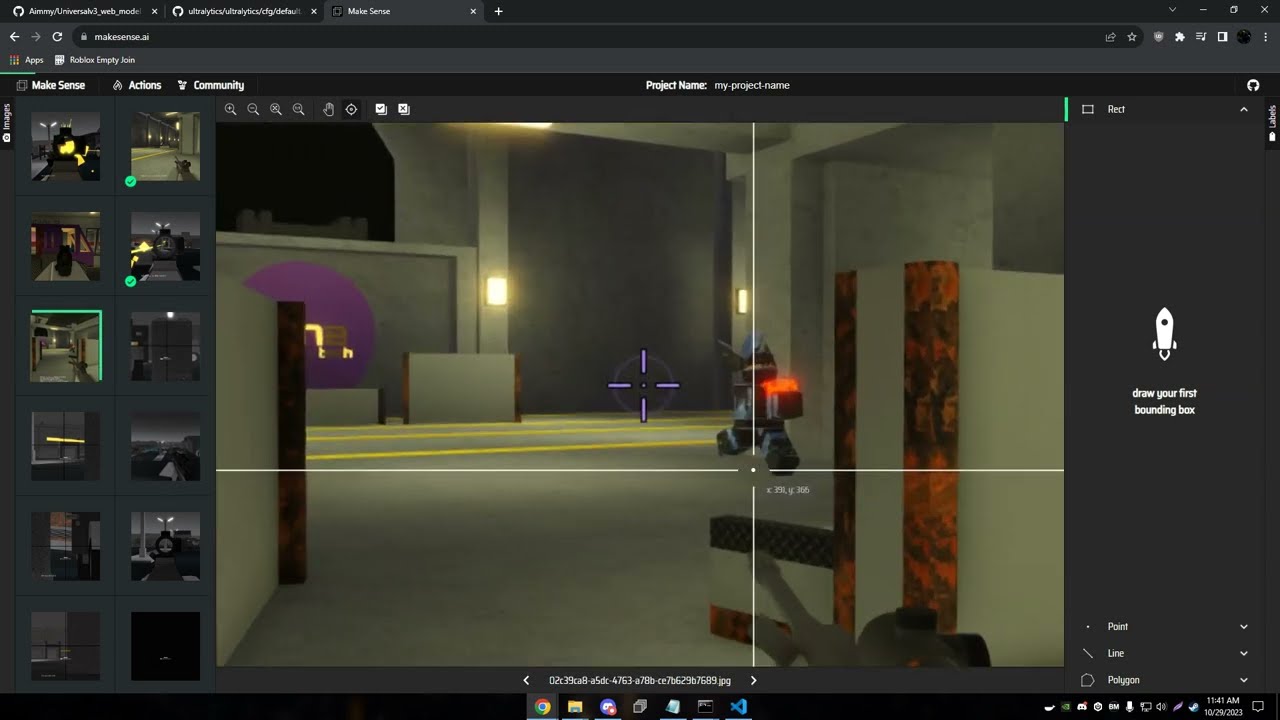
See MODELS.md for the full step-by-step guide. PowerAim's in-app downloader merges models from this fork and from the upstream Babyhamsta/Aimmy repo — newer commit wins on a name conflict, fork wins on a tie.
PowerAim is built on the shoulders of Babyhamsta/Aimmy by BabyHamsta, MarsQQ and Taylor — without their original work and ONNX/DirectML wiring this project would not exist. Thank you. ❤️
Model creators (kept from upstream):
- Babyhamsta — UniversalV4, Phantom Forces
- Natdog400 — AIO V2, V7
- Themida — Arsenal, Strucid, Bad Business, Blade Ball, LGHub check
- Hogthewog — Da Hood, FN
- Ninja — MarsQQ's emotional support
PowerAim is source-available (see SourceAvailable.md). Commercial forks are not permitted.