Open-source-safe persona simulation for apps, CLIs, and agent-facing product flows.
Humanish gives a project a repeatable way to ask: what happens when realistic
synthetic users, with different goals and tolerances, try to use this thing?
It creates committed simulation source under humanish/, ignored run evidence
under .humanish/, a watchable Observer UI, verification gates, and public-safe
feedback drafts.
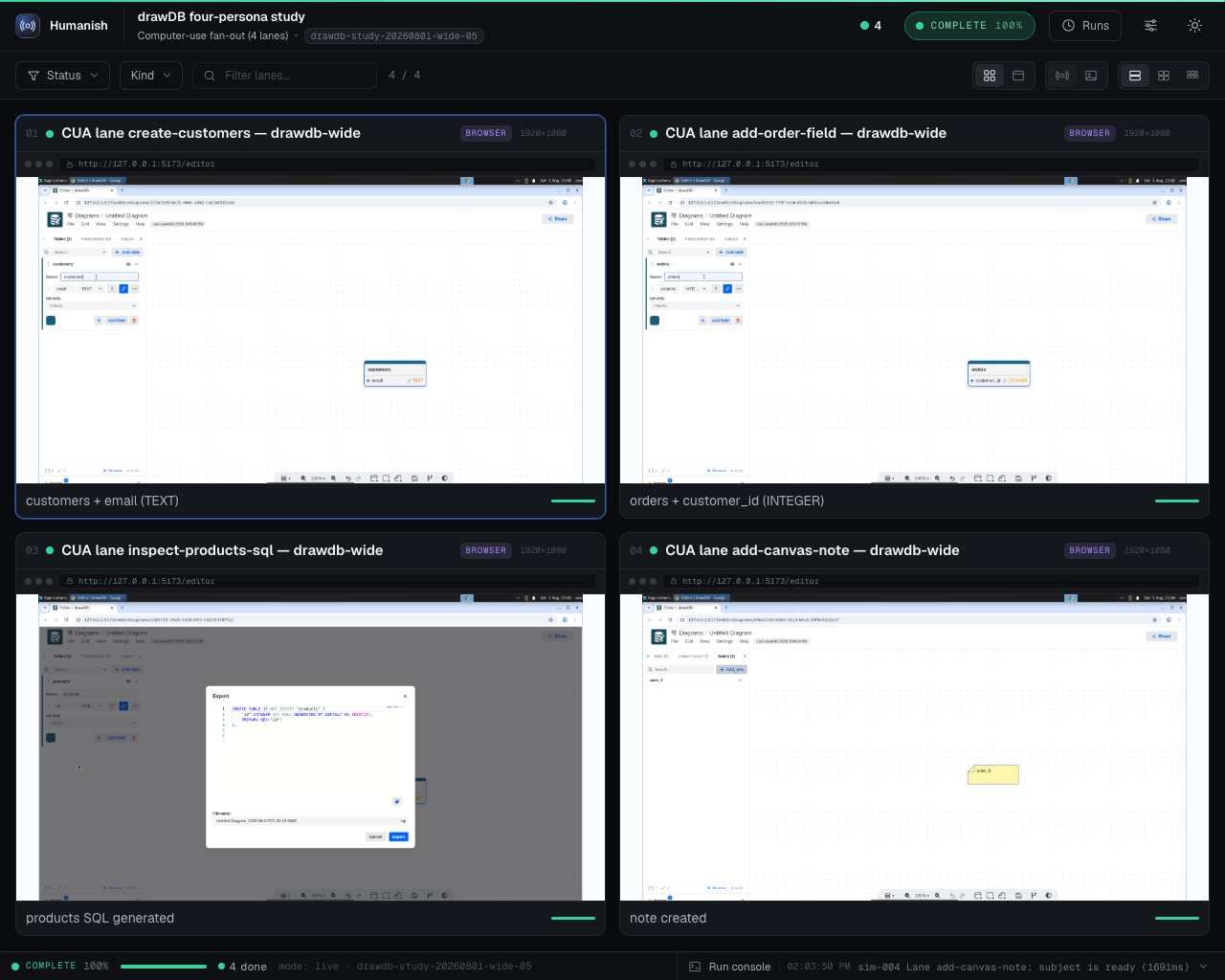
A live four-persona study of drawDB, a public open-source database diagram editor, driven against a commit-pinned local checkout. Every lane is a real computer-use session on a hosted desktop; the captions are each persona's own final report. drawDB is the application studied; it is not a Humanish adopter or endorser.
npm i -D humanish
npx humanish init --yes
npx humanish watch
The package is humanish; the installed binary is humanish. For a one-shot
command before installation, use npx --package humanish humanish ... to
guarantee the binary comes from the humanish registry package rather than a
same-named command already on your PATH.
For coding agents, install the repo skill first:
npx skills add danielgwilson/humanish --skill humanishThe skill lives at skills/humanish/SKILL.md
for skills.sh discovery.
Humanish is designed for public repositories and public issue queues. The boundary is three planks, each enforced where it actually holds:
1. This repo and the published package are kept public-safe by CI. Every push runs a public-surface scan (secret/key/path shapes, a sha256 binary-asset allowlist, over both tracked files and the packed npm payload) plus a full-history gitleaks scan. That protects what we ship — it does not scan your repo.
2. The harness never persists secret values into run artifacts. On every route, values it provisioned are scrubbed by literal match (they have no shape for patterns to catch) and secret-shaped content is pattern-redacted before any log tail, harness error, or model narration lands on disk. Env var names are evidence; values never are. Pixels are the exception: a raw screenshot shows whatever was on screen, which is why plank 3 exists.
3. Run bundles are local by default. Evidence lands under gitignored
.humanish/, and no command publishes it for you. Sharing evidence — committing
screenshots, pasting transcripts, attaching bundles to issues — is a deliberate
act, and reviewing what you share is on you. Use synthetic personas and
synthetic data so there is nothing sensitive to capture in the first place.
What the automated gate enforces. humanish verify scans public-bound
artifacts and fails closed on secret, key, and token shapes and on known local
path shapes. It does not yet detect free-form PII or PHI such as names, emails,
phone numbers, dates of birth, or medical identifiers. Keeping those out depends
on using synthetic data and on review, so redaction: passed means the
automated secret and path scan found no matches, not that the artifact was
certified free of PII or PHI. A first-class PII/PHI detector is on the roadmap
(#108).
humanish verify --json also reports shareSafety.status:
share_ready: the verified bundle is eligible for public feedback drafts;local_only: the bundle is valid local evidence, but should not be shared as-is (for example, full-fidelity raw screenshots are present);blocked: the bundle failed verification or public-safety gates.
Feedback commands require share_ready. A valid local run can still be
reviewed in Observer without being promoted into a public issue draft.
humanish/      committed source plane: labs, personas, scenarios, policy, adapters
.humanish/    ignored runtime plane: runs, Observer output, reviews, local state
The first-run path does not require credentials:
npx humanish doctor
npx humanish watch
npx humanish verify --run latest --json
npx humanish feedback issue --run latest --repo owner/repo --format markdown
humanish watch starts a fresh four-lane synthetic run, renders the Observer,
opens it in the browser, serves it over localhost, and keeps the shell attached.
After humanish init, named lab manifests can be run the same way:
npx humanish watch first-run
npx humanish lab list
npx humanish lab inspect first-run
npx humanish lab preflight first-run
The CI-safe equivalent is:
npx humanish watch --json --no-openhumanish watch follows one attached run; humanish serve serves the whole
local run library under .humanish/runs/ — a library index plus every run's
Observer page:
npx humanish serve
npx humanish serve --expose --tunnel ngrok --tunnel-domain observer.example.dev
npx humanish serve --safe --expose --auth none --tunnel ngrok
The first serves the library on loopback only. The second is the phone path:
it prints a secret capability link once; tapping the link mints a session
cookie, and every request without a valid session is refused. The third is a
secretless safe observer: no link required, but only runs whose humanish verify shareSafety is share_ready exist at all — everything else is absent
and 404s.
In every mode the server binds 127.0.0.1; exposure only ever happens through
a tunnel forwarding to the loopback port. The capability link is minted fresh
per process: Ctrl-C revokes the link and all sessions, and restarting mints a
new link.
Send the capability link by AirDrop or manual entry rather than a chat app: link unfurlers prefetch URLs server-side, and the link is deliberately not single-use for exactly that reason — a preview fetch must not burn the link before you tap it. On iOS, the first tap can land in an in-app webview whose partitioned cookies do not carry over to the real browser; re-tapping the link in the real browser mints a fresh session.
Live desktop stream URLs are never served in any mode; remote viewers see persisted evidence (screenshots, events, terminal tails) only. See Serve architecture.
| Command | Purpose |
|---|---|
humanish init |
Scaffold committed humanish/ source and ignored .humanish/ runtime state. |
humanish doctor |
Explain readiness and missing setup. |
humanish run --dry-run |
Generate a synthetic run bundle without browser, keys, or provider spend. |
humanish run --app-url http://127.0.0.1:<port> |
Capture live desktop/mobile browser evidence against a running local app. |
humanish watch [lab] |
Run sims or a named lab, open Observer, and keep watching. |
humanish serve |
Serve the local run library over loopback; optional capability-link or share-safe exposure. |
humanish lab list |
List committed and ignored lab manifests. |
humanish lab inspect <lab> |
Show the source manifest for a lab without running it. |
humanish lab preflight <lab> |
Check lab routing and optional target reachability before actor/model spend. |
humanish lab run <lab> |
Run a lab manifest in human or JSON mode. |
humanish verify |
Validate a run bundle and public-safety gates. |
humanish cleanup |
Inspect recorded resource evidence and write cleanup.json; stored IDs do not authorize provider mutation. |
humanish review |
Read review evidence for a run. |
humanish runs |
List local runs and latest pointers. |
humanish feedback issue |
Print a public-safe GitHub issue draft without API mutation. |
humanish lab run oss |
Repo-maintainer contract example: dry-run Observer-of-Observers for authorized repo selections. |
humanish lab run oss-smoke |
Repo-maintainer dogfood example: disposable clone smoke test against public OSS repos. |
| Code | Meaning |
|---|---|
0 |
Success. |
1 |
Commander usage error: unknown command, unknown option, or a missing/invalid argument. |
2 |
Humanish domain or validation failure. Check the JSON envelope's error.code for detail. |
128+N |
Terminated by signal N: 130 for SIGINT, 143 for SIGTERM, 129 for SIGHUP. |
Labs are authored as .yaml source:
humanish/labs/*.yaml          committed public-safe labs
.humanish/labs/*.yaml         ignored local labs
.humanish/local/labs/*.yaml   ignored private or machine-specific labs
Committed labs should be useful to anyone who clones the project. Private repo
targets, token-backed provider settings, and local-only dogfood variants belong
in ignored .humanish/ lab manifests and can be run explicitly:
npx humanish watch .humanish/labs/local-dogfood.yaml --env-file .humanish/local/provider.env
npx humanish lab run .humanish/labs/local-dogfood.yaml --json --no-open
--env-file loads values for the current process only. Humanish reports loaded
env var names, never values, and does not persist those values into run bundles
or Observer data.
A computer-use lab dispatches a registered computer-use actor (actors[0].type,
resolved against the actor registry — e.g. openai-computer-use) to drive an app in
a hosted E2B desktop browser and emit an evidence bundle under gitignored
.humanish/ (full-fidelity screenshots by default — see below; length-only typed
text; provider-neutral humanish.actor-trace.v1 on the stream). Two subjects route
here:
subject.source: clone(+execution.target: e2b-desktop+ a computer-use actor): the lab clones your repo INTO the sandbox, runs your declaredserve.install/serve.build/serve.startcommands (detached, with readiness probing), and drives the served app atserve.url. Subject env var NAMES declared insubject.envare provisioned from--env-file(names land in evidence; values never do). The bundle records provenance: repo, cloned commit, env names.subject.source: app-url: you (a library caller) provision the app yourself via theprepareDesktophook (runLab(config, { cuaHooks: { prepareDesktop } })) and the actor drives the URL you declared.
subject:
  source: clone
  repos: [example-org/example-app]
  serve:
    install: pnpm install --frozen-lockfile
    build: pnpm build
    start: pnpm start
    url: http://127.0.0.1:3000/
actors:
  - type: openai-computer-use
    mission: Explore the app as a first-time visitor and complete its primary flow.
execution: { target: e2b-desktop }
scenario: { mode: live }
npx humanish lab run cua-browser # dry-run contract bundle (no spend)Live runs (scenario.mode: live) need OPENAI_API_KEY + E2B_API_KEY (pass via
--env-file) and the optional peer dependency: npm i -D @e2b/desktop. A cloned
subject is served inside the sandbox on loopback; to instead drive a deployment
you own (a Vercel preview, staging), use an app-url subject with
policies.allowPublicTargets: true. The actor's API key never enters the sandbox;
only declared subject env names do. humanish init scaffolds an example at
humanish/labs/cua-browser.yaml.
Screenshots are full-fidelity by default. Run bundles live in gitignored
.humanish/, so the Observer shows exactly what the persona saw — the point of
simming your own app. Set policies.redactScreenshots: true to persist blurred
thumbnails at capture instead (for unowned subjects, or bundles you intend to share
as-is). Raw bundles stay local in gitignored .humanish/; nothing scans the pixels,
so review them before sharing anywhere — a redact-on-export step is planned. The
frame sent to the model is always full-resolution regardless. (Doctrine:
docs/principles/invariants-and-defaults.md — redaction binds the publish boundary,
not capture.) humanish verify reports raw-screenshot bundles as
shareSafety.status: local_only; humanish feedback issue refuses them until the
run is share-ready.
Device presets. execution.desktop.device picks the hosted desktop screen size —
mobile (414×896), small-mobile (360×740), narrow-mobile (320×700), tablet
(820×1180), desktop (1440×950, default), or wide (1920×1080). The values are copied
from the mature in-house sims, not invented. Honest fidelity: on the computer-use /
E2B-desktop route width/height size the virtual display and browser outer window. The actual
page viewport is smaller because browser chrome occupies space; Chromium-family live bundles
measure it through CDP and record it separately from requested/verified screen geometry. Browsers
without that measurement seam omit the viewport rather than guessing. A site's width-based
responsive CSS still fires, and the model is told its device in the prompt, matching
how those sims run organic mobile lanes. There is no touch input, the device-pixel-ratio
isn't rendered, and the user-agent stays desktop on this route; true touch/DPR/UA emulation
arrives with the deterministic CDP actor. Device is run-wide today; per-persona device
(N personas × devices) lands with fan-out. execution.desktop.resolution is a raw escape
hatch that overrides the preset.
Desktop browser choice. Hosted computer-use lanes and shared-world actor seats use the
route's historical opener unless you set execution.desktop.browser to chrome, chromium,
or firefox. A concrete value means "launch this browser or fail" rather than silently
falling back to whatever the image prefers. When configured, run bundles record the requested
browser and the resolved in-sandbox command as desktopBrowser.
Deterministic stop conditions. Freeform computer-use actors can keep acting after the
app has already reached the state you care about. Add stopWhen to the actor or a lane to
stop immediately after a deterministic browser observation matches. Conditions inside one
rule are ANDed together; rules under any are ORed. Lane-level stopWhen overrides the
actor default.
actors:
  - type: openai-computer-use
    mission: Complete the assigned browser task.
    stopWhen:
      any:
        - id: dashboard-visible
          urlPathEquals: /dashboard
          textIncludes: Dashboard
    lanes:
      - id: reviewer
        entry: /items/123
        instruction: Review the item and return to the queue.
        stopWhen:
          any:
            - id: returned-to-queue
              urlPathEquals: /items
              textIncludes: Queue
Supported primitives are urlIncludes, urlPathEquals, textIncludes, and
appStatePathEquals. URL and text observations are runtime-only and are not persisted into
the run bundle; the trace stores only the matched rule id and primitive names. Browser URL
and text observation requires a Chrome/Chromium CDP session in the desktop. For deterministic
browser-observed stops, set execution.desktop.browser: chrome or chromium.
Failed-lane reruns. Multi-lane CUA fan-out can be rerun surgically without mutating the source run:
npx humanish lab run cua-browser --rerun-failed-from latest --json --no-open
npx humanish lab run cua-browser --rerun-failed-from <run-id> --lanes lane-02,lane-04
This creates a new linked run containing only the failed/blocked/timed-out/hollow lanes
(or the explicit --lanes selection). The new run.json records rerun.sourceRunId,
selected lane ids, and previous lane statuses; the source run's verdict is left unchanged.
This is intentionally not automatic retry; a passing rerun is evidence of a
nondeterminism candidate, not permission to erase the original red lane.
Run-owned cleanup. Live providers can record resource evidence in run.json.
Stored bundle IDs are mutable evidence, not provider-mutation authority. The
cleanup command writes a durable inspection receipt until Humanish has a
verified resource-lease contract. Resources already recorded as killed become
already_clean; recorded live or unknown resources become failed, which
makes cleanup and verification fail closed:
npx humanish cleanup --run latest
npx humanish verify --run latest
Humanish does not enumerate or bulk-delete provider accounts from this command. Same-process teardown uses trusted in-memory provider handles. The separate OSS orphan sweep is maintainer-only, opt-in, and verifies provider metadata before calling provider cleanup.
Trust note: serve commands run inside the disposable sandbox with the declared
subject env provisioned — the same trust class as a repo's package.json scripts.
Only run lab configs you trust, and declare only the env names that the subject
genuinely needs. (Since 0.5.0, a clone × e2b-desktop lab whose actor is a
registered computer-use actor routes here and requires serve; on earlier
versions that shape routed to the meta lab.)
The computer-use loop is provider- and substrate-agnostic. You can point a lab at an
already-running local dev server (subject.source: local-app) and drive it
through its in-process JS contract (window.app.getState() etc.) with a custom
CuaExecutor (screenshot optional, appState as the progress signal) paired with a
non-vision CuaProvider (requiresFrame falsey) — keeping personas, the
Observer, the evidence bundle, redaction, and the friction loop, with NO E2B
desktop and NO clone. Supply cuaHooks.buildExecutor + buildProvider to
runLab (a config-only run with no hooks fails closed with a structured error). See
State-driven executor.
humanish run --app-url http://127.0.0.1:<port> looks for executable browser
steps in committed humanish/scenarios/*.yaml. If none are present, Humanish
falls back to the built-in two-step browser persona proof. Browser steps are
public-safe source, so use synthetic fixture values and committed relative app
paths only.
schema: humanish.scenario.v1
id: todo-onboarding
title: Todo onboarding
persona: synthetic-new-user
goal: Create the first synthetic todo and verify the list updates.
mode: browser
browser:
  startPath: /
  steps:
    - id: open-home
      label: Open the todo app
      action: goto
      path: /
      expect:
        text: Add todo
    - id: enter-todo
      label: Enter synthetic todo text
      action: fill
      selector: input[name="todo"]
      value: Synthetic onboarding task
    - id: create-todo
      label: Create the todo
      action: click
      selector: button[type="submit"]
      expect:
        text: Synthetic onboarding task
        stateChanged: true
Supported actions are goto, fill, click, assertText, waitForText,
and waitForSelector. Supported expectations are text, selectorVisible,
urlIncludes, and stateChanged. Generated traces are stored as JSON under
.humanish/runs/<run>/traces/ and summarized in the Observer.
This repository includes a contract-only authorized-repo dogfood lab:
pnpm humanish -- watch oss
pnpm humanish -- lab run oss --dry-run --repos CorentinTh/it-tools,drawdb-io/drawdb,maciekt07/TodoApp,lissy93/dashy
Default lab targets are intentionally app/tool-like repos with visible, locally runnable user surfaces. Avoid libraries and frameworks for public dogfood unless the scenario is explicitly testing developer experience.
The bundled manifest defaults to dry-run and creates contract evidence without cloning repos, launching a provider sandbox, or forwarding credentials. Use:
pnpm humanish -- lab run oss --dry-run --json --no-openLive OSS meta-lab execution is unavailable until repository-derived instructions
have an isolated credential boundary. A live manifest fails closed with
HUMANISH_OSS_META_LIVE_ISOLATION_REQUIRED before callbacks, filesystem writes,
network access, or provider launch.
The oss lab accepts GitHub owner/repo slugs. A CLI --repos override redacts
repo labels in durable artifacts by default; pass --no-redact-repos only for a
public-safe selection. Dry-run does not access or clone repositories and does
not need or use private-repository credentials. Private-repository execution
remains unavailable while the live lane is disabled. Local bundles remain
ignored under .humanish/; do not publish private screenshots, logs, or
upstream details.
pnpm install
pnpm check
pnpm public-surface:scan
pnpm pack:dry-run
Local dogfood:
pnpm humanish:watch
pnpm humanish:verify
pnpm humanish:feedback
pnpm humanish:lab:listStart with the current safety and capability state. Dated design documents may preserve historical mechanisms and carry explicit amendments near the top.
- Current safety state and goals
- Ramp for future contributors and agents
- Project layout
- Observer architecture
- Serve: the run library surface
- Actor contract (first-party registry and extension direction)
- State-driven executor (drive a local app, no E2B/vision)
- OSS lab design record (historical; see its current safety amendment)
- Feedback contract
- Open-source install experience
- Self-driving harness principles
- World-class open-source v0 roadmap
- Open-source release readiness
- Public readiness standard
The package is published on npm. Every future publication remains a human
release action: do not run npm publish or create a release tag unless the
maintainer explicitly approves it in the current context.