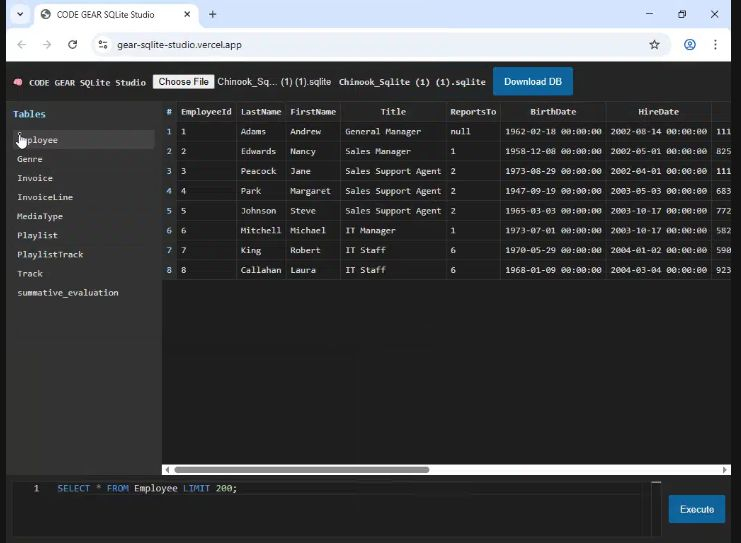
It allows you to open, explore, query, modify, and export SQLite databases directly from your browser — without installing SQLite, without a backend, and without a server.
- ✅ Runs completely in the browser - No installation required.
- ✅ Real SQLite Engine - Uses SQL.js (WebAssembly).
- ✅ VS Code-style Editor - Powered by Monaco Editor for a pro coding experience.
- ✅ Privacy Focused - No data leaves your device; everything stays local.
- ✅ Offline Ready - Works offline after the first load.
- ✅ Modern UI - Clean, dark interface inspired by professional DB tools.
The interface is divided into four main sections:
- Header Bar: File loader, database name display, and export/download button.
- Left Sidebar (Tables Panel): Automatically lists all user-defined tables for instant preview.
- Main Content Area: Scrollable result grid with sticky headers and row numbers.
- Footer (SQL Execution Bar): Monaco Editor for writing and executing SQL queries.
- Supports
.dband.sqlitefiles. - Uses FileReader API to load databases into memory instantly.
- Export Feature: Save your modified database as a new file (renamed as
originalname_modified.db).
- Same core as VS Code.
- SQL syntax highlighting & dark theme (
vs-dark). - Auto-layout resizing and monospaced font.
- Click a table to auto-run
SELECT * FROM table_name LIMIT 200;. - Sticky headers for easy navigation through large datasets.
- Handles wide tables with graceful horizontal scrolling.
| Technology | Purpose |
|---|---|
| HTML5 | Application structure |
| CSS3 | Dark theme UI styling |
| JavaScript (Vanilla) | Core logic |
| SQL.js | SQLite engine via WebAssembly |
| Monaco Editor | SQL editor |
| FileReader API | Local file loading |
| Blob API | Database export |
- Save your code as
index.html. - Open it in a modern browser (Chrome, Edge, Firefox).
- Load a
.dbfile and start querying.
Deploy as a static site using GitHub Pages, Netlify, or Vercel. No backend configuration is required.
-- List all tables
SELECT name FROM sqlite_master WHERE type='table';

-- Create a new table
CREATE TABLE users (
  id INTEGER PRIMARY KEY AUTOINCREMENT,
  name TEXT,
  email TEXT
);

-- Insert Data
INSERT INTO users (name, email) VALUES ('Barun Saha', 'barun@example.com');CODE GEAR A developer-focused project for learning, experimentation, and practical SQLite usage.
This project is open-source and free to use for:
- 🎓 Educational purposes
- 💻 Personal projects
- 🧪 Learning & experimentation
You are free to modify, extend, and redistribute it.