
A small NodeJS module to logs application activities with colored text and automatically save the logs to file.
var log = new CBLogger(options)
Example
// Load module. After loading module, module will also available on GLOBAL object ( global.CBLogger )
require('cb-logger');

// Create new logger.
var log = new CBLogger({ logfile: true, logpath: './logs/main' });

// Log info.
log.info('System', 'Application started.');

// Log warning.
log.warn('System', 'System get wrong configs!');

// Log error.
log.error('System', 'Unable to intit config!');

// Another logs
var foo = function() {
	var log = new CBLogger({ logfile: true, logpath: './logs/custom' });

	log.info('Scoped Logs', 'This information will saved in different location');
}enabled- Enable print logs on console. Default istruelogtime- Enable print and write logs including date-time. Default istruelogfile- Enable save logs to file. Default isfalse.logpath- Location to save the log file. Default is./logs
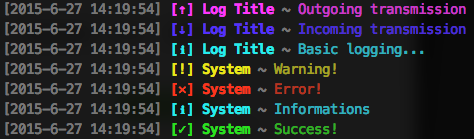
Log informations. Log file located at $LOGPATH/[date]-info.log
Log warnings. Log file located at $LOGPATH/[date]-info.log
Log errors. Log file located at $LOGPATH/[date]-error.log
Log success messages. Log file located at $LOGPATH/[date]-info.log
Log ougoing transmission. Log file located at $LOGPATH/[date]-info.log
Log incoming transmission. Log file located at $LOGPATH/[date]-info.log