


Website: langosh.ai · PyPI: pypi.org/project/langosh · Docs: langgraph API coverage
An opinionated CLI for building and running LangGraph agents. You scaffold a repo, ask
an LLM to write you a graph, test it locally with langgraph dev, and
point the same CLI at a LangSmith / LangGraph Platform deployment to
drive runs against a real server.
The gist: LangGraph is powerful but there's a lot to learn — message
types, reducers, checkpointers, threads vs. runs vs. assistants,
streaming modes, tool bindings. Langosh doesn't hide any of that, but it
tries to put the steps in the order you actually do them, and lets the
LLM handle the StateGraph(...).add_node(...) boilerplate so you can
spend more time on graph logic than on imports.
A few things worth calling out:
- Graphs are authored as JSON, not Python. The LLM edits a
definition.json; a compiler emits the Python module. Easier for the LLM to reason about, easier for you to diff. - Tool resolution happens at build time. The builder sees a live
catalog pulled from
langchain_community.tools+langchain_experimental.tools; the generated graph just imports what it needs. No runtime discovery, no surprises at server boot. - Any LangGraph-Platform-compatible server works. Local
langgraph dev/langgraph upfor iteration, LangSmith-hosted for production. - Built-in
/chatand/codemodes scoped to your LangGraph repo — not generic chat or coding assistants./chatis a Q&A agent framed as a LangChain / LangGraph / LangSmith expert with live access to the framework docs;/codeis a repo-wide engineer that can read, edit, run, and git-introspect any file in the project, also backed by the live docs. Both run through whichever LLM provider you've configured (Anthropic, OpenAI-style, Bedrock, or the Claude Agent SDK). See Chat and Code for details.
- LLM-assisted graph development
- Test and run on the LangGraph / LangSmith platform
- Requirements
- Getting Started
- Usage
- Navigation
- Mode tree
- Universal commands
- Commands
- Supported providers
- Built-in tools
- Testing Agents
- Under the hood
- License
A core design decision in Langosh: graphs are authored as JSON, not
Python. When you ask the LLM to create or modify a graph, it edits a
structured definition.json file; Langosh's compiler then turns that
JSON into a runnable Python module
(graphs/<graph_id>/__init__.py).
Why JSON, in one paragraph: LangGraph graphs are normally written as
Python, but a tiny formatting mistake from an LLM breaks imports, and
the model has to reason about Python syntax and graph semantics
simultaneously. JSON sidesteps both — the LLM only has to get the
graph shape right, surgical edit_definition(old_str, new_str)
patches never corrupt an on-disk module, and compilation is
deterministic so two runs of the same definition always emit byte-for-byte identical Python.
The end-to-end flow is one command per step:
  /graphs  /create                   # LLM produces definition.json
     ↓
  /select <id>  /edit                # iterative LLM edits on the JSON
     ↓
  /compile                            # JSON → Python module
     ↓
  /deploy                             # git commit + push + server reload
     ↓
  /exec  /select <id>  /test | /run  # run on the server
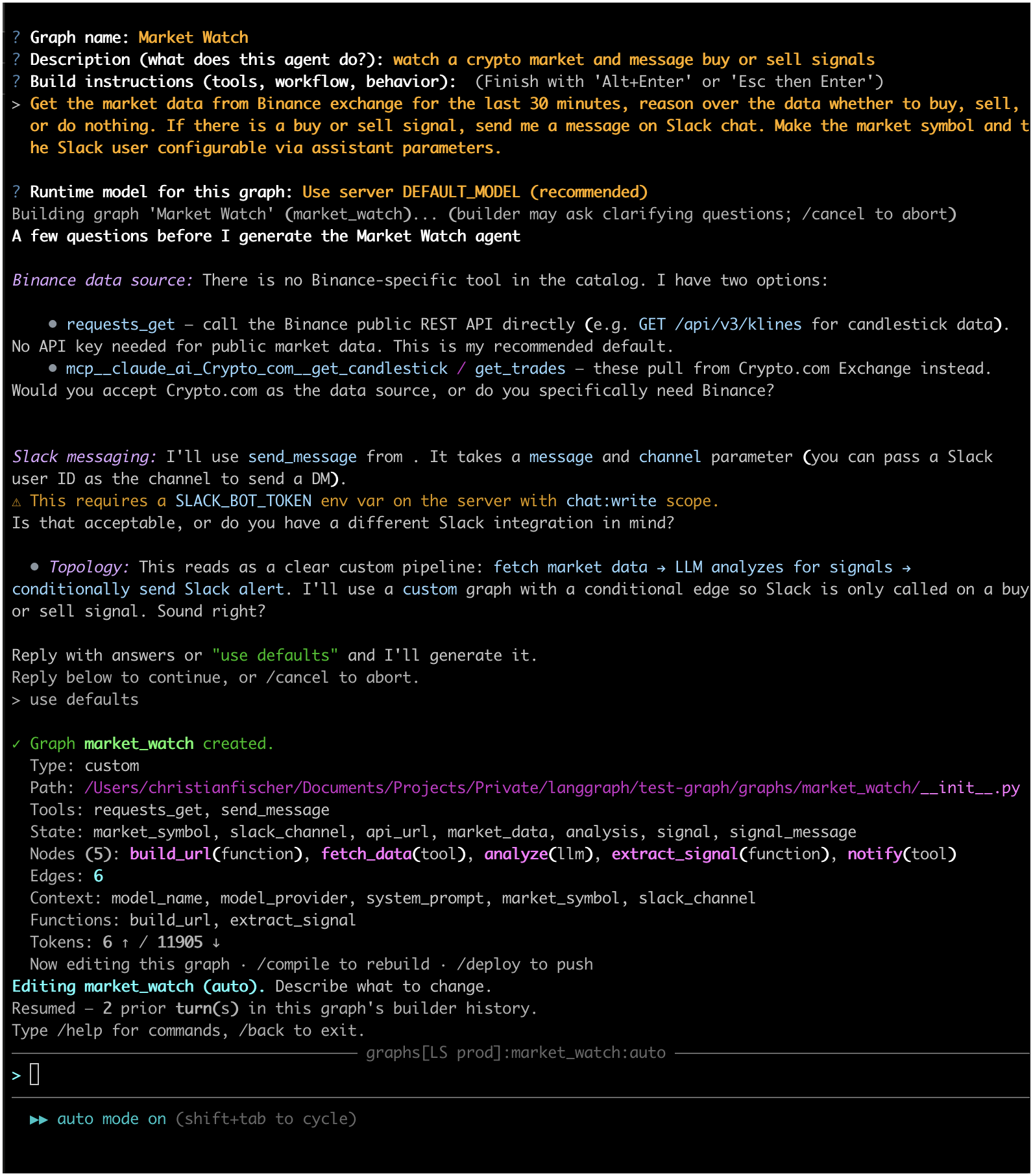
/create in action — answer a few prompts and the LLM produces a
complete definition.json for you:
For the deep dive — graph types, tool discovery, the compiler, the on-disk catalog flow — see Under the hood.
Once a graph is authored and compiled, Langosh ships a small
built-in LangGraph client (wrapping the
langgraph-sdk) that
works with both local servers (langgraph dev, langgraph up) and
LangSmith-hosted deployments. Point at one via /server /add;
everything downstream (/exec, /test, /run) hits that server.
The client is deliberately scoped. Only the endpoints that are useful during graph development are implemented — enough to:
- invoke a graph with different assistant contexts (models, system prompts, per-run parameters);
- monitor runs — stream tokens, watch tool calls, wait for completion, inspect thread state and history;
- collect diagnostic information from completed runs and feed it back into the LLM editor so the builder can reason about what actually happened.
Operational surfaces (Store, Crons, MCP gateway, batch cancels, A2A, Prometheus metrics) are intentionally out of scope. See the LangGraph API coverage document for the full endpoint-to-command map and the explicit list of omissions.
- LangGraph documentation — framework concepts, state, reducers, checkpointers.
- LangGraph Platform — the hosted runtime
/exectalks to. - LangSmith local development — running
langgraph dev/langgraph upand the Studio UI. langgraph-sdk— the Python client Langosh wraps.langgraph-cli— the server-side CLI you invoke inside a scaffolded agents repo.
- Python 3.11+
- A running LangGraph-compatible server instance (optional — only needed for exec mode)
- An agents repo in the current working directory (create one with
/initrepo) - Credentials for one supported LLM route. Langosh drives its
/chat,/code, and graph-builder modes through an LLM; pick one of the following:- Anthropic subscription via the Claude Agent SDK — uses your existing Claude subscription; no API key to manage.
- Provider API key —
ANTHROPIC_API_KEY,OPENAI_API_KEY, or a key for any other supported OpenAI-style provider (DeepSeek, xAI, …). - AWS credentials for Bedrock — any credential source boto3
accepts (static access keys, SSO,
AWS_PROFILE, or an instance/task role withLANGOSH_AWS_BEDROCK_USE_IAM_ROLE=true).
From PyPI:
pip install langoshOr with uv:
uv tool install langoshVerify:
langosh versiongit clone https://github.com/chfischerx/langosh.git
cd langosh
python3 -m venv .venv
source .venv/bin/activate
pip install -e .There are two ways to supply the credentials listed in Requirements — pick whichever fits your workflow, or mix them:
1. Environment variables (per shell / per project / CI)
export ANTHROPIC_API_KEY=sk-ant-...
export LANGOSH_DEFAULT_PROVIDER=anthropic
langosh
Env vars are read live, never written to disk, and take precedence
over anything in settings.json. Ideal for CI runners, ephemeral dev
containers, and keeping keys out of your home directory.
2. The /settings command (persisted across sessions)
langosh
# inside the REPL:
> /settings /configure
This writes to ~/.langosh/settings.json. Good for values you want
to carry between shell sessions on a dev laptop.
Resolution order at read time:
exported env var > ~/.langosh/settings.json > built-in default
Run /settings /show to see every setting and which source it's
coming from. For the full list of recognized environment variables
(including AWS credentials for the Bedrock provider), see the
Settings reference.
langoshThe CLI starts in main mode. Type / to see available commands with tab
completion, or use arrow keys to recall input history.
The CLI uses a hierarchical mode system. Each mode has its own commands.
/back— go back to the parent mode/home— return to main mode/help— show available commands for the current mode/cls— clear screen/exit— quit
The mode bar at the top shows the current path (e.g. exec[local]:my-graph:assistant-1).
- Shift+Tab — cycle the current sub-mode (
plan→auto→edit) where applicable - Ctrl+C (twice within 1 second) — exit
- Up/Down — history / completion-menu navigation
- Tab — complete commands
- Escape — dismiss completion menu
main
├── graphs                   Local graph development (requires langgraph repo)
│   └── [graph_id]:[mode]    LLM-driven editing (plan/auto/edit)
├── exec[server]             Execute graphs on a server
│   └── [graph_id]           Graph-scoped commands
│       └── [assistant]      Assistant-scoped commands
│           └── [thread]     Thread inspection
│               └── [run]    Run inspection
├── chat                     Direct LLM conversation (LangChain docs Q&A)
├── code:[mode]              LLM with tool use (plan/auto/edit)
├── server                   Server management
│   └── [server_name]        Selected server (info, CRUD)
└── settings                 CLI settings
Available in every mode:
| Command | Description |
|---|---|
/model |
Select an LLM model |
/models |
List all models with optional filter |
/fetchmodels |
Refresh model list from APIs |
/help |
Show available commands |
/back |
Go back to parent mode |
/home |
Return to main mode |
/cls |
Clear screen |
/exit |
Quit |
| Command | Description |
|---|---|
/graphs |
Local graph development |
/exec |
Execute graphs and assistants on a server |
/chat |
LLM chat (LangChain docs-backed) |
/code |
LLM with tool use |
/server |
Server management |
/settings |
CLI settings |
/initrepo |
Scaffold a minimal langgraph-agents repo in the current directory |
/fetchtools |
Refresh the tool catalog by introspecting LangChain community + experimental packages |
/version |
Show the application version |
Requires the CLI to be started within a langgraph code repository.
| Command | Description |
|---|---|
/list |
List all graphs from the current repo |
/select |
Select an existing graph to work with |
/create |
Create a new graph (LLM-generated) |
/fetchtools |
Refresh the tool catalog by introspecting LangChain community + experimental packages |
/deploy |
Commit, push, and reload agents on the server |
/status |
Show git status |
/commit |
Commit all changes |
LLM-driven editing. Free text is sent as an edit instruction.
| Command | Description |
|---|---|
/plan |
Read-only: reads auto, writes denied |
/auto |
Reads auto, writes require approval |
/edit |
Auto-approve everything |
/compile |
Compile the selected graph (definition.json → Python) |
/delete |
Delete the selected graph |
/preview |
Visualize the graph as ASCII (via grandalf) |
/test |
Stateless test run against the server |
/deploy |
Commit, push, and reload agents on the server |
/status |
Show git status |
/commit |
Commit all changes |
Requires a selected server.
| Command | Description |
|---|---|
/list |
List all available graphs (from server) |
/select |
Select a graph |
/deploy |
Commit, push, and reload agents on the server |
| Command | Description |
|---|---|
/select |
Select an assistant |
/thread |
Select a thread |
/create |
Create a new assistant with custom context |
/search |
Search for assistants |
/show |
Display the graph (ASCII from server) |
/test |
Stateless run (no thread history) |
/run |
Create a stateful run (interactive: mode, thread, message) |
/threads |
List all threads (filtered by graph) |
/delthread |
Delete a thread |
/delallthreads |
Delete all threads (filtered by graph) |
| Command | Description |
|---|---|
/thread |
Select a thread |
/show |
Display assistant details |
/update |
Update assistant context |
/delete |
Delete the assistant |
/test |
Stateless run |
/run |
Create a stateful run |
/threads |
List all threads (filtered by graph + assistant) |
/delthread |
Delete a thread |
/delallthreads |
Delete all threads (filtered by graph + assistant) |
Both commands prompt interactively:
- Execution mode: Stream output, Wait for output, or Background
- Create new thread? (run only): yes/no
- If yes — optional thread name
- If no — select from existing threads
- Message: the input to send
Threads are created with graph_id, assistant_id, and optional name in
metadata. Thread listings are filtered by the current scope.
| Command | Description |
|---|---|
/details |
Show thread details |
/state |
Show the thread state (messages) |
/history |
Show the thread checkpoint history |
/delete |
Delete the thread |
/update |
Update the thread |
/runs |
List runs for this thread |
/select |
Select a run |
| Command | Description |
|---|---|
/details |
Get details for this run |
/delete |
Delete this run |
/cancel |
Cancel this run |
A LangChain / LangGraph / LangSmith Q&A agent. The system prompt positions the model as a senior framework expert and wires in live documentation access via MCP — so answers reflect the current docs, not stale training data. Use it for API questions, pattern clarifications ("when do I need a checkpointer?"), migration advice, or understanding why something in the repo behaves a certain way.
It is not a general-purpose chatbot: unrelated free-form
questions aren't the target, and there are no file-write or shell
tools here — use /code mode for anything that touches the repo.
Tools available to the LLM:
docs_search(query)— semantic search over the LangChain / LangGraph / LangSmith docs.docs_read(command)— read-only shell-like access (cat,head,ls,tree,find,grep,rg) over the docs filesystem to pull the full content of a page after a search hit.spawn_subagent(role="researcher", task=...)— offload multi-step doc research so large doc dumps don't pollute the main context.
| Command | Description |
|---|---|
/clear |
Clear conversation history |
/compact |
Compact conversation history |
/debug |
Inspect last LLM request/response |
A repo-wide engineering agent scoped to your LangGraph project. The system prompt positions the model as a senior Python engineer working inside a LangGraph repository, with current knowledge of LangChain / LangGraph / LangGraph Platform / LangSmith idioms. Unlike generic coding assistants, it understands that the files it edits are graphs, tools, nodes, state schemas, codegen, and server wiring — and it uses that domain knowledge when reasoning about changes.
This is the mode for repo-wide edits that aren't pure graph
authoring: refactoring node helpers, wiring a new tool into the
Python side, writing or fixing tests, updating langgraph.json,
chasing a stack trace across modules, reorganizing the package
layout. For editing definition.json itself, stay in the graph
editor (/graphs /select <id> /edit) — that flow is JSON-focused
and uses a different prompt optimised for structured edits.
Tools available to the LLM:
- Repository —
read_file,write_file,edit_file,list_directory,glob_files,grep_files, plus git introspection (git_status,git_diff,git_log,git_show,git_blame) and sandboxedexecute_python. - Documentation — the same live
docs_search/docs_readpair that/chatuses. - Subagents —
spawn_subagentfor parallel research or independent sub-tasks.
| Command | Description |
|---|---|
/plan |
Read-only: reads auto, writes denied |
/auto |
Reads auto, writes require approval |
/edit |
Auto-approve everything |
/clear |
Clear conversation history |
/compact |
Compact conversation history |
/debug |
Inspect last LLM request/response |
The current sub-mode is shown below the input line and can be cycled with Shift+Tab:
⏸ plan mode on (shift+tab to cycle)   [yellow]
▶▶ auto mode on (shift+tab to cycle)  [cyan]
▶▶ edit mode on (shift+tab to cycle)  [magenta]
| Command | Description |
|---|---|
/list |
List all configured servers |
/select |
Select a server |
/add |
Add a server |
/update |
Update a server |
/delete |
Delete a server |
| Command | Description |
|---|---|
/list |
List all configured servers |
/select |
Switch to a different server |
/add / /update / /delete |
Server CRUD |
/info |
Server version, graphs, status |
| Command | Description |
|---|---|
/show |
Show all settings (env-overridden values are annotated) |
/configure |
Update settings interactively |
You can set any value either by exporting an environment variable
or by running /settings /configure inside the REPL. Both paths
feed the same Settings object; pick whichever fits your workflow:
/configure— writes to~/.langosh/settings.json. Good for values you want persisted across sessions (default provider, API keys you keep on a dev laptop).export— lives only in your current shell. Good for per-project or per-session overrides, CI pipelines, and anything you don't want on disk.
Resolution order:
exported env var > ~/.langosh/settings.json > built-in default
~/.langosh/settings.json looks like:
{
  "servers": {
    "dev": {"url": "http://localhost:2024"},
    "up":  {"url": "http://localhost:8123"}
  },
  "active_server": "dev",
  "anthropic_api_key": "...",
  "default_provider": "anthropic",
  "max_tokens": 4096
}
Server entries carry just a URL — local langgraph dev / langgraph up
don't need auth, so the CLI doesn't store or send a server-level API key.
(LLM-provider keys — anthropic_api_key, openai_api_key — are still
stored and used for the CLI's own /chat and /code modes.)
Every row in this table can also be edited from /settings /configure.
Unprefixed names (ANTHROPIC_API_KEY, OPENAI_API_KEY) intentionally
match what the upstream SDKs already read — one export wires up both
Langosh and the SDK.
| Setting | Env var | Type |
|---|---|---|
| Anthropic API key | ANTHROPIC_API_KEY |
string |
| OpenAI API key | OPENAI_API_KEY |
string |
| Default provider | LANGOSH_DEFAULT_PROVIDER |
anthropic | openai | deepseek | xai | bedrock_converse | claude_sdk |
| Default model | LANGOSH_DEFAULT_MODEL |
string |
| Max tokens per response | LANGOSH_MAX_TOKENS |
int |
| Max tool-call rounds | LANGOSH_MAX_TOOL_TURNS |
int |
| Use Bedrock IAM role | LANGOSH_AWS_BEDROCK_USE_IAM_ROLE |
bool (1/true/yes/on) |
| Bedrock region | AWS_BEDROCK_REGION (falls back to AWS_REGION) |
string |
| Agents repo path | LANGOSH_AGENTS_PATH |
filesystem path |
| Active server URL | LANGOSH_SERVER_URL |
URL |
/settings /show flags any value currently coming from an env var so
you can tell at a glance whether the effective setting is from your
shell or from settings.json.
When using bedrock_converse, Langosh goes through boto3 — so the
standard AWS environment variables work out of the box. Langosh never
reads or stores AWS access keys itself; it just lets boto3's default
credential chain do its job.
| Env var | Purpose |
|---|---|
AWS_ACCESS_KEY_ID |
Access key for static credentials |
AWS_SECRET_ACCESS_KEY |
Secret key for static credentials |
AWS_SESSION_TOKEN |
Temporary session token (SSO / STS) |
AWS_REGION |
Region; used by Langosh as a fallback for AWS_BEDROCK_REGION |
AWS_DEFAULT_REGION |
Region fallback consumed by boto3 itself |
AWS_PROFILE |
Named profile from ~/.aws/credentials / ~/.aws/config |
AWS_CONFIG_FILE |
Override location of the AWS config file |
AWS_SHARED_CREDENTIALS_FILE |
Override location of the credentials file |
AWS_ROLE_ARN / AWS_WEB_IDENTITY_TOKEN_FILE |
Web-identity / IRSA role assumption (EKS, GitHub OIDC, etc.) |
On an EC2 instance, ECS task, or EKS pod with an instance/task role
attached, set LANGOSH_AWS_BEDROCK_USE_IAM_ROLE=true and skip the
static credential vars entirely — boto3 will pick up the role from
the metadata service.
Langosh speaks to six LLM providers through four implementations —
OpenAI, DeepSeek, and xAI share a single OpenAI-compatible client.
All four stream tokens and emit tool_call / tool_result events,
so the UI and tool flow look the same regardless of which you pick.
Set the active one via LANGOSH_DEFAULT_PROVIDER (or
/settings /configure). Valid values are shown in the left-most
column; for credential setup see Requirements.
default_provider |
Streaming | Tool use | Prompt caching | Auth |
|---|---|---|---|---|
claude_sdk |
tokens + thinking | in-process MCP | n/a | Claude subscription (Agent SDK subprocess; stderr captured as status lines) |
anthropic |
tokens | native | ephemeral | ANTHROPIC_API_KEY |
openai, deepseek, xai |
tokens | function calling | — | OPENAI_API_KEY or provider-specific key; shared OpenAI-compatible client |
bedrock_converse |
tokens | native | cachePoint |
AWS credentials via boto3 — see the AWS table |
The spinner above the input line updates live with character count, and tool calls appear inline as they happen:
⠋ Calling Claude Opus 4.7 (2534 chars)
  ↳ docs_search(StateGraph conditional edges)
  ↳ docs_search done
  ↳ docs_read(cat langgraph/concepts/stategraph.mdx)
  ↳ docs_read done
Chat and code modes have access to:
docs_search(query)— semantic search over LangChain/LangGraph/LangSmith docs (via the LangChain docs MCP server)docs_read(command)— shell-like read of the docs filesystem (cat, ls, tree, grep, rg)
read_file,write_file,edit_filelist_directory,glob_files,grep_files
git_status,git_diff,git_log,git_show,git_blame
execute_python— sandboxed subprocess execution
spawn_subagent(role, task)— delegate focused work to a fresh agent with a restricted toolset
| Role | Tools |
|---|---|
researcher |
docs_search, docs_read |
explorer |
all read tools (file + git + docs) |
coder |
reads + edit_file + write_file |
Subagents run recursively through our provider layer, so their nested
tool calls show up in the main stream with an indented · prefix. Max
depth is 2. Useful for keeping the main conversation context lean when
a task requires deep research or focused implementation.
Reads are always auto-approved. Writes depend on sub-mode:
| Mode | Reads | Writes |
|---|---|---|
plan |
auto | denied |
auto |
auto | approval prompt |
edit |
auto | auto |
Langosh's /exec mode talks to any LangGraph server over HTTP — it
doesn't care whether that server runs on your laptop, on a teammate's
box, in a staging environment, or as a LangSmith-hosted deployment.
Once the server has a URL you can reach, point Langosh at it:
/server /add <name> <url>
/server /select <name>
/exec
From there, /test, /run, /threads, and /assistants all run
against whichever server is selected.
The rest of this chapter covers running a server locally — useful
for tight iteration loops before pushing to a shared deployment. For
a hosted LangSmith deployment, there's nothing extra to set up on
Langosh's side; the /server /add <name> <url> step is identical.
langgraph-cli is wired into the scaffold ([dependency-groups] dev).
After /initrepo + uv sync, use one of the two commands LangGraph
ships for local testing — both read the repo's langgraph.json and
load any env vars declared via its env field. See the LangSmith
local dev docs
for the full reference.
uv run langgraph dev- Default port:
2024. - Hot reload is on by default — edit
definition.json, run/compilein Langosh (or save the generated__init__.py), and the dev server picks up the change. - No Docker. State persists in local pickle files — good enough for iterating on graph logic.
- Open the Studio UI at
https://smith.langchain.com/studio/?baseUrl=http://127.0.0.1:2024for a visual graph runner.
Point Langosh at it once via /server /add (URL http://localhost:2024)
and /select it — now /exec in Langosh hits the dev server for
/test, /run, threads, and assistants.
uv run langgraph up --watch- Default port:
8123. - Runs the full Docker stack — PostgreSQL + Redis + the server — so threads, assistants, and long-running runs persist the same way they will in production.
--watchenables hot reload (opt-in here, default-on indev).- Requires Docker. Slower to boot than
dev; use this right before deploying to catch any Postgres-/Redis-specific issues.
uv run langgraph up --recreate does a full rebuild — handy after
bumping dependencies in pyproject.toml.
Both commands load .env (the path is declared in langgraph.json's
env field — the scaffold sets it to ./.env). /initrepo pre-fills
LANGSMITH_PROJECT and an empty LANGSMITH_API_KEY; add your LLM /
tool keys there before launching.
The rest of this chapter is the long form of LLM-assisted graph development — the why behind the JSON-first design, what a definition actually looks like, how tools are discovered at build time, and what the compiler emits.
LangGraph graphs are normally written as Python — you instantiate a
StateGraph, add nodes, wire edges, compile, and export. That works well
for humans, but it's a poor target for an LLM: a tiny formatting mistake
anywhere in the file can break imports, and the LLM has to simultaneously
reason about Python syntax and graph semantics.
JSON sidesteps both problems:
- Structured, validated surface — the LLM only has to get the graph shape right. No imports, no syntax, no whitespace. A schema tells it which fields exist and what they mean.
- Reliable partial edits — the editor can do surgical patches
(
edit_definition(old_str, new_str)) without risking syntactic damage that would leave an un-loadable Python module on disk. - Deterministic output — compilation from JSON → Python is the same every time, so you never get "the LLM's version" of the same graph — you get the compiler's.
- Easy diffing — a JSON diff of two definitions shows exactly what changed in the graph itself, not noise from formatting.
Simple agents (type: "simple") — a single ReAct loop. One system
prompt, a list of tool names, and a context schema. The LLM decides which
tools to call at runtime.
{
  "type": "simple",
  "system_prompt": "You are a research assistant.",
  "tools": ["web_search", "fetch_url"],
  "context": {
    "model_name": {"type": "str", "default": "anthropic:claude-sonnet-4-5-20250929"}
  }
}
Custom agents (type: "custom") — explicit state, nodes, edges.
Use when you need deterministic routing, staged pipelines, or multiple LLM
roles. Node types:
type: "tool"— direct tool call as a graph node. Arguments come from state or are static. No LLM reasoning.type: "llm"— LLM text generation. Optional"tools": [...]turns the node into a mini ReAct sub-agent.type: "function"— arbitrary async Python. Escape hatch for logic that doesn't fit the other types.
Langosh never asks the LLM to guess which tools exist — it tells it
exactly what's available. At /fetchtools time, the CLI introspects
langchain_community.tools and langchain_experimental.tools for every
BaseTool subclass whose constructor matches a supported pattern
(zero-arg or api_wrapper=XxxAPIWrapper()). A small override table in
tool_discovery.py adds the few tools whose ctor needs special args
(e.g. RequestsGetTool with allow_dangerous_requests=True).
All resolution happens at build time inside the Langosh CLI. The deployed graph has no runtime tool-discovery code — no MCP client, no network call at module import, no surprises at boot.
Run /fetchtools in Langosh to refresh the catalog at
~/.langosh/tools_cache/<hash>.json. The builder LLM reads from the
cache: tool name, description, parameters, and source tag
(community:ddg_search.tool, experimental:python.tool, …). No
hallucinated tool names, no invented parameters.
Every tool is usable the same way in a graph — as a type: "tool" node
for deterministic calls, or inside an llm node's "tools": [...] list
for ReAct-style reasoning. The generated module imports each tool
statically and populates a single _tools_by_name dict at module load.
langchain_community.tools + langchain_experimental.tools  (+ overrides)
                │
                v  /fetchtools
          discovered catalog
                │
                v
~/.langosh/tools_cache/<hash>.json
                │
                ├─> Builder prompt  (tool signatures + parameters)
                └─> Codegen         (static imports + ctors in the graph module)
When you run /compile (or /deploy, which compiles implicitly), Langosh
turns definition.json into a runnable Python module at
graphs/<graph_id>/__init__.py.
The compiler (src/langosh/graphs/codegen.py) does:
- Schema validation — checks the JSON against the type-specific schema. Missing fields, invalid node types, unknown state field types, or edges pointing to non-existent nodes all surface as clear errors before any code is generated.
- Tool resolution — for every tool referenced in
toolnodes andllm.toolslists, looks it up in the cached catalog and emits the matchingfrom langchain_community.tools... import ...line plus a static constructor expression. Unknown tools raiseValueErrorwith the tool name — no silent runtimeImportErrorat server boot. - State class generation — the
statedict becomes aTypedDict(orMessagesStatesubclass if"messages"is present) with the declared field types, including reducers for list/dict fields. - Node emission — each node type generates its own function:
toolnodes → a wrapper that reads args from state/context and calls the tool.llmnodes → a function that formats the prompt template, calls the LLM, and (for tool-using llm nodes) emits a nestedcreate_react_agentwith the right tool list.functionnodes → the provided async code inline.
- Graph wiring — a single
graph = StateGraph(State)block withadd_node/add_edge/add_conditional_edgescalls matching the JSON edges. - Compiled export —
.compile()andgraph = ...so LangGraph's runtime can pick it up by pointer fromlanggraph.json.
The generated module is pure, deterministic output — you can read it, review it in git, and if you want, edit it directly. But typically you edit the JSON, compile, deploy, and move on.
MIT