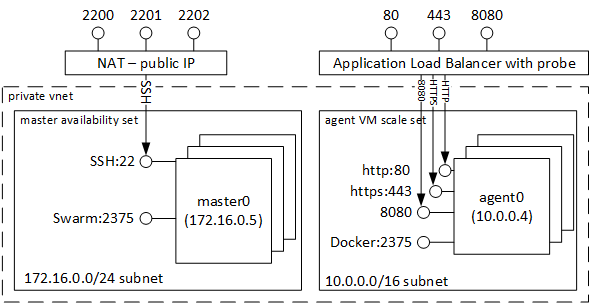
Docker Swarm continuous delivery pipeline demo
Tunneling port 8080 from localhost to the master
username=<username>
masterfqdn=<masterfqdn>
agentsfqdn=<agentsfqdn>
ssh -L 8080:localhost:8080 $username@$masterfqdn
Visualizing the state of the cluster
Create a container with the visualizer in the master node (it is not a task of the cluster)
$> docker run -d -p 8080:8080 -v /var/run/docker.sock:/var/run/docker.sock --name visualizer dockersamples/visualizer
Manual deployment of the application
Steps to manually deploy both apps in a new network:
docker network create --driver overlay gallifrey
docker service create --name riversong --publish 8888:8888 --network gallifrey ciberado/riversong
docker service create --name thedoctor --publish 80:80 --env INTERNAL_SERVICE_NAME=riversong  --network gallifrey ciberado/thedoctor
Check the edge microservice with curl http://$agentsfqdn:80
Undeploy the application with:
docker service rm thedoctor
docker service rm riversong
docker network rm gallifrey
Automatic deployment with Docker Compose wget -O docker-compose.yml https://raw.githubusercontent.com/capside/docker-swarm-mode-workshop/master/docker-compose.yml
docker stack deploy --with-registry-auth --compose-file docker-compose.yml test
Check the edge microservice with curl http://$agentsfqdn:80
Scaledown the inner service to 1
docker service scale test_riversong=1