


| Developer: | Chengze Shen |
|---|
Table of contents
- 8.27.2025 - TIPP-SD is now accepted by ACM-BCB 2025! Run TIPP-SD for
species detection from metagenomic reads with the subcommand
run_tipp3.py detection. - 4.16.2025 - TIPP3 is publicly available on PLOS Computational Biology! DOI link.
- 3.6.2025 - Users can directly download the latest TIPP3 reference package
by running the subcommand
run_tipp3.py download_refpkg. - 1.20.2025 - TIPP3 now is feature complete for abundance profiling, for both the more accurate TIPP3 mode or the fast TIPP3-fast mode. By default, TIPP3-fast is used.
TIPP3 is a metagenomic profiling method that solves the following problems:
- Taxonomic identification
- Input: A query read q
- Output: The taxonomic lineage of q (if identified)
- Abundance profiling
- Input: A set Q of query reads
- Output: An abundance profile estimated on Q
TIPP3 continues the TIPP-family methods (prior methods: TIPP and TIPP2), which use a marker gene database to identify the taxonomic lineage of input reads (if the read comes from a marker gene). See the pipeline below for the TIPP3 workflow.
Additionally, TIPP-SD, as a subcommand, can perform detection at the species level.
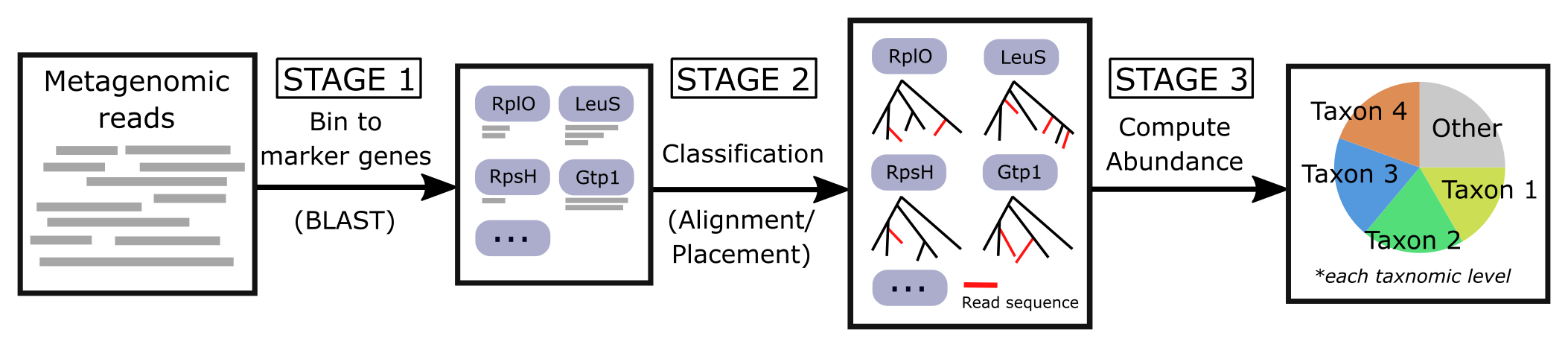
| Publication(s) |
|---|
| (TIPP3) Shen, Chengze, Eleanor Wedell, Mihai Pop, and Tandy Warnow, "TIPP3 and TIPP3-fast: improved abundance profiling in metagenomics." PLOS Computational Biology, 2025. https://doi.org/10.1371/journal.pcbi.1012593 |
| (TIPP2) Nguyen, Nam, Siavash Mirarab, Bo Liu, Mihai Pop, and Tandy Warnow, "TIPP: Taxonomic identification and phylogenetic profiling." Bioinformatics, 2014. https://doi.org/10.1093/bioinformatics/btu721 |
| (TIPP) Shah, Nidhi, Erin K. Molloy, Mihai Pop, and Tandy Warnow, "TIPP2: metagenomic taxonomic profiling using phylogenetic markers." Bioinformatics, 2020. https://doi.org/10.1093/bioinformatics/btab023 |
TIPP3 includes and uses:
- pplacer (v1.1.alpha19).
TIPP3 was tested on Python 3.7 to 3.12.
There are two ways to install and use TIPP3: with PyPI (pip install) or
directly with this GitHub repository. If you have any difficulties installing
or running TIPP3, please contact Chengze Shen (chengze5@illinois.edu).
BLAST is a hard requirement to run TIPP3. The software will automatically
look for blastn in the $PATH environment variable.
If you have not installed BLAST, you can find the latest version from
https://ftp.ncbi.nlm.nih.gov/blast/executables/blast+/LATEST/.
At the time, you can download the TIPP3 reference package from https://databank.illinois.edu/datasets/IDB-4931852, hosted on the Illinois Data Bank. You can also download the latest version using run_tipp3.py download_refpkg. Once downloaded, unzip the file and please see Examples and Usage for referring to the reference package.
If you would like to create a customized TIPP3 reference package, please refer to this Wiki page for the pipeline to do so.
The easiest way to install TIPP3 is to use the PyPI distribution.
# 1. Install with pip (--user if no root access)
pip install tipp3 [--user]

# 2. Three binary executables will be installed. The first time running
#    any of the binaries will create the TIPP3 config file at
#    ~/.tipp3/main.config
tipp3 [-h]           # (recommended) preset "TIPP3-fast" for abundance profiling
tipp3-accurate [-h]  # preset "TIPP3" for abundance profiling
run_tipp3.py [-h] # see other optionspython>=3.7 configparser>=5.0.0 DendroPy>=4.5.2 setuptools>=60.0.0 treeswift>=1.1.28 witch-msa>=1.0.7 bscampp>=1.0.7
# 1. Install via GitHub repo
git clone https://github.com/c5shen/TIPP3.git

# 2. Install all requirements
pip3 install -r requirements.txt

# 3. Execute run_tipp3.py executable for the first time with "-h" to see
#    allowed commandline parameters and example usages
#    Running TIPP3 for the first time will also create the main config
#    file at "~/.tipp3/main.config", which stores the default behavior
#    for running TIPP3 (including all binary executable paths)
python3 run_tipp3.py [-h]
main.config file will be created the first time running TIPP3 at the user
root directory (~/.tipp3/main.config). This file stores the default
behavior for running TIPP3 and the paths to all binary executables that TIPP3
need to use.
In addition, a user can specify a customized config file with -c or
--config-file parameter option when running TIPP3 for abundance profiling
(e.g., run_tipp3.py abundance -c user.config). The user.config file
will override settings from main.config (if overlaps). Command-line
arguments still have the highest priority and will override both config files,
if any parameters overlap.
The general command to run TIPP3 for abundance profiling is listed below. By default, preset "TIPP3-fast" is run, which is significantly faster than the more accurate TIPP3 mode. See Examples below for how to customize the TIPP3 pipeline.
# (Optional) change the logging level to DEBUG for more verbose logging
export TIPP_LOGGING_LEVEL=debug

# TIPP3 supports the following formats for "-i [query reads]"
# XXX.fasta[.gz, .gzip]
# XXX.fa[.gz, .gzip]
# XXX.fastq[.gz, .gzip]
# XXX.fq[.gz, .gzip]

python3 run_tipp3.py abundance -r [reference package path] -i [query reads] -d [output directory]TIPP3 can also perform taxon detection at different taxonomic levels (currently
only support at the species level). This uses the same set of parameters as
the abundance subcommand, with an optional parameter -B to set a
custom threshold for reporting detected species. By default, there will be two
output files with two different thresholds (convervative for better precision
and sensitive for better recall).
# taxon detection (currently only species level)
python3 run_tipp3.py detection -B [detection threshold] ...Users can also directly download the latest version of the TIPP3 reference
package using the subcommand run_tipp3.py download_refpkg.
# download tipp3 refpkg to current directory and decompress
python3 run_tipp3.py download_refpkg -o ./ --decompressSome examples of TIPP3 usage can be found at the bottom of the help text running:
python3 run_tipp3.py -hAll of the following examples can be found in the examples/run.sh bash
script, with example data stored under examples/data. The default example
data used is a small set of Illumina short reads denoted as
illumina.small.queries.fasta.
(TIPP3-fast) Use BLAST for query alignment, and BSCAMPP (bscampp) for
query placement. Note that TIPP3 uses BSCAMPP with pplacer as the base
method. The user can switch to BSCAMPP using EPA-ng by setting
--bscampp-mode epa-ng.
python3 run_tipp3.py abundance -i examples/illumina.small.queries.fasta \
   --reference-package [reference package dir] --outdir tipp3_scenario1 \
   --alignment-method blast --placement-method bscampp \
-t 16Use BLAST for query alignment, and pplacer with the taxtastic package for
query placement (pplacer-taxtastic).
python3 run_tipp3.py abundance -i examples/illumina.small.queries.fasta \
   --reference-package [reference package dir] --outdir tipp3_scenario2 \
   --alignment-method blast --placement-method pplacer-taxtastic \
-t 16(TIPP3) Use WITCH for query alignment, and pplacer-taxtastic for query
placement. Keep all temporary files during the run.
python3 run_tipp3.py abundance -i examples/illumina.small.queries.fasta \
   --reference-package [reference package dir] --outdir tipp3_scenario3 \
   --alignment-method witch --placement-method pplacer-taxtastic \
-t 16 --keeptempUse TIPP3-fast for species detection. Also output a custom detection threshold B=0.3 other than the two default values.
python3 run_tipp3.py detection -i examples/illumina.small.queries.fasta \
   --reference-package [reference package dir] --outdir tipp3_scenario4 \
-t 16 -B 0.3- None for now.