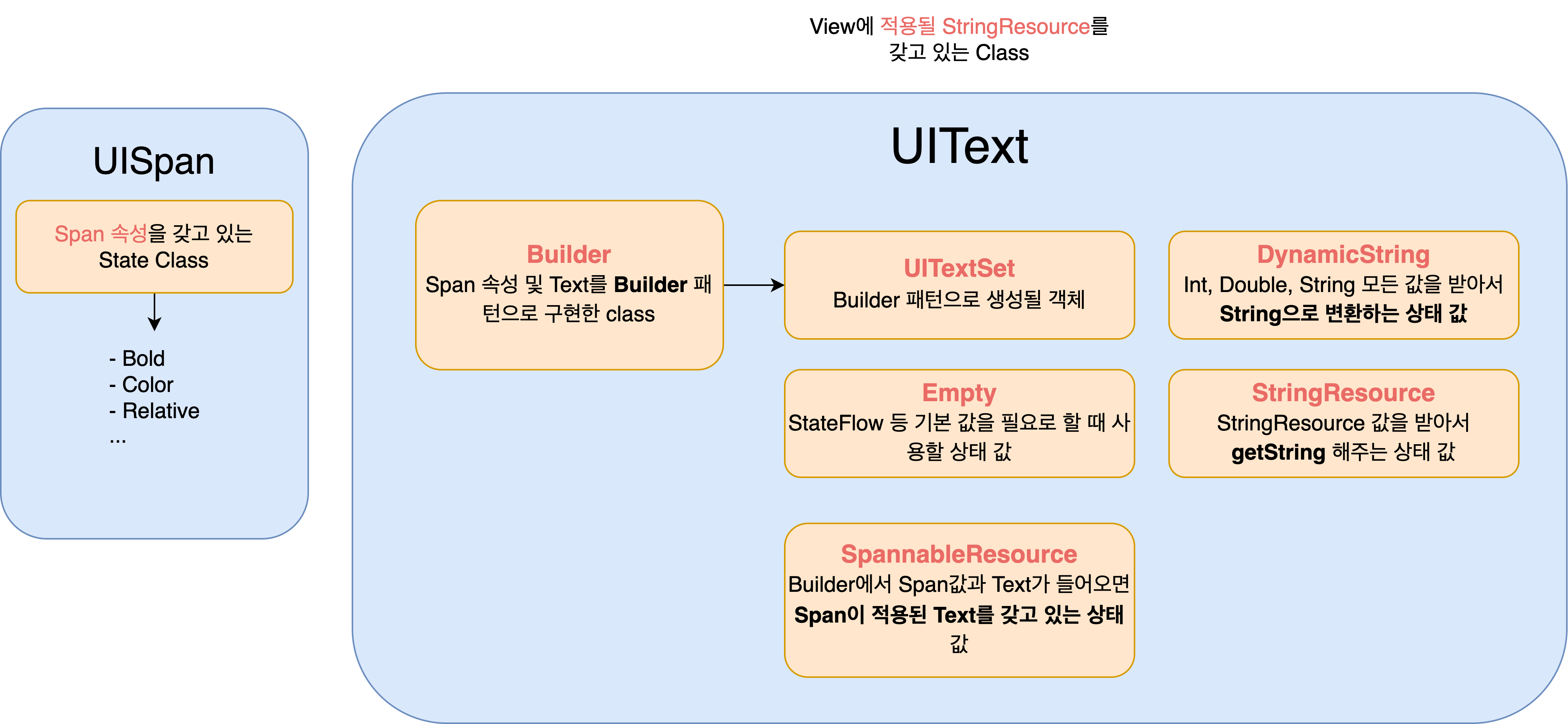
UISpan.kt
UIText.kt
UIText.StringResource(R.string.map_bottom_sheet_title_not)
- 텍스트를 append한 뒤 속성을 넣고 싶다면 spanOn~ 사용을 하면 된다.
- 아래 코드에서 spanOn 속성은
appendDynamicString(" $size")에만 적용이 된다.
UIText.Builder()
  .appendStringResource(R.string.map_bottom_sheet_title_all_brands_prefix)
  .appendDynamicString(" $size")
  .spanOnTextColor(R.color.beep_pink)
.build()<TextView
android:layout_width="wrap_content"
android:layout_height="wrap_content"
app:layout_constraintBottom_toBottomOf="parent"
app:layout_constraintEnd_toEndOf="parent"
app:layout_constraintStart_toStartOf="parent"
app:layout_constraintTop_toTopOf="parent"
app:setUIText="@{vm.uiText}"
tools:text="스타벅스에서 사용 가능한 기프티콘이 3개 있어요" />@BindingAdapter("setUIText")
fun TextView.setUIText(uiText: UIText?) {
Log.d("TAG", "setUIText: $uiText")
if (uiText == null) return
if (uiText.clickable) {
movementMethod = LinkMovementMethod()
}
text = uiText.asString(context)
}
- Builder 패턴을 사용해서 구현이 됐다.
- 새로운 Spannable을 적용할 때마다 View나 BindingAdapter에서 직접 만들어야 하는 방식에서 유연하게 변경이 됐다.
