


Culler is a fast, high-confidence dead-code analyzer for Python projects.
It is built in Rust, distributed as a single command-line tool, and designed to find dead Python code without turning ordinary public APIs, exports, tests, or dynamic Python edges into noisy findings.
culler check .
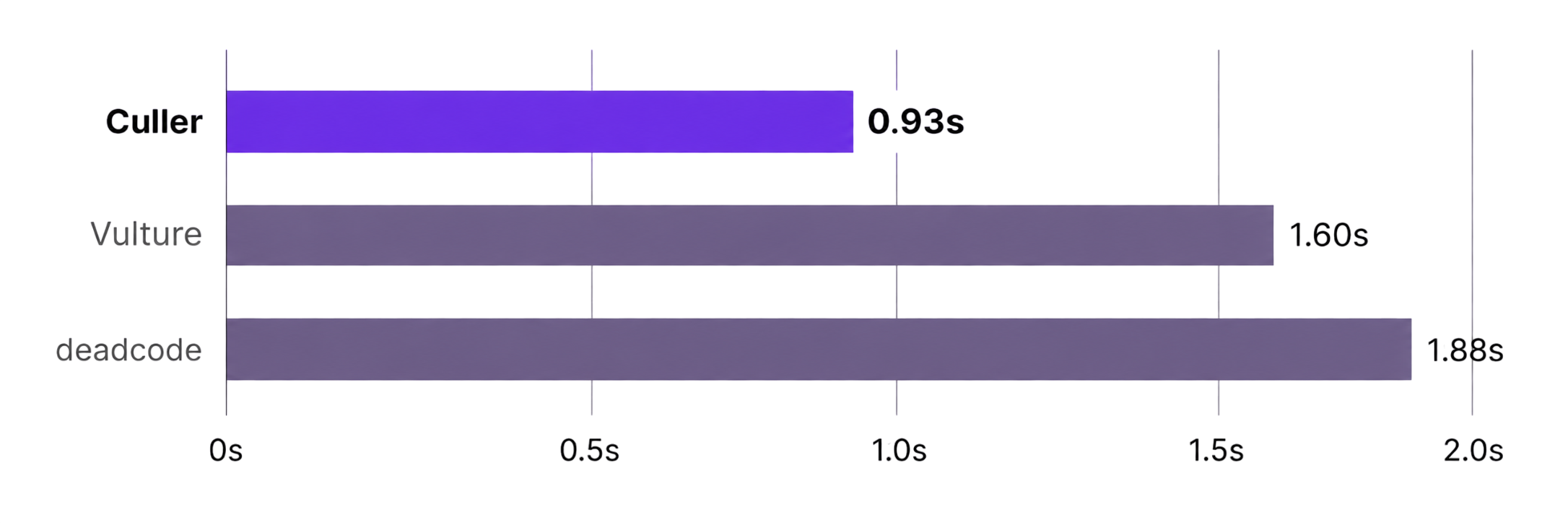
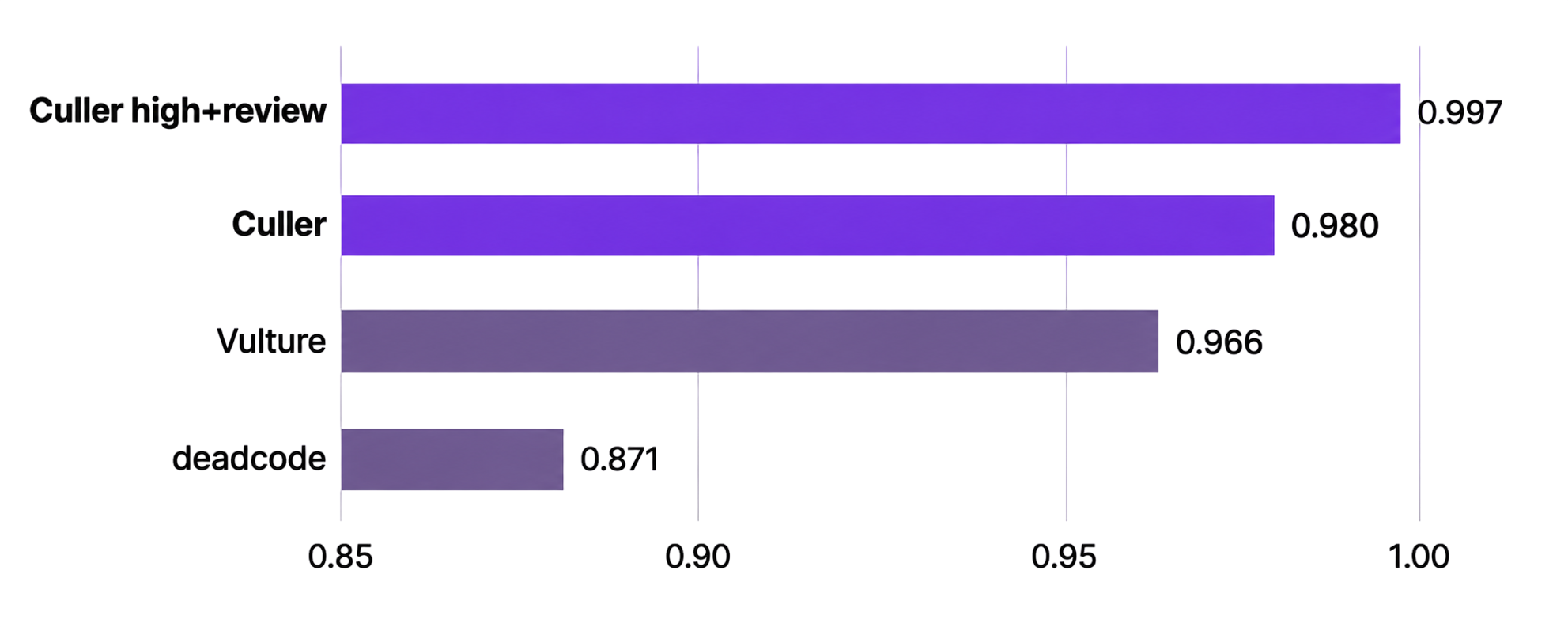
Left: median wall-clock runtime, where lower is better. Right: F1 score, the balance between precision and recall, where higher is better.
Benchmark: 15 realistic Python projects, 57,068 lines, 715 expected findings, and comparisons against Vulture and deadcode. Results are corpus-specific; the methodology and reproduction commands are below.
- High-confidence findings by default. Culler reports the findings it can support strongly, and keeps review-confidence findings available separately.
- Whole-project reachability for applications. Production roots let Culler identify code that is unreachable from known entry points.
- Conservative library analysis. Exports, public surfaces, tests, and dynamic behavior are handled carefully to avoid noisy reports.
- Useful without heavy setup. Basic unused-code checks work with little or
no configuration, and deeper reachability is enabled with
pyproject.toml. - Automation-friendly output. JSON output uses stable rule and diagnostic identifiers for editors, dashboards, CI, and benchmark tooling.
The recommended installation methods for the CLI are uv tool and pipx:
uv tool install cullerpipx install cullerYou can also install it into an existing Python environment:
python -m pip install cullerThe PyPI package installs the compiled culler binary. It does not expose a
Python import API yet.
Run Culler on the current project:
culler check .Emit machine-readable JSON:
culler check . --format jsonShow review-confidence findings as well as high-confidence findings:
culler check . --show-reviewExplain a specific candidate or finding:
culler explain <candidate-or-finding-id> .Exit codes are intentionally small:
| Code | Meaning |
|---|---|
0 |
Analysis completed without default-visible findings. |
1 |
Analysis completed and default-visible findings were reported. |
2 |
Input, configuration, parse, or completeness error. |
Culler reads configuration from pyproject.toml.
[tool.culler]
src = "src"
mode = "auto"
target-python = "3.12"
For applications, declare production roots when you want reachability findings:
[tool.culler]
src = "src"
mode = "application"
root_coverage = "complete"
roots = ["my_app.cli:main"]
For libraries, Culler treats exported and externally visible surfaces more conservatively:
[tool.culler]
src = "src"
mode = "library"
Useful fields:
| Field | Purpose |
|---|---|
src |
Source root or roots to analyze. |
mode |
auto, application, or library. |
root_coverage |
partial or complete when roots are known. |
roots |
Application entry points such as pkg.cli:main. |
tests |
Test paths when they are not discoverable conventionally. |
target-python |
Python syntax/semantic target, currently 3.10 through 3.15. |
exclude |
Glob patterns to exclude from analysis. |
allow_partial |
Permit partial analysis without escalating to exit code 2. |
Text output is optimized for local development and CI logs. JSON output is intended for editors, dashboards, benchmarks, and automation.
culler check . --format jsonRule IDs are stable machine-readable identifiers:
| Rule | Finding |
|---|---|
CULL001 |
Unreferenced function. |
CULL002 |
Unreferenced class. |
CULL003 |
Root-unreachable function. |
CULL004 |
Root-unreachable class. |
CULL005 |
Unused import binding. |
CULL006 |
Unused local binding. |
CULL007 |
Unreachable statement range. |
CULL008 |
Unused private method. |
Diagnostic IDs such as CULL_P0101 describe analysis, parsing, or
configuration problems.
The benchmark compares Culler with Vulture and deadcode on one fixed corpus of artificial but realistic Python projects. The projects are artificial because precision and recall need ground truth; many real repositories contain little confirmed dead code, and exhaustive manual labeling is subjective. The corpus is designed to resemble code developers commonly inherit: services, libraries, CLIs, workers, pipelines, plugin systems, configuration packages, and utility-heavy AI-era codebases.
| Scope | Value |
|---|---|
| Projects | 15 |
| Python files | 374 |
| Python LOC | 57,068 |
| Expected findings | 715 |
| Clean projects | 2 |
| Large or noisy projects | 2 |
The expected findings live under benchmark/expected/ and use comparable
categories: unused imports, unused locals, unreachable statements, unused
functions, unused classes, and unused private methods.
| Tool | Why included |
|---|---|
| Culler | Subject under evaluation. |
| Vulture | Classic Python dead-code detector. |
| deadcode | Newer whole-codebase Python unused-code detector. |
Ruff, Pylint, Pyflakes, Flake8, autoflake, pycln, and unimport are not included in the headline comparison. They overlap on some unused-import or unused-local checks, but they are linters or cleanup tools rather than direct whole-project dead-code analyzers.
Every expected finding not matched by a tool is a false negative. Every parsed tool finding in a scoreable category that does not match an expected finding is a false positive, including findings in clean projects. Matching is deterministic by category, path, symbol name where relevant, and source span; duplicate reports count once as a true positive and then as false positives.
Culler's headline score uses high-confidence findings. The benchmark also reports a Culler high-plus-review aggregate, which includes review-confidence findings from the same Culler JSON run. It does not represent a separate timed CLI invocation.
Runtime includes subprocess startup time. That reflects command-line user experience and avoids special-casing tools written in different languages. By default, each tool gets one warmup run and five measured runs per project; the report uses median wall time. Result JSON records command lines, tool versions, Python version, OS, CPU, memory, and the Culler commit.
Peak RSS is recorded where /usr/bin/time -l exposes it. If unavailable, the
result uses null.
Validate the corpus and expected files:
python3 benchmark/run.py --validate-onlyRun the benchmark runner self-tests:
python3 benchmark/test_run.pyBuild Culler and run the full benchmark:
cargo build --release
python3 benchmark/run.py \
  --culler target/release/culler \
  --tools culler,vulture,deadcode \
  --runs 5 \
  --results benchmark/results/latest.json
Generated reports are written under benchmark/results/ and ignored by
default. Raw tool outputs are retained under benchmark/results/raw/.
Prerequisites:
- Rust 1.82 or newer
- Python 3.10 or newer
uvfor packaging and benchmark helper commands
Core checks:
cargo fmt --all --check
cargo check
cargo clippy --all-targets --all-features -- -D warnings
cargo test
python3 benchmark/test_run.py
python3 benchmark/run.py --validate-only
Build the PyPI package locally:
uvx maturin build --release --out dist --sdist
uvx twine check dist/*Culler is pre-1.0 software. Rule IDs are intended to be stable, but CLI,
configuration, and JSON output details may still evolve before 1.0.
Releases use reviewed PRs and changelog updates. See
CONTRIBUTING.md
for commit and release guidance.
Culler is released under the MIT License. See
LICENSE.