

Written by CEA/IFPEN and Contributors
(C) Copyright 2000-2022 CEA/IFPEN. All rights reserved.
All content is the property of the respective authors or their employers. For more information regarding authorship of content, please consult the listed source code repository logs.
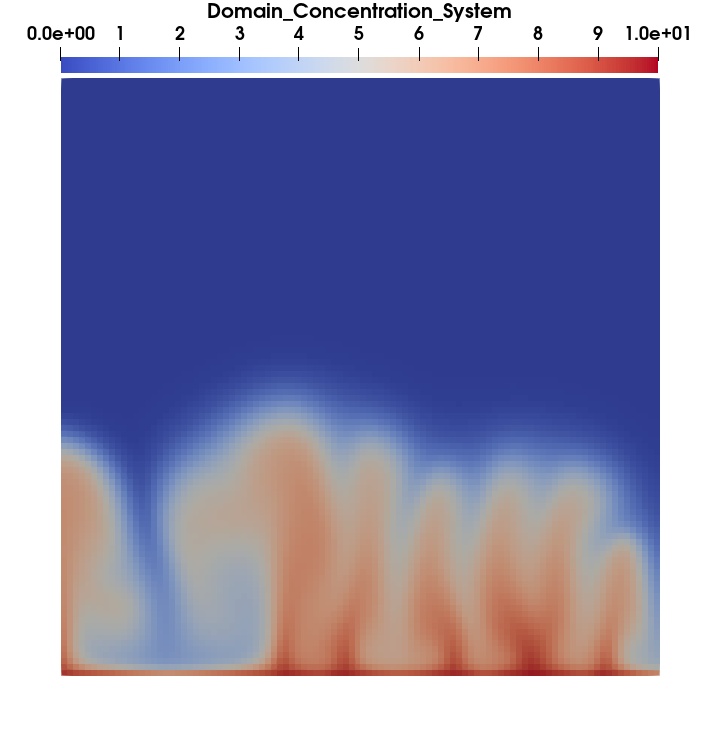
Water concentration in a porous material with Sharc
More Screenshots from Sharc
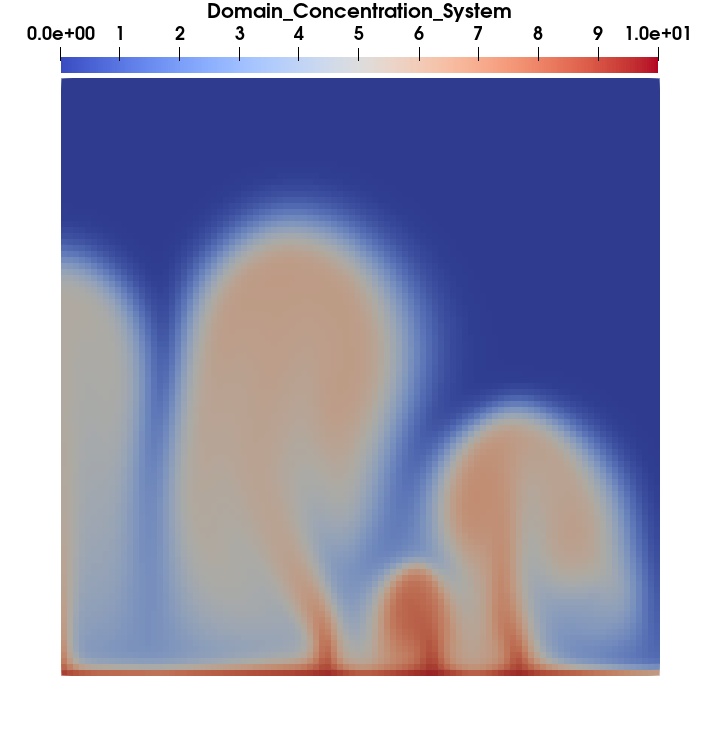
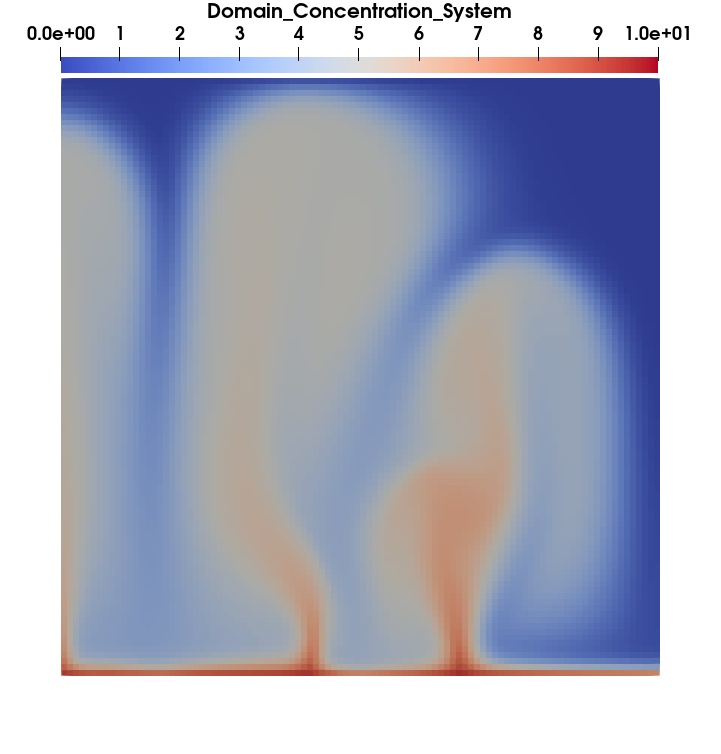
Evolution of water concentration over time in a porous material
- Examples of apt install commands on Ubuntu 22.04
    sudo apt-get -y update
    sudo apt install -y apt-utils build-essential iputils-ping python3 \
                   git gfortran libglib2.0-dev libxml2-dev libhdf5-openmpi-dev \
                   libparmetis-dev libunwind-dev dotnet6 cmake
    sudo apt install -y libeigen3-dev
    sudo apt install -y libboost-all-dev
    sudo apt install -y googletest
    sudo apt install -y ninja-build
    sudo apt install -y libhypre-dev
    sudo apt install -y libpetsc-real-dev
    sudo apt install -y libtrilinos-teuchos-dev libtrilinos-epetra-dev \
                   libtrilinos-tpetra-dev libtrilinos-kokkos-dev libtrilinos-ifpack2-dev \
                   libtrilinos-ifpack-dev libtrilinos-amesos-dev libtrilinos-galeri-dev \
                   libtrilinos-xpetra-dev libtrilinos-epetraext-dev \
                   libtrilinos-triutils-dev libtrilinos-thyra-dev \
                   libtrilinos-kokkos-kernels-dev libtrilinos-rtop-dev \
                   libtrilinos-isorropia-dev libtrilinos-belos-dev
    sudo apt install -y libtrilinos-ifpack-dev libtrilinos-anasazi-dev \
                    libtrilinos-amesos2-dev libtrilinos-shards-dev libtrilinos-muelu-dev \
                    libtrilinos-intrepid2-dev libtrilinos-teko-dev libtrilinos-sacado-dev \
                    libtrilinos-stratimikos-dev libtrilinos-shylu-dev \
                    libtrilinos-zoltan-dev libtrilinos-zoltan2-dev
    sudo apt install -y swig
sudo apt install -y g++-12 gcc-12 nvidia-cuda-toolkit- Examples of apt install commands on Ubuntu 24.04
    sudo apt-get -y update
    sudo apt install -y apt-utils build-essential iputils-ping python3 \
                        git gfortran libglib2.0-dev libxml2-dev \
                        libparmetis-dev libunwind-dev dotnet8 cmake
    sudo apt install -y googletest
    sudo apt install -y ninja-build
    sudo apt install -y swig

    # extra package for Arcnane+Alien
    sudo apt install -y libeigen3-dev
    sudo apt install -y libboost-all-dev
    sudo apt install -y libhdf5-openmpi-dev
    sudo apt install -y libhypre-dev
    sudo apt install -y libpetsc-real-dev

    # extra packages for ShArc
    sudo apt install -y mono-devel aspnetcore-runtime-6.0
The overall architecture of ShArc and its main modules is documented in:
ARCHITECTURE.md— high-level overview of the code structure, module responsibilities and execution flow (ShArc, TwoPhaseFlowSimulation, CAWF, ExaDiBench, tests).- The Architecture section of the Hugo documentation site (if built locally under
docs/):docs/content/architecture/_index.md(Hugo page includingARCHITECTURE.md).
In short:
common/hosts the ArcGeoSim / ArcaneInfra submodules (framework and build system).src/contains the ShArc library:ShArc/(orchestration module),TwoPhaseFlowSimulation/(two-phase flow & thermo-chemical modules),CAWF/(FEM-based solvers and utilities),ExaDiBench/(geometric benchmark module),Main/(ShArc.exe entry point).
test/contains the reference cases and CTest scenarios (TwoPhaseFlowSimulation, CAWF, ExaDiBench, ThermoChemicalConvection, large-scale SPE10).
ShArc ships with a Hugo + Doxygen documentation site under the docs/ directory.
There are two main usage modes:
To browse the documentation locally while developing:
-
Install Hugo (extended version), for example on Ubuntu:
sudo apt install hugo
-
From the root of the repository (not from
docs/), start the Hugo server:cd /path/to/sharc hugo server --config docs/hugo.yaml -DThen open the URL printed by Hugo (typically
http://localhost:1313/or a similar port).
Internally:
- Hugo uses
docs/hugo.yamlas its configuration file. - Content is under
docs/content/(sectionssrc/,test/,api/,architecture/). - Layouts and theme are under
docs/layouts/anddocs/themes/hugo-book/. - The documentation pages for the main modules/tests include the Markdown files
from the project (
src/README.md,test/.../README.md,ARCHITECTURE.md) via a custom shortcode, which is why Hugo must be run from the repository root.
The repository also includes a GitHub Actions workflow that automatically builds and
publishes the documentation to the docs/ folder on the main branch, suitable for
GitHub Pages:
- Workflow file:
.github/workflows/docs.yml-
On each push to
main, it runs:hugo --config docs/hugo.yaml
which generates the static site into
docs/public/. -
Then it copies the generated files into
docs/(adds.nojekyll) and commits the changes back tomain.
-
To use GitHub Pages with this workflow:
-
In the GitHub repository settings, under Pages, choose:
- Branch:
main - Folder:
/docs
- Branch:
-
Ensure the workflow is enabled (default for Actions).
-
After a push on
main, GitHub Actions will regenerate the documentation website, and GitHub Pages will serve it from the/docsdirectory.
This setup keeps documentation generation automated while still allowing local
preview (hugho server) and manual edits of the Markdown files in src/ and test/.
Compilation workflow on Ubuntu 22.04
export INSTALL_DIR=`pwd`/Install
export Arccon_DIR=${INSTALL_DIR}
export Arccore_DIR=${INSTALL_DIR}
export Axlstar_DIR=${INSTALL_DIR}
export Arcane_DIR=${INSTALL_DIR}
export ArcDependencies_DIR=${INSTALL_DIR}
export Alien_DIR=${INSTALL_DIR}
export AlienPlugins_DIR=${INSTALL_DIR}

# Arcane Framework installation
echo "INSTALL ARCFRAMEWORK"

# Clone project
echo "      CLONE PROJECT"
git clone --recurse-submodules https://github.com/arcaneframework/framework.git

# Arcane Framework configuration
mkdir build-framework
cmake -S `pwd`/framework \
          -B `pwd`/build-framework  \
          -DCMAKE_BUILD_TYPE=${BuildType} \
          -DCMAKE_INSTALL_PREFIX=${INSTALL_DIR} \
          -DARCANE_WANT_ARCCON_EXPORT_TARGET=OFF \
          -DFRAMEWORK_NO_EXPORT_PACKAGES=ON \
          -DALIEN_BUILD_COMPONENT=all \
          -DALIEN_PLUGIN_HYPRE=OFF \
          -DALIEN_PLUGIN_PETSC=OFF \
          -DALIEN_GENERATE_DOCUMENTATION=OFF \
          -DALIEN_USE_EIGEN3=ON

# Arcane framework compilation and installation
cmake --build `pwd`/build${SUF}
make -C `pwd`/build${SUF} install -j8

export HDF5_ROOT=/usr
export BOOST_ROOT=/usr
export Boost_DIR=/usr/lib/x86_64-linux-gnu/cmake/Boost-1.74.0
export BOOST_INCLUDE_DIR=/usr/include
export BOOST_LIBRARY_DIR=/usr/lib/x86_64-linux-gnu

# ShArc project
echo "SHARC clone project then switch to numpex-exadi branch"
git clone https://github.com/arcaneframework/sharc.git
git checkout dev/numpex-exadi

# ShArc project configuration
mkdir build-sharc$
echo "CONFIGURE PACKAGE"
cmake -S `pwd`/sharc \
      -B `pwd`/build-sharc${SUF} \
       -DCMAKE_BUILD_TYPE=${BuildType} \
       -DBUILD_SHARED_LIBS=ON \
       -DBoost_INCLUDE_DIR=${Boost_INCLUDE_DIR} \
       -DBoost_DIR=${Boost_DIR} \
       -DArccon_DIR=${Arccon_DIR}/share/cmake/Arccon \
       -DArccore_DIR=${Arccore_DIR}/lib/cmake/Arccore \
       -DAxlstar_DIR=${Axlstar_DIR}/share/cmake/Axlstar \
       -DArcanePath=${Arcane_DIR} \
       -DArcane_DIR=${Arcane_DIR}/lib/cmake/Arcane \
       -DARCANEFRAMEWORK_ROOT=${Arcane_DIR} \
       -DAlienPlugins_DIR=${AlienPlugins_DIR}/lib/cmake/AlienPlugins \
       -DAlien_DIR=${Alien_DIR}/lib/cmake/Alien \
       -DALIEN_DIR=${Alien_DIR}/lib/cmake/ALIEN \
       -DUSE_ALIEN_V20=1 \
       -DUSE_ARCANE_V3=1

# ShArc compilation
cmake --build `pwd`/build-sharc${SUF}
Compilation workflow on Ubuntu 24.04
CC=`which gcc`
CXX=`which g++`
export INSTALL_DIR=$PWD/Install-ubuntu2404
export Arccon_DIR=${INSTALL_DIR}/share/cmake/Arccon
export Arccore_DIR=${INSTALL_DIR}/lib/cmake/Arccore
export Axlstar_DIR=${INSTALL_DIR}/share/cmake/Axlstar
export Arcane_DIR=${INSTALL_DIR}/lib/cmake/Arcane
export Neo_DIR=${INSTALL_DIR}/lib/cmake/Neo
export SGraph_DIR=${INSTALL_DIR}/lib/cmake/SGraph
export AlienPlugins_DIR=${INSTALL_DIR}/lib/cmake/AlienPlugins
export Alien_DIR=${INSTALL_DIR}/lib/cmake/Alien

export HDF5_ROOT=/usr
export Boost_DIR=/usr/lib/x86_64-linux-gnu/cmake/Boost-1.83.0
export BOOST_INCLUDEDIR=/usr/include
export BOOST_LIBRARYDIR=/usr/lib/x86_64-linux-gnu

cmake -S $PWD/sharc \
      -B $PWD/build-sharc-ubuntu2404 \
       -DCMAKE_BUILD_TYPE=Release \
       -DDOTNET_BUILD_TYPE=Release \
       -DBUILD_SHARED_LIBS=ON \
       -DARCANEFRAMEWORK_ROOT=${INSTALL_DIR} \
       -DCMAKE_C_COMPILER=mpicc \
       -DCMAKE_CXX_COMPILER=mpic++ \
       -DMPI_C_LIB_NAMES=mpi \
       -DMPI_CXX_LIB_NAMES=mpi \
       -DMPI_mpi_LIBRARY=/usr/lib/x86_64-linux-gnu/libmpi.so \
       -DMPI_INCLUDE_DIRS=/usr/include/x86_64-linux-gnu/mpi \
       -DMPI_CXX_INCLUDE_PATH=/usr/include/x86_64-linux-gnu/mpi \
       -DHDF5_USE_CMAKE_CONFIG=TRUE \
       -DArccon_DIR=${INSTALL_DIR}/share/cmake/Arccon \
       -DArccore_DIR=${INSTALL_DIR}/lib/cmake/Arccore \
       -DAxlstar_DIR=${INSTALL_DIR}/share/cmake/Axlstar \
       -DArcane_DIR=${INSTALL_DIR}/lib/cmake/Arcane \
       -DNeo_DIR=${INSTALL_DIR}/lib/cmake/Neo \
       -DSGraph_DIR=${INSTALL_DIR}/lib/cmake/SGraph \
       -DAlienPlugins_DIR=${INSTALL_DIR}/lib/cmake/AlienPlugins \
       -DAlien_DIR=${INSTALL_DIR}/lib/cmake/Alien \
       -DBoost_DIR=${Boost_DIR}

cmake --build \
$PWD/build-sharc-ubuntu2404 \In the tools/apptainer directory, some tools are provided to build arcaneframework and shark within a container with apptainer.
$ cd tools/apptainer
# build the container arcane-ubuntu22.04.sif with apptainer
$ bash build-ubuntu22.04.sh

# launch arcane-ubuntu22.04.sif container
$ bash runapp.sh
     # with container
     Apptainer>
     Apptainer> cd /work
Apptainer> bash install-all.shIn the tools/guix directory, some tools are provided to build arcaneframework and shark with guix package manager.
Arcane installation
$ git clone https://gitlab.inria.fr/numpex-pc5/wp2-co-design/proxy-sharc.git
$ export PROXYSHARC_ROOT=$PWD/proxy-sharc
$ export INSTALL_DIR=$PROXYSHARC_ROOT/Install-guix
$ export BUILD_TYPE=Release

# ARCANEFRAMEWORK CLONE PROJECT
# install Arcane prerequires dependancies with guix
$ git clone --recurse-submodules https://github.com/arcaneframework/framework.git
$ export ARCANEFRAMEWORK_ROOT=$PWD/framework

# ARCANEFRAMEWORK PREREQUIREMENT INSTALLATION
$ cd $ARCANEFRAMEWORK_ROOT/tools/guix
$ bash install-arcane-dep-guix.sh

# ARCANEFRAMEWORK CONFIGURATION STEP
$ cd $PROXYSHARC_ROOT
$ mkdir build-arcane
$ export CC=`which gcc`
$ export CXX=`which c++`
$ cmake -S $ARCANEFRAMEWOR_ROOT \
        -B `pwd`/build-arcane  \
        -DCMAKE_BUILD_TYPE=${BUILD_TYPE} \
        -DCMAKE_INSTALL_PREFIX=${INSTALL_DIR} \
        -DARCANE_WANT_ARCCON_EXPORT_TARGET=OFF \
        -DFRAMEWORK_NO_EXPORT_PACKAGES=ON \
        -DALIEN_BUILD_COMPONENT=all \
        -DALIEN_PLUGIN_HYPRE=OFF \
        -DALIEN_PLUGIN_PETSC=OFF \
        -DALIEN_GENERATE_DOCUMENTATION=OFF \
        -DALIEN_USE_EIGEN3=ON \
        -DARCCORE_CXX_STANDARD=20


# ARCANEFRAMEWORK COMPILATION STEP
$ cmake --build `pwd`/build-arcane

# ARCANEFRAMEWORK INSTALLATION STEPSTEP
$ make -C `pwd`/build-arcane install -j8
ShArc instalation
# CLONE ShArc project
$ git clone -b dev/numpex-exadi https://github.com/arcaneframework/sharc.git

# SHARC CONFIGURARTION STEP
$ mkdir build-sharc
$ cmake -S `pwd`/sharc \
        -B `pwd`/build-sharc \
        -DCMAKE_BUILD_TYPE=${BUILD_TYPE} \
        -DBUILD_SHARED_LIBS=ON \
        -DBOOST_INCLUDE_DIR=${Boost_INCLUDE_DIR} \
        -DBOOST_LIBRARY_DIR=${BOOST_LIBRARY_DIR} \
        -DBoost_DIR=${Boost_DIR} \
        -DARCANEFRAMEWORK_ROOT=${INSTALL_DIR} \
        -DCxx20=ON

  # SHARC COMPILATION STEP
$ cmake --build `pwd`/build-sharc