
Anime torrent extension built for Hayase.
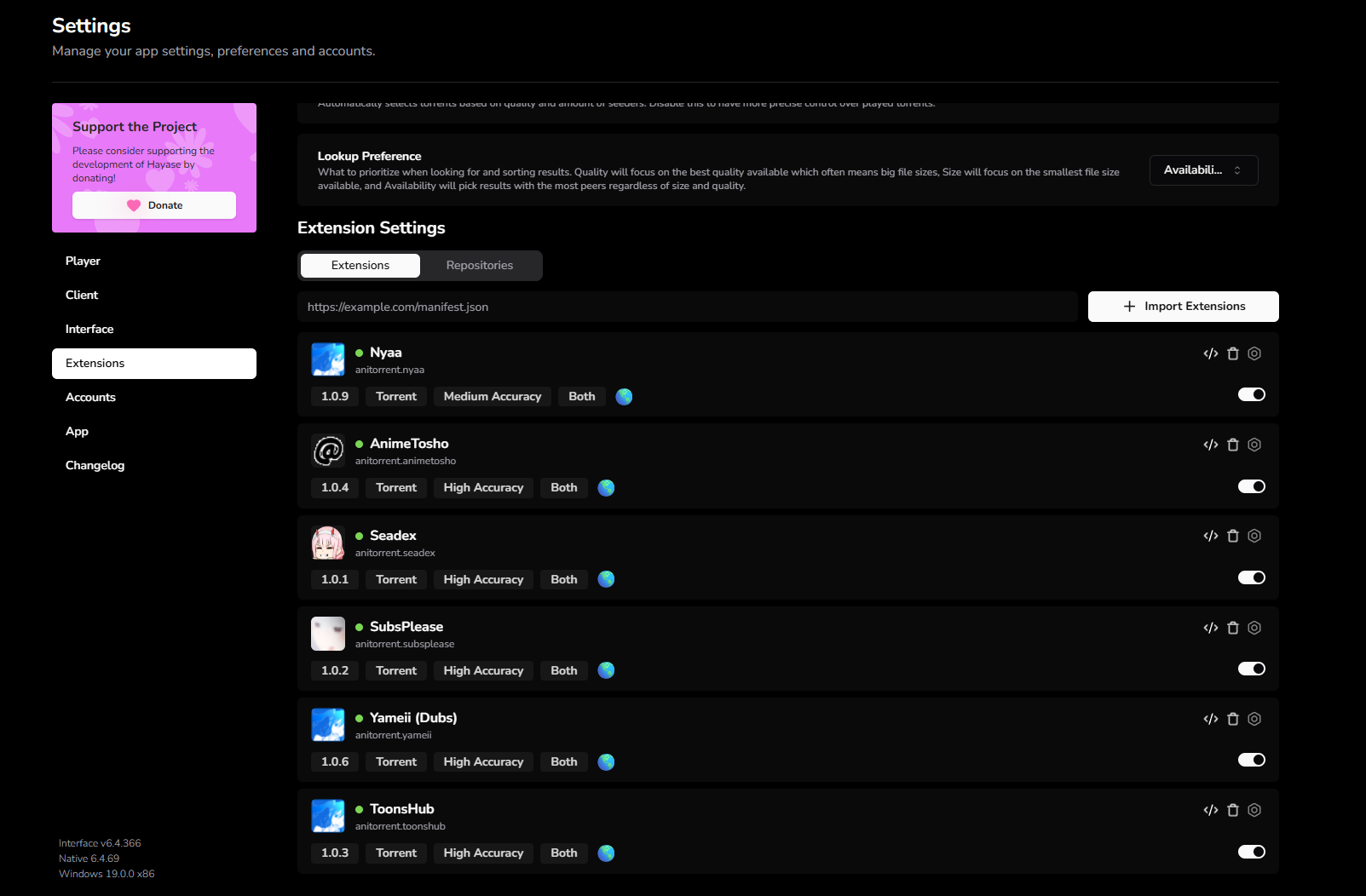
Six toggleable sources, auto-updating in the background, no manual maintenance.
Replaces the abandoned hayase-app extensions (Nyaa, AnimeTosho, Seadex) that have been marked Outdated for months.
Settings → Extensions → Repositories → paste → Import Extensions:
https://raw.githubusercontent.com/anh9000/anitorrent/main/hayase/index.json
That's it. One-time action. Hayase auto-polls the manifest on every launch, so any future release flows in automatically without re-importing.
https://raw.githubusercontent.com/anh9000/anitorrent/main/shiru/index.json
Settings → Extensions → paste.
Shiru note: a Shiru manifest is also published, but this has not been tested in an actual Shiru install. The code was designed against the lowest-common-denominator API both apps accept, so it should work. If you try it in Shiru and hit a problem, please open an issue with the details.
Built and verified against this Hayase build:
┌────────────────────────┬──────────────────────┐
│ COMPONENT              │ VERSION              │
├────────────────────────┼──────────────────────┤
│ Hayase Interface       │ v6.4.366             │
│ Hayase Native          │ 6.4.69               │
│ Platform               │ Windows              │
│ All six sources online │ verified 2026-05-18  │
└────────────────────────┴──────────────────────┘
The extensions page in Hayase, all six sources green and current:
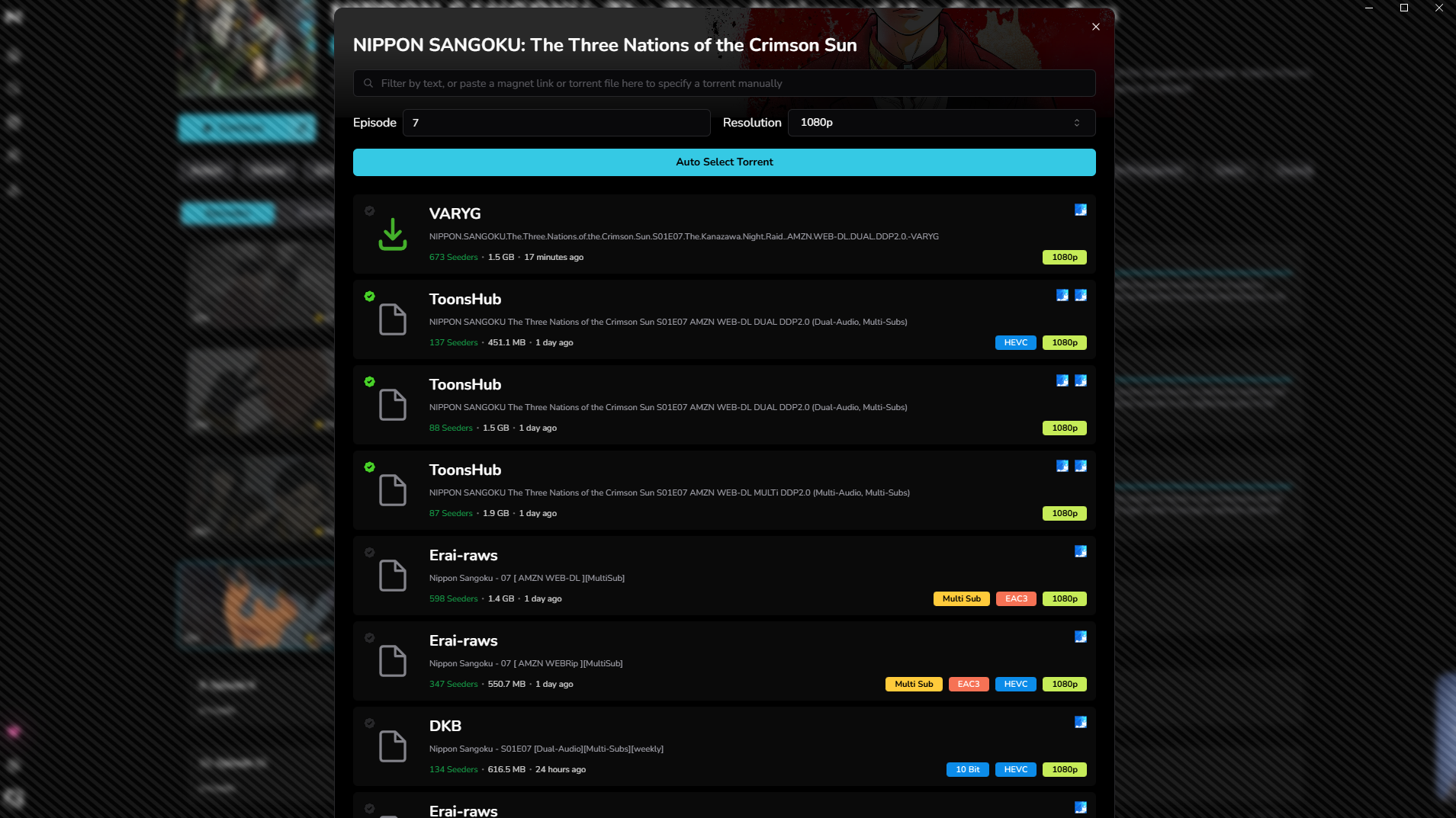
What a search looks like (Nippon Sangoku, episode 7), pulling results from multiple sources in one panel:
┌────────────┬──────────┬──────────────────────────────────────────┐
│ SOURCE     │ ACCURACY │ BEST FOR                                 │
├────────────┼──────────┼──────────────────────────────────────────┤
│ Nyaa       │ medium   │ raw firehose, every anime upload         │
│ AnimeTosho │ high     │ anidb-mapped lookups, batch packs        │
│ Seadex     │ high     │ community-curated best releases          │
│ SubsPlease │ high     │ currently-airing weekly subs             │
└────────────┴──────────┴──────────────────────────────────────────┘
These are personal picks that ship enabled by default but are entirely toggleable.
Disable them in Settings → Extensions if you don't want them.
┌────────────┬──────────┬────────────────────────────────────────────┐
│ SOURCE     │ ACCURACY │ WHAT IT ADDS                               │
├────────────┼──────────┼────────────────────────────────────────────┤
│ Yameii     │ high     │ single-uploader English dub re-encodes     │
│ ToonsHub   │ high     │ dual-audio + multi-sub group releases      │
└────────────┴──────────┴────────────────────────────────────────────┘
- Yameii is a narrow catalog but consistent quality. IRC:
#Yameii@irc.rizon.net - ToonsHub covers many currently-airing shows. Telegram: t.me/thtorrents
All six sources declare media: "both" in the manifest. Hayase shows Sub + Dub badges regardless. The badge is purely informational, it does not filter results.
When you open a torrent picker, Hayase hands the same query to every enabled source. They run in parallel, each filters its own results through the shared matching logic, and Hayase merges everything and de-duplicates by infohash (so a release that several sources carry shows up once).
┌─────────────────────────────────────────────────┐
│ HAYASE  QUERY                                   │
│ titles · episode · resolution · exclusions      │
└────────────────────────┬────────────────────────┘
                         │  the same query goes to every enabled source
                         ▼
┌─────────────────────────────────────────────────┐
│ SOURCES   (queried in parallel)                 │
│                                                 │
│ Nyaa         nyaa.si             raw firehose   │
│ AnimeTosho   feed.animetosho.org anidb-mapped   │
│ Seadex       releases.moe        best releases  │
│ SubsPlease   subsplease.org      weekly subs    │
│ Yameii       nyaa.si             english dubs   │
│ ToonsHub     nyaa.si             dual-audio     │
└────────────────────────┬────────────────────────┘
                         │  each source filters its own hits through
                         ▼
┌─────────────────────────────────────────────────┐
│ SHARED FILTER · src/lib/shared.js               │
│ pick query title · match show · episode · res   │
└────────────────────────┬────────────────────────┘
                         ▼
┌─────────────────────────────────────────────────┐
│ HAYASE MERGES EVERY SOURCE                      │
│ de-duplicate by infohash                        │
└────────────────────────┬────────────────────────┘
                         ▼
┌─────────────────────────────────────────────────┐
│ RESULTS IN THE PICKER                           │
└─────────────────────────────────────────────────┘
The matching logic (which title to search with, how to tell a torrent belongs to the show, episode and batch detection) lives once in src/lib/shared.js and is inlined into every source at build time, so a fix applies everywhere at once.
Where can I find Hayase extensions?
This repo is one option. The previously-popular extensions in the hayase-app ecosystem (Nyaa, AnimeTosho, Seadex) have been marked Outdated and unmaintained for months. This pack picks up where they left off with six current, auto-updating sources.
How do I install extensions in Hayase?
Open Hayase. Settings, then Extensions, then the Repositories tab. Paste the install URL into the textbox at the top. Click Import Extensions. The sources appear in the Extensions tab where you can toggle each one on or off independently.
How do I update Hayase extensions?
Hayase auto-polls every extension's manifest URL on launch. As long as the extension's update field points to a maintained URL, new versions flow in automatically when you restart Hayase. For this pack specifically, just relaunch Hayase. All six sources stay current with no action from you.
Why are my existing Hayase extensions marked "Outdated"?
The Outdated badge means the upstream manifest published a higher version number than what you have installed. For the official hayase-app extensions, this means the maintainers stopped publishing updates. Either delete those and import this pack, or wait for the original maintainers to ship a new version.
Does this Hayase extension work on Android?
Yes. The same install URL works in Hayase on Android (8.0 or later). iOS is not supported because Hayase itself is not available on iOS, since Apple bans BitTorrent apps from the App Store.
Is this Hayase extension safe?
All source code is in this public repo. It only talks to public APIs (nyaa.si, feed.animetosho.org, releases.moe, subsplease.org). No tracking, no analytics, no authentication. Every source file is in the src/ directory and the bundles in dist/ are auto-built from those sources by GitHub Actions.
What sources does this pack include?
Six: Nyaa (raw firehose), AnimeTosho (anidb-mapped aggregator), Seadex (community-curated best releases), SubsPlease (weekly fansubs), Yameii (English dubs), and ToonsHub (dual-audio and multi-sub group releases). All toggleable.
data/anilist-to-anidb.json is a compact 170 KB map (~13,000 pairs) extracted from the manami-project anime-offline-database. The AnimeTosho extension fetches this file on first call (cached in memory for the session) to convert AniList IDs to AniDB IDs when Hayase doesn't provide them, enabling high-accuracy lookups via AnimeTosho's ?aid=<id> endpoint.
The mapping is regenerated weekly by .github/workflows/mappings.yml running .github/scripts/build-mappings.js. Manami publishes "Delta Update" commits multiple times per week and tagged weekly releases, so the chain stays fresh automatically with no manual action.
npm install
npm run build
npm test
src/lib/shared.js holds all the matching/query logic shared by every source (single source of truth). Each source in src/ imports from it and is bundled into a standalone dist/*.js by tsup. CI rebuilds dist/ on every push that touches src/, package.json, or tsup.config.js. npm test runs the relevance suite in test/ against live nyaa.si.
See CHANGELOG.md for the full version history.
GPL-3.0. See LICENSE.