This sets you up with a sorta-competent not decent bootleg CDN that you're not paying shitloads of fucking money for.
This 100% assumes you are using your worker as a subdomain or whatever of your actual site (e.g. cdn.isanyoneup.com).
You need Cloudflare's Wrangler utility installed, this itself requiring you to have Node.js installed.
Run wrangler login to log into your Cloudflare account.
Run wrangler generate example-cdn https://github.com/angelicdust/b2cdn-worker to create a Wrangler project from this repo (change the example).
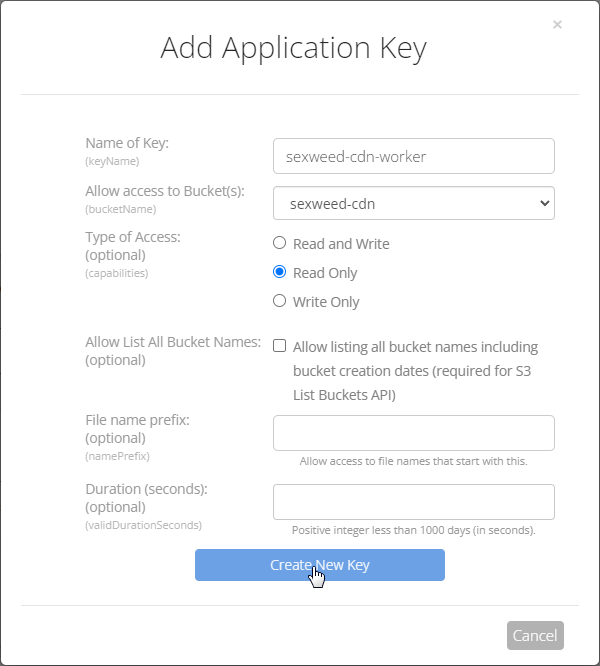
Setup a application key in your Backblaze account (https://secure.backblaze.com/app_keys.htm):
- "Name of Key (
keyName)" should just be some shit like "{bucketName}-worker" (e.g.isanyoneup-cdn-workerifbucketNameisisanyoneup-cdn) - "Allow access to Bucket(s) (
bucketName)" should be set to the bucket you want to serve - "Type of Access: (optional) (
capabilities)" should be Read Only
Copy wrangler.json.template to wrangler.json and configure:
"name"needs to be changed to the project name you configured in thewrangler generatecommand.B2_APPLICATION_KEY_IDis the application key ID from the previous step.B2_REGIONis your bucket's region.B2_BUCKET_NAMEneeds to be the name of your B2 bucket.ALLOW_LIST_BUCKETcan be either"true"or"false"if you want someone to be able to get a directory listing or not.
You must also configure B2_APPLICATION_KEY as a secret:
echo "<your b2 application key>" | wrangler secret put B2_APPLICATION_KEYIf you have a custom favicon.ico that you want to set, just drop it in the assets folder. No need to store that on the bucket.
Run wrangler publish to create the worker on your Cloudflare account, go in and configure the Worker to a subdomain.
Wrangler's local server loads configuration from wrangler.json, but cannot access secrets from your Cloudflare account. Instead, the local server loads additional configuration from .dev.vars.
Copy .dev.vars.template to .dev.vars and configure B2_APPLICATION_KEY:
# Configuration for running the app in local dev mode
B2_APPLICATION_KEY = "<your b2 application key>"