For this project, I trained an agent to solve the Reacher environment.
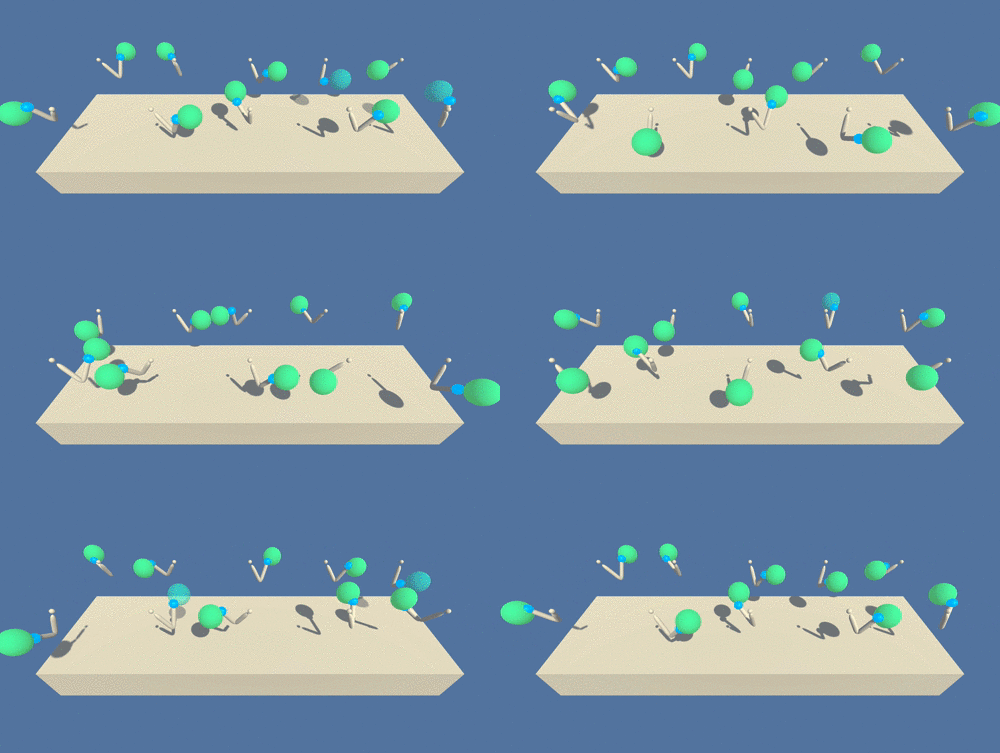
In this environment, a double-jointed arm can move to target locations. A reward is provided for each step that the agent's hand is in the goal location. Thus, the goal of your agent is to maintain its position at the target location for as many time steps as possible.
The observation space consists of 33 variables corresponding to position, rotation, velocity, and angular velocities of the arm. Each action is a vector with four numbers, corresponding to torque applicable to two joints. Every entry in the action vector should be a number between -1 and 1.
For this project, there are two separate versions of the Unity environment:
- The first version contains a single agent.
- The second version contains 20 identical agents, each with its own copy of the environment.
The second version is useful for algorithms like PPO, A3C, and D4PG that use multiple (non-interacting, parallel) copies of the same agent to distribute the task of gathering experience.
The solved criteria differs slightly between the 2 versions of the environment.
The task is episodic, and in order to solve the environment, the agent must get an average score of +30 over 100 consecutive episodes.
The barrier for solving the second version of the environment is slightly different, to take into account the presence of many agents. In particular, your agents must get an average score of +30 (over 100 consecutive episodes, and over all agents). Specifically,
- After each episode, I add up the rewards that each agent received (without discounting), to get a score for each agent. This yields 20 (potentially different) scores. I then take the average of these 20 scores.
- This yields an average score for each episode (where the average is over all 20 agents).
The environment is considered solved, when the average (over 100 episodes) of those average scores is at least +30.
To set up your python environment to run the code in this repository, follow the instructions below.
-
Create (and activate) a new environment with Python 3.6.
- Linux or Mac:
conda create --name drlnd python=3.6 source activate drlnd- Windows:
conda create --name drlnd python=3.6
activate drlnd
-
Clone the repository (if you haven't already!), and navigate to the
python/folder. Then, install several dependencies.git clone https://github.com/udacity/deep-reinforcement-learning.git cd deep-reinforcement-learning/python pip install .
-
Create an IPython kernel for the
drlndenvironment.python -m ipykernel install --user --name drlnd --display-name "drlnd" -
Before running code in a notebook, change the kernel to match the
drlndenvironment by using the drop-downKernelmenu. -
Download the environment from one of the links below. You need only select the environment that matches your operating system:
-
Version 1: One (1) Agent
- Linux: click here
- Mac OSX: click here
- Windows (32-bit): click here
- Windows (64-bit): click here
-
Version 2: Twenty (20) Agents
- Linux: click here
- Mac OSX: click here
- Windows (32-bit): click here
- Windows (64-bit): click here
(For Windows users) Check out this link if you need help with determining if your computer is running a 32-bit version or 64-bit version of the Windows operating system.
(For AWS) If you'd like to train the agent on AWS (and have not enabled a virtual screen), then please use this link (version 1) or this link (version 2) to obtain the "headless" version of the environment. You will not be able to watch the agent without enabling a virtual screen, but you will be able to train the agent. (To watch the agent, you should follow the instructions to enable a virtual screen, and then download the environment for the Linux operating system above.)
-
-
Place the file in the root folder of this GitHub repository, and unzip (or decompress) the file.
The code provided here was tested on an Ubuntu AWS headless (no visual) operating system, but should work for all above provided you follow the correct instructions.
Follow the instructions in Continuous_Control.ipynb to see the training and performance of the trained agent. Best pre-trained weights are saved in files 'best_checkpoint_actor.pth' and 'best_checkpoint_critic.pth'.
Next, I'll try to solve the more difficult Crawler environment.
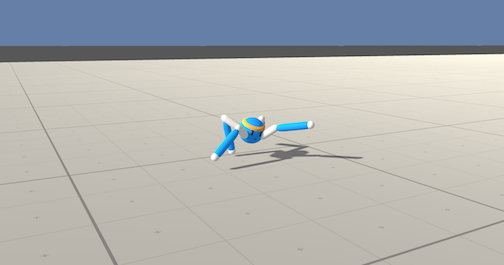
In this continuous control environment, the goal is to teach a creature with four legs to walk forward without falling.
You can read more about this environment in the ML-Agents GitHub here. To solve this harder task, you'll need to download a new Unity environment.
You need only select the environment that matches your operating system:
- Linux: click here
- Mac OSX: click here
- Windows (32-bit): click here
- Windows (64-bit): click here
Then, place the file in the root folder of this GitHub repository, and unzip (or decompress) the file. Next, open Crawler.ipynb and follow the instructions to learn how to use the Python API to control the agent.
(For AWS) If you'd like to train the agent on AWS (and have not enabled a virtual screen), then please use this link to obtain the "headless" version of the environment. You will not be able to watch the agent without enabling a virtual screen, but you will be able to train the agent. (To watch the agent, you should follow the instructions to enable a virtual screen, and then download the environment for the Linux operating system above.)