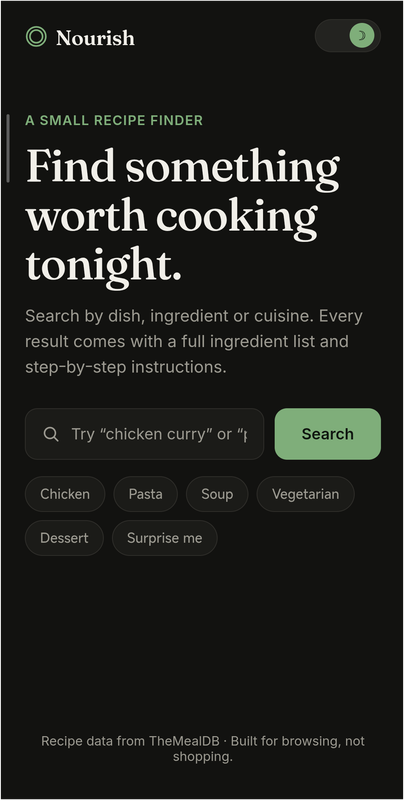
A clean, minimal recipe finder. Search any dish, ingredient, or cuisine and get full ingredient lists with step‑by‑step instructions — no clutter, no ads, no sign‑up.





- Instant search — look up recipes by name, ingredient, or cuisine
- Quick filters — one‑tap chips for popular categories (Chicken, Pasta, Soup, Vegetarian, Dessert)
- Surprise me — pulls a random recipe when you don't know what to cook
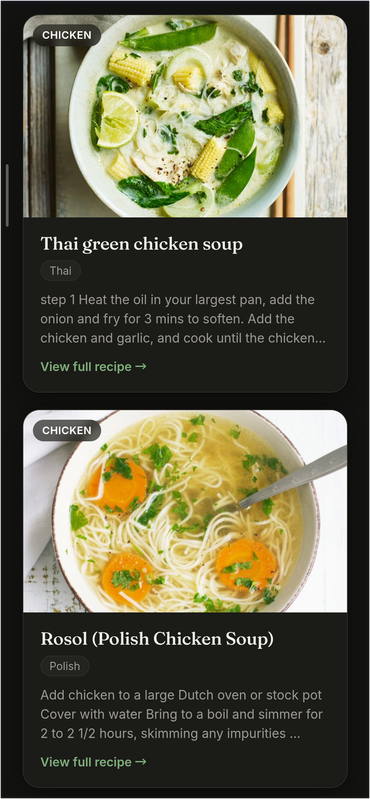
- Recipe detail view — full ingredient list with measurements, plus complete cooking instructions
- Light & dark mode — respects your system preference, with a manual toggle
- Responsive — works cleanly on mobile, tablet, and desktop
- Accessible — keyboard navigable, visible focus states, reduced‑motion support
- Zero dependencies — no build tools, no package manager, no framework
Open index.html in any modern browser — that's the whole app.
nourish/
├── index.html     # page markup and structure
├── style.css      # theming, layout and component styles
└── script.js      # search logic, API calls and modal behavior
git clone https://github.com/akash098p/Nourish.git
cd Nourish
Then just open index.html in your browser — no install step, no server required.
Grab index.html, style.css, and script.js and keep them in the same folder, then open index.html.
Note: Requires an internet connection — recipe data is fetched live from TheMealDB, nothing is bundled locally.
| Layer | Choice |
|---|---|
| Markup | Semantic HTML5 |
| Styling | Vanilla CSS with custom properties (CSS variables) for theming |
| Logic | Vanilla JavaScript (no framework) |
| Fonts | Fraunces (display) + Inter (body), via Google Fonts |
| Data | TheMealDB API (free tier, no key required) |
Colors are defined once as CSS custom properties in style.css on :root, then overridden under [data-theme="dark"]. Toggling dark mode simply flips a data-theme attribute on <body> — no class juggling, no duplicate stylesheets.
:root {
  --bg: #FAF9F6;
  --accent: #3F5D3F;
  /* ... */
}

[data-theme="dark"] {
  --bg: #121210;
  --accent: #7FAE7A;
  /* ... */
}
On load, script.js checks prefers-color-scheme to match your system setting, then remembers your manual choice for the session.
Nourish uses these TheMealDB endpoints:
| Purpose | Endpoint |
|---|---|
| Search by name | GET /search.php?s={query} |
| Random recipe | GET /random.php |
| (Available, not yet wired up) Filter by ingredient | GET /filter.php?i={ingredient} |
No API key is needed for the free tier used here.
- Filter by ingredient, not just dish name
- Save favorite recipes locally
- Adjustable serving sizes
- Print‑friendly recipe view
- Offline caching of recently viewed recipes
Recipe data and images courtesy of TheMealDB.
MIT — free to use, modify and share. Recipe content and images belong to TheMealDB and their respective contributors.