
Connect your ZTE P18X Web UI-based mobile broadband modem to Instantbird for seamless SMS and contact management.
This Instantbird add-on enables you to use standalone mobile broadband USB modems (data cards) from ZTE, specifically those featuring the "P18X" web user interface, as a gateway for sending and receiving SMS messages directly within Instantbird. It also allows for basic contact synchronization with the modem's phonebook.
The P18X Protocol Add-on bridges the gap between Instantbird's messaging capabilities and the SMS functionalities of compatible ZTE modems. By interacting with the modem's internal web API (typically via goform CGI scripts), this add-on allows users to:
- Send and receive SMS messages.
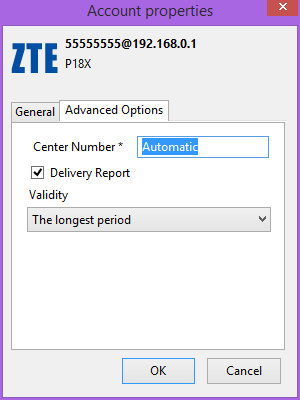
- Manage SMS settings like validity period and delivery reports.
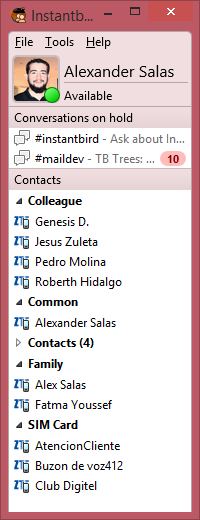
- Synchronize contacts stored on the modem's SIM card or device memory.
- SMS Integration: Send and receive SMS messages directly through Instantbird.
- Direct-to-SMSC Sending: Messages are routed via the modem's connection to the Short Message Service Center (SMSC).
- Contact Management:
- View contacts stored on the modem/SIM.
- Add new contacts to the modem/SIM.
- Basic synchronization of contact names and numbers.
- SMS Settings Configuration:
- Set the SMS validity period.
- Enable or disable message delivery status reports.
- Configure the SMS Service Center Number (SMSC).
- Modem Status Monitoring: Provides feedback on connection status, signal strength, and network information.
- User-Friendly Account Setup: Guides users through setting up their P18X modem account in Instantbird.
The add-on communicates with the ZTE P18X modem by making HTTP requests to its internal web API. This API is the same one used by the modem's own web-based configuration interface. Key aspects include:
- API Endpoints:
- GET Requests: Primarily to
/goform/goform_get_cmd_processfor retrieving status information, SMS messages, and contact lists. Commands are passed as URL parameters (e.g.,cmd=sms_data_total,cmd=pbm_data_total). - POST Requests: Primarily to
/goform/goform_set_cmd_processfor performing actions like sending an SMS (goformId=SEND_SMS), changing settings (goformId=SET_MESSAGE_CENTER), or managing contacts (goformId=PBM_CONTACT_ADD,goformId=PBM_CONTACT_DEL).
- GET Requests: Primarily to
- Data Format: Communication typically involves sending URL-encoded form data and receiving JSON responses.
- Polling: The add-on periodically polls the modem for new messages, delivery reports, and status updates (e.g., network state, SIM status) as the P18X API generally doesn't support push notifications.
- JavaScript Implementation: The core logic is implemented in JavaScript, leveraging Instantbird's XPCOM architecture and JavaScript Modules (JSMs) like
Http.jsmfor network requests andjsProtoHelper.jsmfor protocol structure.
- Instantbird: Version 0.2a1 – 1.6a1pre (or compatible).
- Compatible Modem: A ZTE mobile broadband modem that utilizes the "P18X" Web UI. The specific firmware version might also be a factor.
- Network Access: The computer running Instantbird must be on the same local network as the modem (typically the modem acts as a router or is directly connected via USB, providing a LAN interface).
- Download the P18X add-on (
.xpifile). - Open Instantbird.
- Go to "Tools" > "Add-ons".
- Click the gear icon (Tools for all add-ons) and select "Install Add-on From File...".
- Browse to and select the downloaded
.xpifile. - Follow the prompts to install and restart Instantbird if required.
- After installation, open Instantbird.
- Go to "Tools" > "Accounts" (or the equivalent in your Instantbird version).
- Click "Add New Account...".
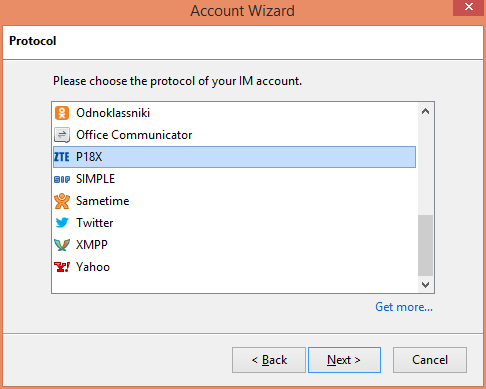
- In the "New Account" wizard, select "P18X" from the protocol list.
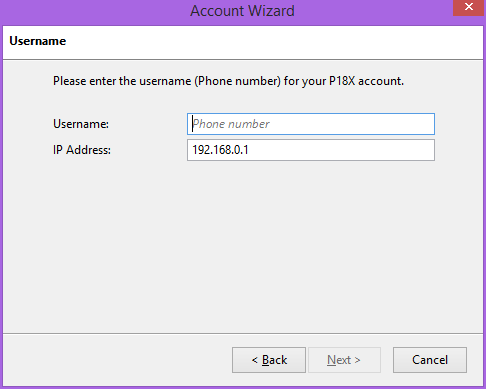
- Username/IP Address:
- The primary piece of information needed is the IP address of your ZTE modem on your local network (e.g.,
192.168.0.1,192.168.1.1). - You can enter this as
your_modem_ip_address. - Optionally, you can prefix it with a username (e.g.,
myzte@your_modem_ip_address) or append your SIM's phone number (e.g.,your_modem_ip_address/your_phone_number), though the IP address is the crucial part for connection.
- The primary piece of information needed is the IP address of your ZTE modem on your local network (e.g.,
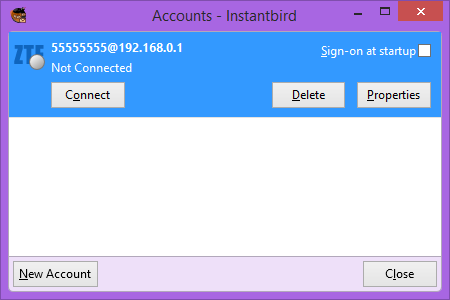
- Click "Next" and follow any further prompts to complete the setup. The add-on will attempt to connect to your modem.
Once connected, you should be able to send/receive SMS and see your modem's contacts.
- P18X Web UI: The specific web-based management interface found on certain ZTE modems, which this add-on targets.
- SMSC (Short Message Service Center): A network element in mobile networks responsible for storing, forwarding, converting, and delivering SMS messages.
- Direct-to-SMSC: Refers to how the add-on, via the modem, sends messages directly to the operator's SMSC.
- PBM (PhoneBook Management): The system on the modem/SIM for storing contacts. This add-on interacts with the PBM to read and write contact information.
goformAPI: The CGI-based API endpoints (e.g.,/goform/goform_get_cmd_process,/goform/goform_set_cmd_process) on the modem used for communication.- Validity Period (SMS): A setting that determines how long the SMSC will attempt to deliver a message if the recipient is initially unavailable.
- Delivery Status Report (SMS): A notification sent back to the sender indicating whether an SMS message was successfully delivered to the recipient's handset.
- Connection Issues:
- Ensure your computer is on the same network as the modem.
- Verify the modem's IP address is correctly entered in the account settings.
- Check if you can access the modem's P18X Web UI through a web browser.
- Firewall software on your computer might be blocking Instantbird's access to the modem.
- SMS Not Sending/Receiving:
- Check your modem's signal strength and network registration status via its Web UI.
- Ensure your SIM card has credit and active SMS service.
- Verify the SMSC number is correctly configured (often set automatically by the network, but can be manually configured via the add-on's account options).
- Contact Issues:
- SIM cards have limited storage for contacts and often only support basic name/number pairs. Extended fields (email, multiple numbers per contact) are usually only supported when contacts are stored in the modem's device memory.
For more specific issues, please check the GitHub issues tracker.
The add-on is expected to work on any operating system where Instantbird runs, including:
- Windows XP, Vista, 7, 8, 8.1, 10+
- macOS
- Linux
Currently available in:
- Chinese (Simplified/Traditional - specify if known)
- English (US)
- Spanish
Contributions for other languages are welcome!
This add-on has been reported to work with:
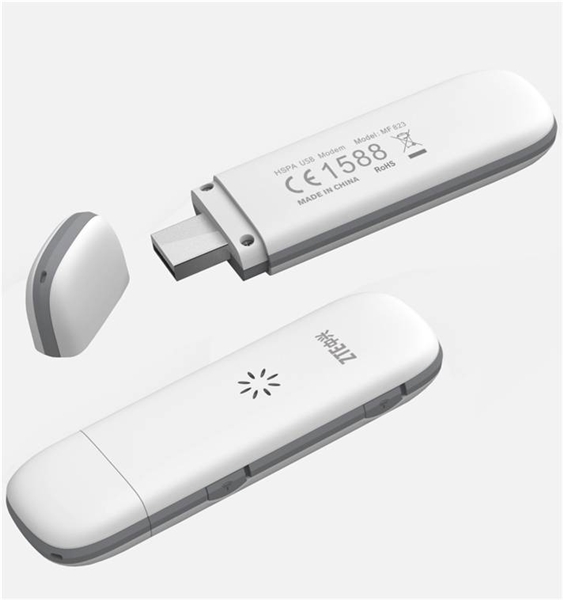
- Model: ZTE MF823
- Carrier: Digitel (Venezuela)
- Web UI: P18X Web UI 5.0
We rely on community feedback for compatibility with other ZTE P18X models and firmwares. Please report your working (or non-working) devices!
Help us expand the list of known compatible devices! If you've tested this add-on with a ZTE P18X modem, please open an issue on GitHub and provide the following details:
- Modem Model (e.g., ZTE MFXXX)
- Carrier (if applicable)
- Web UI Version (if visible, e.g., P18X Web UI X.Y)
- Whether it worked successfully or any issues encountered.
Contributions are welcome! Whether it's reporting bugs, suggesting features, improving documentation, adding localizations, or submitting code changes, please feel free to:
- Open an issue for bugs or feature requests.
- Fork the repository and submit a pull request for code contributions.
 Caption: Account Setup Wizard
 Caption: SMS Conversation Interface
 Caption: Viewing Contacts from Modem
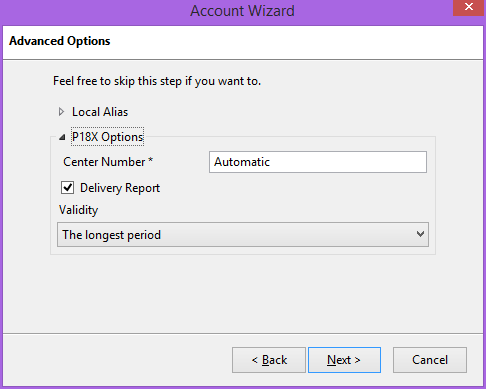 Caption: Configuring SMS Settings
- Instantbird: 0.2a1 – 1.6a1pre (and potentially later compatible versions)
The Instantbird Protocol P18X add-on is free software. It is licensed under the Mozilla Public License, v. 2.0.
You can obtain a copy of the MPL 2.0 at http://mozilla.org/MPL/2.0/.
(Note: The original README mentioned GPLv3. However, the JavaScript code provided (p18x.js) explicitly states "This Source Code Form is subject to the terms of the Mozilla Public License, v. 2.0." It's crucial to ensure the license stated in the README matches the actual license of the codebase. I have updated it to MPL 2.0 based on the code comments. If the project indeed intends to use GPLv3, the code comments should be updated accordingly.)