



- Create, trigger and listen for custom events in vanilla JavaScript and React.
- Create the reactive global variables in React instead of a complex state and cumbersome context.
📦 Small package (~22 kB)
🍃 Tree-shakeable
📝 Well documented
🛡️ Strictly typed with TypeScript
♻️ Events interact with each other across different browser tabs
⚛️ Exports a convenient API for React developers
npm
npm install use-app-eventspnpm
pnpm add use-app-events- useGlobal 🆕
- Create a reactive global variable in React.
- For example, as a replacement for React context (
createContext)
- useAppEvents
- Hook for managing application events in React.
- notifyEventListeners
- Function to notify all listeners of the specified event type(s) subscribed via
listenForEvents.
- Function to notify all listeners of the specified event type(s) subscribed via
- listenForEvents
- Function to subscribe and listen for the specified event type(s) to occur in the app.
- listenForEvents.once
- Function to subscribe and listen for the specified event type(s) to occur in the app only once.
- heap
- (readonly) Collection of resources operated by the package.
- options
- Collection of options used to adjust the behavior of the package.
Normal
import { useGlobal } from 'use-app-events';Selective (tree-shakeable)
import notifyEventListeners from 'use-app-events/notifyEventListeners';Create a reactive global variable in React 🆕
- The initial value of the variable is retrieved from the older instances of useGlobal if any (can be turned off by disabling the
synchronizeoption, see below), otherwise your initial value is used.// Turning off the `synchronize` option const [value, updateValue] = useGlobal('value', undefined, { synchronize: false })
- The value is broadcasted to other browser tabs every time it's updated, meaning the value is the same in all tabs of your app serving as sessionStorage in some way for as long as there are multiple tabs open.
1. Storing a primitive
// Global variable name - 'theme'
// Initial value - 'light'
const [theme, updateTheme] = useGlobal('theme', 'light');

// 1. Re-render with the new "dark" value
// 2. Save the theme value globally
updateTheme('dark');
2. Storing an object
const [params, updateParams] = useGlobal('params', {
  color: 'white',
  palette: 'dark',
});

// Color will be updated in the original object
updateParams({ color: 'black' });

// Or get a previous value (just like setState in useState)
updateParams((prevValue) => ({
  ...prevValue,
  color: prevValue.palette === 'dark' ? 'black' : 'white',
}));Create your own custom events
1. Listen for an event
listenForEvents('media-resume', () => {
  // do something when the event is triggered
});
2. Emit an event
notifyEventListeners('media-resume');3. Listen for an event (it will only be processed once here)
listenForEvents.once('load-resource', async (url) => {
  await fetch(url);
});
4. Emit an event with some data
notifyEventListeners(
  'load-resource',
  'https://www.npmjs.com/package/use-app-events',
);
5. Listen for multiple events
const unlisten = listenForEvents(['event-1', 'event-2'], (eventType, url) => {
  if (eventType === 'event-1') {
    // do something when 'event-1' is emitted
  }

  if (eventType === 'event-2') {
    // do something when 'event-2' is emitted
  }
});
6. Stop listening for events
unlisten();7. Emit multiple events with some data
notifyEventListeners(
  ['event-1', 'event-2'],
  'https://www.npmjs.com/package/use-app-events',
);-
Create a reactive global variable in React 🆕 a. Create a hook for global theme management
import { useGlobal } from 'use-app-events';

export const useTheme = () => {
  const [theme, updateTheme] = useGlobal('theme', 'light');

  return {
    theme,
    updateTheme,
  };
};

// Use the hook in your component to get or update the theme globally
const { theme, updateTheme } = useTheme();

updateTheme('dark');
-
Listen for events in React
import { useAppEvents } from 'use-app-events';
a. Listen for an event
const Component = () => {
  const { listenForEvents } = useAppEvents();

  listenForEvents('event-A', (payload) => {
    // 1. Do something when 'event-A' is triggered...
    // 2. Process a payload if you expect it to be sent by `notifyEventListeners`
  });
};
b. Listen for multiple events
const Component = () => {
  const { listenForEvents } = useAppEvents();

  listenForEvents(['event-A', 'event-B'], (eventType, payload) => {
    // 1. Do something when either 'event-A' or 'event-B' is triggered...

    // 2. Process a specific event by its type in `eventType`
    if (eventType === 'event-A') {
      console.log('We got an event A with some data', payload);
    }
  });
};
-
Notify the event listeners in React
a. Trigger an event
const Component = () => {
  const { notifyEventListeners } = useAppEvents();

  // Notify the listeners of this event type with no data
  notifyEventListeners('event-A');
};
b. Trigger an event with some data
const Component = () => {
  const { notifyEventListeners } = useAppEvents();

  const payload = { a: 1, b: 2 };

  // Notify the listeners of this event type and give them some data
  notifyEventListeners('event-A', payload);
};
c. Trigger multiple events with some data at once
const Component = () => {
  const { notifyEventListeners } = useAppEvents();

  const payload = { a: 1, b: 2 };

  // Notify the listeners of these event types and give them some data
  notifyEventListeners(['event-A', 'event-B'], payload);
};
d. Trigger multiple events with some data, but don't broadcast
const Component = () => {
  const { notifyEventListeners } = useAppEvents();

  const payload = { a: 1, b: 2 };

  // Notify the listeners of this event type in the current tab only
  notifyEventListeners('event-A', payload, false);
  // Notify the listeners of these event types in the current tab only
  notifyEventListeners(['event-B', 'event-C'], payload, false);
};
-
Adjust options
import options from 'use-app-events/options';
import notifyEventListeners from 'use-app-events/notifyEventListeners';
a. Disable event broadcasting globally
options.broadcast = false;

// From now on, notifyEventListeners will send events to the listeners of the current tab only by default
notifyEventListeners('event-A', 'some-payload');
b. Enable the debug mode globally
options.debug = true;

// From now on, listenForEvents and notifyEventListeners will output additional console logs on different stages
listenForEvents('event-A', () => {});
notifyEventListeners('event-A', 'some-payload');
-
It is recommended to have a list of event types that can be used in your app, for example, enum called
EventType, and pass it touseAppEvents()for type safety and misprint-proof:
This way you are protected from the unexpected event types...
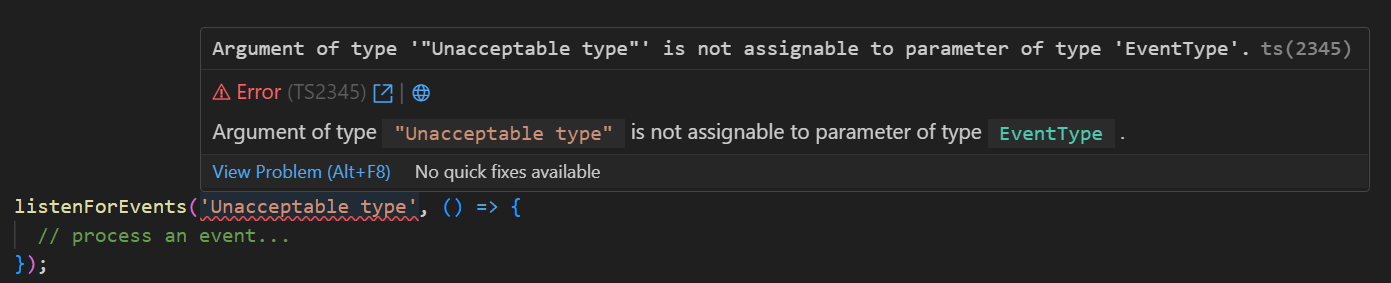
...and only allowed to use the expected ones.


-
However, if
EventTypeis not provided, anystringorenumcan be used:
Clone the repository, install dependencies, and run the dev script to start a web app and play around with examples.
pnpm
git clone https://github.com/aimtbr/use-app-events.git && cd use-app-events && pnpm install && pnpm devnpm
git clone https://github.com/aimtbr/use-app-events.git && cd use-app-events && npm install && npm run devThe motivation to create use-app-events was to find a way to manage the state from any part of the app (globally) and allow all elements to communicate with each other regardless of their position in the tree.
Maksym Marchuk