ai-study-room.github.io项目是该组织的文档项目,项目主要为该组织相关项目提供文档说明 该项目将发布到 github page
该项目使用hugo 作为文档运行程序,使用book theme作为模版。 在此特别感谢两个组织提供的技术。
首先需要安装hugo,安装参见官方文档 中的【installation】
git clone该项目
git clone https://github.com/ai-study-room/ai-study-room.github.io可以选择执行运行,参见如下
cd ai-study-room.github.io
hugo server --bind "0.0.0.0" --baseURL "http://<your ip>:1313"
注明:其中需要修改为你机器的地址,需和浏览器访问地址一致。
运行成功后,通过浏览器输入http://:1313访问
更多运行方式请参见官方文档。
详细参见theme模版项目https://github.com/alex-shpak/hugo-book 其中重要部分如下:
Hugo will create a post with draft: true, change it to false in order for it to show in the website.
hugo new post/title_of_the_post.md
---
title: "title"
date: 2019-10-22T18:46:47+08:00
draft: false
summary: "The summary content"
---
Use <!--more--> to separate content that will display in the posts page as abstraction and the rest of the content. This is different from summary, as summary will not appear in the post.
---
title: "title"
date: 2019-10-22T18:46:47+08:00
draft: false
---
abstraction show in the post page
<!--more-->
other content
In you post add math: true to front matter
---
katex: math
---
Then the katex script will auto render the string enclosed by delimiters.
# replace ... with latex formula
display inline \\( ... \\)
display block $$ ... $$
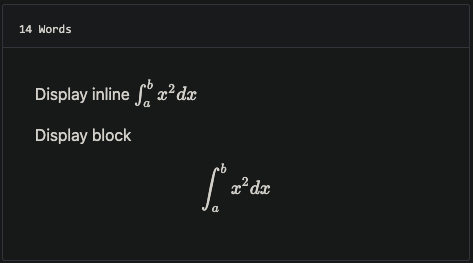
you can add MathJax:true to frontmatter
mathJax: true